AI Security Posture: Securing Copilot, ChatGPT and Gemini at Work
AI security posture is the state of the controls around your AI tools. It covers what they can read, who can use them, where the data goes, and what you can prove afterward. For a business on Copilot, ChatGPT, or Gemini, it's mostly your permissions and accounts.
Table of Contents
Microsoft, OpenAI, and Google have done real work on their side. On their business plans, none of the three trains its models on your prompts, and all three encrypt what you send. That covers the model. It doesn't cover the SharePoint site that's been open to the whole company since 2019, the sales rep pasting a customer list into a personal ChatGPT account, or the connector someone approved that lets an assistant read every folder in the shared drive. Those are yours. They're also the piece of managed cybersecurity an AI rollout tends to skip, because the licenses get bought on a Tuesday and the cleanup gets scheduled for "after."
The numbers say "after" is already here. Cyberhaven Labs' 2026 AI Adoption & Risk Report, built on data movement at 222 companies, found that 39.7% of AI interactions involve sensitive data and that 1 in 3 employees reach AI tools through personal accounts. Microsoft's 2026 Data Security Index, a survey of more than 1,700 security leaders, put generative AI in 32% of their data security incidents. And IBM's 2026 Cost of a Data Breach study found 1 in 4 malicious breaches were AI-enabled, at an average cost of $6M.
The personal-account side of that is shadow AI, and it gets its own treatment. This piece covers the tools you approved and pay for, and whether they're set up in a way you'd be comfortable walking a client, an auditor, or your cyber insurer through.
What Is AI Security Posture?
AI security posture is the current, measurable state of the controls around the AI tools your business uses. It covers which tools are approved, who can sign in, what data each tool can reach, what's blocked from prompts, and what gets logged. You measure it. You don't declare it.
The term gets muddied by a product category. Search it and page 1 fills with AI-SPM, short for AI security posture management, which Palo Alto Networks and others describe as protecting the models, training pipelines, and AI infrastructure a company builds. Useful work, if you're training models.
A 60-person distributor isn't. It bought Copilot licenses.
For a business that buys AI instead of building it, posture sits in six places you already control, laid out further down. The vendor built the vault. You still decide who holds a key and what gets stored inside.
What the Vendors Handle, and What They Hand Back to You
Microsoft states that prompts, responses, and data accessed through Microsoft Graph aren't used to train foundation LLMs, including the ones behind Copilot. OpenAI says it doesn't train on inputs or outputs from ChatGPT Enterprise, ChatGPT Business, or its API platform by default. Google's Generative AI in Google Workspace Privacy Hub says customer data isn't used for model training without permission and isn't reviewed by humans. Microsoft and Google both list ISO/IEC 42001, the international standard for AI management systems, among their certifications for these products.
The same pages are just as clear about access. Microsoft says Copilot "only surfaces organizational data to which individual users have at least view permissions." Google says Gemini "only retrieves relevant content in Workspace that the user has access to."
That's the handoff, in one sentence each. So who in your company can open the payroll folder today? The assistant inherits your permissions exactly as they stand, good and bad, and it finds things in seconds that a person would have needed an afternoon of clicking to stumble into.
What stays with you:
- Which accounts people actually use. A business plan protects nothing while someone's signed into a free personal account in the next browser tab.
- Permissions on files, sites, mailboxes, and shared drives.
- Which connectors and agents are switched on. A connector is a link that lets the assistant read another system, like Salesforce or Box, and an agent is an assistant allowed to take actions, not just answer.
- Retention. How long prompts and responses are kept, and whether anyone can search them during a dispute.
- Whether sensitive data gets stopped before it lands in a prompt.
Copilot, ChatGPT and Gemini Side by Side
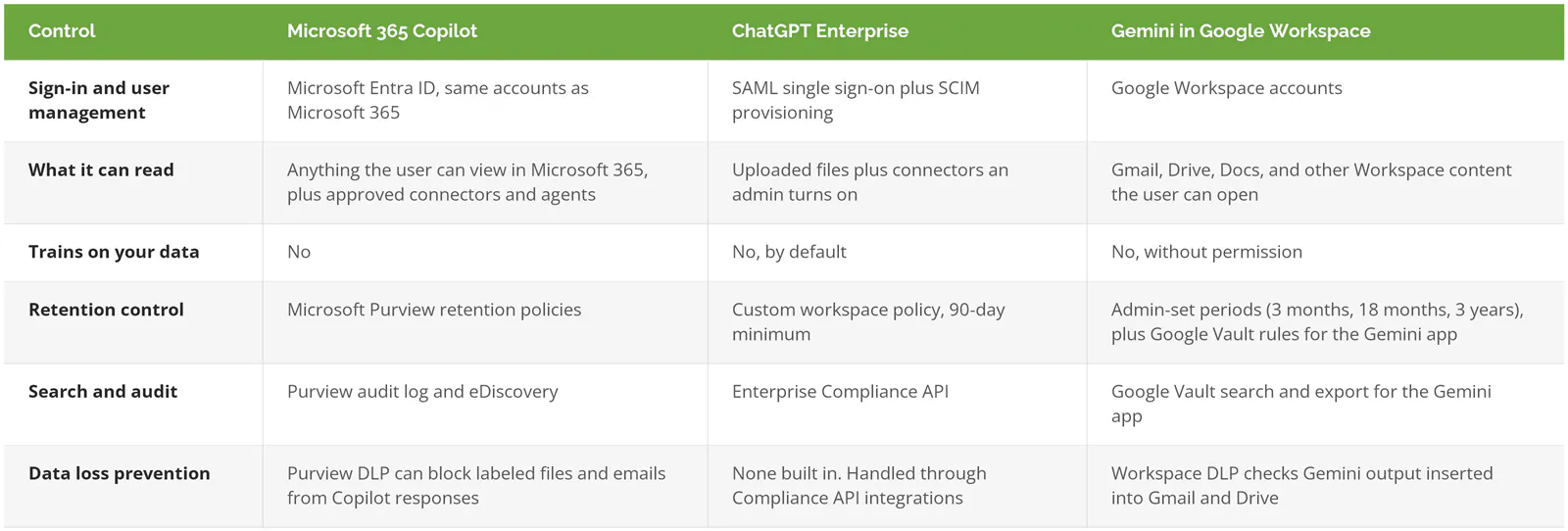
The three platforms put the same controls in different places, and the table below is where each one lives as of September 2026. Licensing tier matters a lot here. Everything in it assumes a business or enterprise plan, not a consumer account.
Microsoft 365 Copilot: your SharePoint permissions are the security model
Copilot is the most governable of the three, on paper, because it lives inside the same tenant as your email and files. Microsoft's data protection architecture page spells out that encrypted files need both EXTRACT and VIEW usage rights before Copilot can summarize them, that new content inherits the highest-priority sensitivity label from its sources, and that prompts and responses are captured for audit and eDiscovery. Purview DLP for Copilot can keep labeled files out of responses entirely.
But all of it rides on labels and permissions somebody has to set up. An unlabeled tenant with "Everyone except external users" sprinkled across a decade of SharePoint sites gets none of that protection, and Copilot will cheerfully summarize the salary spreadsheet for whoever asks the right question. If you're still deciding what Copilot is for, start with what Microsoft 365 Copilot actually does. For the lockdown order, reports first and labels second, the Copilot security and governance guide goes step by step.
ChatGPT Enterprise and Business: connectors and the personal-account problem
ChatGPT doesn't sit on top of your file permissions the way Copilot does. It sees what people upload and whatever connectors your admin allows, which makes the exposure smaller by default and much bigger the moment someone connects the company Google Drive or SharePoint. Treat every connector as a new access grant, because that's what it is.
Identity is where ChatGPT posture is won or lost. With SAML single sign-on and SCIM, accounts get created and shut off by your identity provider instead of by hand, and a departing employee loses access the day HR closes them out. Without it, you've got people on company-paid seats and personal seats and no clean way to tell which is which. OpenAI's own retention documentation covers the rest. Enterprise owners can set a custom retention period of at least 90 days, and deleted conversations clear OpenAI's systems within 30 days unless a legal hold applies.
DLP is the weak spot. ChatGPT Enterprise doesn't check prompts against your data rules on its own. OpenAI exposes conversation data through its Enterprise Compliance API, and tools plug in from there, including Microsoft Purview's ChatGPT Enterprise integration. If nobody has wired that up, nobody is watching.
Gemini in Google Workspace: Drive sharing is the blast radius
Gemini reads what the user can open in Gmail, Drive, and Docs. So a Workspace tenant where half the Drive folders are set to "anyone in the organization with the link" has handed Gemini the same reach. Google does run Workspace DLP against Gemini output that gets inserted into an email or a Drive document, which is more than ChatGPT does natively.
Two exceptions are worth writing down. Google's privacy hub says DLP doesn't extend to Gemini Notebook, and that your file-sharing and data-region settings don't apply to Notebook data either. And Google Vault's retention rules and litigation holds, added in June 2026, cover the Gemini app but not the "Help me write" features inside Gmail and Docs. If you're under a records-retention obligation, that split matters.
The Six Controls That Make Up Your AI Security Posture
Every platform above comes back to the same six controls. The order is deliberate. Doing number 4 before number 3 means writing rules for data you haven't found yet.
1. A short list of sanctioned tools, and a block on the rest. Pick the assistants the business will pay for and support. Block or restrict the others at the browser, network, or identity layer, and put it in writing with an AI acceptable use policy people actually read. A sanctioned list with no enforcement behind it is a suggestion.
2. Identity. Single sign-on for every approved AI tool. SCIM provisioning, the standard that lets your identity system create and remove accounts automatically, so access ends when employment does. Then conditional access rules that require MFA and a managed device before anyone reaches company data through an assistant.
3. Clean up data exposure before rollout. Run the oversharing reports. Fix the sites and folders open to the whole company. Apply a few sensitivity labels, meaning tags like Confidential or Restricted that travel with a file and carry rules. Three labels is enough to start. Twelve is how label projects die.
4. DLP on prompts and uploads. Data loss prevention, the rules that spot sensitive data like account numbers or client records and block it from leaving, needs to cover AI as its own channel, the same way it covers email. On Microsoft, that's Purview (the Purview DLP guide covers setup). Across mixed platforms, it's usually a browser or endpoint tool, and it's part of how we scope data loss prevention services.
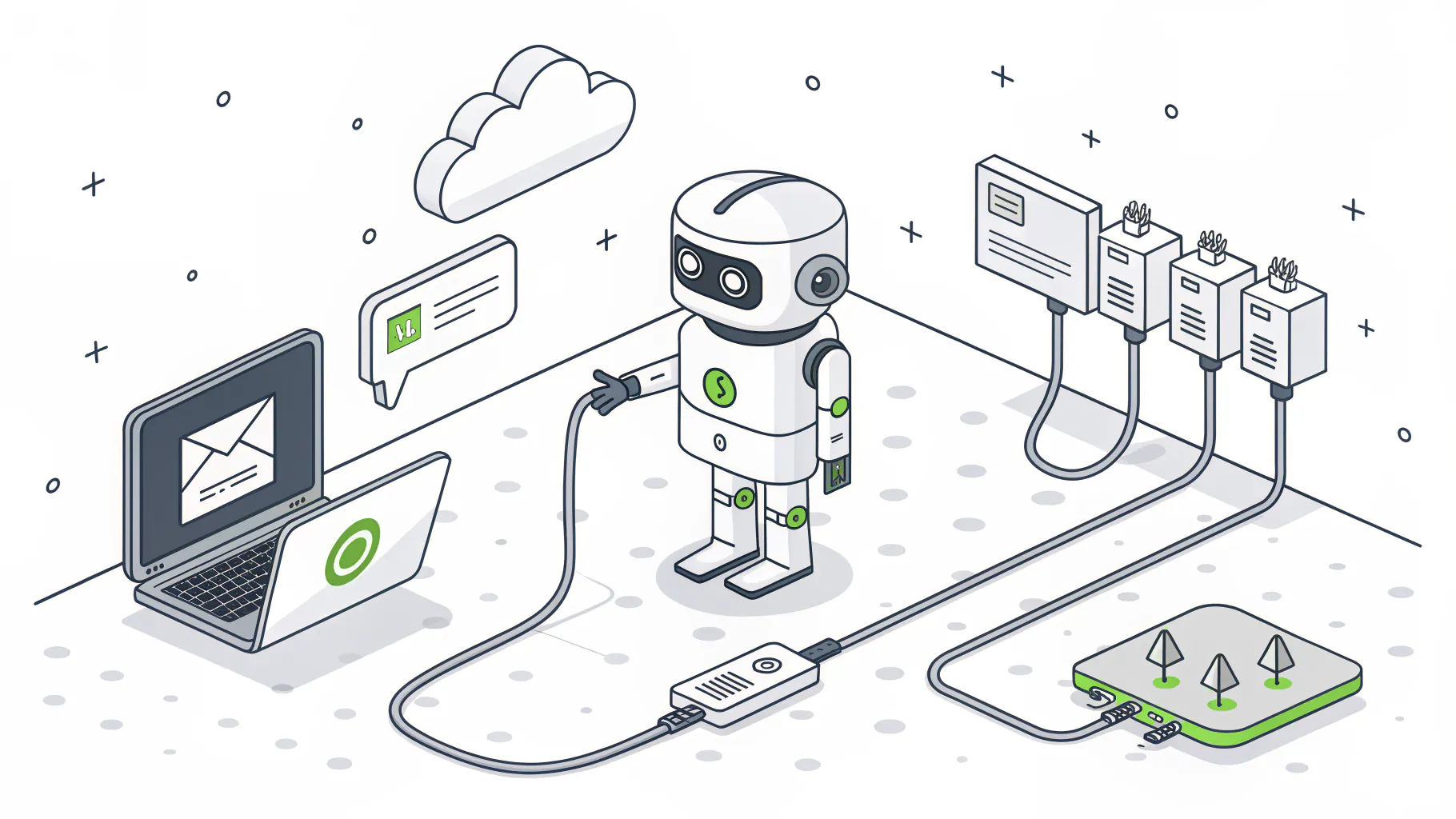
5. Connectors, agents, and indirect prompt injection. This one's newer, and the one I'd watch hardest over the next year. The OWASP Top 10 for LLM Applications 2025 ranks prompt injection first and describes the indirect kind as instructions hidden in websites or files that change how the model behaves once it reads them. Picture an agent with access to your inbox reading a vendor email that contains hidden text telling it to forward invoices somewhere else. Microsoft says Copilot runs classifiers against these attacks, and that's good. It isn't a reason to give an agent more access than the job needs. Approve connectors one at a time, keep a list, and review it quarterly.
6. Logging, retention, and proof. Turn on the audit trail each platform offers (Purview audit, the ChatGPT Compliance API, Google Vault) and set retention to match your legal and contractual obligations, not the default. When a client's security questionnaire asks how you govern AI, this is the evidence you hand over. Screenshots of a policy document don't count.
Where NIST AI RMF, the GenAI Profile, and ISO 42001 Fit
Frameworks give the six controls a structure an auditor recognizes. The NIST AI Risk Management Framework, released January 26, 2023, is voluntary and organizes the work into four functions (Govern, Map, Measure, and Manage). Its Generative AI Profile, NIST AI 600-1, followed on July 26, 2024 and names 12 risks that generative AI creates or makes worse, with data privacy and information security among them. ISO/IEC 42001 is the certifiable one, a management-system standard you can be audited against. On the data side, the joint CISA, NSA, and FBI guidance on AI data security from May 2025 is worth a read for any team that handles sensitive records.
A caution on certificates. Microsoft's ISO 42001 certification covers Microsoft's management of Copilot. It doesn't cover your tenant, your labels, or the connector your marketing team added in March. Compliance doesn't equal security, and a vendor's compliance certainly doesn't equal yours.
For a plain-language walk through the frameworks themselves, see the AI governance frameworks guide. Setting the policies behind these controls, from tool approval and data classification to acceptable use and vendor review, is a separate engagement from day-to-day security. It's what our AI governance services cover, starting with a readiness assessment of the AI your team already uses.
Score Your Posture in an Afternoon
Answer each question yes, partly, or no. Be strict. "Partly" means there's a gap you can name.
- Can you list every AI tool the business pays for, and is everything else blocked or restricted?
- Does every approved AI tool sign in through your identity provider, with accounts removed automatically when someone leaves?
- Have you run an oversharing report in the last 90 days and fixed what it found?
- Would a prompt containing a client's account number or a Social Security number get stopped before it reached the model?
- Could you produce, today, a list of every connector and agent with access to company data?
- If a client asked to see what an employee typed into an AI tool last month, could you pull it?
Six yeses is rare. Two or more "no" answers on questions 2 through 4 means the rollout got ahead of the groundwork, and that's where to spend the next month. If you'd like an outside read on the controls underneath, like access, identity, and logging, a cybersecurity risk assessment covers those.
When This Can Wait
A 10-person office on a single sanctioned tool, with no connectors, no agents, and no regulated data, doesn't need a formal AI posture program yet. Turn on single sign-on, write a one-page use policy, and revisit it the day someone asks to connect the assistant to your file shares. That request is the trigger.