SCIM Provisioning: How to Automate Joiners, Movers, and Leavers
SCIM provisioning is an open standard (SCIM 2.0) that lets your identity provider, like Microsoft Entra ID or Okta, automatically create, update, and disable user accounts in connected apps when people join, change roles, or leave.
Table of Contents
It closes the account nobody remembered to shut off. It doesn't, on its own, close the session a fired employee still has open in your CRM. That gap looks tiny on paper and enormous on a bad Friday, and it's why SCIM belongs inside an identity and access management program instead of being mistaken for the whole thing.
Picture the timeline. Your controller gets walked out at 4:05pm. At 4:10, someone in IT clears the Account enabled box in Entra. The provisioning service picks that up on its next pass, which Microsoft says typically runs every 20 to 40 minutes, and tells Slack, Salesforce, and your file-sharing app to switch the account off. Somewhere around 4:45, it's done.
Mostly done. The laptop in their bag still holds a Microsoft access token that stays valid for up to an hour. Any app that issued its own session cookie that morning decides for itself when that cookie dies. Entra can't reach in and cancel it.
None of that makes SCIM a bad idea. It makes SCIM a system with a clock attached, and anything with a clock attached gets planned around instead of trusted blindly.
What Is SCIM Provisioning?
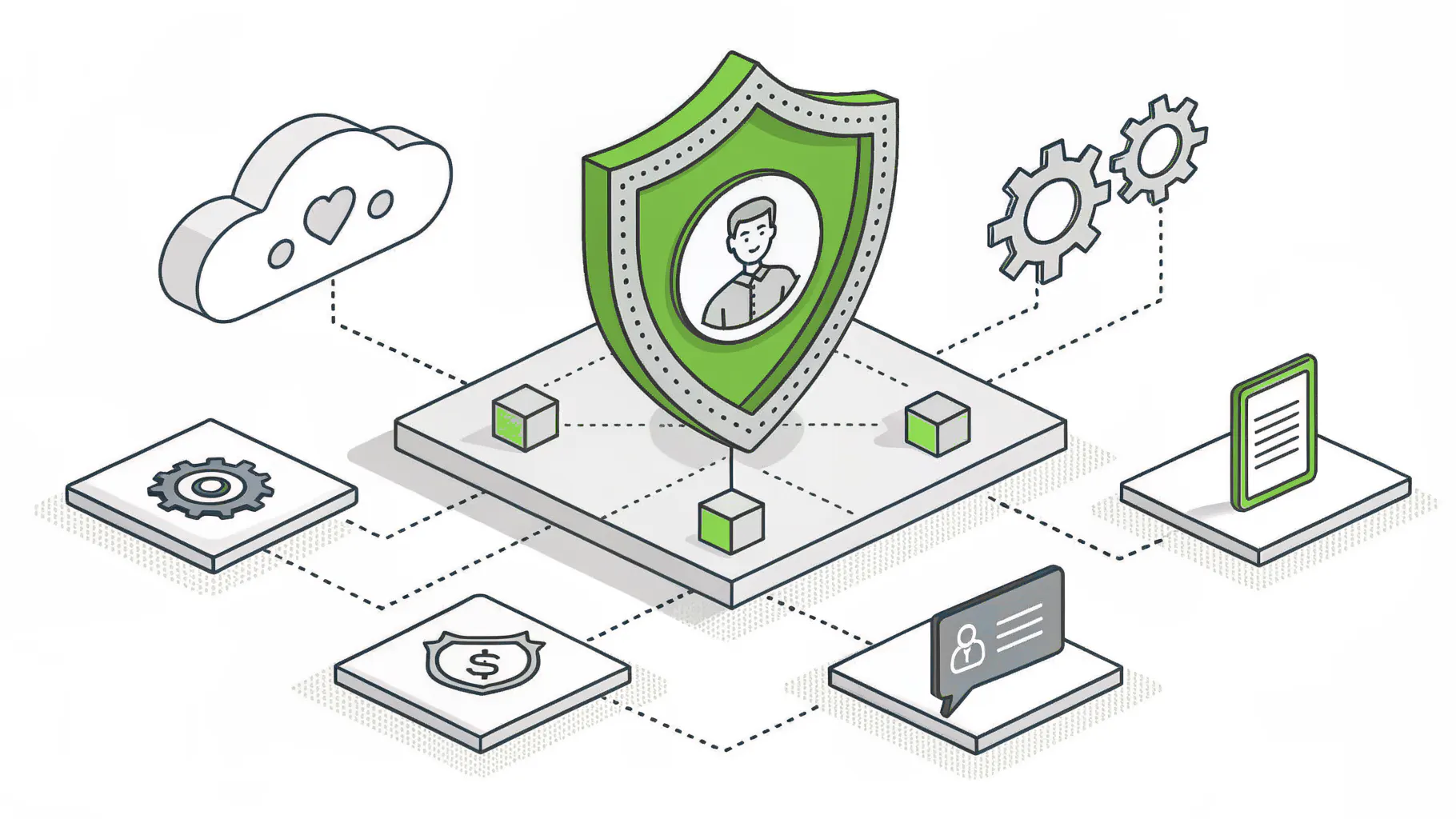
SCIM, short for System for Cross-domain Identity Management, is a shared language apps use to accept account changes from one central directory. Your identity provider sends create, update, and disable requests. The app applies them. Nobody retypes anything.
Today's version came out of the IETF in September 2015 as a pair of standards, RFC 7643 for what a user and a group look like and RFC 7644 for how changes get sent. Engineers from Oracle, SailPoint, Cisco, and Salesforce wrote them. Competitors, agreeing on something. Rare.
Under the hood, your directory makes ordinary web requests to the app. A POST creates a person. A PATCH changes one detail, like a job title or a manager. Flipping a field called active to false locks the account without erasing it, and a DELETE removes it for good. Because every SCIM-compliant app accepts the same requests, Microsoft Entra ID ships prebuilt provisioning connectors for apps like Dropbox, Salesforce, and ServiceNow. Anything else that follows the standard can be connected with a URL and a secret token.
One source of truth. A long list of apps, and nobody re-keying names into admin panels.
SCIM, SSO, and JIT Aren't the Same Thing
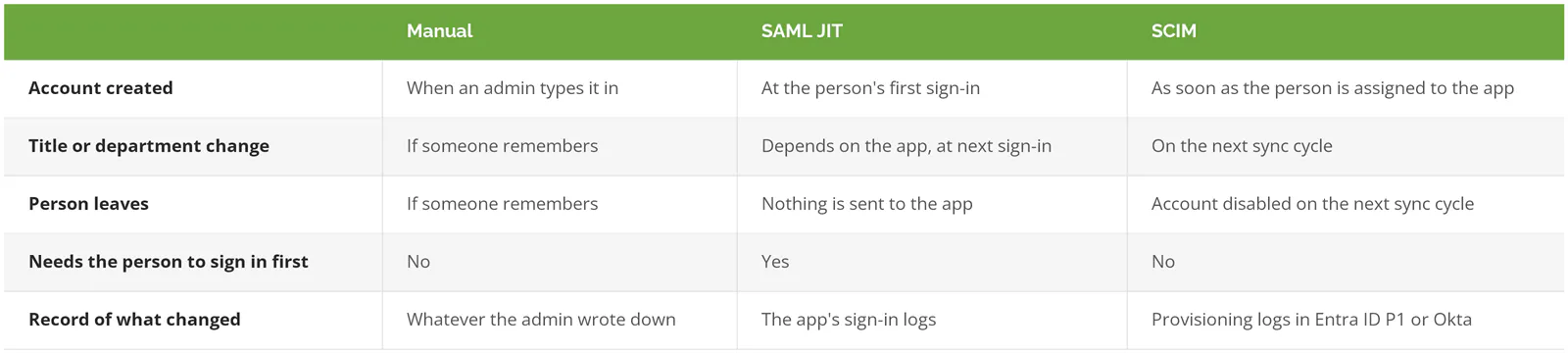
SSO decides whether someone can sign in. SCIM decides whether there's an account to sign in to. They get confused because the same enterprise app in Entra usually handles both, and because vendors tend to sell them on the same price tier. If the sign-in terms still blur together, our breakdown of SSO, MFA, and IAM separates them.
Just-in-time (JIT) provisioning is the one that catches people. With JIT, the app builds an account the first time someone signs in through SSO, using details passed along with the login. Great for joiners. Useless for leavers. Someone who stops logging in never sends the app a thing, so the account just sits there.
How Does SCIM Handle a Joiner, a Mover, and a Leaver?
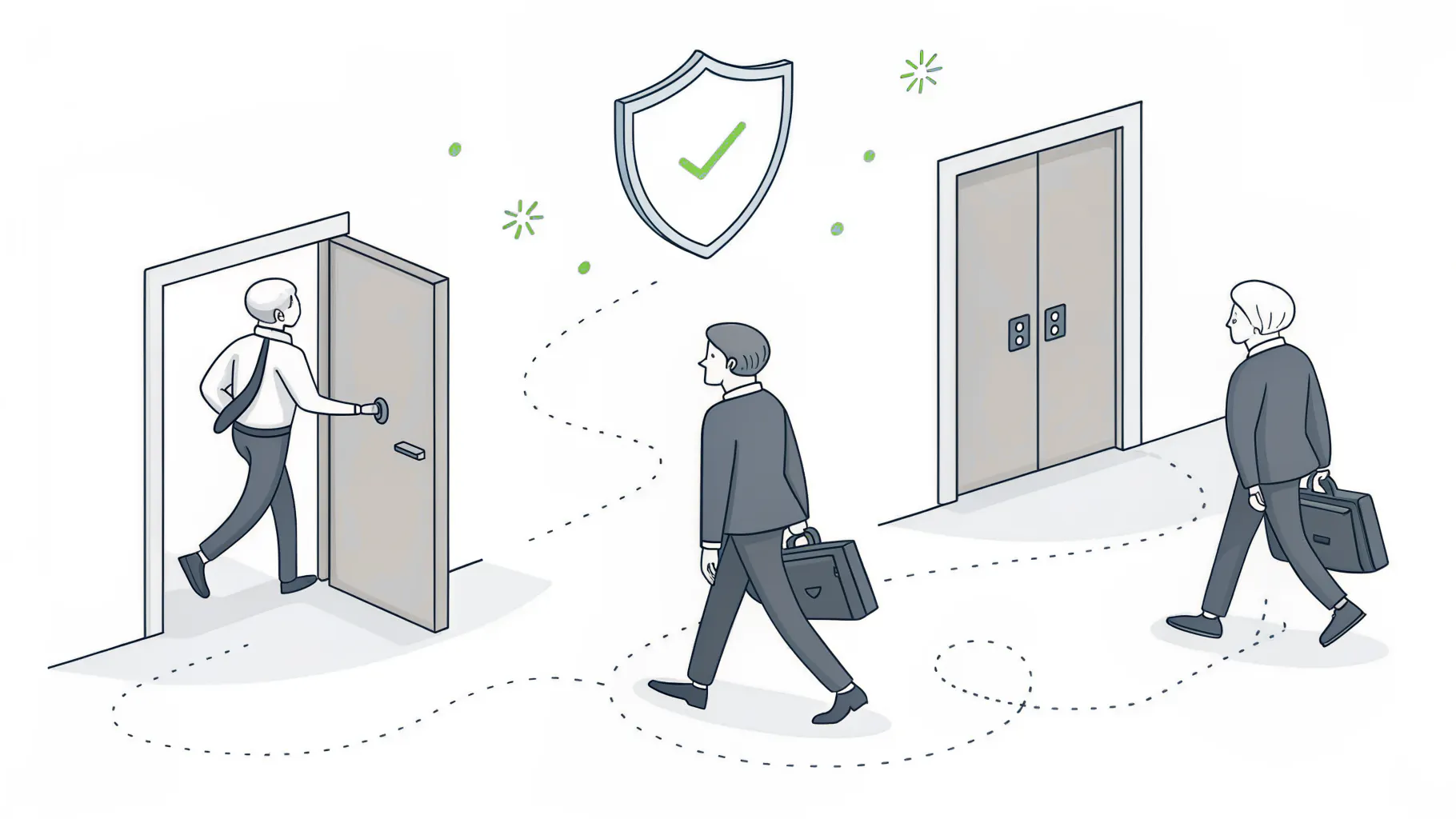
Through group membership. You assign a group to an app in your identity provider, and SCIM creates accounts for everyone in it, updates them as their details change, and disables them when they leave the group or the company.
In Entra, assigning apps by group requires Entra ID P1, which Microsoft 365 Business Premium already includes. Assign the Sales group to Salesforce once. Every new salesperson added to that group gets an account on the next cycle, with no ticket and no forwarded email asking IT to set someone up.
Joiners are easy. Leavers are mostly easy. Movers are where your design gets tested.
Take a customer service rep at a 90-person distributor who moves into purchasing after two years on the phones. Their title updates everywhere. Fine. Their access only changes if their group memberships change, and in plenty of Microsoft 365 tenants (a tenant is your company's Microsoft 365 environment) those memberships get maintained by hand, by whoever has a spare minute. So the rep picks up the purchasing groups on Monday and quietly keeps every customer service group they ever had. SCIM faithfully copies that pile of leftover access into every app it touches.
A few Entra behaviors decide whether movers work:
- Nested groups are invisible to the provisioning service. Put Purchasing inside All Operations, assign All Operations to an app, and only the direct members of All Operations get accounts. Keep app groups flat.
- Dynamic groups fill themselves from a rule, like department equals Purchasing. Microsoft counts falling out of one as a deprovisioning event, so when HR changes a department, the old app access goes away without anyone touching it.
- That cuts both ways. A typo in one department name can switch off a whole team before lunch.
- Admin roles? Keep them out of dynamic groups entirely.
NIST SP 800-171, the security standard defense contractors get assessed against, spells out both halves in requirement 03.09.02. Disable access within a set time when someone is terminated. When someone transfers, review whether they still need what they had and change it. Terminations tend to get a checklist. Transfers tend not to.
Should HR or IT Be the Source of Truth?
Whoever's record changes first should drive everything downstream. In a company with a real HR platform, that's HR, because payroll doesn't let a hire slip through unnoticed.
Microsoft calls this HR-driven provisioning. Entra has prebuilt connectors for Workday and SAP SuccessFactors. A new hire record creates the Entra account, a title or manager change flows through, a termination disables the account, and a rehire can bring the old one back. HR systems without a connector can feed Entra through API-driven inbound provisioning, which accepts a CSV export or a direct push instead. Both routes need Entra ID P1.
How fast does HR enter a termination?
If it lands in the HR system three days late, after the final paycheck runs, every connected app stays open for those three days. No connector fixes that. Agree on a rule with HR, same business day for resignations and before the meeting for involuntary exits, and write it down somewhere both teams will see it.
Under 50 people with no HR platform to speak of? Let Entra be the source of truth and give one person the job.
What Actually Happens in the First Hour After Someone Leaves?
SCIM disables the person's app accounts on the next sync, which in Entra typically runs every 20 to 40 minutes. It doesn't end sessions an app already handed out. For a hostile exit, disable the account and revoke sessions by hand first.
Disabled, usually. Not deleted. For SCIM apps, Entra sets active to false when someone is unassigned, disabled, or soft-deleted (moved to the recycle bin, where it stays recoverable for 30 days), and only sends a true DELETE once the user is permanently deleted, 30 days after a soft delete. Okta sends the deactivation and never follows up with a delete. Both leave room to undo a mistake. A disabled account can come back the day HR admits it terminated the wrong Chris.
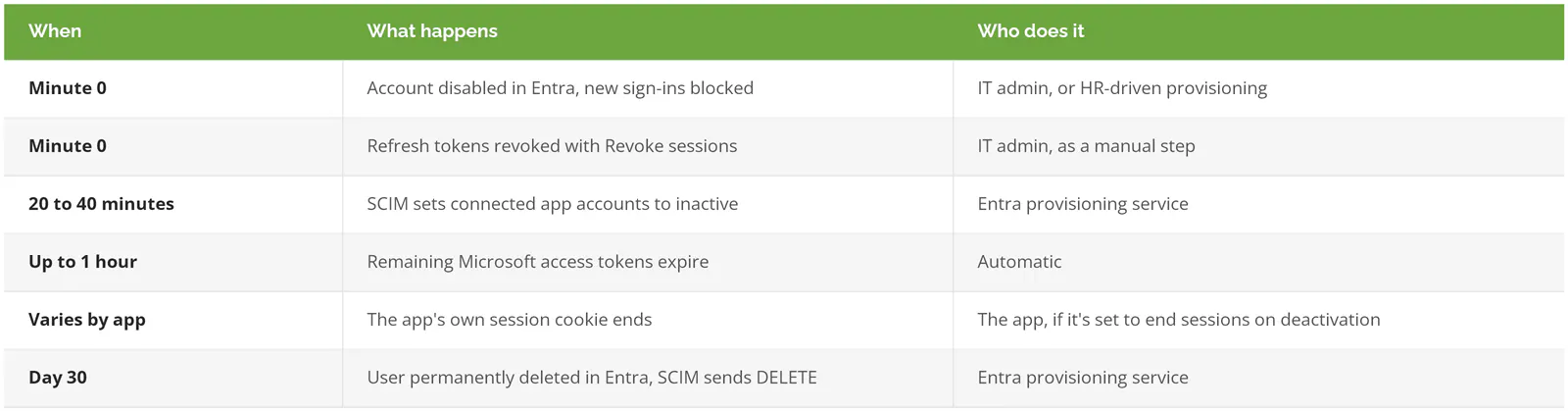
Microsoft's emergency access revocation guidance gives the order for a termination that can't wait on a sync cycle. Disable the account. Select Revoke sessions on the user's page to kill their refresh tokens, the credentials apps use to quietly sign someone back in. Disable the devices registered to them. Then let provisioning clean up the apps behind you. Apps that support continuous access evaluation, a Microsoft feature that pushes a revocation to supported apps in near real time, close most of the one-hour gap. The others wait for their tokens to run out.
In February 2024, CISA published an advisory about a state government organization breached through a former employee's account that still carried administrative privileges. The password had leaked in an unrelated breach, and the account was never disabled when the employee left. The attacker connected over the VPN, pulled user, computer, and domain details from the directory, and posted the files on a dark web broker site.
One account nobody switched off. That was the door.
Which of Your Apps Can SCIM Actually Reach?
Fewer than you'd hope. SCIM only works when the app supports it, and plenty of SaaS vendors put it on their higher pricing tiers. Every app left over needs a manual offboarding step, a different connector, or a ticket.
Slack is a typical case. SCIM provisioning is listed for Slack's Business+ and Enterprise plans. IT people call this the SCIM tax. Before paying the upgrade for one app, count how many departures a year touch it and what each one costs to handle by hand.
Then sort the rest of your app list:
- Included on the plan you already pay for. Turn it on this quarter.
- Locked behind an upgrade. That's a math problem, and the math changes fast between 40 people and 400.
- Apps running on your own servers with a SQL database, an LDAP directory, or their own SCIM endpoint. Entra's on-premises provisioning agent can still reach those. It needs Entra ID P1 and a Windows Server 2016 or later machine.
- No provisioning of any kind? Those go on a written offboarding checklist with a named owner. The ERP login out on the plant floor, the freight carrier portal, the bank's treasury site, the vendor tool someone signed up for on a company card.
That checklist gets shorter every time an app moves up a bucket. It never gets to zero.
What Do You Need in Microsoft 365 to Run It?
Less than you'd think. Entra ID Free covers automatic user provisioning to gallery SaaS apps (the cloud apps Microsoft has a ready-made connector for). Group provisioning, HR-driven provisioning, on-premises apps, and provisioning logs need Entra ID P1, which comes with Microsoft 365 Business Premium and E3.
Lifecycle Workflows are the next step up. They run scheduled joiner and leaver tasks, like emailing a manager before a start date or stripping licenses on someone's last day, and they need a Microsoft Entra ID Governance license. A 150-person company on Business Premium can get a long way without them.
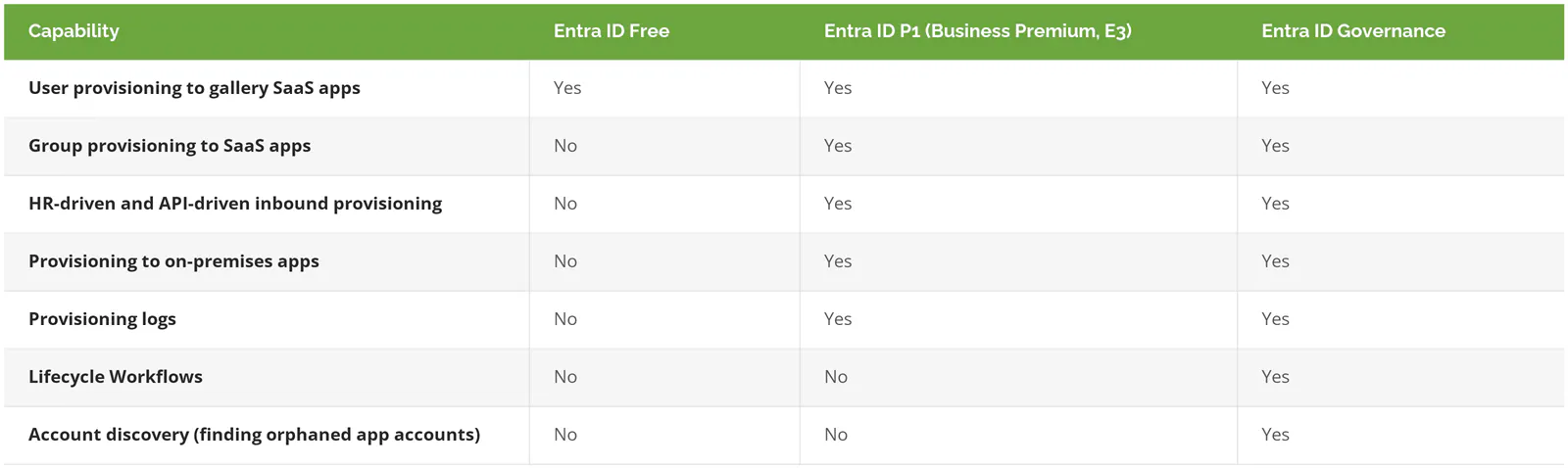
That's straight from Microsoft's Entra licensing documentation. The Free column hides a catch. Without provisioning logs, you can't see why an account didn't get created, and you'll find out from the new hire standing at the help desk on day one.
Your P1 license also runs Conditional Access policies. If you're on Business Premium and haven't set up either one, you're paying for both and using neither.
How to Roll Out SCIM at a Company With 20 to 1000 Users
Start with a list, not a tool. Pull every app that holds company data from the Entra sign-in logs, the expense reports, and the finance team's card statements. The card statements are where the forgotten subscriptions tend to show up. Mark which apps support SCIM on the plan you already pay for.
Pick the source of truth next. The HR system, if you have one and HR is disciplined about dates. Entra, if you don't.
Groups come third. One flat group per app and role, named so a stranger could read it. Sales-Salesforce-Users beats SF_grp2 every time.
Test on one test account before any real employee. Entra's provision on demand pushes one user through the full cycle and shows exactly what got sent, which beats discovering a bad attribute mapping (the rule for which field goes where) on the whole finance team. The first full sync takes a while, too. Microsoft's own estimate for an initial cycle is 0.01 to 0.08 minutes per assigned user, group, and group member, so a tenant with 700 assigned objects lands somewhere between 7 and 56 minutes.
Turn on the failure emails. When calls to an app keep failing, often because an admin token expired, Entra puts the job in quarantine, slows it to one sync a day, and disables the job after four weeks. A sync that stopped makes no noise. Someone spots it months later, when an employee who left in spring still shows as active in the CRM.
Keep admins out of it. Global Administrator and app admin rights should come through a separate, time-limited approval, which is what privileged access management covers. SCIM should hand out the job, not the keys.
Then review access every quarter. Automation copies whatever your groups say, so somebody has to check that the groups still say the right thing. Our guide to IAM best practices for smaller teams covers how often and who signs off.
Skip all of this if you're a 22-person firm running Microsoft 365 and a handful of other apps. A written checklist, one owner, and a same-day rule will hold. Revisit once the app list gets long enough that nobody can recite it from memory.