What Is Shadow AI? The Risk Hiding in Your SaaS Stack
Shadow AI is the AI your company uses without approving it. Some walks in with employees. More of it arrives switched on by vendors you already pay. IBM's 2026 breach report tied unapproved AI to 43% of security incidents. This is how it gets in, and how to find yours.
Table of Contents
Shadow AI is any AI tool, feature, or agent used for company work without IT approval or oversight. It includes free chatbots, AI browser extensions, and AI features vendors enable by default inside software you already license. It's a governance problem before it's a technology problem, which is why it sits inside managed cybersecurity rather than off to the side as an AI project. Finding it is a discovery exercise, not a policy exercise. If you already know what you're running and just need the rules written down, the AI acceptable use policy guide covers that side of the work.
Ask your IT lead how many AI tools your company uses. You'll get a number. Then ask how many AI tools have touched company data in the last 90 days. Different number. Nobody has it.
That gap is shadow AI. It stopped being a hypothetical this year. Unapproved AI tools showed up in 43% of the security incidents IBM studied for its 2026 Cost of a Data Breach Report, more than double the prior year's share, and roughly half of those incidents ended in data actually being lost or exposed. The global average breach now runs $4.99 million.
What makes this different from every unapproved-software problem that came before it is where it comes from. The instinct is to picture an employee sneaking a chatbot past IT. That happens. But the biggest single source of ungoverned AI in a 20 to 500 user company right now is a vendor flipping a switch on software you're already paying for, in a contract you already signed, without asking you first.
What Is Shadow AI, Exactly?
Shadow AI is AI used for company work that your security and IT teams never reviewed, approved, or monitored.
That covers four things at once. Public chatbots used on company data. AI browser add-ons installed by individual employees. External AI services connected to your email and file storage through the standard connect-your-account button. And AI features that a software vendor turned on inside a product you already own.
Only the first one looks like the picture in most executives' heads.
The last category is the one that breaks people's mental model, so it's worth being blunt about it. If your company licenses Microsoft 365 and Microsoft enables a new model provider inside Copilot by default, you now have AI processing company content that nobody at your company chose. No employee did anything wrong. No policy was violated. The exposure is real anyway.
Which is why the definition matters more than it sounds. Define shadow AI as employee misbehavior and you'll build a training program and an approval form, then keep the exposure. Define it as ungoverned AI regardless of who introduced it, and the work changes shape entirely.
Shadow AI vs. Shadow IT, and Why the Old Playbook Misses It
Related, but not the same thing. Shadow IT is unapproved software. Shadow AI is unapproved processing. That difference sounds academic until you try to detect it.
One leaves a paper trail. Someone bought something, so there's a credit card charge, a vendor invoice, a new domain in the firewall logs, a login page nobody recognizes. You can find it by following money and network traffic.
The other leaves none of that. It's free. It runs inside a browser tab on a personal account. Or it's already inside a tool you approved two years ago, using credentials you issued, hitting domains you've whitelisted.
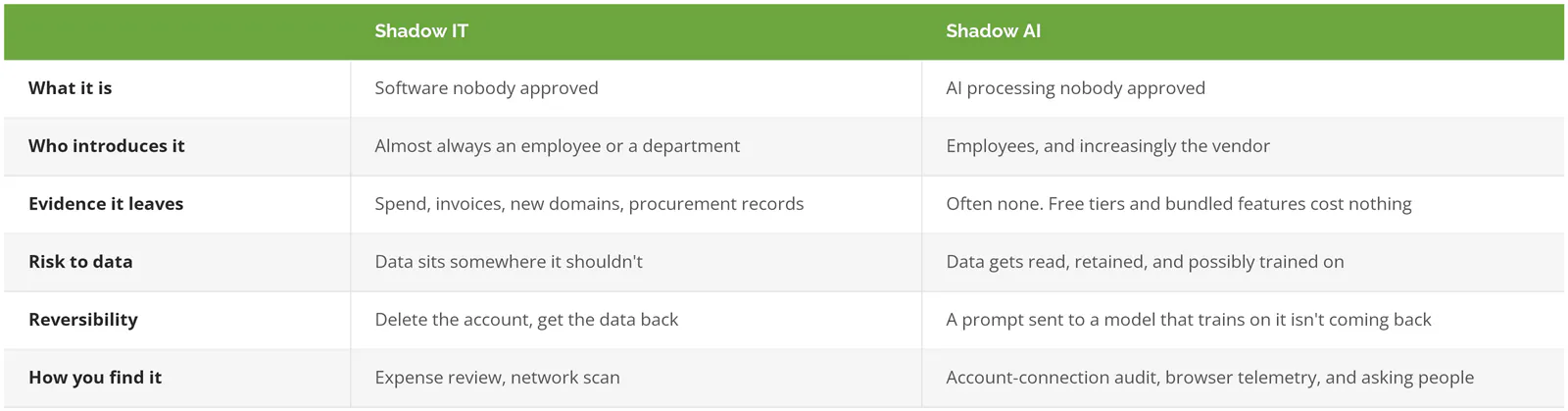
That bottom-right cell is the whole problem. You have to ask people, because a meaningful share of shadow AI produces zero technical evidence.
The Four Doors Shadow AI Walks Through
Shadow AI gets into a mid-market environment through four doors. They're listed in order of how much data they typically expose, which is close to the reverse of how much attention they usually get.
Door 1. The vendor turns it on for you
This is the largest door and the least discussed. Software you already license adds AI, defaults it to on, and processes your content under the existing contract.
Two live examples from this year. Starting January 2026, Anthropic's Claude models became enabled by default for some Microsoft 365 Copilot features, with content processed in datacenters that are mostly US-based. Turning it off requires an admin to go into Copilot settings and do it. In April 2026, Google launched Workspace Intelligence, giving Gemini continuous access across Gmail, Drive, Chat, and Calendar. Google's own admin documentation is built around turning individual data sources off, which tells you which direction the default runs.
Neither of those is a scandal. Both are reasonable product decisions. But if you have a client contract that says their data stays in a specific jurisdiction, or a customer questionnaire where you attested to which subprocessors touch their information, a default-on model change is a compliance event that happened to you while you weren't looking. Awareness training does not fix this. Nobody clicked anything. There was nothing to click.
Door 2. Employees connect AI services to your accounts
An employee finds an AI meeting summarizer, a proposal writer, a spreadsheet assistant. It asks to connect to their work Google or Microsoft account. They click allow. That grant, the standing permission an outside app gets to read your email, calendar, and files without asking again, persists until somebody revokes it. It survives password changes. It survives offboarding. Nobody checks.
These grants are one of the highest-signal indicators of shadow AI because they're logged and searchable. They're also badly neglected. Spin.AI's 2026 analysis of connected-app risk across Google Workspace and Microsoft 365 found 60% to 80% of these grants go unmonitored, with 64% of third-party apps reaching sensitive data without a business justification on record, up from 51% the year before.
Door 3. AI browser extensions
Extensions are the messiest door. An AI writing assistant installed from the Chrome store can request permission to read and change data on every site the user visits. That includes your CRM, your accounting system, and the client portal.
Akamai's 2026 review of enterprise environments found that roughly 75% of AI browser extensions in use demand high or critical permission levels, and 16.3% carried known security flaws. At the end of 2025, researchers found two Chrome extensions with more than 900,000 combined installs shipping users' full AI conversation histories to outside servers on a 30-minute timer. Both had passed store review. One of them was carrying Google's Featured badge.
Door 4. Free personal accounts on work email
Oldest door, hardest to see. Someone signs up for a free chatbot with their work address, pastes in a contract, a payroll file, or a customer list, and gets an answer in 4 seconds that would have taken them an hour.
They're not being reckless. They're being fast. But free consumer tiers and enterprise agreements are different products with different data terms. On a free OpenAI account, conversations can be used to improve models unless the user finds and disables that setting. Zero-retention terms, the contractual promise that a provider keeps nothing, apply to qualifying enterprise agreements, not to free accounts or standard consumer sessions.
How often does this actually matter? Cyberhaven Labs tracked real data movement into AI tools for its 2026 AI Adoption and Risk Report and found that 39.7% of it involved sensitive data, and that more than 60% of AI tool access happened through personal accounts rather than company-managed ones. Not occasionally. That's the baseline.
What Actually Goes Wrong When Nobody's Watching
Five failure modes. They aren't equally likely.
- Data you can't retrieve. A file uploaded to a service that trains on inputs is gone in a way a deleted Dropbox folder isn't. There's no unsend.
- Your compliance posture quietly stops matching your paperwork. Shadow AI touches SOC 2 controls for vendor risk, logical access, and third-party management all at once, and audit practices are already scoping unapproved and vendor-embedded AI into their reviews. Under GDPR Article 28, an AI vendor processing personal data on your behalf needs a signed data processing agreement, the contract that makes them legally accountable for handling it. Free-tier tools don't have one with you.
- Data residency breaks. If you've told a client their data stays in a region, a default-on model change can move it without a purchase order or a notification anyone read.
- Ownership of what comes out gets murky. Output generated from a prompt containing your proprietary process, on a consumer account, is not sitting on the clean side of any IP argument you'd want to make later.
- Wrong answers ship. A hallucinated figure inside a quote, a made-up clause in a contract summary, a fabricated citation in a client deliverable. Nobody logs this one. It just costs you the account.
Why does this keep happening? The IBM data is blunt about it. Close to 7 in 10 breached organizations had no governance policy for AI at all. Among organizations that reported an AI-related security incident, 92% were missing basic access controls like role-based permissions and multi-factor authentication on their AI systems, and only 2 in 5 organizations apply access controls to AI models and data in the first place.
Policy without control. That's the pattern. Writing the policy is the easy half. It's also the half everybody does first.
How to Find the Shadow AI You Already Have
Discovery takes about a week of part-time effort for a company under 500 users. Six places to look, roughly in order of signal per hour spent.
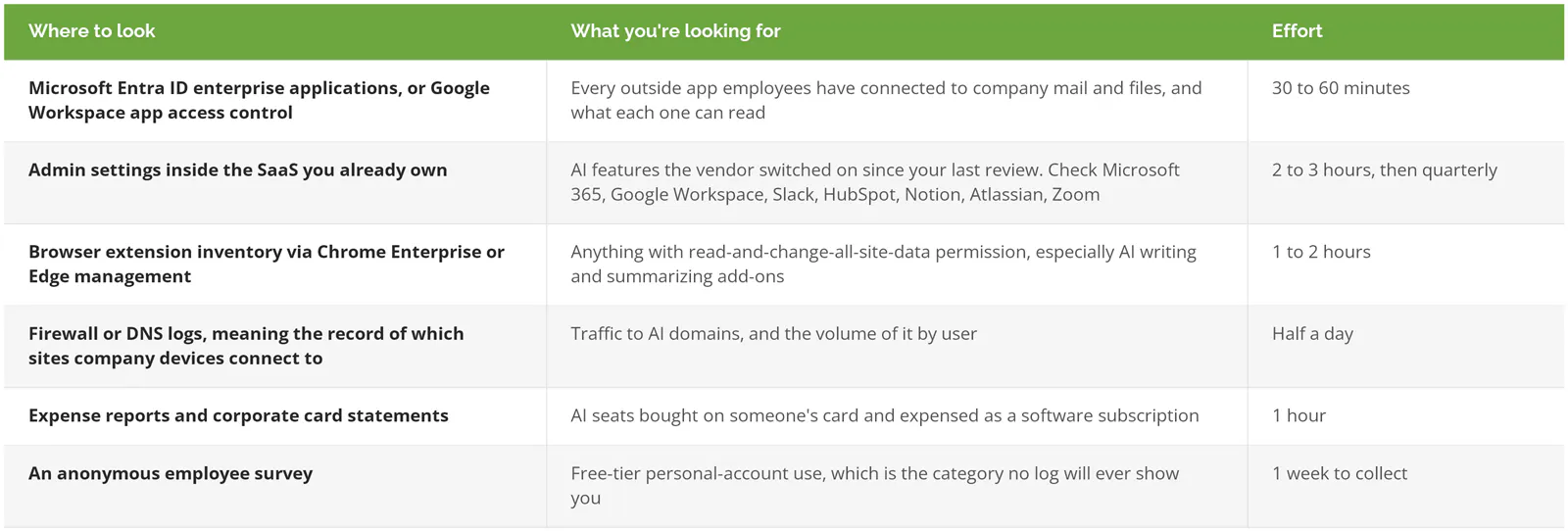
Run the survey. It feels soft next to log analysis and it's the step people skip, but it's the only method that reaches door 4, and door 4 is where the pasted payroll file lives. Keep it genuinely anonymous and keep the framing neutral. Ask what tools help people do their job faster, not what unauthorized software they've installed. You'll get honest answers to the first question and silence to the second.
One thing to add that most discovery efforts miss. For each tool you find, write down what data class it has probably seen. Customer records, financial data, employee information, source code, contracts. A tool with access to nothing sensitive is a housekeeping item. A tool with 8 months of access to your client files is a different conversation, and you can't tell them apart from a list of tool names.
What Discovery Usually Turns Up
Three patterns repeat in environments this size.
The count is higher than leadership expects, and the gap isn't small. Executives are considerably more confident about their visibility into AI usage than employee surveys support, which tracks with what the IBM governance numbers suggest. Sales and marketing are almost always the heaviest users, finance is the quietest and the highest risk per instance, and there's usually one connected app nobody can identify that was authorized by someone who left the company.
Second consistent finding. Almost everything people are using is reasonable, and discovery isn't a hunt for bad actors. It's an inventory. Plenty of what turns up should be approved, licensed properly at the business tier, and left running, because banning it outright is how you get the same behavior on personal devices where you have no visibility at all.
Third, and this is the one that changes budgets. The riskiest item on the list is almost never the tool anybody was worried about. It's a forgotten connected app with read access to a shared drive, sitting there since 2024, authorized by someone in a department that no longer exists. Nobody was using it. It just never got turned off.
When This Isn't Worth Your Time
Skip this exercise if you've already done it in the last 6 months and you have a quarterly review scheduled. Repeating it now buys almost nothing.
One other case is genuine. If you have a full-time CISO, a working vendor risk process, and enforced device management on every endpoint, your shadow AI exposure is likely limited to door 1, the vendor default-on problem. That's one calendar reminder and an admin settings review, not a project.
Everyone else is exposed to all four doors, and the gap between what leadership believes is running and what's actually running tends to be wide.
What Comes After You Find It
Discovery produces a list. The list isn't the point.
What turns the list into control is a small number of decisions. Which tools get approved and licensed at a business tier with real data terms. Which get blocked. Which connected-account grants get revoked today. Who owns the quarterly re-check, because vendors will keep shipping AI features whether or not you're ready for them.
Then the rules get written down, and that's a separate piece of work with its own structure. The AI acceptable use policy guide has the template, the data-handling rules, and the rollout sequence. If you're working at the framework level instead, on how AI decisions get governed across the business, start with AI governance frameworks.
Two controls do most of the heavy lifting once the policy exists. Data loss prevention catches sensitive data on its way out to an AI service, and tightening identity and access management is what stops the next connected-app grant from happening silently. Neither one works without the inventory first, which is the whole argument for doing discovery before anything else.
The Short Version
None of this is primarily an employee discipline problem, and treating it as one produces a training deck and no reduction in exposure. It's an inventory problem with a vendor component that keeps growing. The companies handling it well did the unglamorous part first. They found out what was actually running.
Three things worth holding onto. The vendor is now a bigger source of ungoverned AI than your staff. A written policy without access controls is documentation, not protection, and IBM's data shows how common that combination is. And discovery is a week of work, not a quarter.
Consilien is a managed IT and cybersecurity provider working with companies of 20 to 500 users nationwide, in manufacturing, distribution, professional services, and real estate. The work here is translating technology risk into decisions an executive can actually make, which is what a shadow AI inventory is for. If you don't know what AI is touching your data right now, speak to a cybersecurity expert and start with the discovery pass.