What Is Microsoft 365 Copilot? A Business Buyer's Guide
A paid add-on that puts AI inside Word, Excel, Outlook, and Teams, Microsoft 365 Copilot is grounded in your own company's emails, files, and chats. It runs anywhere from $0 to $99 per user per month depending on which door you walk through. What it's worth to you depends less on the license tier than on how clean your file permissions are. Here's the licensing, the data access, the limits, and the case for skipping it.
Table of Contents
Microsoft 365 Copilot is a paid AI assistant built into Word, Excel, Outlook, and Teams that reads your company's emails, files, and chats through Microsoft Graph, limited to what each user already has permission to open. Microsoft sells it four different ways in 2026, from a web-only chat tier included at no cost up to a $99 per user bundle. It doesn't train Microsoft's models on your data. Its usefulness is capped by how well your SharePoint and OneDrive permissions are set, not by which tier you buy.
Right now, Microsoft 365 Copilot is the most-asked-about line item on a lot of IT budgets. Microsoft says 15 million people pay for it. Set that against the roughly 450 million commercial Microsoft 365 seats it's been sold into and the picture shifts. Recon Analytics surveyed more than 150,000 US paid AI subscribers between July 2025 and January 2026. Where workers could choose freely between Copilot, ChatGPT, and Gemini, 8% made Copilot their primary tool. Eight percent.
That's not an argument for skipping it. It's an argument for buying deliberately, as part of the same managed cloud services stack you're already paying for. Which means knowing what Copilot reads, what it costs this year, and what has to be true inside your tenant before any of it works. Those three answers sit in different corners of Microsoft's documentation. Rarely together. This guide puts them in one place.
Two things changed in 2026 that make older guides wrong. Both are below.
What is Microsoft 365 Copilot?
Microsoft 365 Copilot is an AI assistant that sits inside the Microsoft 365 apps your team already opens every morning, and answers using your organization's own content rather than only the public web.
Three parts make that work. The apps themselves, which give Copilot somewhere to appear. Microsoft Graph, which is the index of who your people are and what they've touched. And a set of large language models that turn a question into an answer. Microsoft has now onboarded both OpenAI and Anthropic as subprocessors, so the model answering you isn't always the one you'd assume. That detail matters later.
Day to day it's duller than the demos. Copilot drafts the first version of a document, summarizes a thread you were copied on but never actually read, pulls a formula out of a spreadsheet somebody in operations built four years ago and never documented, and writes up the meeting you had to miss because a customer called. Useful. Not magic.
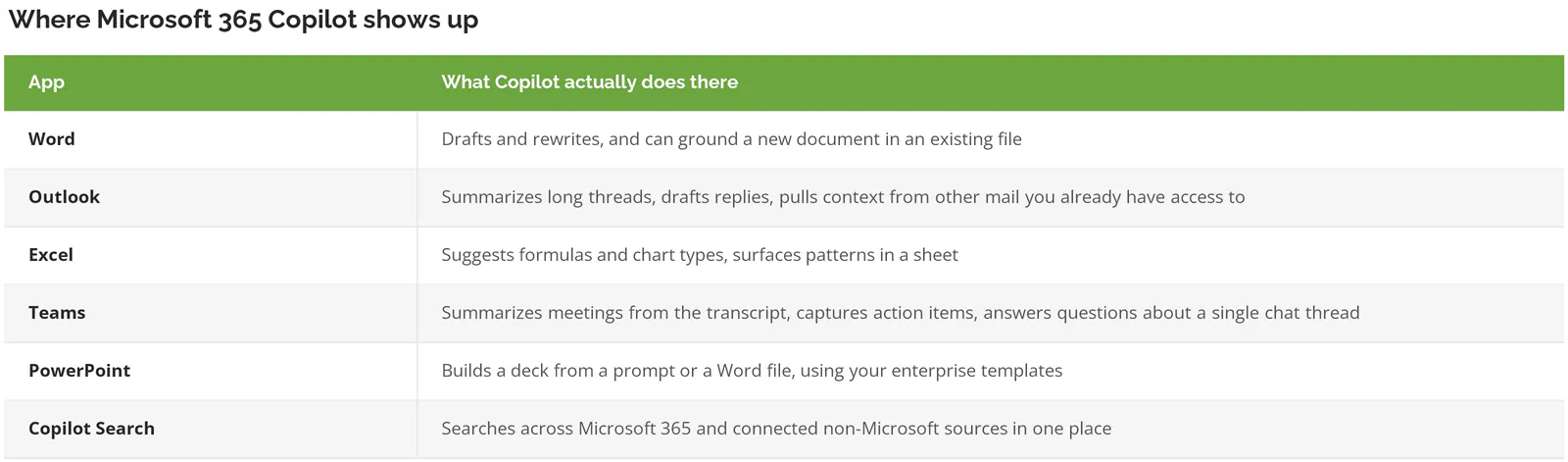
Notice what's missing from that list. Nothing in it replaces a person. Not one item. Every one of them shortens a task somebody was already doing badly at 4:45pm on a Thursday.
What can Copilot actually read?
Copilot reads whatever the person prompting it could already open. Emails, Teams chats, SharePoint documents, OneDrive files, meeting transcripts, calendars. It enforces existing permissions rather than replacing them.
Understanding the mechanism matters, because it drives every risk decision further down this page. Copilot queries Microsoft Graph, which holds the map of users, activity, and accessible content, then runs it through a semantic index that understands meaning and not just keywords. Ask for "the pricing model we agreed with the Vernon plant," and it can find that in a document nobody thought to name "pricing."
Permission checks happen at query time. If Marcus in accounting can't open the HR compensation folder today, Copilot won't read it for him tomorrow. Consistent. Well documented. Genuinely reassuring, right up until you turn the statement around and realize it also guarantees that anything Marcus was accidentally granted access to in 2019, by an admin who has since left, is now searchable by him in plain English in under two seconds.
Some boundaries get assumed wrongly. In Teams chat, Copilot can summarize up to 30 days of a conversation and only that single thread. It can't reach across to other chats, transcripts, or files from inside that summary. It also isn't sitting in your mailbox watching. Copilot works inside a session you open, on a question you ask. It doesn't monitor. It doesn't act on its own.
If you're already running Azure and Microsoft 365 management in a mature tenant, none of this is surprising. If your environment grew by accretion over 15 years, keep reading.
What Microsoft 365 Copilot can't do
Plumbing is what separates a Copilot demo from a Copilot rollout. These are the disqualifiers that kill pilots after the purchase order is signed, and Microsoft publishes all of them.
- Mailboxes have to live in Exchange Online. On-premises and hybrid mailboxes don't support the grounding that makes Outlook and calendar features useful. This one disqualifies more mid-market manufacturers than any other item on the list.
- Your Microsoft 365 apps must run Current Channel or Monthly Enterprise Channel. Semi-Annual Enterprise Channel, the update track cautious IT teams pick precisely because it changes slowly, doesn't support Copilot at all.
- Device-based licensing is out. Copilot needs a licensed human, not a licensed shared PC on a production floor.
- Every user needs a Microsoft Entra ID account, which is the directory that holds your work logins and controls who gets into what.
- Connected Experiences has to be on. Turn that privacy setting off and Copilot either partially works or doesn't appear.
- Third-party cookies, of all things, for Copilot to function in the browser versions of Word, Excel, and PowerPoint.
Then there's the ceiling. Copilot still gets things wrong, confidently, in the same way every large language model does. It summarizes a thread and drops the one caveat that mattered. Features like Vision, Voice, and Actions carry usage caps and a monthly AI credit allowance rather than running unlimited. Not a bug. A budget.
So treat the output as a draft. Always. A finance team that pastes a Copilot summary of a supplier contract straight into a board pack without opening the contract itself hasn't saved anybody time, it has quietly relocated the risk from a place where somebody was accountable for reading carefully to a place where nobody thinks they need to.
What does Microsoft 365 Copilot cost in 2026?
Copilot pricing runs from $0 to $99 per user per month across four buying paths, and the add-on price is never the real number because every tier requires a qualifying Microsoft 365 base license underneath it.
That last clause is where budgets break. A $30 add-on sitting on a $57 E5 seat is an $87 seat. The $30 is what gets quoted. The base license underneath it rarely makes the slide. Ask for both numbers.
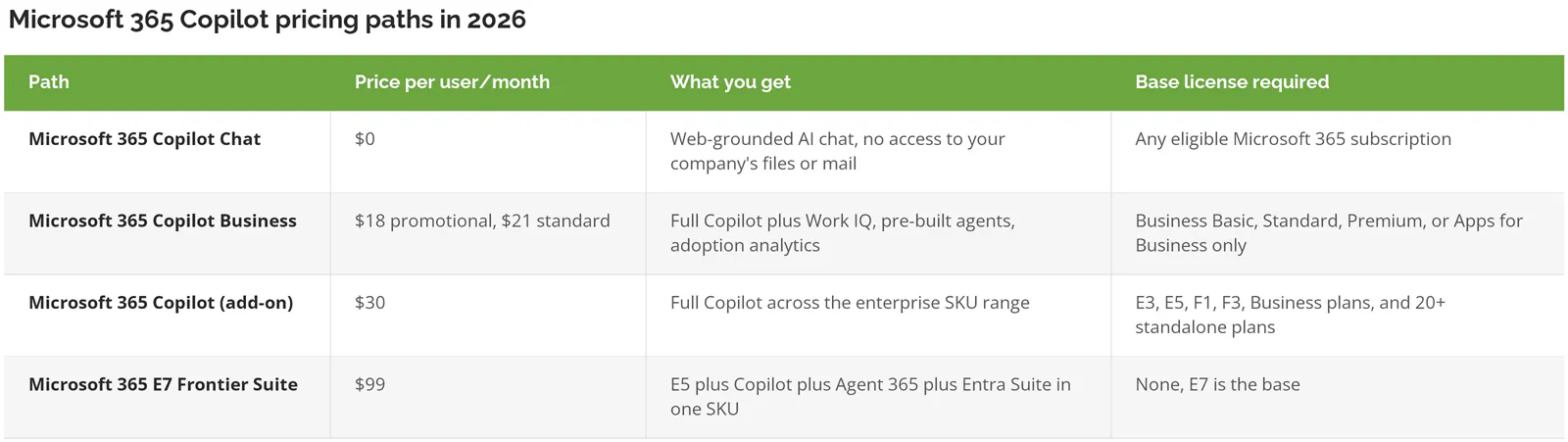
$18 is a first-year promotion running through September 30, 2026, after which Copilot Business lands at $21. Microsoft also sells pre-bundled seats now, with Business Premium with Copilot at $32 per user per month on an annual commitment and Business Standard with Copilot at $23.50.
E7 is the new one. Microsoft announced the Frontier Suite on March 9, 2026 and it went generally available May 1, 2026 at $99. Agent 365, the control plane for governing AI agents, is also sold separately at $15 per user per month.
One trap worth naming. Copilot Business only attaches to Microsoft 365 Business plans. Companies in the 20 to 500 user range are frequently sitting on Business Premium, assume the cheaper tier must be a stripped-down version of the enterprise one, and find out at renewal that they'd been comparing two products with different eligibility rules the whole time. It isn't a downgrade. It's a different shelf.
Copilot Chat is already in your tenant. Here's where it stops.
Every eligible Microsoft 365 subscription already includes Copilot Chat at no extra cost. It answers from the web. It doesn't reach into your mail, files, or Teams history unless a user pastes something in manually.
A year ago that line was blurrier, and closing it is the first of the two 2026 changes. On April 15, 2026, Microsoft pulled in-app Copilot Chat out of Word, Excel, PowerPoint, and OneNote for anyone without a paid add-on license. Seat count decided how much that hurt. Tenants above 2,000 seats lost the feature outright under admin center notice MC1253858, while tenants below 2,000, which covers nearly every company reading this, kept it under standard access under MC1253863, meaning it still runs but slows at peak hours and prompts you to upgrade.
Three in-product labels now tell you which one you're on. M365 Copilot (Premium) is a paid add-on and the full experience. M365 Copilot (Basic) is standard access without the add-on. Copilot chat (Basic) is the label for the users who lost those four apps entirely.
Which means a lot of executives tested Copilot in Word during 2025, formed an opinion, and are now working from a version of the product that either changed underneath them or disappeared. Their opinion is stale. They don't know it.
Chat is still the right starting point for plenty of companies. Free is a good price for finding out whether your people will touch AI at all.
Does Microsoft 365 Copilot train on your company data?
No. Microsoft's commitment is explicit that prompts, responses, and data accessed through Microsoft Graph aren't used to train the foundation models, including the ones behind Copilot.
Prompts and grounding data are processed inside the Microsoft 365 service boundary and logically isolated per tenant, so one customer's content can't surface in another's answers. The GDPR and EU Data Boundary commitments that already cover your Microsoft 365 data extend to Copilot. So far, so clean.
Now the nuance that most buyer guides skip, and the reason the subprocessor detail from earlier matters. Models provided by Anthropic as a subprocessor sit outside the EU Data Boundary. Separately, Microsoft switched on a behavior called Flex Routing, which lets it push the answer-generation step outside that boundary when demand on EU infrastructure runs high. Your files, mail, and SharePoint content stay where they are. The context bundled up and sent with a prompt can travel to hardware in the US, Canada, or Australia. It defaults to on, from March 25, 2026 for newly created tenants and from April 17, 2026 for everyone else, under admin center notice MC1269223. Some large enterprise, education, and public sector tenants got an opt-in version instead, so check which notice you received rather than assuming.
For a California manufacturer with no EU footprint, this is trivia. Skip it. For a distributor with a subsidiary in Rotterdam and a data processing agreement that spells out where information is allowed to be handled, it's a question to answer before the seats are assigned, not after. Worth pairing with an AI acceptable use policy so employees know which tools are sanctioned for which data.
The permissions problem you fix before you buy
Nothing about Copilot breaks your permissions. It exposes the ones you already broke. Every file shared with "Everyone," every site with broken inheritance, every anonymous link somebody generated in 2019 becomes findable in two seconds instead of never.
Which is the single biggest gap between companies that get value from Copilot and companies that quietly shelve it after four months.
What's actually sitting in your tenant right now? Think about the folders nobody has opened since the last time somebody reorganized the department, and the sites created for a project that ended two reorganizations ago. Salary bands in a spreadsheet on a departed HR manager's OneDrive. The acquisition model somebody dropped in a Teams channel and forgot. Severance terms. A vendor contract with pricing your salespeople shouldn't see. None of that was secure before Copilot. It was buried. Burial is not a control.
You already own the remediation tooling. It ships with the license, and Microsoft publishes a sequence for using it. Find the overshared content, contain it, then fix the permissions underneath.
- Microsoft Purview Data Security Posture Management for AI runs a data risk assessment that flags overshared sites holding sensitive content, risky sharing links, and files people are actually hitting.
- Restricted Content Discovery pulls your worst sites out of Copilot's reach while you clean them, which buys time without blocking the rollout.
- Site access reviews push the decision to the site owners, who are the only people who know who genuinely needs access.
- Restricted Access Control locks a business-critical site to an allow list.
- SharePoint Advanced Management handles the inactive-site cleanup that improves answer quality as a side effect.
Microsoft's own guidance structures this as pilot, deploy, operate, which is a polite way of saying it isn't a weekend project. Budget real hours. Then double them. This work overlaps heavily with data loss prevention controls and with whatever identity and access management discipline you already run, so it isn't wasted effort even if you never buy a single seat.
Is Copilot worth $30 a seat?
For some teams, comfortably. For others it's $360 a year per person to summarize meetings nobody needed to attend. So which is it? The evidence points both directions and you should see both.
Forrester's Total Economic Impact study, commissioned by Microsoft, put it at 116% ROI over three years and 9 hours saved per user per month. Read the composite before you borrow the number. It models a 25,000-employee company with $6.25 billion in annual revenue. If you have 150 people, that organization isn't you, and neither is its payback period. Vendor-funded research isn't worthless. But a study a vendor paid for and a survey of what workers pick when nobody's watching are different instruments measuring different things, and only one of them has an incentive attached.
Recon Analytics supplies the counterweight. Copilot converts 35.8% of US paid subscribers who have workplace access to it, against 83.1% for ChatGPT. Given a genuine choice, 8% make Copilot primary. Both numbers are real.
Read those two findings together and a pattern falls out. Copilot wins on integration and loses on raw capability. If your work happens in Outlook and Teams all day, integration is worth a lot. If your people are already pasting things into ChatGPT on their phones, a Copilot license won't stop them. It adds a line to the invoice. That's a shadow IT problem wearing an AI costume.
Skip Copilot for now if
- You're under 20 users. Copilot Chat at no cost tells you what you need to know about appetite before you spend anything.
- Your mailboxes are hybrid or on-premises. Fix that first, or you're paying for a product that can't see half of what makes it useful.
- Nobody owns the SharePoint permissions review. Without that, you're buying a very fast search engine for content you haven't audited.
- Your team barely uses Teams and lives in a line-of-business system instead. The grounding data won't be there.
Four gates before you sign
Run these in order. Each is a yes or a no. Which one would you fail today? A no means fix it before you buy, not after.
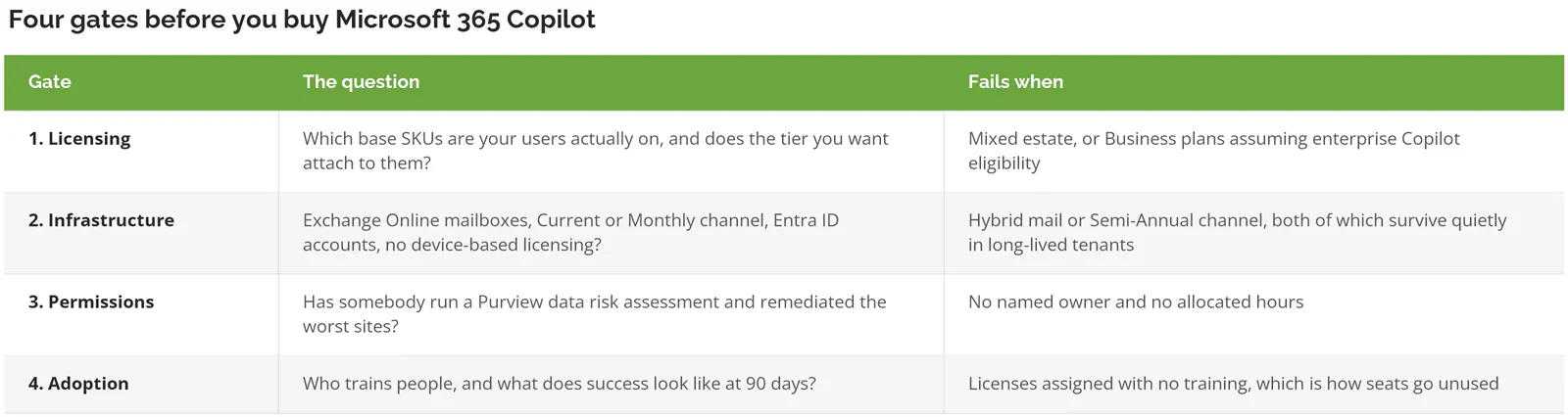
Gate 3 is where this stops being technical and starts being political. Somebody has to walk into a department head's office and explain that the site their team has run out of for six years is open to the entire company, and that conversation goes very differently before an executive finds their own compensation letter through a Copilot prompt than it does the week after. Sequence matters. Fold the work into whatever AI governance framework you're standing up, because the same permission questions apply to every agent you deploy afterward.
Where this leaves you
Two things to carry out of this. Copilot's ceiling is set by your data hygiene rather than your license tier, so the permissions work isn't preparation for the purchase. It largely is the purchase. And the free Chat tier is a legitimate first move, not a consolation prize.
Companies that get real value share a trait. They ran the permissions review first and bought seats second. The ones that shelve it did the reverse. Then blamed the product.
Consilien is a security-first managed IT and advisory firm that has been running Microsoft environments for companies with 20 to 500 users since 2001, which means the Copilot question usually arrives here as a permissions question wearing a licensing costume. If you want the four gates run against your actual tenant before you commit to a seat count, speak to a Microsoft 365 expert. We'll tell you which gate you'd fail. Including the ones that mean waiting a quarter. That work sits inside our existing IT assessment, and inside the same fully managed IT engagement if you're already a client.
What buyers ask before they sign
Can Copilot read my emails without me opening it?
No. Copilot works inside a session you start, answering a question you ask. It isn't monitoring your mailbox in the background or taking action on its own. When you do ask it something, it reads your mail through Microsoft Graph using the exact permissions you already have, which is how it can summarize a thread or find the message you half remember.
Is Copilot free if we already pay for Microsoft 365?
Partly. Copilot Chat is included and answers from the web, while the version that reads your own files and mail is a paid add-on starting at $18 per user per month. Two products, confusingly similar names.
We're on Business Standard. Can we buy the enterprise Copilot license?
You can, though you probably shouldn't. The $30 enterprise add-on does attach to Business Standard. But Copilot Business at $18, rising to $21 after September 30, 2026, covers the same core capability and was built for exactly your license position. Check the pre-bundled Business Standard with Copilot seat at $23.50 too, because depending on your renewal timing the bundle can land cheaper than the add-on math suggests.
How long before people actually use it?
90 days is the honest planning horizon for meaningful daily use, and only where someone owns training. Assign licenses with no enablement and you'll see a spike in week one, a collapse by week three, and a renewal conversation you don't enjoy. The technology isn't the hard part. Habit change is.
Does our SharePoint mess actually matter, or is that a vendor upsell?
It matters, and Microsoft agrees, which is why they ship Purview and SharePoint Advanced Management with the license instead of selling them separately as they easily could have. Copilot enforces permissions faithfully. That's the problem. Faithful enforcement of permissions that were set carelessly over a decade means the assistant will confidently surface exactly what it's allowed to surface, and what it's allowed to surface is usually more than anyone intended.
Copilot or ChatGPT Enterprise for a 120-person company?
Both are defensible. The tiebreaker is where the work actually lives. Copilot if your day runs through Outlook, Teams, and SharePoint. ChatGPT Enterprise if it doesn't. The grounding in your own content is Copilot's whole advantage and nothing else matches it inside those apps, but ChatGPT tends to win on raw output quality and on teams that aren't Microsoft-centric. Worth knowing that when people have access to both, roughly 70% make ChatGPT their primary tool. Also worth knowing that number measures preference, not business value. Those aren't the same thing, and a CFO who conflates them will buy the wrong one.