Microsoft 365 Copilot Security: What to Lock Down First
Lock down SharePoint permissions first. Copilot reaches everything a user can already open, so oversharing becomes searchable the day you switch it on. Then sensitivity labels, then Purview DLP, then agent controls, then auditing. Microsoft 365 Copilot security comes down to one uncomfortable fact. Copilot doesn't grant anyone new access. It reads whatever the person prompting it could already open, and it reads all of it in about two seconds.
Table of Contents
Your permissions model is the security model. Copilot just made it searchable.
That's why so many rollouts stall in week three. The pilot goes fine, then someone in marketing asks a harmless question and gets back a salary band. Nothing was breached. A file that had been quietly overshared since 2021 simply surfaced for the first time. If you're still working out what Copilot actually does before you get to the security question, start there and come back.
This piece assumes you've decided to deploy and you want the order of operations. Not a list of every control Microsoft sells. Just the order. Sequence is where companies get this wrong, and one of the controls that nearly every published guide still tells you to turn on first was closed to new tenants at the end of July.
What Changes the Day You Turn Copilot On?
Nothing about your permissions changes. Copilot grounds its answers in Microsoft Graph using the prompting user's own access rights, so any file that person could already open becomes fair game for summarizing, quoting, and citing.
Grounding is worth translating, because it does a lot of work in Microsoft's documentation. It means Copilot goes and reads your actual company content before it answers, rather than making something up from its training. Good for accuracy. Also the reason a permissions problem turns into a disclosure problem overnight, because the file that took a determined person 20 minutes to find in 2023 now arrives inside a summary nobody asked for.
Two things people expect to be risks here, and aren't. Your prompts and responses are not used to train the underlying foundation models, and processing stays inside the Microsoft 365 service boundary under the same contractual commitments that already cover your Exchange and SharePoint data. That question dominates every executive conversation. It's also the wrong one to spend time on.
So what should you be asking instead? Something quieter. Concentric AI, working across more than 550 million data records, found that 16% of an organization's business-critical data is overshared, averaging roughly 802,000 files at risk per organization. Of those files, 83% were overshared internally. Not leaked to a competitor. Nothing that dramatic. Just sitting on a site with wider membership than anyone intended, invisible until something indexed it and offered to summarize it on request.
The First Step Most Guides Give You No Longer Works
Search "how to secure Copilot" and a large share of what comes back tells you to enable Restricted SharePoint Search, curate an allow list of trusted sites, and roll out behind that fence. That advice is now dead. Microsoft blocked new enablement of Restricted SharePoint Search on July 31, 2026.
It was never a good long-term answer anyway. Microsoft's own documentation says plainly that it "isn't a security boundary and doesn't change any permissions on SharePoint sites." The allow list caps at 100 sites. Files pulled from a user's recent activity cap at the last 2,000 entities. And even with it switched on, a user still reaches anything they own, recently visited, or had shared with them directly. Companies that turned it on and called the project finished have been sitting on a control that stops roughly nothing. Worth knowing before your next board update.
Its replacement is Restricted Content Discovery, and it's better in the ways that matter. Applied per site, it pulls that site out of organization-wide search and Copilot responses without touching a single permission. It also strips the AI entry points out of the site, so users stop seeing the Copilot button, the AI actions menu, and the option to create agents from that content. Cleaner control. Narrower blast radius. Still temporary.
Propagation is not instant. Not close. Microsoft says a site with more than 500,000 items can take more than a week to fully reflect the change across search and Copilot. So the "we'll flip the sensitive sites off the night before launch" plan doesn't survive contact with a large document library. Build that week into the schedule. Nobody does, the first time.
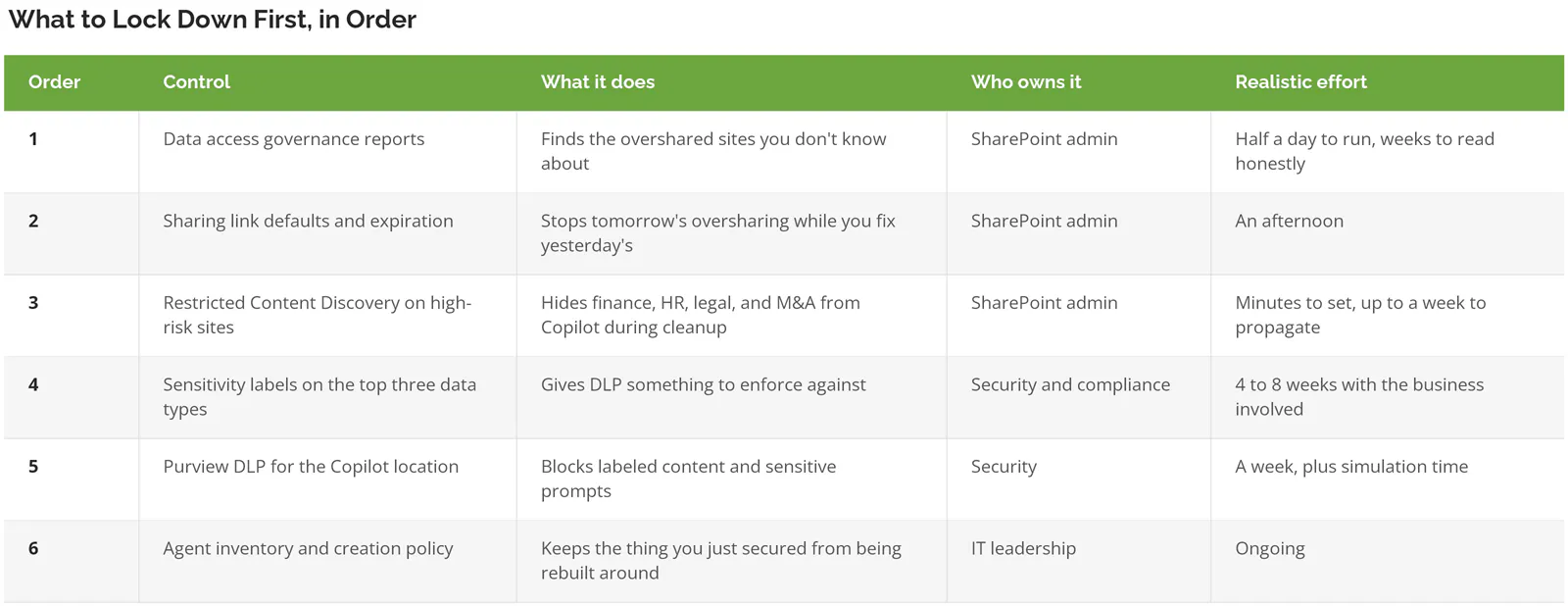
What to Lock Down First, in Order
Six controls, in the sequence that actually reduces exposure fastest. Each one assumes the one above it's done. Doing them out of order wastes effort, because labels applied to a site nobody has cleaned up just decorate the problem.
Start with the reports, and read them properly
SharePoint Advanced Management ships with the data access governance reports that make this tractable. The site permissions baseline report gives you a snapshot of overall exposure. The "Everyone except external users" report surfaces sites shared with your whole company. Sharing links activity shows where people are generating "Anyone" links. Start there.
Read the fine print on those last two. They cover the top 100 sites over the past 28 days. That's an activity window, not an inventory. A finance site overshared in March and untouched since won't appear at all. Not once. Run them monthly for a quarter before you decide you've seen the whole picture, and pair them with the site permissions baseline, which is a snapshot rather than an activity feed.
Site attestation is the underused one. It pushes a recurring prompt to the site owner asking them to confirm that the owners, members, permissions, and sharing settings on their site are still what they should be, which moves the judgment call to the only person who can actually make it. IT cannot do this alone. IT does not know that the "Project Falcon" site holds the acquisition model. The person who does know has never once been asked. Ask them.
Then labels, and only three of them
Label taxonomies fail because companies build twelve of them. Pick three. For most of the manufacturers and professional services firms we work with, that's compensation, customer contracts, and anything tied to an active deal or claim. Everything else waits for phase two, which in practice means next year. That's fine. Three labels enforced beats twelve labels designed, argued over for two quarters, and applied to almost nothing by the time the pilot needs to expand.
Labels carry a mechanic worth knowing before you promise anything to your board. When a label applies encryption, the user needs both EXTRACT and VIEW usage rights, meaning permission to open the file and permission to pull content out of it, for Copilot to work with that file at all. And Copilot agents can't read files carrying user-defined label permissions, which is either a useful control or a confusing support ticket depending on whether you knew about it beforehand.
Tighten group membership while you're in here. Most oversharing traces back to a distribution group that grew for six years and never shrank, which is an identity and access problem wearing a SharePoint costume. Groups only ever grow. Our notes on identity and access management for smaller teams cover the cleanup pattern. It's dull work. It's also the single highest-yield thing on this page.
Where Purview DLP for Copilot Stops
Purview DLP, Microsoft's data loss prevention tooling, can block Copilot four ways. It can stop Copilot from processing files and emails carrying a chosen sensitivity label, stop it from answering prompts containing sensitive information types, stop it from sending those prompts to external web search, and in preview, stop it from grounding on email received from outside your domains.
Useful. Also narrower than most people assume once you read Microsoft's documentation on the Copilot policy location.
Three gaps to plan around, and none of them show up in the admin center as a warning.
- Files uploaded straight into a prompt are not scanned. Microsoft states it directly. DLP only checks the text typed into the prompt, which means the control everyone assumes covers the crown jewels has a hole exactly where a user drags in a spreadsheet they just exported from the ERP.
- You can't put a sensitive-information-type condition and a sensitivity-label condition in the same rule. Two rules in one policy is fine. One rule is not. Small thing. It derails the first policy build every time. Every single time.
- Changes take up to four hours to appear in the Copilot experience, so testing feels broken before it feels working.
Blocked items still appear in citations, incidentally. Copilot won't use the content, but the user learns the file exists and where it lives. Whether that's acceptable depends entirely on what your file naming conventions give away. Have a document called "Layoff Scenarios Q4"? The citation is the leak. Same class of problem data loss prevention has always had, just with a faster surface.
Can You Prove What Copilot Did?
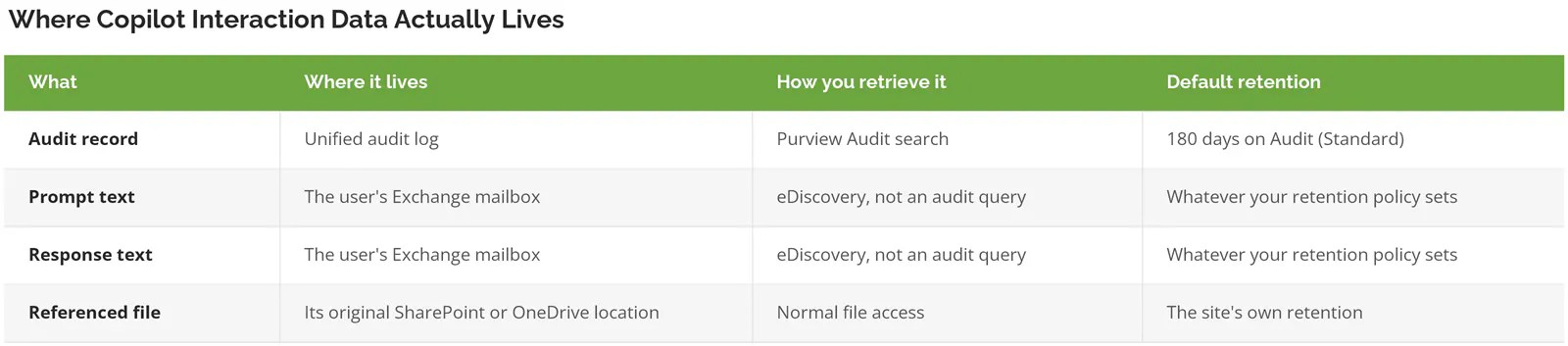
Partly. Audit records capture that a Copilot interaction happened, who ran it, and what content it referenced. The prompt text and the response are stored as messages in the user's Exchange mailbox, which means retrieving them is an eDiscovery exercise, the legal-hold search your compliance team runs, not an audit-log query.
That distinction lands hard during an incident. Your admin pulls the audit log expecting to read what someone asked and finds metadata instead. Different tool. Different permissions. Usually a different person, on a Friday. Plan the runbook now.
Retention is the other thing to check before you need it. Audit (Standard) keeps records for 180 days by default. Audit (Premium) holds Exchange, SharePoint, OneDrive, and Entra records for a year for E5-licensed users, with everything else still falling back to 180 days, and it can extend to 10 years with the add-on license. Does your cyber insurance policy or your SOC 2 auditor expect a year of AI usage evidence? Check which side of that line your licensing sits on now, rather than during the questionnaire.
Set a retention policy for Copilot interactions deliberately, in either direction, because the default is whatever your licensing happens to do and that's not a decision anyone made. Keeping every prompt forever creates discoverable material you may not want. Keeping none of it removes your ability to reconstruct what happened. Pick a number, write down why, and put it in your AI acceptable use policy so it survives the person who set it.
The Agents Are What Get Away From You
An agent is a saved, reusable Copilot pointed at a specific set of content and given standing instructions. A SharePoint agent inherits that site's permissions, which sounds safe and mostly is. No single agent is the problem. The count is. Agents get built in at least three places, and nobody is tracking the total.
Users create them in SharePoint. Power users create them in Agent Builder. Developers create them in Copilot Studio, which reports into the Power Platform admin center rather than the Microsoft 365 one, so the person who owns your Copilot governance policy may not even have a login to the console where half the agents live. That's a different console with a different owner and, in most tenants, no review cadence at all. Nobody owns the total. An agent built in March against a site that got restructured in June keeps answering questions from stale grounding content, and no report will tell you it went stale.
Then there's the meter. Agent usage bills in Copilot Credits at $0.01 per credit on pay-as-you-go, or in prepaid packs of 25,000 credits for $200 a month. Admins can switch pay-as-you-go on without licensing every user, which is genuinely convenient and also means consumption scales with employee behavior rather than headcount. It's the only line on the Microsoft bill that moves for reasons your finance team can't predict from a seat count.
Before you scale agents, three decisions. Who is allowed to publish one. Where the inventory lives. What triggers a review. That's a governance conversation, not a technical one, and it belongs alongside whatever AI governance framework you're already working against.
Worth naming the adjacent problem while we're here. Plenty of AI is already running in your tenant that nobody deployed, switched on by vendors inside software you already license. Different animal from Copilot. It's covered in our piece on shadow AI.
Skip This If
Not every company needs this whole program, and pretending otherwise wastes money.
Under 20 users on a flat tenant where everyone genuinely can see everything by design? The permissions cleanup has nothing to clean. Set sharing defaults, train your people, move on. Genuinely. Mid-migration into Microsoft 365 with content still half in file shares? Do the migration properly and revisit this after, because you'd otherwise be governing an environment that won't exist in six months. And if you already run a mature information protection program with a live label taxonomy and DLP in enforcement mode, most of this is already built. Your work is the agent inventory and the audit retention question. Two weeks, not two quarters.
Companies that need the full sequence sit in the middle. 20 to 500 users, ten or more years of SharePoint history, at least one acquisition or reorg that left permissions in a state nobody has audited since. Manufacturing and professional services firms land here constantly, usually because a decade of project sites, departmental libraries, and one-off external collaborations accumulated faster than anyone documented them. The tell is always the same. Nobody can answer "who can see the finance site" without opening it and looking.
User behavior belongs in scope too. A tenant can be configured perfectly and still leak through someone pasting a customer list into a prompt, which is a training problem rather than a policy one. That's where security awareness training earns its budget.
What This Costs You in Time
A realistic readiness pass for a 200-user tenant with normal SharePoint sprawl runs 8 to 12 weeks. Reports and sharing settings in week one. Restricted Content Discovery on the obvious high-risk sites in week two, allowing propagation time. Label taxonomy design and business sign-off eats the middle six weeks, and that's the part that slips, because it needs decisions from people who don't work in IT and don't consider this their project.
You can compress it. Pilot Copilot with 15 people in one department whose content you've already validated, keep Restricted Content Discovery on everything else, and expand as each area clears. Slower to full deployment. Much faster to a first useful pilot. Better politics, too. It also puts a real deadline on the label work, which is the only thing that ever moves label work. Deadlines do.
Consilien is a security-first managed IT and compliance partner. We work with companies running 20 to 500 users, mostly manufacturers, distributors, and professional services firms, and the problem we solve on this particular project is the one nobody wants to own, which is deciding what the business actually considers sensitive. If your team wants the permissions and classification work run in parallel rather than in sequence, that's what our data loss prevention services are built for. Speak to a Microsoft 365 expert before you buy the licenses, not after the pilot surfaces something awkward.