Microsoft 365 DLP: What It Covers and What It Misses
Microsoft 365 DLP covers Exchange, SharePoint, OneDrive, Teams, Windows and macOS endpoints, Fabric and Power BI, and on-premises file shares. It misses non-Microsoft SaaS, unmanaged devices, most browsers, and any data that never touches your tenant.
Table of Contents
Nearly every company running Microsoft 365 already owns some data loss prevention. Very few know which parts. That gap is where the trouble sits, because a policy that looks like it protects the business often protects one workload and stops there. What follows is a map of the real boundary, drawn from Microsoft's own documentation rather than a vendor comparison chart. It's the same boundary our data loss prevention services team walks before anyone writes a policy.
Two things keep that boundary hard to see. Licensing splits the product into pieces that look like one product in the admin console, so a feature you're reading about in a Microsoft article may not exist in your tenant at all. And the coverage map is organized by Microsoft workload, while data leaves a company by path. Nobody exfiltrates data from SharePoint. They email a spreadsheet. They copy it to a thumb drive. They paste a customer list into a chatbot at 11pm because the deadline is tomorrow.
What Microsoft 365 DLP Covers Today
Microsoft 365 DLP inspects content in eight locations. Exchange Online email, SharePoint sites, OneDrive accounts, Teams chat and channel messages, onboarded Windows and macOS devices, Fabric and Power BI workspaces, on-premises file shares reached through a scanner, and non-Microsoft cloud apps connected through Defender for Cloud Apps. Eight sounds like a lot. Three are enabled by default on any plan that includes DLP at all, and the other five each need something added first.
Each location is a separate switch. Turning DLP on doesn't turn all eight on. Several of them need work outside the Purview console before they do anything at all, and two of them need a product you may not own. Microsoft's own overview of data loss prevention lists them together, which reads as one coherent product and isn't.
The detection engine underneath is genuinely good. That part gets undersold. Over 200 built-in sensitive information types ship with the tenant, covering credit card numbers, Social Security numbers, passport numbers, bank routing details, and dozens of country-specific identifiers. Add trainable classifiers, exact data match, and document fingerprinting on top of that, and the classification side holds up against anything a standalone vendor is selling into the mid-market today. Want the broader definition first? We wrote up what DLP actually does separately.
Detection isn't the weak part. Reach is.
What Your License Actually Turns On
Three tiers. They don't line up with how people describe them. The base tier covers email and files. The E5 tier adds chat and devices. And a third set of capabilities isn't in any license at all. It bills by consumption.
Here's what the Purview service description says as of its August 2026 revision, cross-checked against the individual product pages where the two disagree.
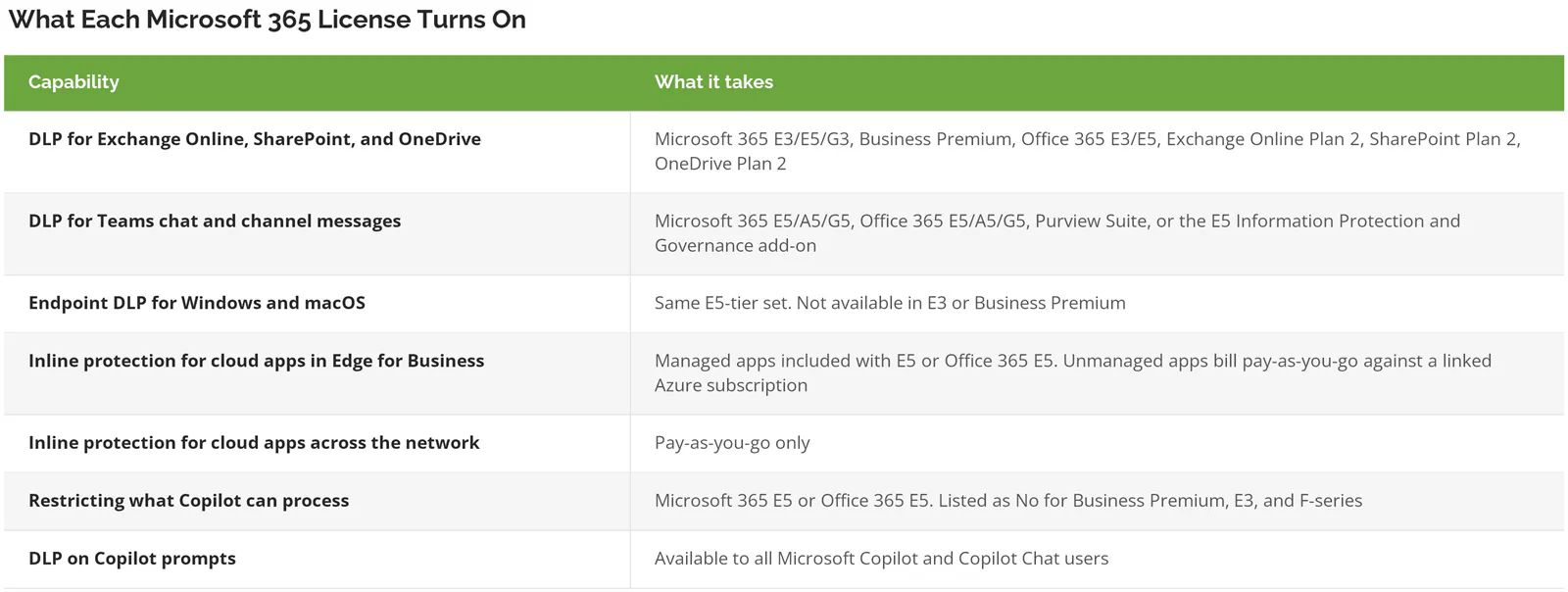
Two rows in there surprise people. A different row needs a footnote first.
Microsoft's own documentation disagrees with itself about Teams. It happens more than you'd hope. The service description leaves the Office 365 E5 column blank on the Teams DLP row, while the Teams DLP page lists Office 365 E5/A5/G5 first among qualifying licenses. A blank cell in a Microsoft entitlement table isn't a No. It isn't a Yes either. Check the individual product page before you conclude you're missing a capability you already pay for, because the service description is a summary document and the product pages are where the entitlements actually get maintained.
Business Premium gets real DLP. Email, SharePoint, and OneDrive inspection is included, which means a 60-person firm on Business Premium can block credit card numbers from leaving through Outlook today without buying a thing. That's meaningful coverage on the plan a lot of companies under 300 users are already paying for. Nobody sells it to them because there's no upsell attached.
Pay-as-you-go is not a licensing tier. It's metered billing, and it requires an Azure subscription attached to the tenant before anything turns on. Budget approvals written around a per-seat number don't account for it, which means the finance conversation happens after the security design has already been signed off and the browser piece quietly falls out of scope while everyone assumes it's covered. Plan for it early. It's the single most common surprise in a Purview rollout.
The Paths Data Takes Out, and Which Ones Get Watched
Reorganize the coverage map by exit route instead of by product and the picture gets much clearer. Here's the same information, sorted the way a business actually loses data rather than the way Microsoft ships features. These are the nine routes out of a 200-person company.
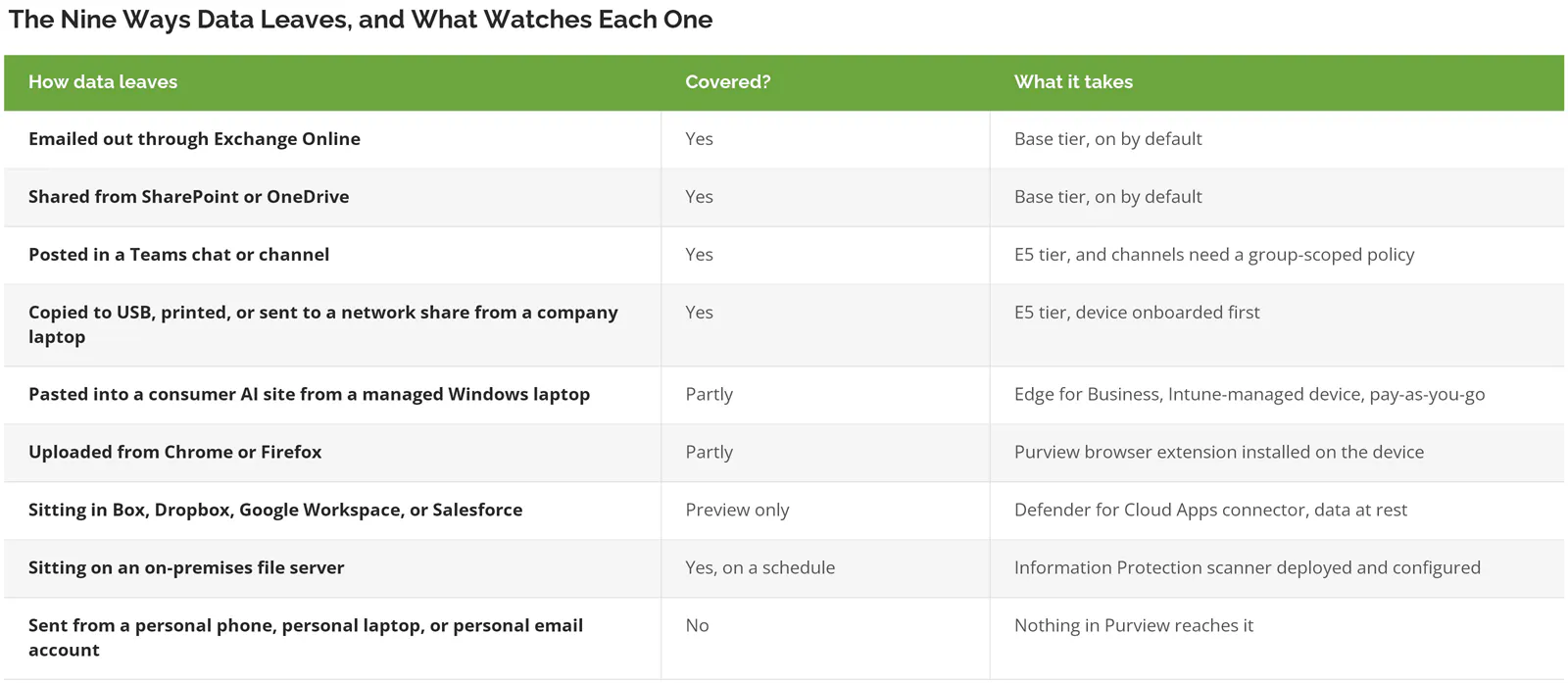
That last row deserves a minute. A salesperson who forwards the pipeline export to a personal Gmail address from a home computer, using a copy they downloaded three weeks earlier while the laptop was still compliant and the file still had a legitimate business reason to exist, generates no signal anywhere in your tenant. No blocked action. No audit event. Nothing at all. The tenant never sees the transaction because the transaction never touches the tenant. No log. No recourse.
Every DLP product has that hole. Microsoft's isn't unusually large. It's just rarely drawn on the diagram. Ask your vendor where theirs is.
Where Endpoint DLP Stops on the Device
Endpoint DLP surprises people in both directions. It does far more than expected in some places. It quietly does less in others, and the gaps aren't where anyone looks for them.
On the doing-more side, Microsoft's endpoint DLP documentation lists activities you can block outright. Copying to USB removable media. Copying to a network share. Printing. Copying to the clipboard. Moving something through an unallowed Bluetooth app. Copying across a remote desktop session. Uploading to a restricted service domain. There's even a preview control governing whether sensitive content is allowed to land in a Windows Recall snapshot. Activity monitoring runs on MIME type for the core Office formats and PDF, so renaming a .docx to .zzz before copying it doesn't defeat the rule. That last detail matters more than it sounds. Extension renaming is the oldest workaround there is.
Now the parts that don't work the way people assume.
Unsaved data is invisible. Microsoft states it plainly. If data is never written to a file on the local device, endpoint DLP can't scan or classify it. Open a document in Word, save it straight to a USB drive without saving locally first, and that copy goes uninspected. It's an architecture consequence rather than a bug. No amount of policy tuning changes it.
Some file types are never monitored. Executables, DLLs, system files, and .ini files sit on the unsupported list. So does anything outside the monitored extension set, unless you enable the separate restrictions-for-unsupported-extensions feature, which blocks by extension without scanning content at all. A developer moving source code inside a .tar.zst archive sits outside the monitored formats entirely, and the activity looks clean in Activity Explorer because nothing was ever evaluated.
macOS is close but not equal. The three most recent major versions are supported and most controls work. The parity gaps are specific. Copy or move over RDP isn't supported on Mac. VPN-based conditions aren't supported. Access by apps outside the restricted apps list isn't supported. Offline enforcement, including just-in-time protection in block mode, isn't supported on Mac either. And macOS 27 changed the permission model, currently in preview, which is worth testing before the design team upgrades on their own schedule.
Offline devices run stale policy. Rules already pushed to a Windows laptop keep enforcing when it's off the network, which is good. New or changed policies don't arrive until it reconnects, and enforcement events stay out of Activity Explorer until then as well. A laptop that lives on a plane runs last month's rules. It also reports nothing back.
None of this makes endpoint DLP weak. It makes the coverage claim specific, which is a different thing entirely, and the specific version is exactly what you need when the question on the table is whether E5 pays for itself.
What Happens When Someone Pastes Into ChatGPT
Every executive asks this now. The honest answer has moved a long way in the last year. It used to be a flat no. It isn't anymore, and most of the content you'll find on this topic was written before the change.
Purview can inspect and block what a user types or pastes into a consumer AI site, through inline protection built into Edge for Business. The device doesn't need to be onboarded to Purview. Microsoft publishes the list of unmanaged apps the browser policies recognize, and as of the current catalog it includes ChatGPT consumer, Google Gemini, Perplexity AI, DeepSeek, Grok, Meta AI, Cohere, Notion AI, Otter.ai, Adobe Firefly, CapCut, DeepAI, Runway, QwenAI, Qwen Chat, Textcortex, and You.com.
Read that list again. Notice who isn't on it. Anthropic's Claude has no entry in the catalog. If a team standardized on a tool Microsoft hasn't cataloged, the browser policy doesn't recognize the destination, and nothing in the Purview console warns you that a coverage gap exists.
Four conditions gate this. All four have to hold.
- The browser has to be Edge for Business, version 144 or newer. Chrome and Firefox aren't options here, and the Purview extension for those browsers covers a different, narrower set of activities.
- Unmanaged-app policies apply only to Windows 10 and 11 devices managed by Intune. Not macOS.
- Microsoft states directly that browser and network data security policies don't apply to B2B guest users. Your contractors and outside counsel sit outside this control.
- Endpoint DLP takes priority over inline browser policy when both target the same user and action. For managed-app scenarios Microsoft says you must exclude those users from the endpoint DLP policy or the browser policy silently won't apply.
Microsoft also flags that Runway and Meta AI sometimes send content in encoded form to dynamically generated endpoints, which can break enforcement. That's the vendor documenting its own inconsistency in a support article. I'd take that over a marketing claim any day.
Copilot is a separate story again. Restricting what Microsoft 365 Copilot can process requires E5. Applying DLP to Copilot prompts is available to every Copilot user regardless of plan, which is one of the few places where the smaller license gets the same control. If Copilot governance is the live question at your company, we covered governing Microsoft 365 Copilot on its own.
Everything That Lives Outside the Tenant
Three coverage areas exist on paper. All three behave differently in practice, and each one is worth understanding before it appears on an architecture diagram as a solid line. This is also where a managed cybersecurity engagement usually earns its keep, because the work is unglamorous and easy to postpone.
Non-Microsoft SaaS
Purview can now write DLP policies against Box, Dropbox, Google Workspace, and Salesforce. Four apps. It's still in preview. It needs a Defender for Cloud Apps connector for each one, it covers data at rest rather than data in motion, and the restrictions are worth knowing before you plan around it. Policy tips aren't supported. User overrides aren't supported. Simulation mode isn't supported either, so there's no safe rehearsal before you go live. PDFs and encrypted files aren't classified. And these locations can't be combined with SharePoint, OneDrive, Exchange, Fabric, or Devices inside the same policy, which leaves you maintaining two parallel policy sets that have to stay logically consistent without any tooling to help you check.
One deadline to put in the calendar. If you already lean on Defender for Cloud Apps file policies, those retire on January 6, 2027. Migration to Purview DLP or auto-labeling is the stated path.
On-Premises File Shares
The on-premises repositories location covers file shares and on-prem SharePoint libraries, and it can do real work. It strips broad access groups out of a file's permissions, forces inheritance from a parent folder, or replaces the file with a stub and moves the original into quarantine. Useful actions. But it runs on the Purview Information Protection scanner, which you deploy and configure separately as its own project, and it evaluates data at rest on a scan schedule rather than watching activity. Policy tips aren't available. Nothing is real-time. A file copied off the share between scans leaves no DLP record.
For manufacturers and professional services firms still running an on-prem file server alongside Microsoft 365, that scheduling detail matters more than the feature list does.
Teams, Once the Conversation Crosses a Boundary
Teams DLP handles chat and channel messages, private channels included. The edges are where it gets fragile. Your tenant has to be the one that started the chat or thread for guest-facing enforcement to apply, and in a cross-tenant conversation a user's home-tenant policies don't follow them into a thread another organization is hosting. Same person. Same laptop. Same sensitive file. Different outcome, decided by who opened the conversation.
There's also a scoping trap inside Teams that almost nobody writes about. It comes down to how you targeted the policy in the first place, and the console gives you no warning at all when the targeting you picked silently excludes an entire class of message from evaluation. If a Teams DLP policy is scoped to individual user accounts, Microsoft's own scope of DLP protection table shows it covers 1:1 and group chats and gets no protection on standard, private, or shared channel messages. Channel coverage only works when the policy targets a security group, a distribution group, or a Microsoft 365 group. Groups, not people. That distinction is the whole thing.
So a policy that looks correct in the console, and reports matches in Activity Explorer, can be watching half of Teams. Half. Silently. Check the scoping page on any Teams policy you inherited. It takes a minute. This is the kind of thing that goes unnoticed for years.
Is It a Configuration Gap or a Real Boundary?
Half the complaints about Microsoft 365 DLP describe setup problems rather than product limits, and the two get argued as though they're the same thing. They aren't. Separating them saves real money.
Configuration problems look like this. Alert volume nobody triages, because confidence level and instance count were left at their defaults. Endpoint policies that appear to do nothing, because devices were never onboarded, or because the user is in scope and the device isn't. Chrome uploads sailing past a rule, because the Purview extension was never deployed to the fleet. Policy tips missing in Outlook, because advanced tip support requires E5 and the tenant is sitting on E3. Every one of those is fixable inside a week without buying anything, and the rollout practices that hold up cover most of them.
Real boundaries look different. Personal devices you don't manage. AI tools outside Microsoft's catalog. Data that never gets written to a file. Contractors and guests. Any SaaS platform beyond the four in preview. Tuning doesn't reach those, and a second control is the only honest answer.
The test is simple enough to run in a meeting. Could an admin close this gap with a setting change? If yes, it's configuration. If no, put it on the list for a compensating control and stop trying to solve it inside Purview, because the months companies spend attempting to configure their way around a platform boundary are months the actual exposure sits open and unaddressed.
What to Do With Each Gap
Gaps don't all deserve the same response. Sorting them by how the business actually operates costs an afternoon. It also prevents an unnecessary purchase. Usually two.
Personal devices are the easiest one. The fix usually isn't DLP at all. Conditional Access policies that require a compliant device before granting access to SharePoint or Exchange remove the scenario instead of monitoring it, which is cheaper and more reliable than trying to inspect a laptop you don't manage and can't reach.
With AI tools outside the catalog, start with discovery. Find out which ones people actually use. DSPM for AI in Purview surfaces the activity. The answer is frequently three tools nobody in IT had heard of. Sometimes four. Then you choose. Standardize on a supported enterprise tenant, or block at the network layer.
Regulated data on a SaaS platform is where people overspend. Box, Dropbox, Google Workspace, and Salesforce have a preview path. Everyone else waits. Everything else needs the platform's own controls, or a cloud access broker in front of it. Check what you already own first. A surprising amount of platform-native data protection already ships inside the plans companies are paying for every month without knowing it, and Salesforce Shield is the example that gets missed most often.
On-prem file shares need the scanner deployed. Scheduled is what you get. Pair it with a permissions cleanup, which does more for the underlying risk than any DLP policy will and which tends to get skipped because it is tedious rather than because anyone ever decided against doing it. Worth doing alongside any Azure and Microsoft 365 migration work already underway.
Guests and contractors are an access design problem. Not a detection problem. Sensitivity labels carrying encryption travel with the document itself, so the protection survives the file leaving your tenant in a way a rule watching an exit path never can.
When What You Already Own Is Enough
Plenty of companies don't need to add a thing. The profile is fairly consistent.
Sensitive data living in Microsoft 365. Staff working on company-issued laptops you manage. No regulated data sitting under a framework that names specific technical controls. Email as the realistic main exit for anything that matters. That company is covered by base-tier DLP and one well-tuned Outlook policy, and adding E5 for endpoint coverage buys precision it won't use.
The math shifts in three situations. A second data platform enters the picture. A regulator or a customer contract names required controls. Or headcount growth outruns how carefully devices get issued, which happens quietly and is usually noticed about six months late. Under 50 people with everything in one tenant, a standalone DLP product is generally solving a problem you don't have yet. If you do reach the shortlisting stage, we keep a running view of the DLP tools worth shortlisting.
IBM puts the 2026 global average cost of a data breach at $4.99 million, a 12% rise and a record. That figure gets used to justify purchases. It argues just as well for understanding what you already own, because a tuned policy on a license you're paying for anyway closes more real exposure than a second console nobody has time to watch.