Best Data Loss Prevention (DLP) Solutions 2026
Forcepoint DLP scores highest at 7.96 out of 10, matching Symantec on channel coverage and carrying the most verified buyer reviews of any product here. Proofpoint (7.87) leads on email. Microsoft Purview (7.82) is the cheapest route for Microsoft 365 shops. Nine products scored on six criteria weighted for companies running 20 to 500 users.
Table of Contents
Quick Picks
- Highest overall score: Forcepoint DLP
- Best if the company already owns Microsoft 365 E5: Microsoft Purview DLP
- Best fit for 20 to 500 users: Safetica
- Best when email is the main leak path: Proofpoint Enterprise DLP
- Best for shadow AI and GenAI leakage: Cyberhaven
Picking the best DLP solutions in 2026 got harder for a reason nobody planned for. Employees started pasting company data into chatbots. Verizon's 2026 Data Breach Investigations Report analyzed 858,440 data loss prevention events aimed at generative AI tools and found shadow AI use tripled in twelve months, from 15% of the workforce to 45%. The single most common data type going into those tools was company source code.
Data loss prevention solutions watch sensitive files and block them from leaving. That's what DLP actually does, stripped of the marketing. The trouble starts when a company counts the doors, because there are six of them, the endpoints, the mail gateway, the SaaS applications, the browser, the USB ports, and the network traffic leaving the building, and no single product covers all six equally well. The category has existed for twenty years. The leak paths have not stayed still.
Nine products are ranked below, scored on six independently verifiable criteria and weighted for companies running 20 to 500 users rather than 20,000. Every rating came from a live pull. Not a memory, not a vendor deck, not a figure carried over from last year's article. And the highest-scoring product on this list is not the one most readers should buy, which is covered further down.
How These DLP Tools Were Scored
Rankings come from a Confidence Score methodology. Six independently researched criteria, applied identically to all nine products. No vendor paid for placement, no vendor submitted its own data, and Consilien has no reseller or referral relationship with any product on this list. No affiliate links, no sponsored slots.
Here's how the weighting breaks down.
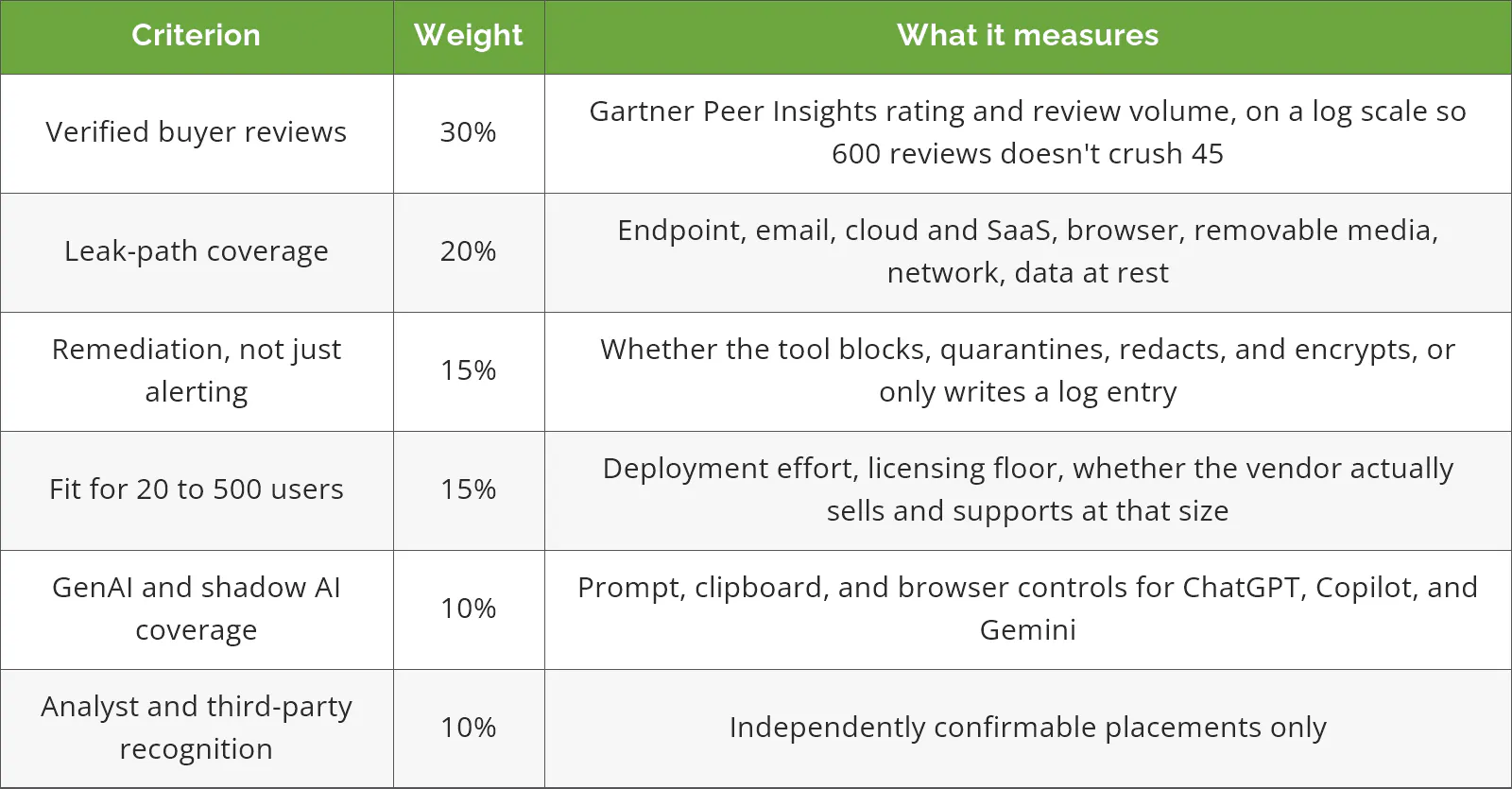
A word on the review data, because it's the biggest single input.
Gartner Peer Insights carries the entire review factor here. That's unusual, and it needs explaining. G2 is normally the primary review source for software comparisons, but every G2 page tested during this research returned a captcha wall, including through a headless browser, so no live figure could be read. Capterra and TrustRadius are both reachable, but their "data loss prevention" categories are stuffed with backup and recovery products. Carbonite, Backblaze, Veeam, Druva. Those are fine products. They aren't DLP. Scoring against a mis-mapped category would have been worse than scoring against one good source.
So one source it is. Every rating and review count below was read off the live Gartner Peer Insights DLP market page on August 18, 2026.
Buyers looking for a Magic Quadrant to check this against won't find one. Gartner retired the enterprise DLP Magic Quadrant in 2018 on the grounds that the market had gone static, and replaced it with a Market Guide, most recently published April 9, 2025. There's no quadrant. There hasn't been for eight years, which is part of why a visible scoring model matters more in this category than in most.
Netskope, Varonis, and Code42 Incydr show up on other DLP lists and are absent from this one. All three sell real data protection. None of them sits in Gartner's DLP market. They're categorized under security service edge (cloud-delivered network security), data security posture management, and insider risk instead. Including them would have meant nine products with a verified rating and three without, scored side by side. Worth noting that Varonis was named a Leader in the Forrester Wave for Data Security Platforms in Q1 2025, so its absence here is a category boundary, not a judgment.
The recognition criterion carries only 10%, and the reason is visible in the results. Only three of the nine products had any analyst placement that could be independently confirmed in this research pass. The other six sit at the same score on that line. A criterion that separates a third of the field doesn't deserve more weight than that.
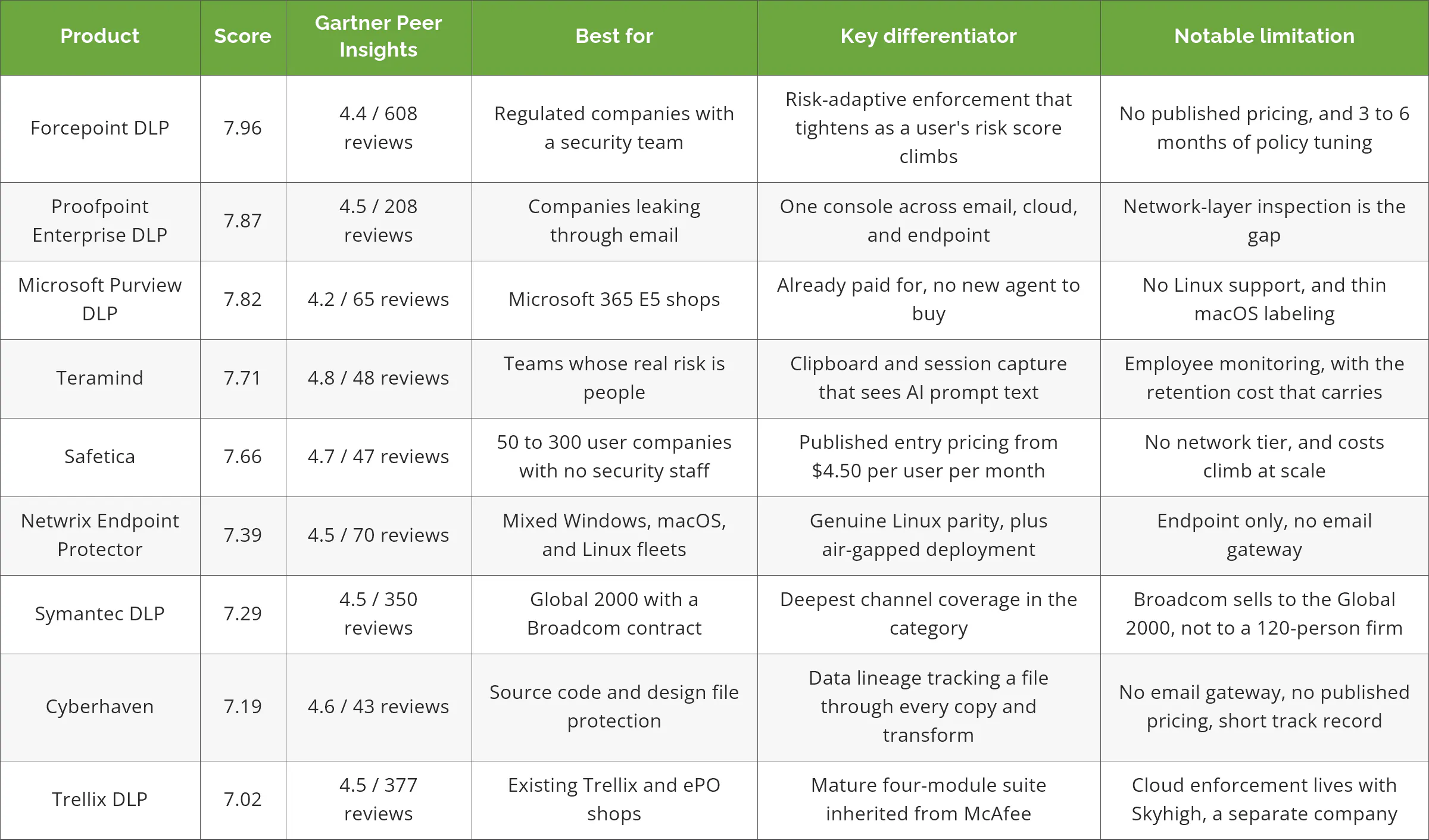
The Nine at a Glance
The 9 Best DLP Solutions for 2026
1. Forcepoint DLP, the one with the most channels and the highest bar to run
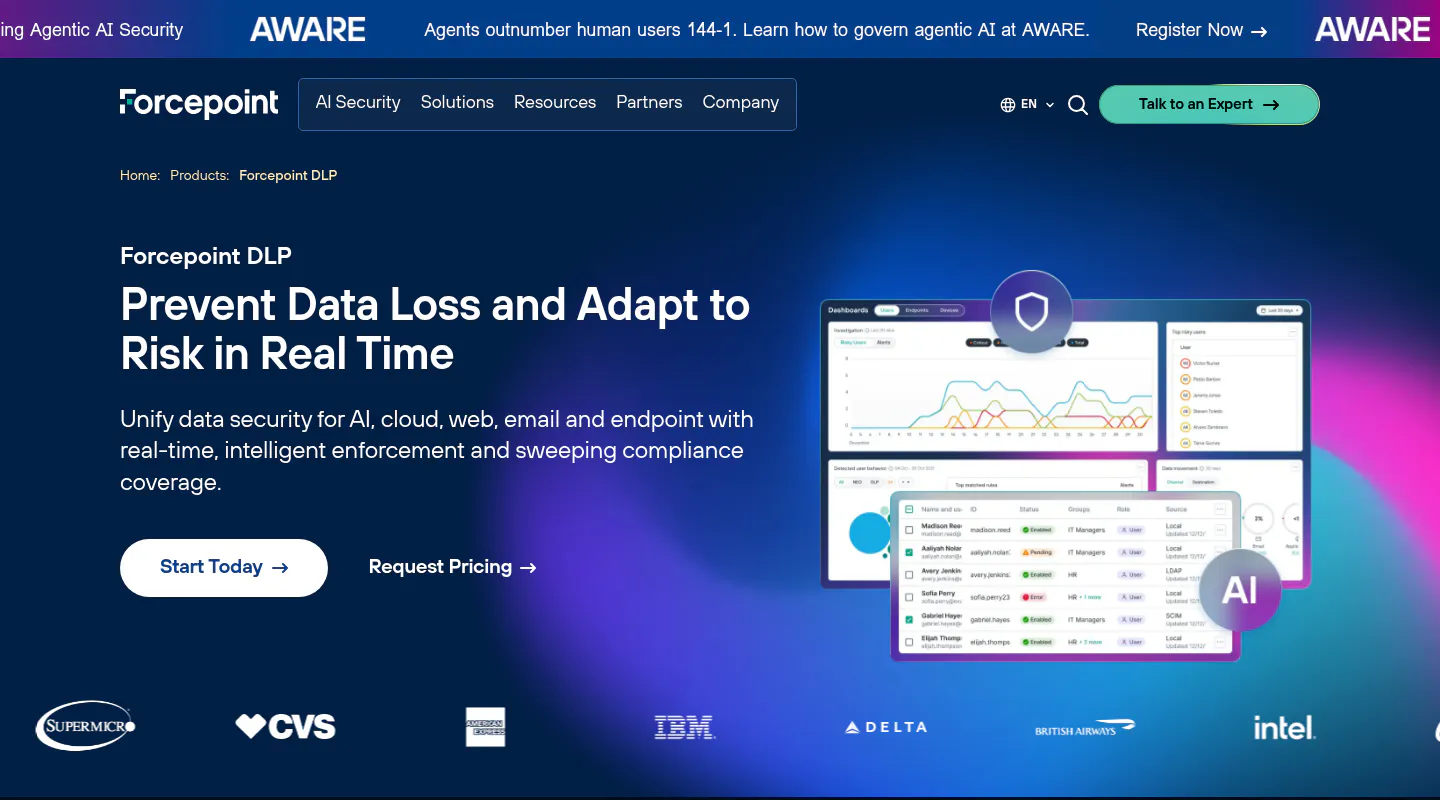
Twenty years of enterprise deployments show up in the product. Forcepoint covers more exit points than anything else on this list, and 608 buyers on Gartner Peer Insights have said so at 4.4 stars, the largest verified review base in the DLP market by a wide margin.
Score: 7.96/10
Key Strengths
- Endpoint, network, email, web, cloud, and data-at-rest discovery run from one console with one policy set, so a rule written once follows the data across all six
- Risk-adaptive protection changes what a user is allowed to do as their behavior score moves, which means the person who just downloaded 4GB of customer records at 11pm gets stricter rules automatically instead of after a review meeting
- Named a Strong Performer in the Forrester Wave for Data Security Platforms, Q1 2025, scoring among the top three on current offering and taking the highest possible score in four criteria, data classification and DLP among them
- Pre-built policy templates for PCI DSS, GDPR, and CCPA that teams without a policy library start from rather than writing rules cold
The tradeoff. Forcepoint publishes no pricing at all. Every deal is a custom quote through sales. Budgeting becomes a phone call. G2 buyer data puts implementation at roughly three months, and the tuning that comes after is the real work. Plan on three to six months before false positives stop annoying people. Reviewers on Peer Insights consistently name false positive volume as the thing they want fixed.
Best For: Companies over roughly 500 seats in a regulated sector with at least one full-time security person who owns policy.
Not Ideal For: A 60-person firm with no dedicated security staff. The product will work. Nobody will have time to tune it, and an untuned DLP tool is a machine that generates alerts nobody reads.
Services: Endpoint DLP, network DLP, email DLP, web and cloud DLP, data discovery, risk-adaptive protection, data classification.
Industries: Financial services, government and defense, manufacturing, energy, professional services.
Why It Ranks #1: It won on breadth and evidence rather than on being pleasant to own. Only Symantec matches it for leak-path coverage, and no other product pairs that breadth with 608 verified buyers and a current-year Forrester placement. The score reflects what the product does, not how easy it is to live with, and those are genuinely different questions.
2. Proofpoint Enterprise DLP, built around the channel most data actually leaves through

Email is still where sensitive files go to get lost, and Proofpoint has spent two decades on that specific problem. It shows.
Score: 7.87/10
Key Strengths
- A single triage console covering email, cloud, and endpoint, so an analyst investigating one incident isn't logging into three tools to reconstruct it
- The Normalyze acquisition, closed in November 2024, added agentless data security posture management, meaning the platform can now find sensitive data sitting in cloud storage before anyone tries to move it
- 4.5 stars across 208 verified reviews on Gartner Peer Insights
- Proofpoint publishes the 2025 Gartner Market Guide for DLP, which confirms representative vendor status in the category
Worth knowing. The network layer is genuinely missing. A company that needs traffic inspection across its own wire will be adding a second product. And enterprise DLP is a separate purchase from Proofpoint's email security, so an existing customer isn't simply switching something on. The insider threat management product is licensed and rated separately too, at 4.4 across 63 reviews, which is a second line item most buyers discover during the quote.
Best For: Companies where Proofpoint already runs the mail gateway and email is the honest answer to where the data actually goes.
Not Ideal For: Manufacturing or engineering environments where the leak paths are USB drives and network shares rather than Outlook.
Why It Ranks #2: Strong reviews, confirmed analyst standing, and the strongest email channel of the nine. It lost the top spot on one thing, and one thing only, which is that Forcepoint covers a channel it doesn't.
3. Microsoft Purview DLP, the cheapest good option and the most misunderstood
For a company already on Microsoft 365 E5, DLP is sitting in the tenant right now, switched off. That fact alone reshapes the math for most mid-market buyers, because the comparison stops being Purview against Forcepoint on features and becomes Purview at zero incremental cost against a new agent, a new contract, and a new console the IT team has to learn.
Score: 7.82/10
Key Strengths
- No new agent, no new vendor, no new contract for E5 customers. Policies get built in a portal the IT team already has a login for
- Native coverage of Microsoft 365 Copilot prompts, which matters given how fast Copilot has landed in mid-market tenants
- Sensitivity labels travel with the file, so a document classified as confidential keeps its protection after it's emailed outside the company
- Auto-labeling and block-with-override, meaning a user can push a legitimate file through with a business justification instead of filing a helpdesk ticket
There's a licensing trap here worth spelling out. E3 DLP covers Exchange and SharePoint. That's it. Endpoint DLP, Teams messages, and third-party cloud apps all require the E5 tier, either through E5 itself or through the E5 Compliance add-on at roughly $12 per user per month on top of E3. Microsoft 365 E5 moved from $57 to $60 per user per month on July 1, 2026. Companies that assume owning Microsoft 365 automatically means owning DLP are usually covering two channels out of six.
The platform gaps are real too. Microsoft's own documentation confirms endpoint DLP supports Windows and macOS only, with no Linux. And the client that applies sensitivity labels to non-Office files, PDFs, images, CAD drawings, and source code among them, doesn't exist for macOS at all. A design firm running Macs and a manufacturer running Linux workstations both have a hole.
At 4.2 stars across 65 reviews, Purview also holds the lowest buyer rating of the nine products here. That's not nothing.
Best For: Companies standardized on Microsoft 365 E5 with a Windows-majority fleet and data that mostly lives in Microsoft services.
Not Ideal For: Mixed operating system environments, heavy non-Microsoft SaaS estates, or anyone still on E3 who hasn't priced the upgrade.
Why It Ranks #3: Best economics in the field by a distance, and the coverage inside the Microsoft boundary is legitimately strong. It ranks third because the boundary is the product. Step outside it and Purview stops seeing things.
4. Teramind, which watches people rather than files
Highest buyer rating on this list. 4.8 stars, 48 reviews. Teramind approaches the problem from the opposite end from everyone else, and that's either exactly right or exactly wrong depending on the company.
Score: 7.71/10
Key Strengths
- Clipboard and keystroke capture picks up prompt text going into ChatGPT or Gemini directly, which is a different thing from blocking the website
- Risk scoring compares each user against their own behavioral baseline, so the flag fires on the person behaving unlike themselves rather than on a static rule
- Session recording produces an actual video record when an investigation happens, which is the difference between suspecting and knowing
- Published pricing, which almost nobody else in this category offers. Roughly $15 per seat per month at the entry tier, around $30 for the cloud DLP plan, with a 5-seat minimum
Limitations
- This is employee monitoring, and monitoring has a measured cost. The American Psychological Association's 2023 Work in America survey found 42% of monitored workers intended to look for a new job within a year, against 23% of unmonitored workers
- Reviewers repeatedly cite configuration complexity, and the reason shows up in the feature list, because a platform that records sessions, scores behavior, watches clipboards, and enforces content rules has four configuration surfaces where a simpler product has one. The defaults are not the answer
- No email gateway and no network tier, so it sees the endpoint and stops
Best For: Companies whose genuine exposure is a departing salesperson with a client list, not a misconfigured cloud bucket. It also fits organizations willing to tell staff plainly what's being recorded.
Not Ideal For: Any leadership team unwilling to have the monitoring conversation openly. Deploying this quietly is how a security project turns into an HR problem.
Why It Ranks #4: The highest verified rating in the field, real GenAI visibility, and honest published pricing. The channel coverage is narrower than the products above it, and the human cost of the approach is documented rather than hypothetical.
5. Safetica, the one a 90-person company can actually deploy

Czech-built, mid-market by design, and the only product here with a published entry price that starts with a four. That matters more than it sounds.
Score: 7.66/10
Key Strengths
- Entry pricing from around $4.50 per user per month, which puts real DLP inside a budget that wouldn't cover a Forcepoint discovery call
- Covers endpoints, email, cloud apps, USB, and web from one console without an appliance stack behind it
- Insider risk and DLP in the same product, so behavioral context and content rules share a view instead of living in separate tools
- 4.7 stars across 47 verified reviews
The catch. The published starting price is a starting price. Safetica's own pricing page routes buyers to a sales form, and reviewers note the total climbs quickly past a few hundred seats. There's no network tier and no data-at-rest discovery worth the name, so a compliance auditor asking "where does the regulated data live" won't get an answer from this tool. The review base is also small, 47 against Forcepoint's 608, which is a thinner evidence base to buy on.
Best For: 50 to 300 user companies that need documented DLP for a contract or an insurance renewal and have no security engineer to hand.
Not Ideal For: Regulated enterprises that need network inspection, data discovery across file shares, and an audit trail spanning both.
Why It Ranks #5: It scored highest of all nine on fit for 20 to 500 users, and that's a real result rather than a consolation prize. The narrower channel coverage is what keeps it out of the top three.
6. Netwrix Endpoint Protector, and the Linux gap no other product closes
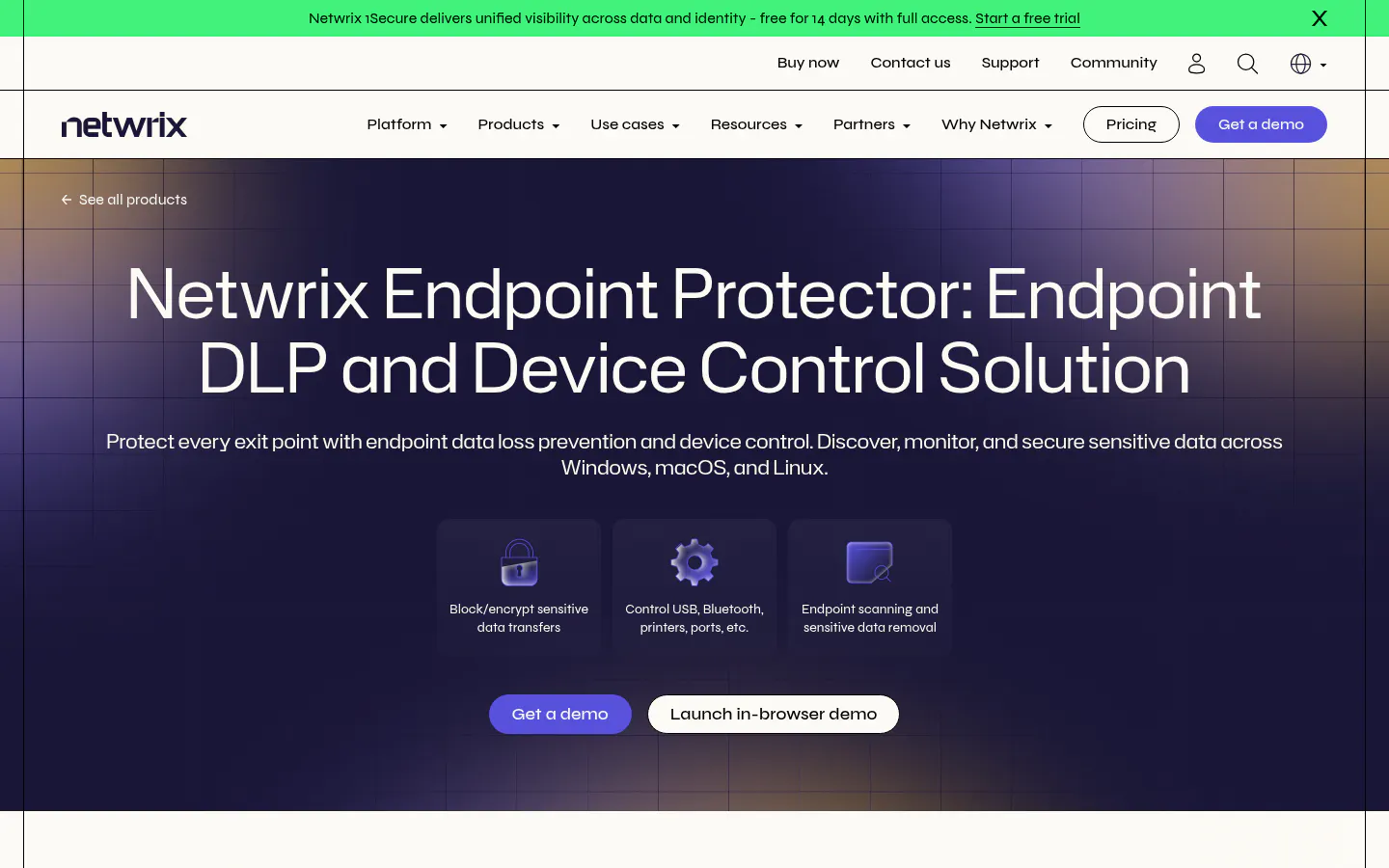
Acquired by Netwrix on February 1, 2024, and still the answer for a specific problem nobody else solves cleanly. One problem. Solved properly.
Score: 7.39/10
Key Strengths
- Windows, macOS, and Linux with genuine feature parity, which no other product on this list offers. For an engineering firm running Ubuntu workstations, that narrows the shortlist to one
- Device Control covers 45+ device types with per-user and per-device rules, plus enforced encryption on removable media
- Deploys on-premises, as a virtual appliance, into a company's own AWS, Azure, or GCP tenant, or fully air-gapped, meaning cut off from the internet entirely
- 4.5 stars across 70 reviews
Where it stops. It's an endpoint product and it doesn't pretend otherwise. No email gateway, no network tier, no cloud API integrations. A company whose data walks out through Outlook attachments should look elsewhere or plan on two tools. Pricing isn't published either.
Best For: Mixed operating system fleets, manufacturing and engineering shops with Linux on the floor, and anyone with an air-gapped environment where a cloud console isn't an option.
Not Ideal For: Cloud-first companies whose sensitive data mostly lives in SaaS applications.
Why It Ranks #6: Solid reviews, and it ties Purview for the best mid-market deployment story behind Safetica. The endpoint-only scope caps it, because four of the six leak paths in the scoring model are simply out of reach.
7. Symantec DLP, the deepest product almost nobody on this list can buy
Feature for feature, Symantec is still one of the two most complete DLP platforms on this list. Getting Broadcom to sell it is the hard part.
Score: 7.29/10
Key Strengths
- Endpoint, network monitor and prevent, email, cloud, and storage discovery, with FlexResponse remediation that can encrypt or apply rights management to a file in place rather than just quarantining it
- 350 verified reviews at 4.5 stars, the third-largest evidence base here
- Exact data matching fingerprints a real customer database rather than guessing at patterns, so structured records that regular-expression rules skip still get caught
The problem. Broadcom has publicly focused the Symantec business on Global 2000 accounts, with smaller customers routed through channel partners. A 120-person firm calling Broadcom directly is not the customer this go-to-market was built for. It never was. The architecture reflects that too, with a multi-server deployment that assumes an infrastructure team. And no 2025 or 2026 analyst placement for the product could be independently confirmed during this research.
Best For: Global 2000 enterprises with an existing Broadcom relationship and staff to run it.
Not Ideal For: Effectively every company in the 20 to 500 user range, regardless of how good the product is.
Why It Ranks #7: It scored near the top on coverage and remediation, near the bottom on whether a mid-market buyer can realistically get it deployed, and the average of those two lands exactly where a product like this belongs on a list weighted for companies with 300 people rather than 30,000. Both halves are true at once.
8. Cyberhaven, the one built for the problem that showed up last year
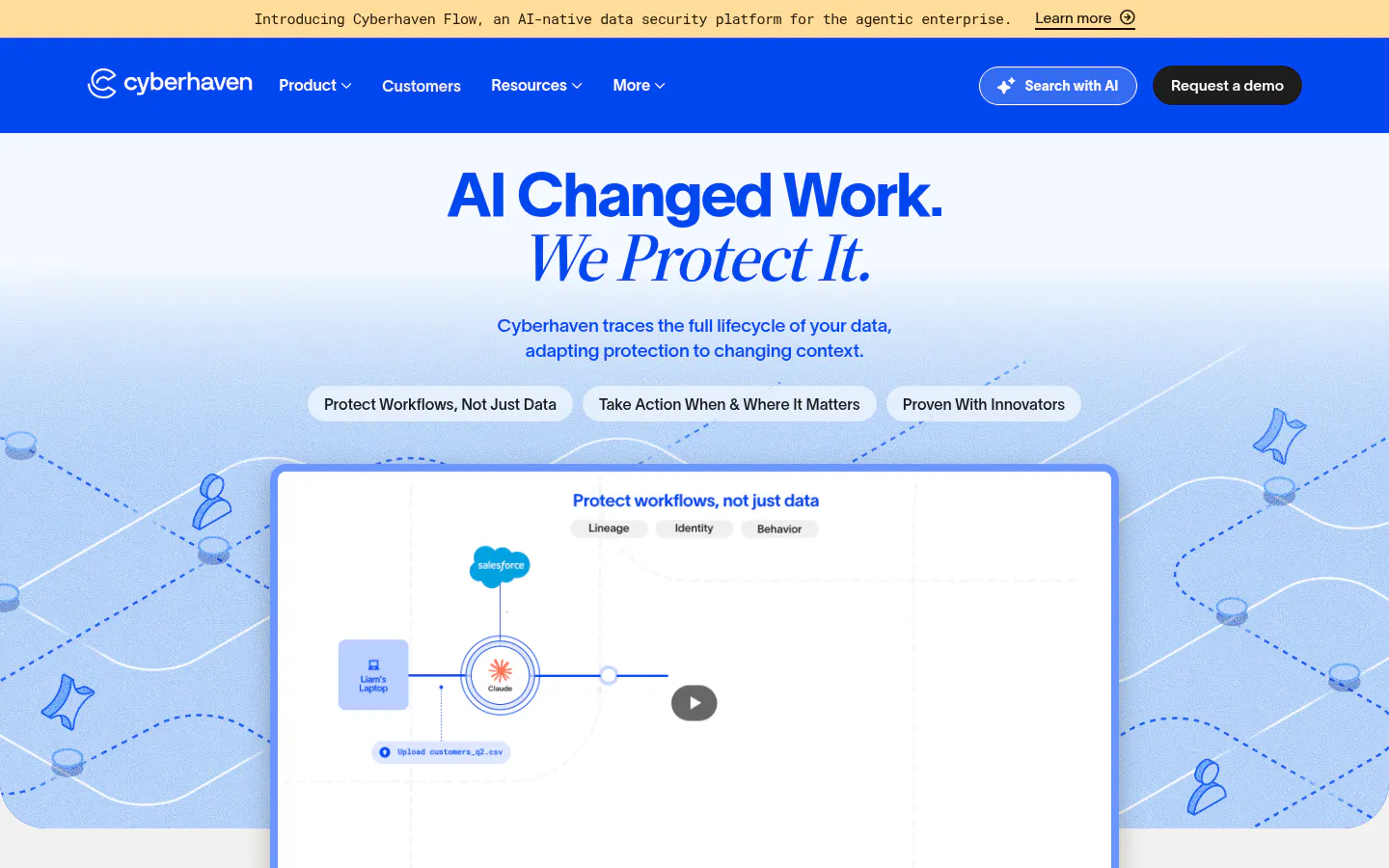
Data lineage instead of pattern matching. Rather than asking whether a file looks like a credit card number, Cyberhaven tracks where the data came from and follows it through every copy, paste, rename, and transform.
Score: 7.19/10
Key Strengths
- Lineage catches the case that breaks traditional DLP, which is source code pasted from a repository into a ChatGPT window where it no longer matches any content rule
- Blocks and coaches at the browser for ChatGPT, Copilot, and AI agents, the exact channel the 2026 DBIR identified as the fastest-growing insider path
- Founded in 2016 by a research team out of EPFL, now at $250M raised across all rounds including a $100M Series D led by StepStone Group, at a $1B valuation
- 4.6 stars across 43 reviews
Where it falls short
- No email gateway and no network tier
- No published pricing, and the sales motion targets accounts considerably larger than the companies this list is weighted for
- Smallest review base and shortest production track record of the nine
Best For: Companies whose crown jewels are source code, CAD files, or design assets, and whose realistic leak path is a browser tab rather than an attachment.
Not Ideal For: Compliance-driven buyers who need to prove where regulated data is stored, not just where it went.
Why It Ranks #8: Best GenAI coverage in the field, and it isn't close. The narrow channel coverage and the enterprise sales motion pull the total down, which is a fair reflection of a young product that does one thing better than anyone.
9. Trellix DLP, mature technology inside a complicated corporate story
This is McAfee DLP, renamed. McAfee Enterprise merged with FireEye in January 2022 and became Trellix, and the four modules carried over intact. Same engine, new badge.
Score: 7.02/10
Key Strengths
- DLP Endpoint, Prevent, Monitor, and Discover cover the endpoint, email and web, network, and data at rest respectively, all administered from ePO, the central management console Trellix products run through
- 377 reviews at 4.5 stars, a large and stable evidence base built over many years
- For a company already running ePO, adding DLP is a module rather than a project
The complication. The corporate structure creates a real product gap. When the McAfee Enterprise business split, the endpoint side became Trellix and the cloud and SSE side became Skyhigh Security. Both sit under the same private equity ownership, but they're separate companies, so cloud and SaaS enforcement means a second vendor relationship. Published GenAI controls are the thinnest of the nine products here. And ePO is real infrastructure to stand up if a company isn't already running it.
Best For: Existing Trellix and ePO customers extending what they already own.
Not Ideal For: Any company starting a DLP evaluation from scratch in 2026.
Why It Ranks #9: Good reviews and a mature feature set kept the score respectable. Weak GenAI coverage, a split product line, and no confirmable recent analyst placement kept it last.
The Highest Score Is Not Always the Right Buy
Forcepoint won. A 90-person distribution company should probably buy Safetica anyway.
Is that a contradiction in the scoring model? No. It's what happens when a scoring model measures the product and a purchase decision has to account for the buyer. Forcepoint scored 9.5 out of 10 on channel coverage and 4.0 on fit for a 20 to 500 user company. Those numbers are both accurate. They point in opposite directions.
Three of the nine products here were built for organizations with a security operations team, a policy owner, and a three-month deployment window. Symantec, Forcepoint, and Trellix all assume those things exist. Six of the nine don't.
A DLP tool deployed at 40% of its capability and then tuned patiently for a year beats a better tool that fires 3,000 alerts a week until someone quietly switches the blocking rules back off, and that second outcome turns up often enough in mid-market environments to belong in the evaluation criteria rather than in the post-mortem. Which is why the fit criterion carries 15% instead of 5%.
The IBM Cost of a Data Breach report for 2026 puts the global average breach at $4.99 million, with AI-enabled breaches running closer to $6 million. Neither number tells a company which product to buy. Both explain why the shelf-ware outcome, meaning a tool bought, installed, never tuned, and quietly left in monitor-only mode while the alerts pile up unread, ends up costing considerably more than the license line ever showed.
Choosing a DLP Tool Without Overbuying
Start with the leak path, not the vendor list. Data loss prevention solutions differ more in which exits they watch than in anything on a feature sheet. Companies that lose data through email need a different product from companies that lose it through USB drives, and buying a platform that covers both when only one is happening is how DLP budgets get spent twice.
Four questions sort most of it out.
Where does the data actually leave? Pull 90 days of email logs and check what's leaving as attachments. Look at whether USB ports are even enabled. Ask the engineering team which SaaS tools have company data in them. The answer is usually narrower than expected. A company that finds 90% of its regulated data moving through Outlook and almost nothing crossing a USB port has just cut four products from the shortlist and saved itself an evaluation cycle it was about to spend on endpoint agents it doesn't need.
What operating systems are on the floor? A Windows-only fleet opens up every option here. Any Linux at all narrows it to Netwrix Endpoint Protector. Heavy macOS use rules out Purview for file labeling, since the client that handles PDFs, images, and source code doesn't run on macOS.
Is Microsoft 365 E5 already in the building? If yes, switch on Purview first and measure what it catches before buying anything. It costs nothing extra and it establishes a baseline. If the gaps that show up are all outside Microsoft services, that's a much better-informed second purchase.
Who owns the policy after go-live? This is the question that decides whether the project works. DLP is not a product a company installs. It's a product a named person tunes for six months and then maintains. Without that person, budget for a managed service instead of a license, because an untuned tool protects nothing.
Then there's the AI question, which barely existed when most of these products were designed. If the honest concern is employees pasting proprietary information into chatbots, the traditional endpoint agents will catch some of it and miss the rest, because the content leaving a machine as clipboard text doesn't match the pattern rules those agents were built around. Cyberhaven, Teramind, and Purview all address the prompt layer directly. The other six mostly address the website. Understanding the difference between shadow AI as a browsing problem and shadow AI as a data problem changes which of these tools is worth evaluating.
Whichever product wins the evaluation, the rollout sequence matters more than the feature list. Run it in monitor-only mode first, look at what it flags, and fix the policy before anything starts blocking. Companies that turn on enforcement from day one generate a helpdesk backlog and lose the room. Permanently, in some cases.
For companies without an internal owner for any of this, a managed DLP program covers the tuning, the policy maintenance, and the alert triage that the license doesn't. Pairing it with managed email security closes the channel most of this data actually leaves through.
Questions That Come Up Before a DLP Contract Gets Signed
Does Microsoft 365 already include DLP, or is that a separate purchase?
Partly included, and the part that isn't is the part a mid-market company actually needs. E3 covers Exchange and SharePoint only. Endpoint DLP, Teams messages, and third-party cloud apps all need the E5 tier, either through full E5 at $60 per user per month as of July 2026, or the E5 Compliance add-on at roughly $12 per user per month layered on E3. A company on E3 that believes it has DLP has two channels covered out of six.
Realistically, how long before a DLP tool stops being annoying?
Three to six months for an enterprise platform, closer to four to eight weeks for the cloud-native mid-market products. G2 buyer data puts Forcepoint implementation at around three months, and that's implementation, not tuning. The tuning is the longer half. Anyone quoting a two-week timeline is describing the install, not the outcome.
Will DLP stop employees leaking data into ChatGPT?
Some will, most won't, and the difference is architectural. Blocking chatgpt.com at the firewall is trivial and nearly useless. Employees switch to a phone, a personal laptop, or one of the several hundred other model endpoints that were not on the blocklist when it was written, and the data leaves anyway. Catching the content requires visibility at the endpoint, into clipboard activity and browser input, which is a capability three of these nine products have. Verizon's 2026 report found 67% of employees reaching AI services through non-corporate accounts, which is exactly the traffic a network block never sees.
Is DLP worth it for a company under 100 people?
Depends entirely on what the company holds. A 40-person firm handling controlled unclassified information for a defense prime, cardholder data, or a proprietary manufacturing process has a real requirement and often a contractual one. A 40-person marketing agency mostly doesn't, and would get more risk reduction out of multi-factor authentication and a decent backup than out of a DLP license. Buying DLP because it's on a compliance checklist and then never tuning it is the worst of both outcomes.
What's the difference between DLP and insider threat software?
DLP watches the data. Insider threat tools watch the person. A DLP rule fires when a file matching a pattern moves somewhere it shouldn't, regardless of who moved it. An insider risk tool builds a behavioral baseline per user and flags the deviation, whoever it is. Teramind and Cyberhaven lean toward the second model, Symantec and Trellix toward the first, and Proofpoint sells both as separate licensed products. The overlap is real. And the vendors are not helping with the naming.
Can DLP be run without a full-time security person?
Yes, with two conditions. Pick a product built for the size, meaning Safetica, Purview, or Netwrix Endpoint Protector rather than Forcepoint or Symantec. Then give someone explicit ownership of the policy, even at a few hours a month. Companies that skip the second condition end up two years later with an expensive tool still sitting in monitor-only mode, a dashboard nobody opens, and a renewal invoice that arrives anyway. It happens a lot.