Threat Hunting Explained: Finding the Attackers Your Alerts Miss
Threat hunting is the practice of searching your own systems for signs of an attacker that your security tools didn't flag. A hunter starts from an assumption, like a stolen login in use, then tests it against logs.
Table of Contents
It's a human job, mostly. Security tools are built to recognize what they've seen before, and an attacker who signs in with a real employee's password doesn't match anything on their list. Hunting is how an in-house analyst, or the team behind a SOC as a service, goes looking for that person on purpose instead of waiting for an alert that may never fire.
Why does it matter? Timing. CrowdStrike's 2026 Global Threat Report found that in 2025, the average financially motivated attacker needed 29 minutes to move from the first machine they broke into to other systems on the network. The fastest took 27 seconds. Mandiant's M-Trends 2026 put the global median dwell time, meaning how long an attacker stays inside before anyone notices, at 14 days.
A 29-minute head start against a 14-day blind spot. The attacker has usually finished spreading out long before anyone knows they arrived, and a hunt is one of the few ways to shrink that second number on purpose.
What Is Threat Hunting?

Threat hunting is a planned search through your logs and cloud accounts for attacker activity that automated tools missed. It's a form of proactive threat detection that starts from the assumption that someone may already be inside, then sets out to prove or disprove it.
NIST made it a formal security control in 2020. Control RA-10 in SP 800-53 Revision 5 asks organizations to keep a hunting capability that searches for indicators of compromise, the traces an intrusion leaves behind, and that detects, tracks, and disrupts threats that get past existing controls. Frequency is your call.
Splunk's security research team put it more plainly in its PEAK threat hunting framework in 2023. Hunting, in their definition, is any manual or machine-assisted process meant to find the security incidents your automated detection missed. No particular product required.
Picture a building. Door alarms and cameras catch someone forcing a lock. They don't catch someone who walked in with a real badge and headed for the records room, which is why a good security guard still walks the floors at night and opens the doors that should have nobody behind them. The alarms are your security tools, and the walk is the hunt.
So who starts the work? With an alert, the tool. With a hunt, it's a person, and they begin with a question.
Why Don't Security Tools Catch Everything on Their Own?
Security tools are good at catching known bad things, like malware files and flagged web addresses. Attackers now avoid bringing those. They log in with stolen passwords and use tools already on your machines, which looks like normal work.
In the same report, 82% of CrowdStrike's 2025 detections were malware-free. MITRE ATT&CK, the public catalog of attacker techniques that security teams use as a shared vocabulary, files this behavior under Valid Accounts. An attacker using a real login is, as far as your systems can tell, that employee.
That's the blind spot.
Your endpoint detection and response (EDR) tool, the software that watches each laptop and server for suspicious behavior, does catch a fair amount of this. But it has to decide, over and over every day, whether a PowerShell command (Windows' built-in scripting tool) is an administrator doing their job or someone pretending to be one. Tune it tight and your IT team is buried in false alarms by Tuesday. Tune it loose and the quiet stuff slides by. No setting fixes both. Every vendor makes that tradeoff somewhere, and it's a reasonable one to make.
Hunting covers the gap the tradeoff leaves. MITRE's research on TTP-based hunting, written for US Cyber Command, argues for hunting on behavior, meaning the tactics, techniques, and procedures an attacker uses, rather than on specific file fingerprints or IP addresses. An attacker can swap a file or an address in minutes. The ways to move around a Windows network after getting in are far fewer. Windows itself limits the options. So a search built around those moves keeps working after the attacker changes tools.
How Does a Threat Hunt Actually Work?
A hunt starts with a question, gathers the data that could answer it, and ends with a decision. Either the hunter finds an attacker and calls in incident response, or finds nothing and saves the search as a new detection.
The PEAK framework sorts hunts into three kinds, and a mature program runs all of them.
- Hypothesis-driven. The hunter picks one specific suspicion and tests it. Someone is using a stolen VPN login, for example.
- Baseline hunts map what normal looks like first, say which accounts usually sign in after 10 p.m., and then study whatever doesn't fit the pattern.
- Model-assisted, where machine learning does the first sort and a person reviews only the strangest slice of activity.
PEAK stands for Prepare, Execute, and Act with Knowledge, and those three verbs are the whole method.
Say a hunter at a 150-person distributor wants to test one idea. Nothing fancy. A remote access login is being used by someone other than the person it belongs to.
Prepare. The hunter decides what data can answer that. VPN logs, sign-in records from Microsoft Entra ID (Microsoft's cloud login system), and 30 days of history.
Execute. They search for the same account signing in from two locations nobody could travel between that fast, from a country the company doesn't operate in, or right after a burst of rejected multifactor prompts. Three accounts turn up.
Act. Two belong to a salesperson whose phone keeps bouncing between a cell network and a hotel VPN. Noise. The hunter writes it down so nobody chases it again next month. The third is a service account, a login meant for software rather than a person. Those should never sign in interactively. This one did. Now it's an incident, and the hunter hands it to whoever runs incident response with the queries and timestamps already attached.
Either way, the search gets saved. If a question was worth asking once, it's worth asking every week, and the monitoring platform can ask it automatically from then on. A hunting program that works this way makes the alerting a little sharper after every hunt, whether or not anyone was found.
Threat Hunting, Threat Intelligence, and Incident Response
Sales conversations blur these together, and the blur costs money when you're comparing quotes. Three different jobs, though. Threat intelligence is research on what attackers are doing out in the world, who they're going after, and how. Hunting asks whether any of that is happening in your network. Response is what follows a yes, working through the incident response lifecycle from containment to recovery.
Two more get mixed in. SIEM alerting comes from security information and event management, the system that pulls logs from everywhere into one searchable place and fires alerts when a rule matches. Penetration testing is an authorized attack you pay for.
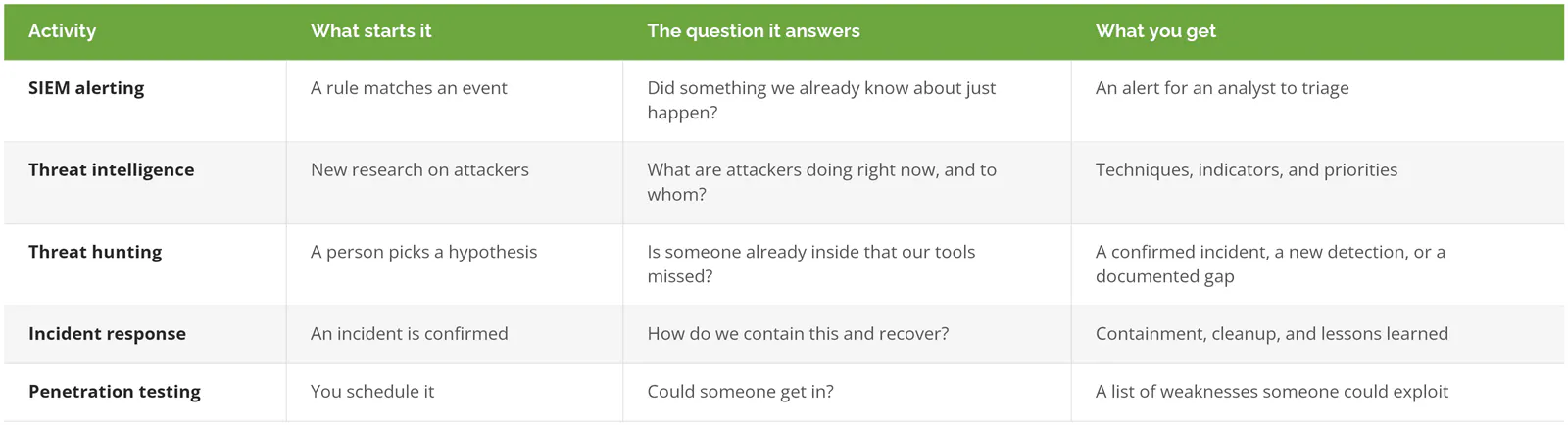
Pen testing is the one people swap in by mistake, probably because both involve someone thinking like an attacker on your behalf. The tester breaks in from outside. The hunter looks for someone already in. Neither replaces the other.
What Does a Hunt Find When Nobody's There?

In a July 2025 advisory, CISA and the US Coast Guard published what they found during a threat hunt at a US critical infrastructure organization. No sign of an attacker.
The report didn't stop there. The hunt turned up a list of problems that would have made an attacker's job easy.
- Several machines shared the same local administrator account and password, and the passwords sat in plain text inside batch scripts, small automation files anyone with access could open.
- Regular user accounts on office PCs could reach the network segment that runs the facility's control systems.
- Windows event logs weren't being sent to the central log system. Command-line auditing was switched off.
- No multifactor authentication (MFA) on admin access, remote desktop, or VPN.
- Two configuration problems too, including a database password policy under 15 characters and a web server accepting anonymous encrypted connections.
None of it is exotic. Each item probably started as a sensible shortcut. A script that sets the same admin password on every machine saves a technician an afternoon in the year it's written. Ten years later it's a master key sitting in a text file. Nobody remembers the script.
I'd underline the logging finding. Without command-line logs, a hunter can see that a program ran but not what it was told to do, and the difference between an administrator's script and an attacker's script usually lives in exactly those details. A clean result from that environment couldn't mean much. The hunt was partly blind.
So an empty hunt has two possible meanings. Nobody's there, or you couldn't have seen them if they were. A good hunt report tells you which one you're looking at.
Can You Hunt With the Data You Have Today?
Only if the right logs exist and reach back far enough. A hunt needs sign-in records, device activity that includes command lines, and weeks of history, since an attacker's first move is the one you most want to see and also the oldest.
CISA, the FBI, the NSA, and international partners made the same case in their 2024 best practices for event logging and threat detection. Their point is that living-off-the-land attacks, where intruders use a system's own built-in tools instead of malware, only show up when logging is detailed enough to show how those tools were used.
If your company runs Microsoft 365 Business Premium, you already have Microsoft Defender for Business, which Microsoft built for organizations up to 300 users. It's a real EDR product. But Microsoft's own comparison table shows it doesn't include advanced hunting, the query console that lets an analyst search 30 days of raw device data, or the six months of data retention. Those come with Defender for Endpoint Plan 2.

Business Premium isn't the wrong license. We have EDR and we can hunt are simply two separate statements, and it's worth knowing which one is true for you before a proposal tells you hunting is included. A provider can still hunt on a Business Premium setup. Microsoft's streaming API (a feed that sends security events to another system), generally available for Defender for Business since December 2023, sends device, sign-in, and network events into a SIEM such as Microsoft Sentinel, and the hunting happens there instead.
Before anyone hunts, check four things.
- Are Windows process creation events (Event ID 4688, with command lines turned on) collected somewhere central?
- How many days back can you actually search? Check. Don't assume.
- Cloud sign-ins from Microsoft Entra ID or Google Workspace, landing in that same place.
- Firewall and VPN logs, since an outside attacker's first login passes through one of them.
Who Should Do the Hunting?
People are the bottleneck. In the SANS 2025 Threat Hunting Survey, 61% of organizations named a shortage of skilled staff as a primary barrier to hunting. That tracks. A good hunter understands Windows and cloud identity well enough to spot an attacker posing as an admin, and that person is expensive to hire and hard to keep busy at a 200-person company.
Build It In-House When
You already run a security team with dedicated analysts, you keep logs centrally for months, and you can protect a hunter's time from the ticket queue. Squeezed in between tickets, hunting just doesn't happen. The cost of building a SOC in-house is worth pricing out before hunting is even on the list.
Get It Through a SOC or MDR Service When
Your company has somewhere between 20 and 1000 users, security is one of several jobs your IT team juggles, and you want someone watching overnight and on weekends. Managed detection and response providers and SOC services frequently bundle hunting. But the words threat hunting on a proposal can mean anything from a weekly analyst-led hunt to a saved query that runs by itself and never gets a human look. Ask which.
Hold Off for Now When
There's no centralized logging, MFA isn't enforced on email and remote access, and nobody's sure how many admin accounts exist. Fix those first. A hunter dropped into that environment will spend the engagement writing roughly the same hygiene list from CISA's hunt above, and a security risk assessment produces that list without a hunting engagement.
How to Tell Whether a Provider Actually Hunts
Ask how often they hunt, what data they search, and what happened after their last hunt that found nothing. A provider that really hunts answers all three with specifics. Vague answers usually mean automated alerts wearing a new label.
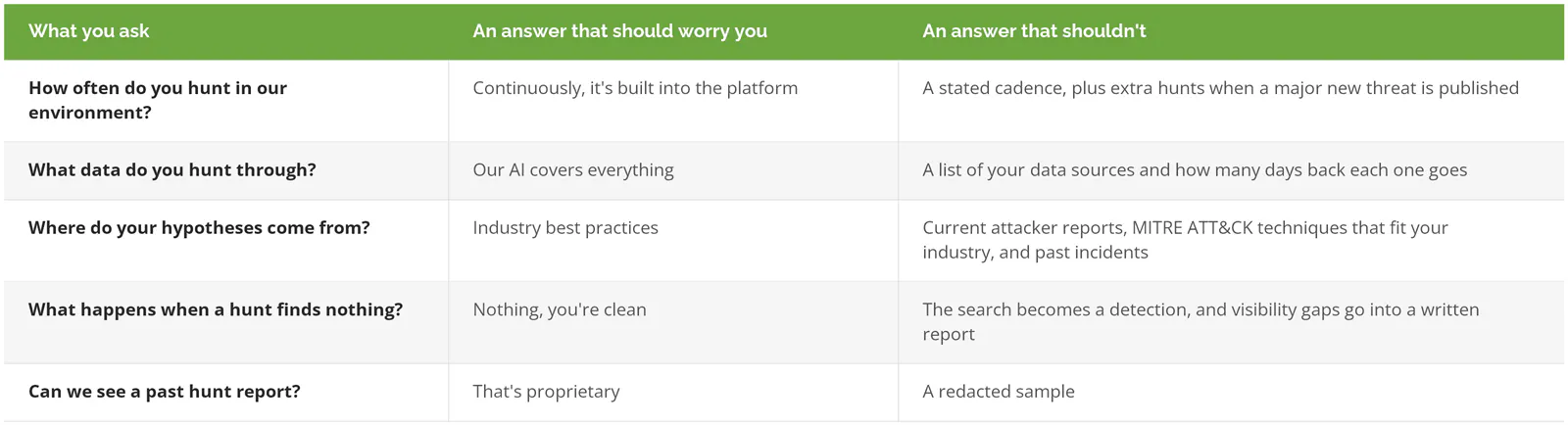
Weak answers deserve a follow-up question, not an automatic no. The person on the sales call may never have worked a shift inside the SOC, and there's nothing wrong with that, but the useful answers live with someone else. Ask to talk to someone who has.