SASE vs SD-WAN vs VPN: What Mid-Market Teams Actually Need
A VPN encrypts a connection. SD-WAN steers traffic between your sites across the best available link. SASE bundles SD-WAN with cloud security like ZTNA and a cloud firewall. Which you need depends on sites, remote users, and where apps live.
Table of Contents
SASE vs SD-WAN vs VPN gets sold as a three-way race. It isn't. SD-WAN and a VPN both build encrypted tunnels, and SASE contains SD-WAN outright. What you're really choosing is which job to fix, connecting offices to each other or connecting people to apps, and whether your network security still lives in one box at headquarters. One office with a few remote staff can keep a hardened VPN. Add a second site, a hybrid team, and apps that moved to the cloud, and SASE starts earning its fee.
You probably landed here because a quote showed up. Maybe your internet provider pitched SD-WAN at contract renewal. Maybe a security vendor told you the VPN is finished and SASE is the replacement. Both pitches can be right. Both can also sell you a fix for a problem you don't have.
Search for sase vs sd-wan and page one is almost entirely vendors, and each one draws the dividing line wherever its own product happens to sit. That's not dishonest. It just isn't a buying guide.
So start somewhere plainer. What's actually breaking? Choppy Teams calls between two offices is a network problem. A remote-access appliance sitting on a federal list of actively exploited bugs is a security problem. A bill for private circuits that nobody can explain anymore is a contract problem. Each one lands on a different budget line.
Most companies do this backward. They pick the acronym first, then go looking for a problem it solves.
What's the Actual Difference Between SASE, SD-WAN, and a VPN?
A VPN is an encrypted tunnel. SD-WAN is software that manages several internet links between your sites and picks the best path for each application. SASE is SD-WAN plus a stack of security services delivered from the vendor's cloud.
SASE, short for secure access service edge, is a term Gartner coined in 2019. It isn't a new technology so much as a new package. NIST's Guide to a Secure Enterprise Network Landscape (SP 800-215) puts it bluntly, saying the networking and security services in SASE "are not new but simply delivered together as a single package rather than through point security solutions."
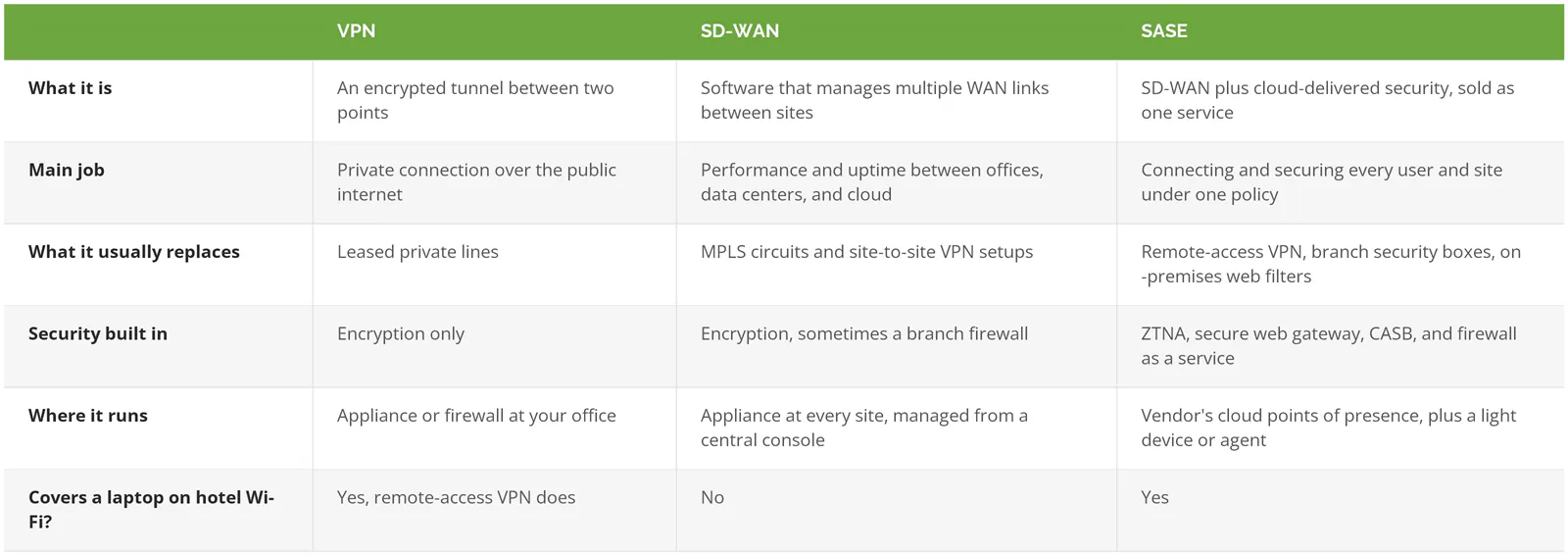
Those four security services are where buyers get lost. The joint CISA and FBI guidance on modern network access security lists the same building blocks.
- ZTNA (zero trust network access) lets a user into one application after checking who they are and whether their device is healthy, instead of dropping them onto the whole network.
- A secure web gateway is your web filter, moved out of the office and into the cloud so it follows the laptop home.
- CASB, a cloud access security broker. Controls on SaaS apps like Microsoft 365 and Salesforce, including who can download what.
- Firewall as a service does a firewall's inspection work in the vendor's cloud rather than in a box you patch.
Strip away the acronyms and it's a simple split. A VPN and SD-WAN move traffic. SASE moves it and decides whether it should be moving at all.
"VPN" Means Two Different Things, and That's Where Comparisons Go Wrong
Comparison articles treat "VPN" as one product. It's two. A site-to-site VPN is a permanent tunnel between two firewalls, say headquarters and a warehouse, that no employee ever logs into. A remote-access VPN is the client on a laptop, the thing your staff open at the kitchen table to reach the file server.
They fail in different ways, and different things replace them.
SD-WAN goes after the first one. In fact it doesn't so much replace the site-to-site VPN as absorb it. Palo Alto Networks' SD-WAN vs VPN explainer notes that SD-WAN encryption usually runs on IPsec, the same protocol under a traditional VPN, and NIST SP 800-215 lists the merging of VPN functions into SD-WAN as one of its defining traits. The tunnels are still there. Same plumbing. SD-WAN adds a brain on top, one that watches several internet connections at once and moves your video call off a flaky link before anyone notices.
ZTNA goes after the remote-access VPN. ZTNA doesn't make a better tunnel to the network. It skips the network entirely and connects the person to a single app, which is why our explainer on how ZTNA replaces the VPN treats it as a change in access model rather than a faster pipe.
So when someone asks "SD-WAN or VPN?" the honest answer is another question. Which VPN?
- Site-to-site tunnels between your offices point you toward SD-WAN.
- Remote-access VPN for people working away from the office. That's ZTNA, sold alone or as part of SSE or SASE.
- Both, across several sites with a hybrid team, and you're describing the exact problem SASE was packaged to solve.
Picture a distributor running three warehouses on site-to-site tunnels between FortiGate firewalls, plus 40 staff on a remote-access VPN. Buying SD-WAN fixes the warehouse links and leaves the laptop problem exactly where it was. That's not a bad purchase. It's half a purchase, and the vendor quote rarely says which half.
SASE vs SD-WAN: Where Does One Stop and the Other Start?
SD-WAN stops at the building. It connects and prioritizes traffic between sites, but it doesn't inspect a remote laptop's traffic or decide who reaches which application. SASE adds that security layer and stretches it to users wherever they sit.
The security half of SASE has its own name, SSE (security service edge), meaning ZTNA, the web gateway, CASB, and the cloud firewall without the SD-WAN piece. Zscaler's comparison of SD-WAN, SSE, and SASE draws the same line. The five components and the single-vendor debate get their full treatment in our SASE explainer.
Plenty of SD-WAN appliances ship with a firewall built in, and vendors market that as "secure SD-WAN." It does protect the branch. Traffic leaving the warehouse gets inspected at the warehouse. What it can't do is anything about the salesperson on airport Wi-Fi opening your CRM, because that traffic never touches the branch box. And cloud apps make it worse. NIST SP 800-215 describes the "hair-pinning" problem, where a remote user's cloud traffic gets hauled back to the office edge for inspection and then sent back out to the internet, adding distance, latency, and a bottleneck at your front door. SD-WAN can route around that for branches. For people outside a branch, it's not in the picture.
That's the dividing line. Sites, SD-WAN. People, SSE. Sites and people under one policy and one console, SASE.
When Is a VPN Still Enough?
Stick with a VPN when you run one office, a modest number of people work remotely, and your key apps live on servers in that office. With a single site there's nothing for SD-WAN to balance, and a patched VPN with MFA (a second login step, like a code on your phone) covers the remote workers.
Vendor pages rarely cover this case, since there's nothing to sell in it. It's also common. An accounting practice with one office, a local file server, a line-of-business app that has to run on-premises, and eight people who work from home on Fridays doesn't have a WAN. It has an internet connection and a firewall.
If that's you, skip the new platform and harden the old one.
- Keep the VPN appliance on current firmware, and know its end-of-support date before the vendor tells you.
- MFA on every VPN login. No exceptions for the owner.
- Can anyone on the internet reach the appliance's admin page? That should be a flat no.
- Limit what a VPN user can reach once connected, so a stolen login doesn't open the whole office. Our guide to network segmentation covers how.
You'll know when this stops being enough. A second office opens, the file server moves to SharePoint, or the remote team outgrows the appliance's license count. Until then, a well-kept VPN is a reasonable answer, and a boring one. Boring is fine.
Why Is the Remote-Access VPN the Part to Retire First?
It's the part attackers are breaking into. Remote-access VPN appliances sit on the open internet by design, they grant broad network access once a login succeeds, and they've been hit by a long run of actively exploited flaws across several of the biggest VPN vendors.
In its June 2024 guidance, CISA reported more than 22 known exploited vulnerabilities tied to VPN compromise, bugs attackers were already using, "leading to broad access to victim networks." The agency wasn't subtle about the direction either. It urged organizations to move toward SSE and SASE.
2025 made the point again. Ivanti disclosed CVE-2025-0282 in its Connect Secure VPN on January 8, and CISA added it to the Known Exploited Vulnerabilities catalog the same day. CISA's mitigation instructions didn't stop at patching. For the highest confidence, even with no sign of compromise, they called for a factory reset of the appliance, and if compromise was confirmed, resetting admin passwords, API keys, service accounts, and domain passwords twice.
Then April. Fortinet reported that attackers who had exploited older FortiGate SSL-VPN flaws had planted a file that kept read-only access to the device's files, configurations included, after the patch was applied. CISA's alert on the Fortinet technique suggested disabling SSL-VPN entirely as a temporary workaround. Patched, and still exposed.
Why does a VPN breach hurt so much more than a single bad app login? Design. A traditional VPN assumes that anyone who makes it through the tunnel is trusted, and NIST's zero trust architecture standard (SP 800-207) was written largely to retire that assumption. Under zero trust security, where a request comes from earns it nothing. Location isn't a credential. A compromised VPN hands an attacker the building. A compromised ZTNA session hands them one room, and the device check may have flagged the laptop before they got there.
Real money rides on it. IBM's 2026 Cost of a Data Breach study put the global average breach at $4.99M, up 12% in a year.
None of this means every VPN is about to be breached. It means the remote-access VPN is the piece of your network with the worst exposure-to-access ratio, and if you're only going to change one thing this year, change that.
Which One Does Your Business Need? A Decision Matrix
Three facts about your environment decide it. How many sites you run, how many people work outside them, and where your applications actually live. Answer those honestly and the choice mostly makes itself.
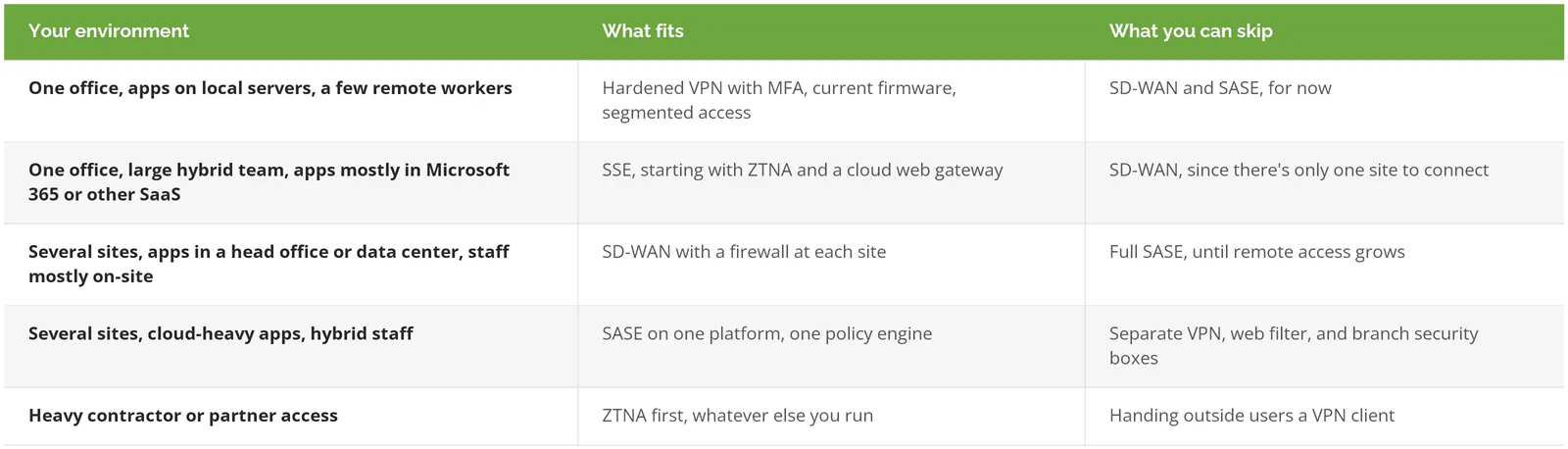
The last row needs explaining. NIST SP 800-215 calls out that VPNs "often require agents," which makes access for a high volume of contractors and partners difficult. ZTNA can grant a partner one app, with an expiry date, and never put them on your network. For a manufacturer letting three outside engineering firms into a design system, that's the whole case.
Notice what the matrix doesn't ask. Headcount. A 40-person firm with four locations and a road-warrior sales team has a stronger case for SASE than a much larger company that sits in one building and runs everything off a server room.
If You're Moving Off the VPN, What Order Should You Buy In?
Sequence matters more than the platform. CISA's guidance says plainly that migration "may take proper planning and sequential implementation," and the order below keeps your exposure falling at every step instead of spiking during a big cutover.
- Map who uses the VPN and for what. You'll likely find a handful of apps carrying most of the traffic, and one or two that only the finance team touches.
- Harden the VPN you still have. CISA's transition checklist covers it, including blocking outside access to the appliance's management functions (the control plane), using a dedicated management interface, patching and watching the VPN's logs, requiring MFA, and version-controlling the running configuration so an unexpected change stands out.
- Move remote access to ZTNA app by app. Contractors and your most sensitive apps go first. Pilot with a small group first. CISA's guidance calls for testing before going fully operational.
- Bring in SD-WAN on the network's own clock, when a circuit contract comes up or branch firewalls near end of support.
- Switch off the VPN concentrator, the appliance remote users connect to. Actually switch it off. A retired appliance still answering on the internet is the worst of both worlds.
The firewall stays. Even in a full SASE design, each site still has local traffic, printers, cameras, badge readers, sometimes production equipment, that never leaves the building and still needs a boundary. A next-generation firewall often ends up doing double duty as the SD-WAN edge device. Who patches it, tracks its end-of-support date, and watches its logs is the question a managed firewall arrangement answers.
What Does the Market Shift Mean for Your Next Renewal?
Expect every vendor to pitch a bundle. Dell'Oro Group reported SASE revenue of $3.5B in the second quarter of 2026, its fifth straight quarter above 20% growth, with SD-WAN spending picking back up on branch upgrades. And Gartner's 2025 Magic Quadrant for SASE Platforms predicts that by 2028, 70% of SD-WAN purchases will be part of a single-vendor SASE offering, up from 25% in 2025.
Translation? Bundles, everywhere. Your next SD-WAN or firewall quote will probably arrive with SASE attached, priced to make the bundle look like the obvious choice.
Sometimes it is. Often not. A bundle is a good deal when you'll actually use the pieces in it. It's an expensive one when you're paying for a cloud firewall at a site that has two people and a printer. Before you sign, put three dates side by side. When does the firewall hit end of support, when does the circuit contract end, and when does the VPN license renew? If they're years apart, a phased plan beats a big-bang platform swap. If they land in the same quarter, that's your window.
Getting the Order Right
Consilien is a managed IT and cybersecurity provider that designs and runs firewall, VPN, and SASE environments for businesses nationwide, including the patching and monitoring that keep the edge from becoming the way in. Our managed firewall and network security services start from the matrix above, not from a product list.
If a quote is sitting on your desk and you're not sure which half of the problem it fixes, speak to a network security expert before you sign it.