What Is a Managed Firewall Service?
A managed firewall service hands day-to-day operation of your firewall to an outside team. Rules, firmware, alerts, audit evidence. All of it moves. The question worth asking before you sign isn't what the provider monitors. It's who owns the patch window when your model lands on a federal advisory.
Table of Contents
A managed firewall service is an arrangement where an outside provider operates your firewall for you. They own the rule changes, the firmware updates, the alert response, and the compliance evidence. You keep the network and the risk.
Firewalls used to be a purchase. You bought the box, it got configured during install week, and it sat in the rack until the warranty expired. Managed firewall and network security exists because that model stopped working.
Today it's an asset with a support calendar, a patch queue, and an expiration date. Companies running 20 to 500 users feel that first. You have a firewall. You might even have a good one. What you don't have is someone whose actual job includes reading the vendor advisory feed on the day it publishes, or who can tell you which of your 340 rules still has a business reason behind it.
Ask three providers what managed firewall means and you'll get three different scopes. One means monitoring. One adds rule changes. One means the whole lifecycle, firmware through replacement. Same two words on all three proposals.
That gap is the product. Not the hardware.
So What Does Managed Actually Mean?
Managed means a provider takes operational responsibility for the firewall. They configure it, change the rules, apply firmware updates, watch the alerts, and produce the reports your auditor asks for. You still own the device.
That word covers a wide range, though. Some contracts stop at monitoring. The provider tells you something happened. You go fix it yourself. Others include change management, patching, and lifecycle planning. Notification service, or operations team. Both get called managed.
Firmware, in plain terms, is the operating system running inside the firewall itself. It gets security patches the same way a laptop does, except a laptop reboots at lunch and a firewall reboot drops every VPN tunnel and every branch office at the same moment, which is why an update that should take 15 minutes turns into a scheduling problem 3 weeks out. So firmware slips. Somebody has to schedule the outage, warn the people who'll notice, and be awake when it goes sideways.
Rules are the other half. Each one is a single line saying which traffic is allowed where, and a midsize company usually carries a few hundred of them, accumulating the way anything accumulates when removing it carries more risk than keeping it. A vendor needed access in 2019. A printer needed a port opened in 2021. An office moved. Nobody deletes anything, because deleting the wrong line breaks payroll and everyone knows it.
What a Managed Firewall Service Covers
Five things get assigned in a managed firewall contract. The device, the ruleset, the firmware and lifecycle, the alerts, and the compliance evidence. That's the whole scope. Read a proposal against those five and the gaps show up fast.
Two or three get covered well in a typical quote. The rest sit in language vague enough to argue about later. Vague means yours.
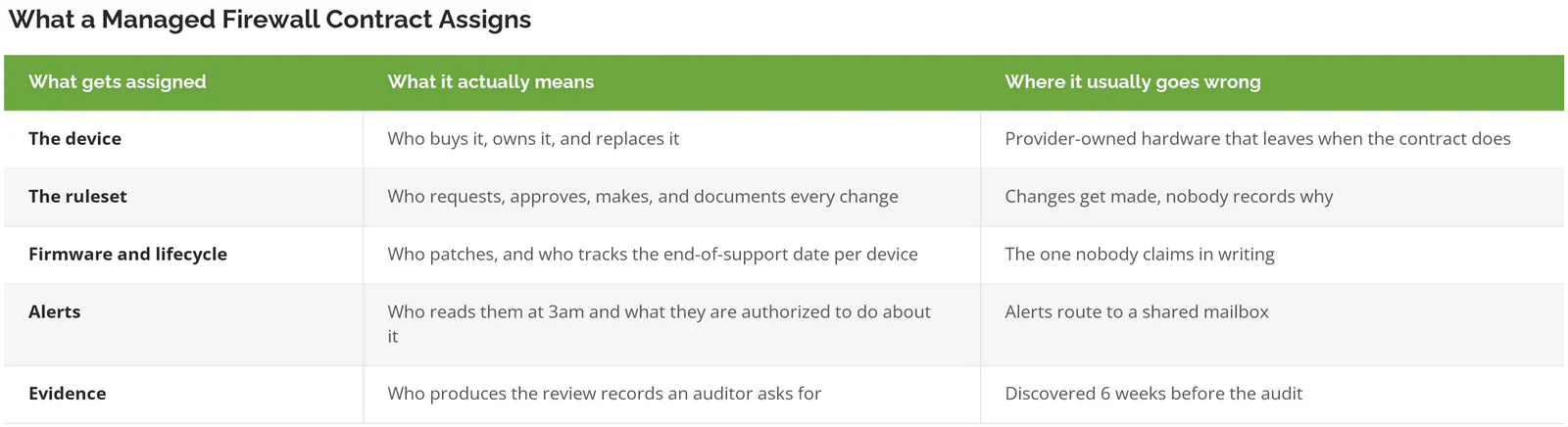
Device ownership trips people up more than it should, because if the appliance belongs to the provider, switching costs include buying new hardware, and that quietly changes every negotiation you'll have from year two onward. Worth knowing on day one.
None of this depends on which platform you run, because a next-generation firewall with application awareness and intrusion prevention still needs someone deciding what the policy should actually say, and someone answering for it afterward. Better hardware raises the ceiling. It doesn't operate itself.
The Firewall Became a Way In
Attackers break in through the firewall now. Not around it. Verizon's 2026 Data Breach Investigations Report put vulnerability exploitation ahead of stolen credentials as the top initial access vector for the first time, at 31%.
Edge devices carried most of that jump. Firewalls and VPN gateways went from 3% of exploitation-driven breaches to 22% in a single year. Seven times the share. Twelve months.
Scanning volume behind that number is hard to picture. GreyNoise recorded close to 3 billion malicious sessions aimed at internet-facing edge devices across 162 days in its 2026 State of the Edge report, which works out to roughly 212 exploitation attempts every second, and 52% of the remote code execution attempts came from IP addresses their sensors had never seen before.
Numbers that size stop meaning much. A smaller one lands harder. On August 11, 2026, CISA added CVE-2026-20349 to its known exploited vulnerabilities catalog, a flaw that lets an unauthenticated attacker crash Cisco Secure Firewall ASA and Threat Defense appliances with a single crafted HTTP request. Federal agencies had until August 14 to remediate. Three days.
Who inside your building would have known about that on the 11th?
Speed is the whole problem now. Median time to fully patch a vulnerability reached 43 days, up from 32 the year before, and across the 13,000 organizations Verizon polled, only 26% of the vulnerabilities on CISA's known-exploited list had been fully remediated, down from 38%. Everyone is getting slower. The window keeps shrinking.
In February, CISA issued Binding Operational Directive 26-02 alongside a joint fact sheet with the FBI and the UK's NCSC on end-of-support edge devices. It orders federal agencies to inventory every unsupported firewall, router, and VPN gateway by May 5, 2026 and begin removing them by February 2027. Federal directives aren't binding on private companies. They're a reliable preview of what auditors and cyber insurers start asking about 18 months later.
If you can't say which of your devices are already past end of support, and for a lot of companies that answer takes a week to assemble, that's the first thing a network security risk assessment should tell you.
The Part That Rots Quietly
Rulesets degrade faster than hardware. FireMon, which sells policy management tooling, analyzed 9.2 million device-level policy checks and found 69% of firewall rules unused, 45% carrying no owner or documentation, and 17% redundant or shadowed by another rule.
And 58% of the firewalls in that dataset failed high-severity configuration checks on first evaluation. Not after an incident. On the first look, before anything had gone wrong.
Nobody deletes a rule they can't explain. That's the entire mechanism. The engineer who opened a remote desktop port for a vendor in 2019 left the company in 2021, the documentation was a message in a chat thread nobody archived, and the line sits there today because removing it might break something and might not. Multiply by 6 years.
[VERIFY: replace with a real inherited-firewall rule count from a Consilien onboarding, or cut this paragraph. Numbers below are illustrative, not observed.] I know a 90-person distributor that inherited a firewall carrying 412 rules when they switched providers, and after 3 weeks of tracing, the incoming team could tie only 60 of them to a live business need. Sixty, out of 412. The rest weren't dangerous on their own. Together they were a map of every shortcut the company had taken in 11 years, still open, still routable.
PCI DSS v4.0 requirement 1.2.7 already forces a documented review of network security control configurations at least every 6 months, and companies outside card processing rarely have that clock imposed on them, which is a large part of why their rulesets look the way they do.
Any managed service that won't name a rule-review cadence in the contract isn't managing the ruleset. It's watching it.
Pair that review with segmenting the network and one bad rule stops being a building-wide problem. Segmentation limits how far traffic travels once it's inside. Rule review limits how much gets in.
Managed Firewall, Firewall as a Service, or In-House?
Three ways to solve this. They aren't interchangeable.
Managed firewall means someone else operates the physical or virtual appliances you already run. Firewall as a service, usually shortened to FWaaS, moves inspection into a cloud platform, so there's no appliance to patch and no end-of-support date to track, and it typically arrives bundled into a broader SASE architecture rather than sold on its own. In-house means you hire for it, or train for it. Coverage is yours.
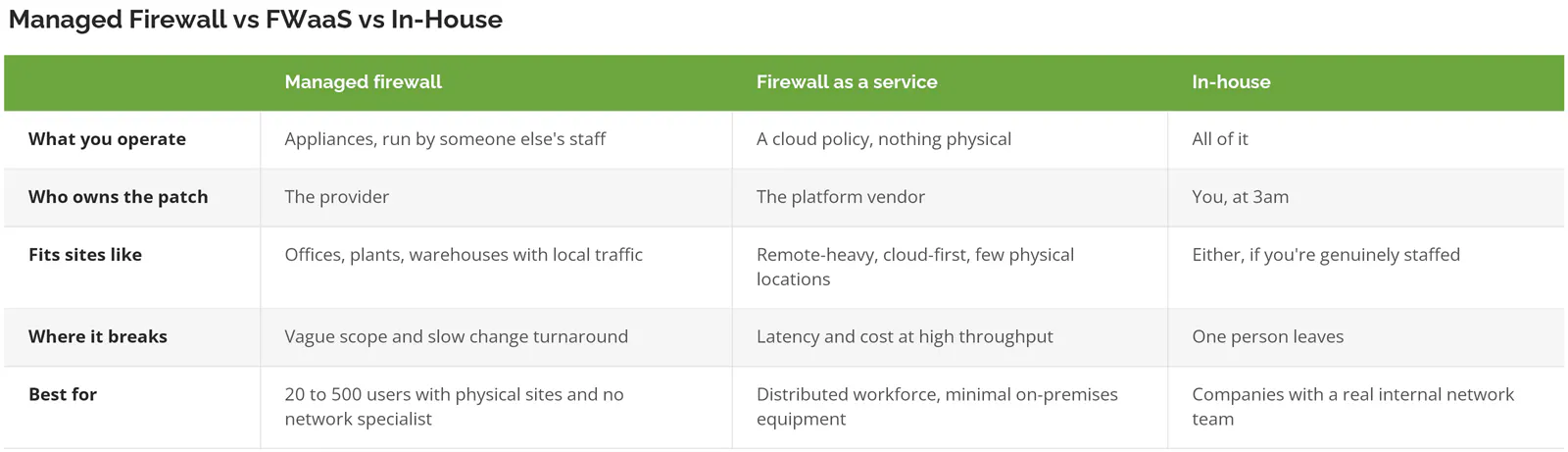
Plenty of companies end up running two of the three. The plant floor keeps its appliance because the machines need local inspection. Sales routes through the cloud. Somebody still has to own both, and that's the conversation a proposal should be having with you rather than around you.
Before the first sales call, it helps to see how differently providers scope the same two words. Comparing firewall and network security providers side by side makes those differences visible in a way one quote never does.
What Does a Managed Firewall Service Cost?
Pricing is per device, per month. Almost always. The appliance is either bundled into that monthly fee or bought separately up front. The number moves on throughput, number of sites, coverage hours, and whether lifecycle work is in scope.
Published figures for this service are close to worthless. Search it and you'll get $300 to $800 a month for a single site, $500 to $2,000 for mid-market, and $5,000 and up for multi-site. Every one of those figures sits on a provider's own marketing page, quoting a range wide enough to contain whatever they hand you later.
Four things move the price more than anything else.
- Throughput and feature licensing on the appliance. That's the hardware vendor's price, not the provider's, and it's the one line you can verify independently.
- Sites. Two locations isn't twice one location. It's more, because the rules have to agree with each other.
- Coverage hours, where business-hours support and 24/7 support get sold under the same product name at very different prices.
- Whether firmware updates, end-of-support tracking, and refresh planning sit inside the monthly fee, or come back later as separate project quotes.
Scope on that fourth item is where quotes diverge most, and it's usually why the cheap proposal wins on paper, because a monthly fee that excludes lifecycle work isn't actually cheaper. The work still happens. Just at project rates, at the worst possible moment, on a device that's already past its support date. [VERIFY: Consilien's current monthly price band per managed firewall, per site]
Skip This If
Not everyone should buy this.
Under 20 users, a single office, and a cloud-only stack, a managed firewall is more contract than you need. Your traffic is a handful of laptops reaching hosted applications. Buy a supported appliance, turn on automatic updates, and put the money into identity and endpoint protection instead. More risk reduction per dollar.
With a real network engineer on staff who owns the firewall and has the hours to own it, you're buying redundancy rather than capability, and a co-managed arrangement covering after-hours response and firmware windows usually costs less while keeping the institutional knowledge inside your building.
And if you're 8 months from decommissioning the rack in a move to fully cloud infrastructure, wait. Signing a 3-year appliance agreement right before you stop needing appliances is a familiar and expensive mistake.
Seven Questions to Ask Before You Sign
Seven questions separate a real managed firewall contract from a monitoring subscription with a bigger name on it. Ask them on the first call. Not the third.
- What's your emergency patch window, in hours? Not the standard maintenance window. The one used when a flaw affecting your model lands on CISA's known-exploited list with a 2-week deadline attached.
- Who tracks the end-of-support date on each device, and when do I hear about it? 12 months of warning is a budget conversation. 3 weeks is an emergency purchase order.
- How fast does a routine rule change get made, and will you put that number in the agreement?
- Who reviews the full ruleset, how often, and what do I receive afterward? A report you can hand an auditor is a very different deliverable from a note saying it was done.
- Where do alerts go at 3am? A shared mailbox isn't an answer. Ask whether there's a SOC that answers the alert or only a system that generates it.
- How long are firewall logs retained, and can I export them if we leave?
- What happens at the end of the term? If the appliance is theirs, find out now what you keep.
Providers who own the lifecycle answer these in a sentence each. Providers selling monitoring start explaining.
Where This Leaves You
You already have a firewall. So the buying question isn't whether you need one. It's who owns it on the worst Tuesday of the year, when a vendor publishes an advisory, your model is on the list, and the fix requires dropping every VPN tunnel in the company for 20 minutes in the middle of a business day.
If nobody in your organization can name that person, that's the gap a managed firewall service fills. Consilien runs this for companies with 20 to 500 users, mostly manufacturers, distributors, and professional services firms, the kind with physical sites and no network specialist on payroll. The scope gets written down, firmware and end-of-support work included, rather than left to the part of the contract nobody reads.
Bring a proposal you've already received. Speak to a network security expert about how firewall management gets scoped, and we'll read it against the five responsibilities above.