RTO vs RPO: What They Mean and How to Set Numbers You Can Actually Hit
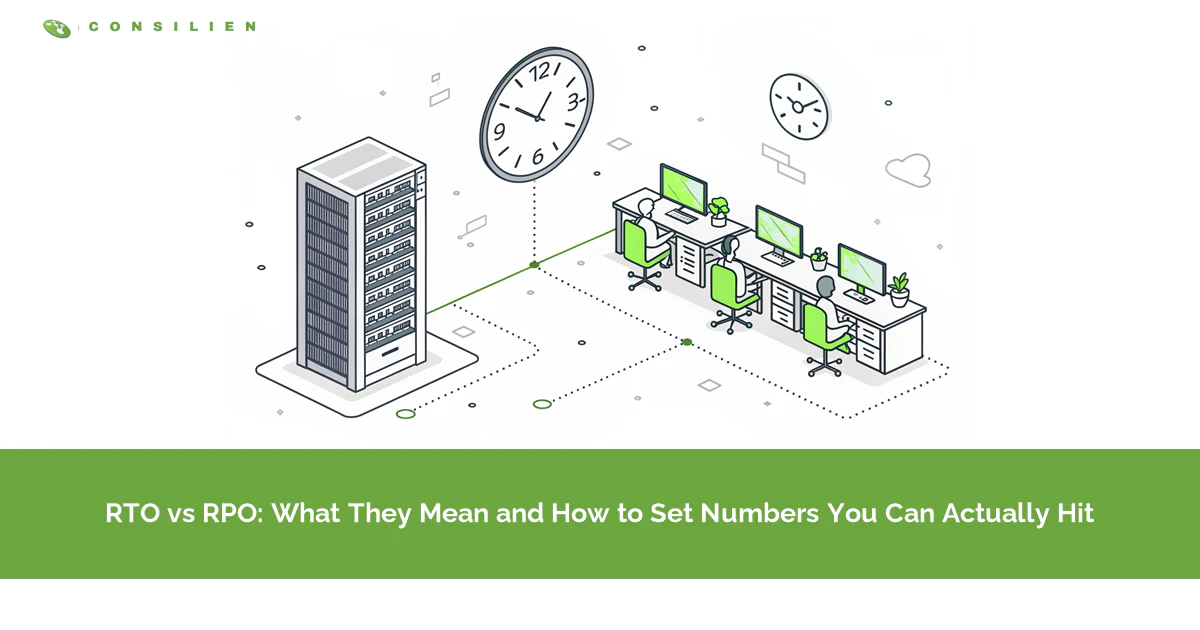
RTO is how long you can be down. RPO is how much data you can lose. RTO measures forward from the outage, RPO measures backward from it. RPO sets your backup frequency, RTO sets your recovery architecture.
Table of Contents
That's the whole RTO vs RPO distinction, and most people get it inside of a minute. The hard part comes next. Somebody has to write actual numbers into your backup and disaster recovery plan, defend them to a CFO, and then prove the business can hit them under pressure. That second part is where almost every plan quietly falls apart.
Here's what usually happens. An MSP hands over a template. Somebody in IT fills in a four-hour RTO and a 24-hour RPO because those felt reasonable on a Tuesday afternoon. The document gets signed, filed, and referenced once a year during a compliance review. Nobody tests it. Nobody prices it. And nobody asks the only question that matters, which is whether the business would actually survive four hours down and a full day of re-keyed orders, because those are two very different kinds of pain and the plan treats them as one number.
Then the outage happens. The plan meets reality. Reality wins.
What Is RPO, and What Does It Actually Control?
RPO, or Recovery Point Objective, is the maximum amount of data your business can afford to lose, measured in time. A four-hour RPO means you accept losing up to four hours of work.
It runs backward. Picture the incident as a line on a calendar, and RPO is how far to the left of that line your last usable copy sits. NIST SP 800-34 defines it as the point in time to which business process data can be recovered after an outage. Same idea, drier wording.
RPO controls exactly one thing. Backup frequency.
Back up nightly at 10pm, lose the server at 3pm, and 17 hours of work is gone. That's your real RPO, whatever the document says. Want one hour? Then something has to capture a recovery point every hour, which means snapshots or replication, not a nightly job. The number on the page and the schedule in the backup tool have to agree. In a surprising number of environments, they don't. The plan says four hours. The job runs at midnight. Nobody noticed, because nobody ever read the two documents side by side.
Order entry and financial systems usually land at minutes, because a lost transaction there is a lost customer commitment, a broken audit trail, and a reconciliation problem that follows somebody around for a month. A document archive can sit at 24 hours and nobody blinks. The question isn't what's technically possible. It's what your people could rebuild from paper, memory, or their sent folder if the copy vanished.
What Is RTO, and Why Is It Almost Always Wrong?
RTO, or Recovery Time Objective, is the maximum time a system can be unavailable before the damage becomes unacceptable. A 6-hour RTO means 6 hours from failure to functioning.
It runs forward. Same calendar line, opposite direction. NIST frames RTO as the point where unavailability starts causing unacceptable impact on the business processes that depend on it. That dependency framing is the part people skip.
Now the uncomfortable part. Most RTOs are wrong, and they're wrong in a specific, predictable way.
Ask IT what the RTO is and they'll tell you how long it takes to restore the system. Ask the business the same question and they mean something else entirely. They mean how long until we can take orders again. Those aren't the same event. The distance between them is where recovery plans go to die. Restoring a server is a technical milestone. Resuming operations is a business one. Your plan measures the first. Your customers measure the second.
RPO you buy with backup frequency. RTO you buy with architecture. Faster recovery means warm standby infrastructure, replication, tested runbooks, and somebody who knows where the runbook lives at 2am on a holiday weekend when the person who wrote it left the company back in March. All of that costs real money, and the curve gets brutal at the fast end.
RTO vs RPO at a Glance
Side by side, the difference stops being abstract.
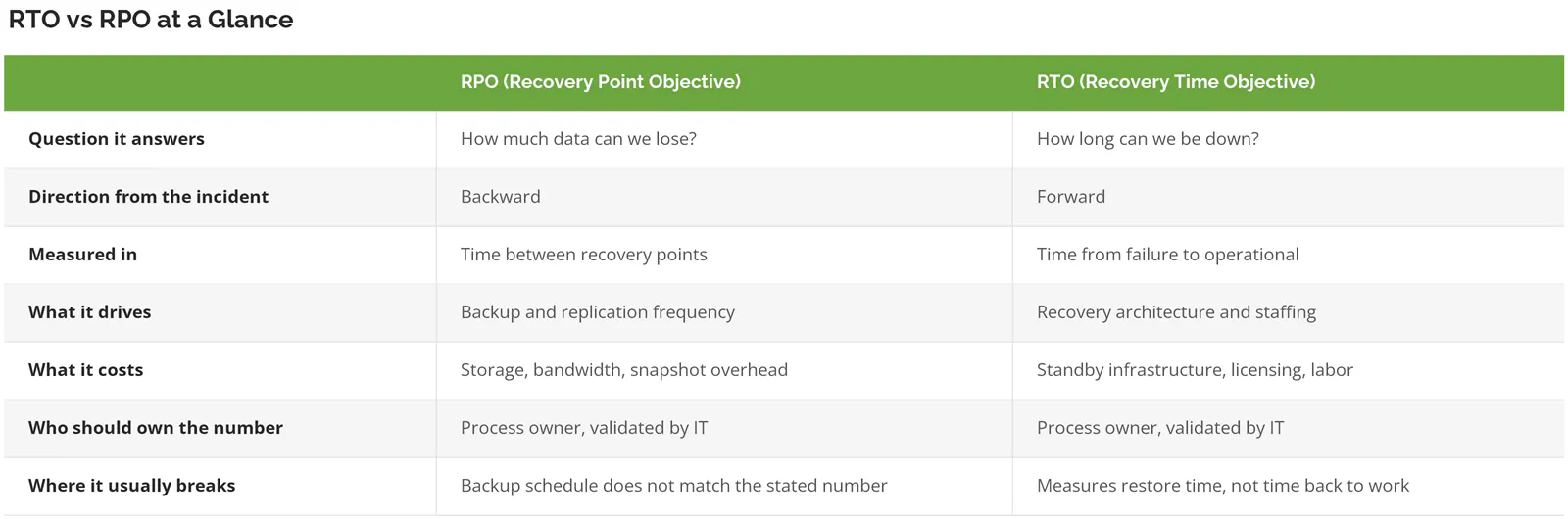
Look at the last row. Both sides describe a gap between the document and reality. Not a coincidence.
The Third Number Nobody Writes Down
There's a third measurement that decides whether your RTO means anything. It appears in almost no vendor guide. It's called Work Recovery Time, and it's the gap between the system coming back and the business actually running.
Restore is not resume.

When a system returns from a recovery point, everything that happened after that point is gone, and somebody inside the business has to put every piece of it back by hand while the rest of the week keeps arriving on schedule. Orders taken by phone, shipping confirmations, production schedule changes, invoices, timecards. All of it re-entered by people who also have a normal day waiting for them. Then add verifying the restore is clean, reconnecting integrations that timed out while the system was dark, and confirming nothing posted twice.
That work is invisible on most DR scorecards. It's also where the hours go.
Maximum Tolerable Downtime, in Plain Terms
Above all three sits Maximum Tolerable Downtime, or MTD. That's the hard ceiling. Not expensive. Existential. NIST treats MTD as the constraint RTO has to fit inside, not as a separate goal you chase.
One rule actually governs your plan, and it's arithmetic.
RTO + Work Recovery Time must be less than MTD.
Miss that and the plan fails on paper, before a single thing goes wrong in production. Most plans have never had the arithmetic run on them. Not once.
A Worked Example Where the RTO Is Met and the Business Still Misses
Take a 120-user contract manufacturer running an ERP system. Nightly backup at 10pm. Stated RPO of 24 hours, stated RTO of 6 hours, MTD of 12 hours because production scheduling and shipping stop dead without it.
Tuesday, 3pm. The server dies.
Recovery point is Monday 10pm, so 17 hours of data is gone. Under a 24-hour RPO, that passes. Restore completes in 5 hours and the system is live at 8pm. Under a 6-hour RTO, that passes too. On the scorecard, this is a clean recovery. Gold star.
Except 2 shifts of order entry, 4 production schedule revisions, and a full day of shipping confirmations no longer exist. Rebuilding that from paper tickets and inbox archaeology takes a three-person team most of Wednesday. Call it 16 hours. 5 plus 16 is 21, against a 12-hour ceiling.
Both objectives met. Business missed by nearly a full day.
We run into that failure mode more than any other in disaster recovery planning, and it stays invisible until somebody writes the third number down.
Who Sets These Numbers (Hint, It Isn't IT)
Who owns the RTO at your company? Not who typed it into the document, who owns it. If that answer takes more than a second, you've already found something.
RTO and RPO are business decisions with technical consequences. Not technical decisions with business consequences. IT can tell you what's achievable and what it costs. Only the business can say what's acceptable.
Get that backward and you end up with numbers nobody in the room actually agreed to. It happens constantly. IT picks conservative-sounding figures to avoid overpromising, finance never sees the tradeoff, and the process owner who would have said we cannot be down past noon on a Friday was never in the meeting.
A workable split looks like this.
- The process owner names the tolerance. Not IT. The person accountable for order entry says how long order entry can stop and how much of it can vanish.
- IT or your MSP comes back with what each tolerance costs and, more usefully, what's actually achievable in the environment as it exists today. Sometimes the honest answer is that the current architecture can't hit the requested number at any price without a redesign, and that answer needs to be said out loud early rather than discovered during an incident.
- Finance checks spend against loss. Almost always skipped.
- Somebody signs the gap. Where budget won't close the distance, that's accepted risk, and it needs a name attached in writing.
All of it runs on a business impact analysis. A BIA produces defensible RTO and RPO values because it forces the conversation about which processes actually stop revenue and which ones merely annoy people. Skip it and you're guessing with a template. CISA's Service Continuity Management resource guide treats the impact analysis as the thing that establishes recovery requirements in the first place, not as paperwork you produce afterward to justify a decision already made.
Veeam's 2026 Data Trust and Resilience Report, built on responses from more than 900 senior IT, security, and risk leaders, found that 90% are confident they can recover within their RTOs while only 69% say those RTOs are fully aligned with business continuity goals. Read that twice. A fifth of the market is confident about hitting a target they've already admitted might be the wrong target.
How to Set an RTO and RPO You Can Defend
Defensible means you can show your work when a CFO, an auditor, or a cyber insurance underwriter asks how you got there. Five steps. Each one produces something you can hand to somebody.
Step 1. List the Processes, Not the Servers
Start with what the business does, not what's in the rack. Order entry, production scheduling, payroll, customer support, shipping, invoicing. Then map which systems each one depends on.
You'll find shared dependencies nobody knew about. You'll also find at least one server nobody can name a business reason for. That's normal.
Step 2. Price an Hour of Downtime for Each Process
You can't set a defensible RTO without knowing what an hour costs. Loaded labor for everyone who goes idle, lost or delayed revenue, contract penalties, the overtime to catch up, and the customer commitments that slip a week and quietly cost you a reorder six months later.
Our downtime cost calculator runs that arithmetic from headcount, salary, overhead, and revenue. It also estimates your current recovery time based on how the backups are actually configured. That second output is usually the uncomfortable one.
Benchmarks are worth a sanity check, though they scatter wildly. Uptime Institute's 2026 Annual Outage Analysis found that 57% of respondents said their most recent major outage cost more than $100,000, and for the second year running, one in five said theirs cleared $1 million. Useful context. Terrible substitute for your own number.
Step 3. Set the Tolerance Before You Look at the Price Tag
Ask the process owner what they can survive. Get the answer before anyone mentions cost. Anchor on cost first and you'll get tolerances that match the budget instead of the business, and you'll never know which one you actually got.
Write down two figures per process. Downtime tolerance, data loss tolerance. Separately.
Step 4. Find Where Faster Stops Being Worth It
Run the arithmetic and the wish becomes a decision. Take that 120-user manufacturer, downtime priced at $18,000 per hour.
- Moving from a 12-hour RTO to a 4-hour RTO costs roughly $2,400 a month in replication and warm standby. Call it $28,800 a year. It saves 8 hours per qualifying event, or $144,000. At one event every four years, that's $36,000 of avoided loss annually against $28,800 of spend. Worth doing.
- Four hours down to one hour is a different story. Another $9,000 a month, $108,000 a year, to save three more hours. That's $54,000 per event, or $13,500 a year at the same frequency. You'd be spending eight dollars to avoid one.
The crossover sits somewhere between four hours and one hour. Finding it is the entire exercise. AWS says the same thing in its guidance on establishing recovery targets, which notes that faster recovery and less data loss always require extra resources and configuration, so the cost curve climbs as the target drops.
Those figures are illustrative, built to show the method rather than to describe any particular company. Run yours with real inputs and the shape holds even when the numbers move.
Bias disclosed, since we sell disaster recovery services. This is the step that usually tells a client to spend less, not more. A four-hour RTO you can actually hit beats a one-hour RTO you bought and never tested. Every time.
Step 5. Write Both Numbers per Tier, Not per Company
AWS is blunt about this one. Objectives have to be set application by application, it says, and evaluated against the added cost and complexity each target brings. One company-wide RTO is the most expensive mistake in this whole process. Set it aggressively and you're funding continuous replication for a SharePoint site nobody has opened since March. Set it loosely and your ERP inherits the same permissive number as an internal wiki.
Tier instead.
Example RTO and RPO Targets by Tier
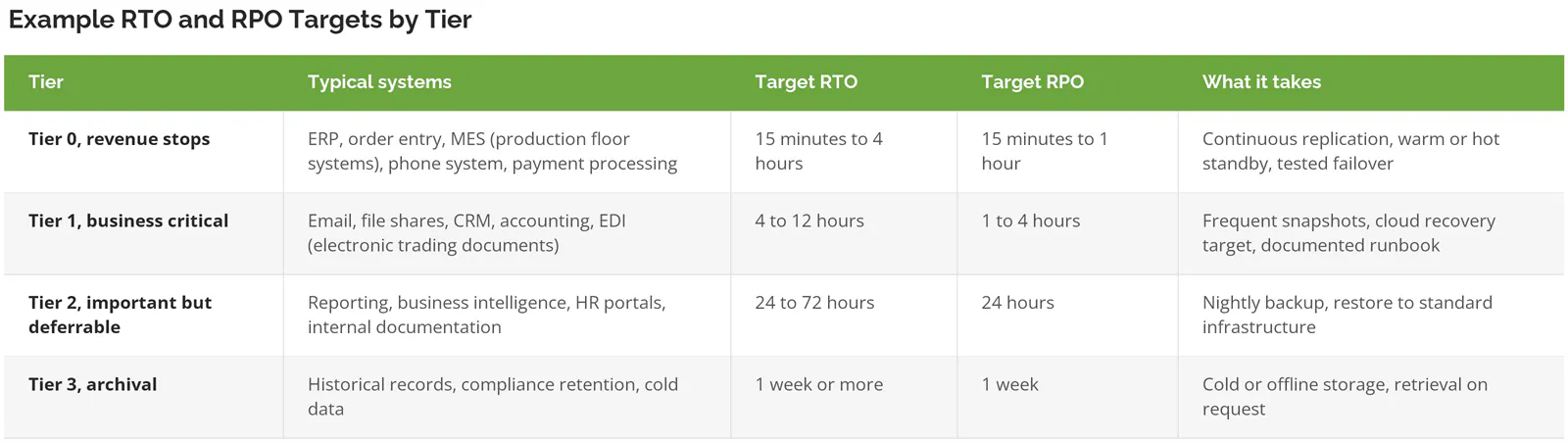
Three tiers is usually enough. Four if you're regulated. Past that you're building a spreadsheet nobody maintains, and an unmaintained tier map is more dangerous than a rough one, because people keep trusting it long after the systems it describes have been replaced, retired, or quietly moved somewhere else. That's the trap.
Where the recovery lands matters as much as how fast it happens. The difference between hot, warm, and cold recovery sites is mostly a difference in RTO, expressed as infrastructure you either pay for in advance or wait around for during an incident.
Your Ransomware RTO Is Not Your Hardware RTO

A failed disk array and a ransomware event produce the same symptom and completely different recovery clocks. Treating them as one number is the simplification that burns people hardest.
So which clock did your plan account for? And if it was the hardware one, what happens to those numbers when the other event shows up instead?
Hardware fails, restoration starts immediately. You know what broke. You know when. Last night's backup is clean.
Ransomware hits and the clock starts somewhere else entirely. First you scope it, which means working out which systems are affected and when the intruder actually got in. Then legal, insurance, and sometimes law enforcement get involved, and restoration frequently pauses while evidence is preserved, which reads as procedure right up until it's your production line sitting idle waiting on a forensics firm to finish imaging. Then you rebuild into a clean environment, because restoring into a compromised network just re-infects everything on a schedule.
Here's the part that wrecks RPO assumptions. Attackers sit inside environments for weeks before they trigger encryption. Your most recent backup may already have them in it. So the real cyber recovery point isn't last night. It's the last copy taken before the intrusion started, which can sit considerably further back than your stated RPO allows for.
Sophos surveyed 2,158 IT and cybersecurity leaders across 17 countries whose organizations were hit in the past year. Encryption succeeded in 56% of attacks, up from 50%. Backup-based recovery climbed to 66% of encrypted-data cases. Average recovery cost hit $1.7 million per incident, up 11% year over year. That figure is recovery. Not ransom.
Veeam's data lands in the same place from another angle. Only 28% of ransomware victims fully recovered all affected data, 44% recovered less than three quarters of it, and the average landed at 72%. A 72% recovery is not a recovery. It's a business trying to operate with a quarter of its records missing.
Two things follow from that. Immutable backups, so the copy can't be encrypted or deleted by somebody holding domain admin. And retention depth, so you hold recovery points from before a dwell period nobody knew was happening, which in practice means keeping weekly and monthly copies long enough to reach back past an intrusion you only discovered last Tuesday. Frequency protects you from hardware. Depth and immutability protect you from people.
Write a separate recovery objective for cyber scenarios. Exercise it separately too.
An Untested RTO Is a Guess
That's the whole argument in one line. A recovery objective you've never tested isn't a target. It's a claim.
The Veeam numbers put a size on the gap. 90% confidence going in. 28% full recovery coming out. Confidence and capability turn out to be unrelated variables.
A real test measures more than whether the restore finished. It measures how long it took to decide to declare an incident, whether the person holding the credentials was reachable, whether the runbook still matched the environment, how long verification took, and how long the business needed after the system came back. That last one is your Work Recovery Time. You cannot estimate it. You have to watch it happen.
Now the honest part. The first test almost always misses the target, sometimes badly. That isn't a failure of the exercise. It's the point of it. A four-hour RTO that tests at 11 hours just handed you a specific, fixable list. A four-hour RTO nobody has tested handed you a number on a page and a feeling.
Both halves matter. Disaster recovery drills test whether people know what to do. Testing your recovery plan validates whether the technology performs. Skip either and half the plan stays unverified. Twice a year for Tier 0 systems, annually for everything else, and always after a migration, a platform change, or a headcount shift big enough to change who's on call.
Common Mistakes That Make These Numbers Meaningless
Six patterns show up over and over.
- One RTO for the entire company. Covered above. Still the most common by a wide margin.
- The RPO was never set at all. It got inherited from whatever the backup software defaulted to at install, usually nightly, then written into the plan afterward as though somebody had decided it.
- Nobody revalidated after the cloud migration, so the objectives now describe a physical environment that stopped existing 18 months ago, complete with a tape rotation and a server room that has since become a storage closet for spare chairs.
- Counting restore time only. Wrong finish line.
- No owner. When an objective belongs to everyone it belongs to nobody, and it never gets challenged when the business changes underneath it.
- Testing the technology but never the decision-making. Plenty of organizations can restore a server. Far fewer can tell you who has the authority to declare a disaster at 4am on a Saturday, or how many hours that phone call takes to happen.
That last one burns more hours than any technical problem on the list.
Where This Leaves You
Three things to take away. RPO is a decision about acceptable data loss and it sets your backup frequency. RTO is a decision about acceptable downtime and it sets your architecture, but only if you measure it to the moment people can work again rather than the moment the server answers a ping. And whichever numbers you land on, they're guesses until a test turns them into measurements.
Consilien is a security-first managed IT and IT advisory firm serving companies with 20 to 500 users nationwide, mostly in manufacturing, distribution, professional services, and real estate management. We build and test disaster recovery strategies that hold up under audit and under pressure. Where ransomware is the realistic scenario, our ransomware protection and recovery work treats the cyber recovery clock as its own problem with its own numbers. What separates that from a backup vendor is straightforward. We start from what the business can tolerate, not from what the product can do.
Start by pricing an hour of your own downtime. Then compare it against what your current setup can actually deliver. If those two numbers don't line up, speak to a disaster recovery expert and work through where the gap is.