Microsoft 365 Business Premium vs E3 vs E5: Which Plan Fits Your Business?
Business Premium fits businesses under 300 users at $22 per user per month. E3, at $39, is for larger headcounts but has no built-in endpoint detection. E5, at $60, pays off when you need stronger identity protection and insider-risk tools.
Table of Contents
The price list makes this look like a ladder. Premium at the bottom, E3 in the middle, E5 at the top, and you climb as you can afford it.
It isn't a ladder. You buy these licenses by headcount and risk, one piece of cloud managed IT for Azure and Microsoft 365, and our Microsoft 365 managed services cost guide covers what running the tenant (your company's slice of Microsoft 365) costs on top of the license.
Key Takeaways
Business Premium is $22, Microsoft 365 E3 is $39, and E5 is $60 per user per month on an annual term. Premium caps at 300 seats across all Business plans combined. It includes Defender for Business with endpoint detection and response, which E3 doesn't. Adding Microsoft's Defender and Purview suites to Premium costs $15 more, so $37 total, still under bare E3. E5 earns its price through Entra ID P2, insider-risk tools, and premium eDiscovery.

What's the real difference between Business Premium, E3, and E5?
Business Premium is Microsoft's security-heavy plan for businesses up to 300 users. E3 is the enterprise base plan with no seat cap, Windows Enterprise, and basic security. E5 is E3 plus Microsoft's full identity, threat protection, and compliance stack. Price follows that order. Endpoint protection doesn't.
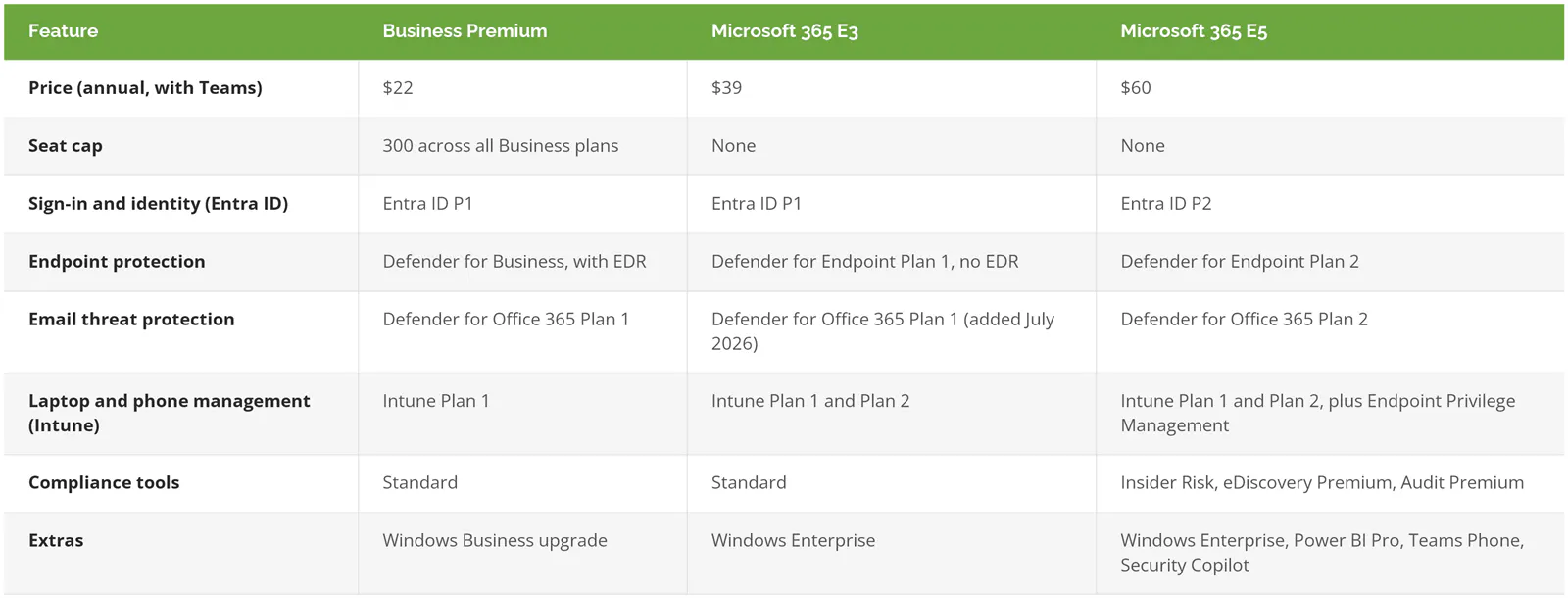
Prices are from Microsoft's July 2026 pricing and packaging update. E3 went from $36 to $39 and E5 from $57 to $60 on July 1. Premium didn't move. If your business doesn't use Teams, the no-Teams versions are $18.79, $30.45, and $51.45.
Why does Business Premium protect laptops better than E3?
Business Premium includes Defender for Business, which has endpoint detection and response (EDR), software that watches what's running on a laptop, flags attacker behavior, and lets someone isolate the machine. E3's endpoint tier is antivirus-grade. You pay $17 more per user for E3 and give up EDR.
Microsoft is direct about it. Its enterprise pricing page describes E3 as including "basic security features like Microsoft Entra ID P1 and Microsoft Defender Antivirus," then points you at add-ons. Microsoft's Defender for Business overview says Defender for Business "includes the features of Defender for Endpoint Plan 1, some features from Defender for Endpoint Plan 2, and some unique features for small to medium sized businesses." In the same comparison table, EDR is checked for Defender for Business and blank for Plan 1.
Antivirus catches known malware. Ransomware crews don't announce themselves with a known file, though. They log in with stolen credentials and use the admin tools already on the machine. That's the gap EDR covers, and our explainer on what EDR is goes through how it works.
So a growing business that "upgrades" from Premium to E3 can end up with less endpoint protection than it had. Tools don't equal protection, and a more expensive license doesn't either.
What happens when you pass 300 users?
You can't add user 301 to a Business plan. Microsoft's Business Premium FAQ says organizations "may only provision up to 300 seats total across all of our Business family of plans (Business Basic, Business Standard, Business Premium)." Seats past that go on enterprise licenses.
"Total" is the word to watch. Premium for 260 people plus Business Basic for 45 warehouse staff is 305 seats, which is over the cap.
Crossing the line doesn't mean moving everyone to E3. You can keep up to 300 seats on Premium and put the rest on enterprise licenses in the same tenant. What it does mean is planning. A business adding 30 people a year at 240 seats has about two renewals left before it needs an enterprise strategy. Decide that at 240. At 299 you're deciding under pressure.
When is E5 worth the extra $21 per user?

E5 is worth it when stolen admin accounts, insider data theft, or legal discovery are real risks for you. It adds Entra ID P2, Microsoft's full Defender stack, and Purview's premium compliance tools. If nobody will configure and watch those tools, the extra $21 per user buys features that just sit there.
- Entra ID P2. Microsoft's FAQ says P1 covers "single sign-on, multifactor authentication, Conditional Access, and more," while P2 "offers comprehensive identity protection and risk detection, adaptive risk-based access controls, and privileged access for critical resources." In practice, that means a sign-in from an unusual country at 3 a.m. can be blocked automatically, and admin rights can be granted for an hour instead of permanently. If you haven't built basic conditional access policies on P1 yet, start there before buying P2.
- Defender for Endpoint Plan 2, Defender for Office 365 Plan 2, Defender for Identity, Defender for Cloud Apps. Threat hunting across laptops, email, on-premises Active Directory, and the cloud apps your staff signed up for without asking.
- Purview Insider Risk Management, eDiscovery Premium, Audit Premium. These are for the day a departing salesperson downloads the customer list, or outside counsel asks for every message about a contract.
- Power BI Pro, Teams Phone, and Microsoft Security Copilot, which came to E5 in July.
E5 also tells you something about your team. Every one of those tools produces alerts, and alerts nobody reads protect nothing. Identity is where we'd spend first, and our identity and access management services page covers that work.
Can Business Premium plus add-ons replace E5?
For security, mostly yes. Microsoft sells the Defender Suite and Purview Suite for Business Premium at $10 each, or $15 for both, per user per month. Premium plus both comes to $37. That's less than E3 alone and $23 less than E5, though Windows Enterprise, Power BI, and Teams Phone aren't part of it.
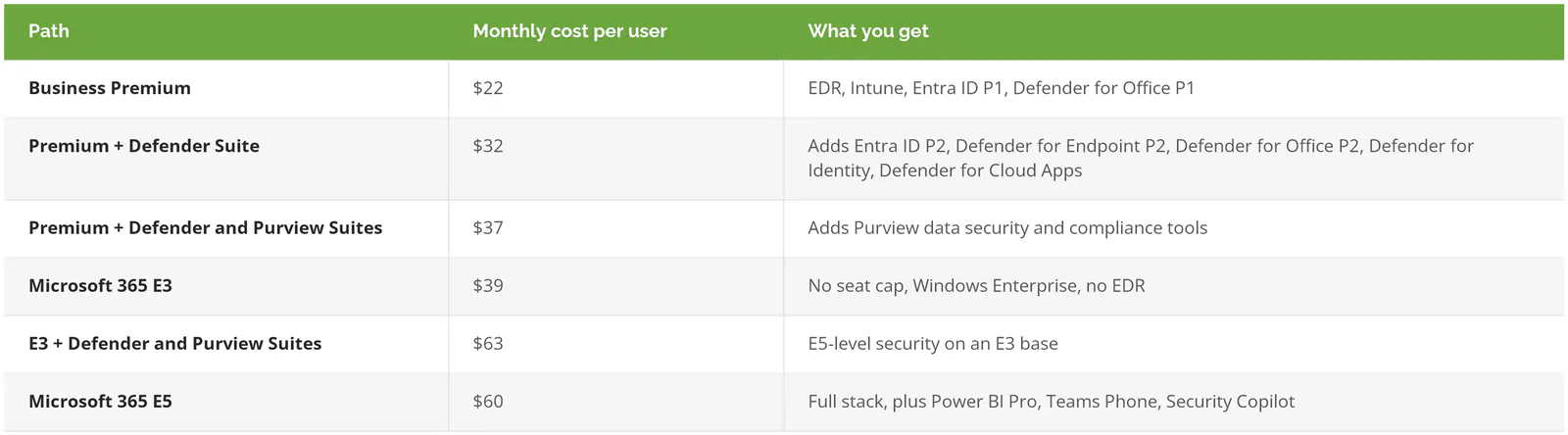
The Business Premium suite prices are on Microsoft's security add-on page for small and medium businesses, marked "Requires Microsoft 365 Business Premium." On the enterprise side, Microsoft's enterprise security plans page lists the E3 versions at $12 each.
Look at the bottom two rows. E3 with both suites costs $3 more than E5, so at that point E5 is the cheaper way to buy the same protection.
The suites don't lift the 300-seat ceiling. If you're past 300 users and most of your staff need Teams Phone and Power BI anyway, skip the add-on math and buy E5.
Should you mix plans in one tenant?
Yes, when your risk sits with a few people. A common split puts general staff on Business Premium and gives finance, executives, and IT admins the Defender Suite or E5. Those are the accounts attackers want. The receptionist's mailbox and the CFO's mailbox don't carry the same risk, and their licenses don't have to match either.
One caveat from Microsoft's own launch post for the Business Premium security add-on: "Microsoft Defender for Business does not support mixed licensing so a tenant with Defender for Business…will default to Defender for Business." Before you buy E5 for 15 people in a Premium tenant, get your provider to confirm, in writing, which endpoint features those 15 machines will actually run.
Mixed tenants also leak money if nobody audits them. CoreView, a vendor that sells license management software, reported that 40% of the Microsoft 365 licenses it studied across more than 5 million users were unassigned, inactive, or more expensive than the user needed. An E5 seat sitting on the account of someone who left in March costs $60 a month for nothing.
What you're protecting matters too. If the worry is invoice fraud through email, start with Microsoft 365 email security. If it's sensitive files walking out the door, Microsoft's DLP coverage by plan is the question to answer before buying anything.
Microsoft 365 E3 or Office 365 E3? Check the quote
These are different products. Office 365 E3 costs $26 and covers apps, email, and file storage. It has no Intune, no Entra ID P1, and no Windows license. Microsoft 365 E3, at $39, includes all three. Some comparison articles online mix them up, and so do some quotes.
If a quote just says "E3," ask which one. Office 365 E3 got Defender for Office Plan 1 in July, which helps with email, but it still leaves laptops and sign-in controls to be bought somewhere else.
How do you pick? Four questions
- How many people will you have in 18 months? Under 300 with room to spare, Business Premium. Close to 300 or past it, plan for enterprise licenses now.
- Do you have EDR on every laptop today, from any vendor? If you don't and you're on E3, Business Premium or the E3 Defender Suite fixes that gap. If you do, check whether you're paying twice.
- Would a lawsuit, a regulator, or a departing employee make you produce or protect specific records? Then the Purview tools in E5 or the Purview Suite matter. If not, they're probably shelfware.
- Who holds admin rights, and how many of them are there? Five people with permanent global admin is a risk on any plan. Entra ID P2's privileged access controls are built for exactly that.
Answer those four and the plan usually picks itself. The licensing is the easy part. Configuring what you bought is where businesses fall short, and it's what our Microsoft 365 managed services cost guide prices out.
Consilien is a Microsoft Cloud Solution Provider that serves businesses nationwide. It sells and manages Microsoft 365 licenses as part of managed IT. If you have a renewal quote and aren't sure the tier fits, speak to a Microsoft 365 expert and bring the license list.