Endpoint DLP vs Network DLP vs Cloud DLP: Which One Catches Your Leak
Three enforcement points. Three different blind spots. Endpoint DLP covers USB drives, printing, and clipboard. Network DLP covers traffic on its way out. Cloud DLP covers what's already sitting in Microsoft 365. Buying all three at once is how a data loss prevention program dies in month two. This walks through what each one misses, and which to switch on first.
Table of Contents
Endpoint DLP watches what users do on devices. Network DLP inspects traffic leaving your network. Cloud DLP scans data sitting in SaaS apps. Each sees one slice of the leak. Start with the channel your data actually uses.
You already know you need DLP. The question nobody answers cleanly is where to put it.
Ask three vendors and you'll get three versions of the same answer. All of them. Deploy everywhere, cover every channel, and worry about tuning later. It isn't wrong, exactly. It's just not a plan you can execute with the budget and the headcount you actually have.
IBM's 2026 Cost of a Data Breach report put the global average at $4.99 million and found that only 37% of breached organizations encrypt sensitive data both at rest and in transit, which is a fair description of where the baseline sits before anyone buys anything at all. Worse than most executives assume. Adding a fourth uncovered channel to a program you can't staff doesn't move that number.
What follows is the blind-spot map. What each enforcement point genuinely catches, what it structurally cannot, and how to sequence a rollout at 20 to 1000 users.
Endpoint, Network, and Cloud DLP Do Three Different Jobs
The three types differ by where enforcement happens. Endpoint DLP runs an agent on the laptop. Network DLP inspects traffic at the edge. Cloud DLP reads data at rest inside SaaS platforms. Same policies, three enforcement points.
An agent is a small piece of software installed on the machine itself, which is why endpoint DLP keeps working when someone takes a laptop home on a Friday and never touches your corporate network again until Monday. Network DLP has the opposite property. It sees every device on the wire and nothing off it. Cloud DLP doesn't care about devices at all, because it reads the file where the file lives.
Those aren't three products competing for one job. Three questions, three answers. If the underlying idea is still fuzzy, start with what data loss prevention actually does and come back.
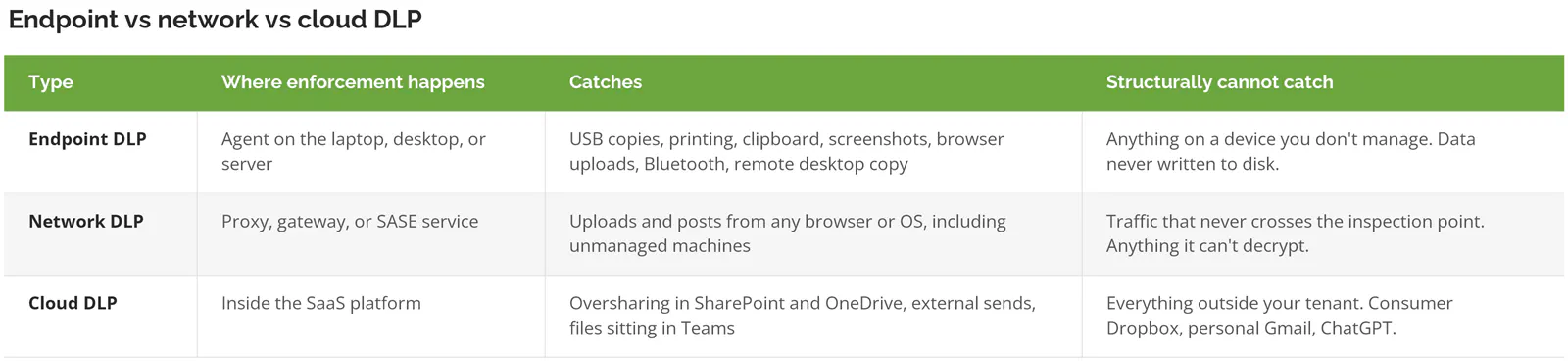
A tenant is your organization's own Microsoft 365 or Google Workspace environment. That distinction on the last row costs companies more money than any other line in the table.
What Endpoint DLP Sees That Nothing Else Does
Endpoint DLP is the only plane that watches physical and local actions. USB drives. Print jobs. Clipboard copies and screenshots. No network device sees it. None of it generates traffic.
Microsoft's Endpoint DLP documentation lists what it can audit and block on Windows and macOS. Copy to a USB device. Copy to a network share. Print. Copy to clipboard. Paste into a browser. Upload to a restricted domain. Bluetooth transfers. Remote desktop copy. Even Windows Recall snapshots, currently in preview.
That list is why endpoint DLP maps so cleanly onto compliance work. If you handle Controlled Unclassified Information for a federal contract, government data that isn't classified but is still restricted, NIST SP 800-171 requires you to control the use of removable media on system components. No network-layer control satisfies that. A USB stick never touches the network. No traffic, no inspection.
Where Endpoint DLP Goes Blind
That same documentation names the limits too. If data is never saved to a file on the local device, Endpoint DLP cannot scan or classify it. Microsoft's example is worth reading twice. A user opens a document in Word and saves it directly to a USB device without storing it locally first. Endpoint DLP cannot inspect or block that action.
Read that again if you just bought endpoint DLP specifically to stop USB exfiltration. It's in Microsoft's own docs.
It isn't the only gap. A few more that rarely make it into a vendor comparison:
- Executables and system files are unsupported. Endpoint DLP does not monitor .exe, .dll, .sys, .ini, or a handful of others. If your intellectual property ships as compiled code, the agent isn't reading it.
- Windows Servers running as domain controllers, or installed with the Core option, aren't supported at all.
- Every device has to be onboarded first, meaning registered with the management service, and a contractor's own laptop never will be, which quietly puts the entire BYOD population outside the plane before you write a single policy.
- Offline enforcement keeps running, but the events don't reach Activity Explorer until the machine reconnects. Your policy held. Your visibility didn't.
None of that makes endpoint DLP a bad first move. It makes it a first move with a known perimeter, which is a very different proposition from the blanket coverage most vendors imply when they walk you through the demo.
Network DLP Is Doing Less Every Year Than It Used To
Network DLP inspects traffic on its way out, at a proxy, gateway, or cloud service. It's the only plane covering devices you don't manage, and it's also the plane that encryption has been quietly eroding for the better part of a decade, one protocol update at a time.
Chrome's own security team puts HTTPS adoption in the 95 to 99% range, where it has sat since roughly 2020. To read any of it, a network inspection point has to decrypt and re-encrypt the session in the middle, which Microsoft documents as transport layer security inspection. That works until it doesn't. Applications with certificate pinning, meaning the app carries the expected server certificate baked into its own code, refuse to connect when they see a substitute. Banking apps do this. Corporate VPN clients do this. A growing number of SaaS desktop clients do too.
And the ground moved again.
In March 2026 the IETF published RFC 9849, TLS Encrypted Client Hello, as a Proposed Standard. It encrypts the opening message of a TLS connection, including the Server Name Indication, the field that reveals which website a device is contacting. That field has been doing quiet, load-bearing work in enterprise security for years, because plenty of network policies never decrypted anything at all and simply read the hostname before making a decision.
Those policies stop working as ECH deployment spreads. Not immediately. Not everywhere. But the direction is set, and a standards body set it rather than any vendor's roadmap.
What Microsoft's Own Network Plane Actually Requires
Microsoft's answer here is Purview Network Data Security.
It is in preview. Classification covers HTTP and HTTPS only. It requires either Microsoft 365 E7 licenses, or Purview E5 plus Entra Internet Access, or Purview E5 plus the pay-as-you-go billing model running through a third-party SASE partner such as Zscaler, Netskope, Palo Alto, Island, or Menlo. Policies take up to 24 hours to reach the network service. Activity can take another 30 minutes to appear. Not real time.
Billing is the detail that surprises people. Network Data Security meters by the request, and a request is every network call a device or browser makes to a website or an API. Usage-based pricing, on a channel where usage isn't something you control. Budget accordingly.
Network data security policies don't apply to B2B guest users. If your risk is a partner or contractor moving files out of a shared workspace, that's exactly the population the policy skips.
Cloud DLP Covers Your Tenant, Not the Internet
Cloud DLP inspects data inside SaaS platforms you own. In Microsoft 365 that means Exchange Online, SharePoint, OneDrive, and Teams. It catches oversharing, bad external sends, and sensitive files sitting in the wrong library.
It's also the cheapest plane to switch on, because most companies already pay for it. Already bought. Rarely turned on.
What it doesn't do is follow the data out, so the moment a file leaves your tenant, cloud DLP has nothing to say about where it goes next or who ends up reading it. And the traffic leaving tenants right now isn't going where the 2019 threat model said it would.
LayerX's enterprise browser telemetry found that 77% of employees paste data into generative AI prompts, that 82% of those pastes come from accounts the company doesn't manage, and that roughly 40% of file uploads to those tools carried personal or payment data. Picture a personal ChatGPT login in a browser tab, on a corporate laptop, moving customer records out of the business one paste at a time. That's shadow AI in one sentence. Cloud DLP sees none. Neither does anything else, unless you've specifically extended a policy to the browser or the wire.
Which Plane Should You Turn On First?
Start with the channel your sensitive data actually uses, not the channel with the best demo. Four situations cover most companies at this size.
Your data lives in Microsoft 365 and the team is small and remote. Cloud first. The policy engine is in your license already, the rollout doesn't touch a single laptop, and you'll learn what your real data flows look like before spending a dollar on a product. Right answer more often than the category suggests.
You handle CUI, ITAR, or defense contract data. Endpoint, and it isn't close. Removable media control and print control are named obligations. You can't satisfy them from the network layer, and an auditor will ask.
Half the workforce is contractors on machines you don't own. Network. You can't install an agent on a laptop you don't control, and pretending otherwise has burned a lot of budget. Go in knowing about the encryption trend and the B2B guest exclusion above.
Shadow AI is what actually keeps you up at night. Then it depends on your license rather than your architecture. Browser controls through endpoint DLP handle Edge natively, and Chrome or Firefox through an extension, which is also where Copilot governance starts. The network plane handles everything else, including native apps, but costs more and sits in preview. Pick based on what you already own.
Whatever you pick, run it in monitor-only mode before blocking anything. 4 to 8 weeks is typical at this size. DLP programs that skip that step generate alert volumes nobody can triage, the analysts stop reading them by about week three, and the program gets quietly switched off some time around March.
What Your Microsoft 365 License Actually Decides
Before comparing products, check what you're already paying for. Most companies at this size own more DLP than they've turned on, and the license tier decides which planes are even available. Check the bill first.
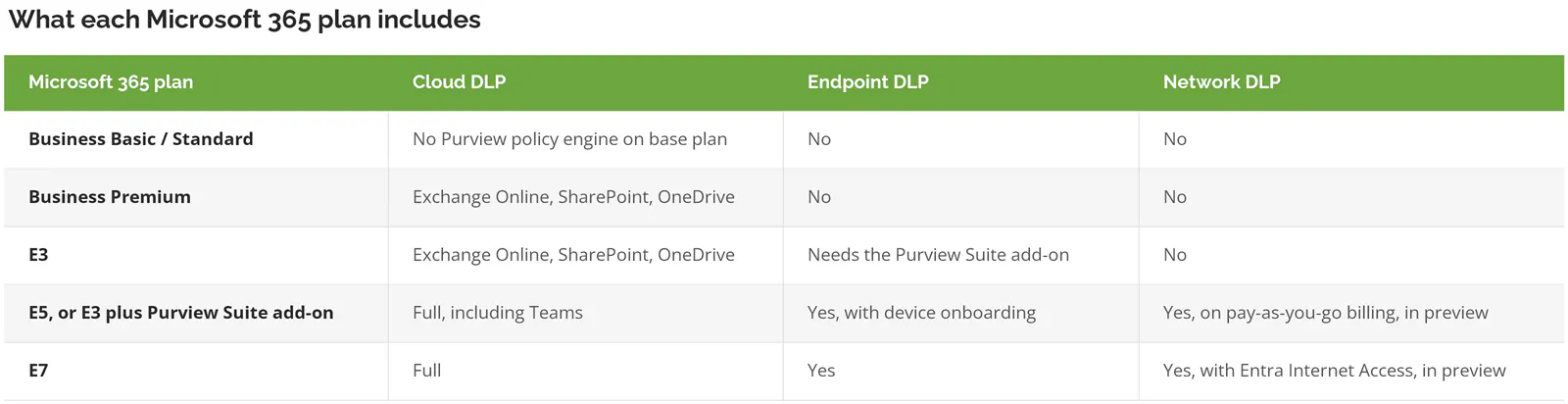
Two warnings on that table. Microsoft moves DLP features between tiers roughly once a year, so confirm against Microsoft's current licensing guidance and your own agreement before building a business case on it. And an E5 upgrade for 200 users is a large annual number. Sometimes a standalone product costs less than the license uplift. I know a 180-person distributor that ran exactly that comparison, found the standalone endpoint tool came in under half the E5 delta, and spent the difference on the analyst time to actually run the thing.
Weighing named products against each other? The 2026 DLP platform comparison covers the vendor side.
When None of This Is Your Problem Yet
Some companies shouldn't be buying any DLP this year.
If you're under 20 users, everything you own sits in Microsoft 365, and you don't handle regulated data, turn on the built-in policies for credit card and identity numbers and stop there. Most of the value, none of the cost.
Nobody has done data classification? Then DLP produces noise instead of signal. Classification means deciding, in writing, what counts as sensitive. Every plane depends on knowing what to look for. Buy that work first.
And there's a blunter test. If you can't name the five files that would genuinely hurt if they walked out the door tomorrow, you're not ready to enforce anything. That takes an afternoon. It's free.
Questions That Come Up Before the First Policy Goes Live
Do I actually need all three, or is that just what vendors say?
Almost nobody at 20 to 1000 users needs all three in year one. Vendors say it because their platform spans all three. Pick the plane covering where your data actually moves, run it properly, and add a second when the first is tuned and quiet. Two well-run planes beat three noisy ones.
If I can only fund one this year, which one?
Cloud DLP, in about 7 cases out of 10, because you're already paying for it and the rollout doesn't touch a laptop. The exception is regulated data on physical devices. Handle CUI or ITAR material and the answer flips to endpoint immediately, because removable media control is a named requirement you can't satisfy any other way.
Does endpoint DLP work on personal laptops?
Wrong question, slightly. It can, but only if the person lets you install a management agent on hardware they own, which most contractors reasonably decline. For unmanaged devices the network plane is the honest answer. Or a policy keeping sensitive data off those machines entirely.
Realistically, how long before we can turn on blocking?
4 to 8 weeks of monitor-only for most companies this size. The variable isn't the technology. It's how many legitimate business processes involve moving sensitive files around. A finance team that emails statements to a bookkeeper every Friday will trip a naive rule 52 times a year, and you want to find that in the audit log rather than in an angry email from the CFO.
Will network DLP still work once encryption gets stronger?
Partly, and less than it does now. Encrypted Client Hello removes the hostname signal a lot of lightweight network policies rely on, so anything doing full decryption at a managed proxy survives, and anything doing cheap metadata filtering degrades. Slow shift, not a switch that flips. Still a real reason not to build the whole program on the network plane alone.
Is Microsoft Purview enough, or do I need a separate product?
Purview is enough for a large share of companies already sitting on E3 or E5. Where it struggles is heavy macOS estates, unmanaged devices, and content inspection outside the Microsoft ecosystem. The honest test is to price the license uplift against a standalone tool for your specific user count. Sometimes Microsoft wins on cost. Sometimes it isn't close, and assuming the answer is how companies end up paying for E5 to use one feature.
Where to Start
Pull your Microsoft 365 license list and open the Purview admin center, then check how many active DLP policies you have. For a lot of companies the number is zero, on a license that already includes the engine. One afternoon. It usually changes the shape of the whole conversation.
Then pick the one channel where a leak would hurt most and cover it properly before adding a second. A single plane that's monitored, tuned, and eventually enforcing does more than three planes generating alerts nobody reads.
Want a second opinion on which plane fits your environment and what your licensing already covers? Speak to a data protection expert at Consilien. We run managed DLP programs for companies from 20 to 1000 users, nationwide, and the first conversation is usually about what you can switch off rather than what you should buy.
Written by Eric Kong, CEO and co-founder of Consilien.