Business DLP Buyer's Guide 2026: Requirements, Costs, and Contract Terms
Buying data loss prevention is a procurement problem before it's a security problem. This guide covers what to write down before you take a demo, what the software costs once you add the labor to run it, the vendor questions that force evidence instead of a pitch, how to run a two-week bake-off, and the four contract terms worth arguing about.
Table of Contents
A DLP buying process should answer four questions before anyone books a demo. Which data are you protecting, which channels does it leave through, who reviews the alerts, and what does the program cost after tuning labor? Features come last.
Every DLP buyer's guide opens with a feature checklist. Content inspection, endpoint agents, cloud coverage, policy templates. All useful, up to a point. But features aren't what makes a data loss prevention purchase work or fail.
Alert volume does. Staffing does. What you signed does.
You can buy the highest-rated product on the market and switch it off in month three because nobody had time to review 400 alerts a week. That isn't a technology failure. It's a procurement failure, and it happened before anyone signed anything. A managed DLP program works when the buying process accounts for the operating cost and not just the license.
So this guide covers the buying process itself. Still deciding whether you need DLP at all? Start with what data loss prevention actually does. If you already know and you just want a shortlist, the nine DLP tools worth evaluating are ranked separately, and if you're worried you're not ready to buy yet, there's a straight answer on who shouldn't buy DLP yet. This one is for the stretch in between, where you've decided to buy and now have to run an evaluation that holds up.
What Are You Actually Buying When You Buy DLP?
You're buying a tuning commitment. The software finds sensitive data and stops it from leaving. Keeping that accurate as your business changes is ongoing work, and that work decides whether the program is still running a year from now.
Think of the license as roughly a third of what you're signing up for. The rest is the policy design work at the front and the alert review that never ends. Vendors quote the third. Buyers budget for the third. Then the other two thirds show up in month two and land on somebody who already had a full-time job.
Failure here is boringly predictable. A policy fires on every outbound email containing a price list, sales gets blocked 30 times in one week, and someone with authority tells IT to loosen the rule, which is a completely reasonable decision in the moment and also the exact moment the program starts dying. The rule gets loosened. Then loosened again. Six months later the policy technically exists and catches nothing, which is worse than never having bought it, because now there's an audit artifact claiming coverage you don't actually have.
Notice what didn't fail there. The product worked. Detection fired correctly every single time, exactly as promised, and the program still ended up switched off, because nobody had priced the handful of hours a week it takes to keep a rule honest while the business changes around it.
Which changes what you should be evaluating. Not "can this product detect a credit card number." Everything detects a credit card number. That's table stakes. The real question is how much of your team's week the product eats to stay accurate, and whether you actually have that week to give it.
Products sold as enterprise DLP assume a dedicated administrator somewhere in the building. If nobody holds that job at your company, the extra capability isn't an upgrade. It's shelfware you're paying to license.
Write the Requirements Before You Take a Demo
Four inputs make a requirements document worth writing. What data matters, where it moves, how many people and devices are in scope, and who owns the alert queue. That's the whole list. Everything else on a vendor's feature matrix is noise until those four sit on paper.
Take the demo without them and the demo writes your requirements for you. That's how companies end up buying network inspection appliances for a workforce that's been fully remote since 2020, sold by someone who never bothered to ask where the staff actually sit these days.
Begin with a data inventory. Every compliance framework you might be chasing already expects one, and NIST SP 800-171 treats knowing where your controlled data lives as a prerequisite rather than a deliverable you produce later. Can't name the five systems holding your most sensitive records? You aren't ready to write policies against them.
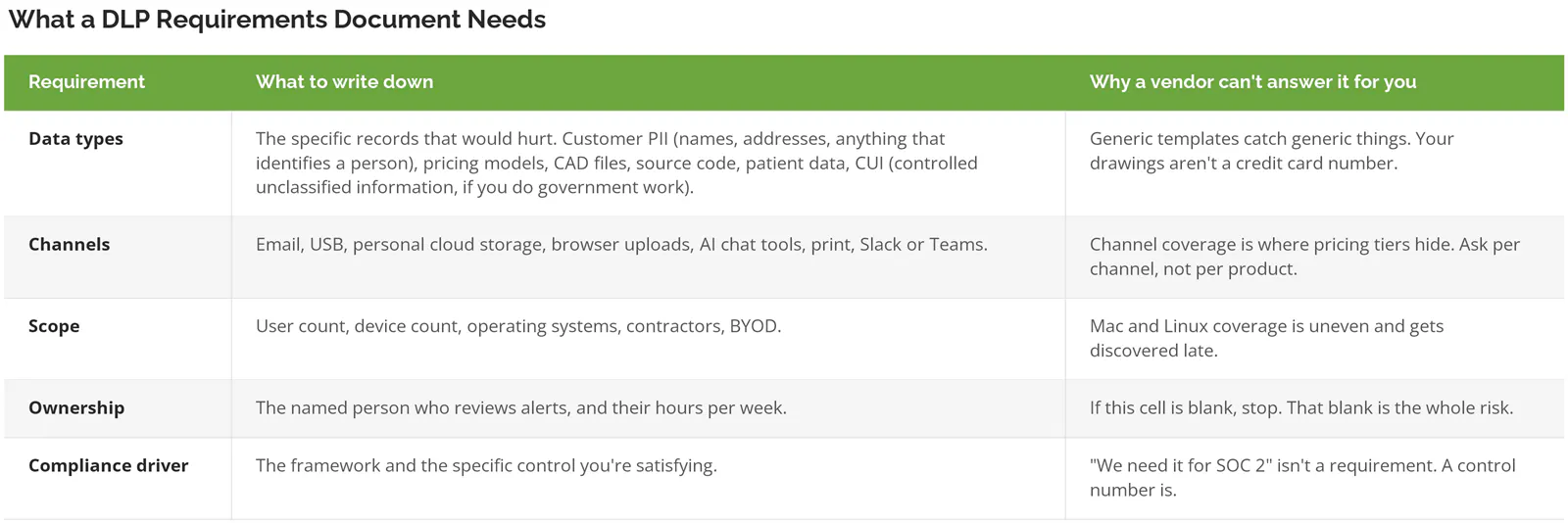
One thing worth naming out loud. Under 25 people, running Microsoft 365 Business Premium, no regulated data? You don't need a buying process at all. Genuinely. You need an afternoon in the Purview portal and a policy on outbound email. Save the evaluation for when headcount or a customer contract makes it real.
What Changed in 2026 That Breaks an Older Shortlist
Employees paste sensitive data into AI tools now, and older DLP products can't see it. A shortlist built before 2025 was scoped around email and USB drives. The channel that grew fastest isn't on it.
The numbers moved fast. IBM's 2026 Cost of a Data Breach report found shadow AI incidents at 43% of breached organizations, up from 20% the year before, adding as much as $670,000 to the average breach, and what leaked was exactly what businesses say they care about most, customer PII and intellectual property. IBM also found 68% of organizations had no governance in place to detect any of it.
Doubling in a year. That's not a trend line. It's a wall.
Practically, this puts one line in your requirements doc that didn't exist three years ago. Can the product see and control data going into unmanaged AI tools, through the browser and across the network? Microsoft now names ChatGPT, Gemini, DeepSeek, and Copilot as targets through inline web traffic policies, though several of those capabilities sit in preview today. Preview matters. It means don't hang a compliance commitment on it yet.
Pair the control with policy, not just tooling. Blocking a paste into ChatGPT without an acceptable use policy behind it produces confused employees and a help desk ticket. For background on the risk itself, shadow AI is covered separately.
What Does DLP Actually Cost?
Budget the license at roughly a third of year-one cost. The remainder is policy design, deployment, and the hours somebody spends every week reviewing alerts. A program priced on license alone will be underfunded by month two.
Model the structure below before you take a single quote. Then compare quotes against it. Fill in your own numbers, because the license line swings enormously by vendor and by how hard you push in negotiation.
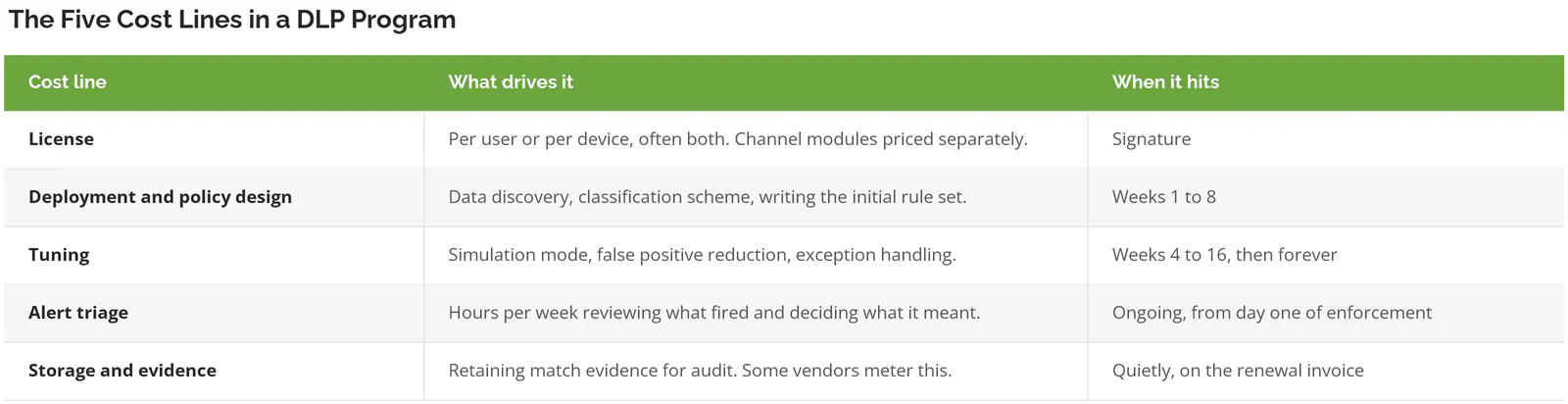
Triage is the line buyers skip. Run the arithmetic yourself. A tuned policy set producing 60 alerts a week, at 4 minutes each to clear, costs you 4 hours weekly, or roughly a tenth of a person. Untuned, in month one, that figure is routinely 10 times higher. A full day, gone. So ask your finalists what a comparable customer's weekly alert volume looked like at day 30 and again at day 180. If they can't answer, that is the answer, because a vendor who has never watched their own product settle into real use won't be much help when yours has to.
The Microsoft Licensing Question Comes First
Find out what you already own before pricing anything else. Microsoft 365 includes DLP for Exchange, SharePoint, OneDrive, and Teams at the mid tier. Endpoint DLP, which covers USB copies, printing, clipboard, and browser uploads, sits at the higher tier or behind a Purview add-on. That one boundary decides whether you need a third-party product at all. Start there.
Check it against Microsoft's own security and compliance licensing guidance rather than a reseller's summary, then price the upgrade path against a standalone product before assuming either one is cheaper. Our DLP services page walks through that licensing check in more detail. Useful shortcut, by the way. Already paying for Defender for Endpoint? Your devices are partly onboarded for Purview DLP already.
The Vendor Questions That Get Real Answers
Ask questions a marketing team can't answer from a slide. The useful ones demand numbers, named customers, or a live demonstration. Anything answerable with "yes, we support that" tells you nothing, because everyone supports everything.
Worth spending demo time on:
- What was the weekly alert volume for a customer our size, 30 days after enforcement and again at 180 days? Numbers, not adjectives.
- Show me a policy being tuned. Not a slide about tuning. The actual console, a live policy, a false positive getting resolved while I watch.
- Which of the capabilities you just showed me are in preview or beta right now?
- What can't your agent see?
- How many of your customers our size run in block mode rather than monitor only?
- Mac and Linux, same feature set or a subset? Get the subset in writing.
- When we leave, how do we export our policies and match history, in what format, over what window?
That fourth question does more work than the other six combined. Every product has blind spots, and a vendor willing to name theirs is being straight with you. Microsoft publishes theirs, to their credit. Their endpoint documentation states plainly that data never saved locally can't be scanned, so a user who opens a document and saves it straight to a USB stick without storing it on the device first won't be inspected or blocked at all. Executables, DLLs, and .ini files go unmonitored. Domain controllers and Server Core installs aren't supported.
None of which makes it a bad product. It makes it a documented one. Ask every finalist for their equivalent list and watch who squirms. Some will.
How to Run a Two-Week Proof of Concept
Deploy to 20 to 50 real users in monitor mode, run your actual policies against synthetic test data, and count false positives. Two weeks is enough to see whether the product fits your environment. It isn't enough to tune it, and that's fine.
Use fake data. Never production records. DLPTest.com is free and generates synthetic PII and payment data built to pass the structural checks real detection engines run, so policies fire the way they would against real records, and you never hand a vendor your actual sensitive files during an evaluation you might walk away from. It offers sample CSV, PDF, and Excel files, HTTP and HTTPS post endpoints, and an FTP target that wipes uploads after 10 minutes.
Test each channel separately and write down what happened. Copy a test file to a USB drive. Print it. Paste a block of it into a browser tab pointed at a personal Gmail account. Upload it to personal Dropbox. Paste it into ChatGPT. Copy it across a remote desktop session. Attach it to an outbound email. Then repeat the entire set on a Mac, because that's where the coverage gaps usually surface.
One scoping detail catches people here. In Microsoft Purview, both the user and the device have to be in policy scope before enforcement applies on an endpoint, so missing either one leaves the policy silently doing nothing, which on a dashboard looks identical to a product that simply doesn't work. Check that before you conclude anything about the software. It's usually scope.
Set your exit criteria before you start, and write them where the vendor can see them:
- Every channel in your requirements table either fires correctly or is documented as a gap.
- False positive rate on your highest-volume policy is low enough that your named alert owner can clear a week's queue in the hours they actually have.
- Agent performance complaints from pilot users stay in single digits.
- Policy changes take effect inside the window the vendor promised. Microsoft publishes roughly an hour for policy sync, and 24 hours for authorized group changes.
Miss the second one and stop. Don't negotiate it down because the pilot went well otherwise. That number is what switches the program off later.
Scoring the Finalists
Weight the scorecard toward operating burden, not feature count. Two products can score identically on capabilities and still differ by 6 hours a week in what they cost your team to run. That difference is the decision.
Workable split for a business between 20 and 1,000 users:
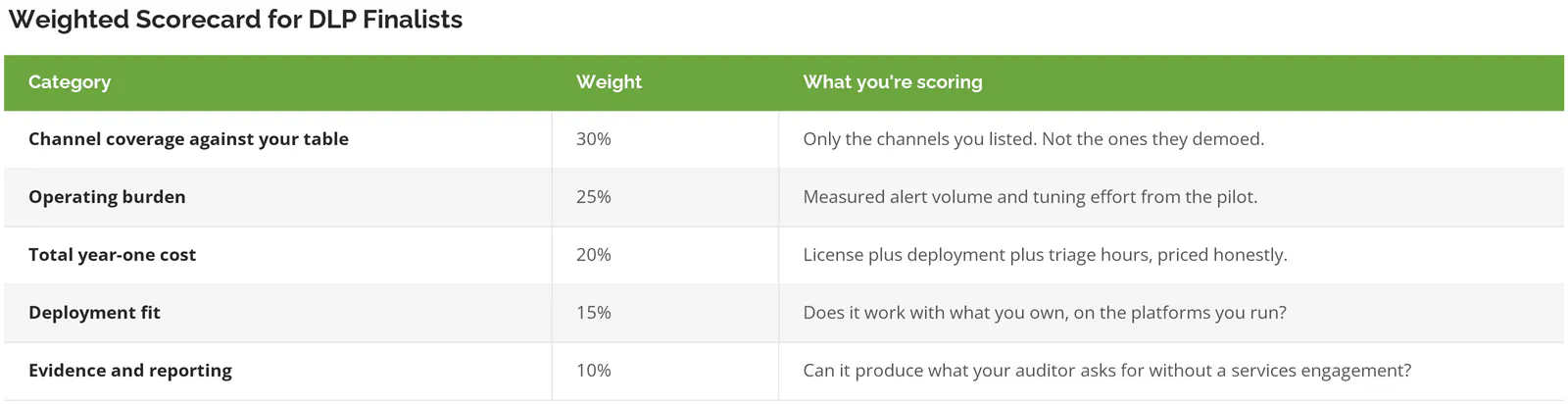
Score the pilot, not the demo. And score against the requirements table you wrote in week one, not the version the vendor helpfully reshaped somewhere along the way. Watch for that.
The Contract Terms Worth Arguing About
Four terms matter more than headline price. Renewal caps, what counts as a licensed unit, included tuning hours, and how you get your data out. Each one is cheap to fix before signature and expensive afterward. Very expensive.
Renewal pricing. Get a cap in writing for at least the second and third year. DLP is sticky by design, because a policy set you spent six months tuning doesn't port to a competitor. Nothing ports. Vendors know this perfectly well. Price your renewal before you're locked in, not after.
Then there's the question of what you're actually being counted on. Users or devices? A 200-person company where half the staff carries both a laptop and a phone can find itself licensed for 300 units, a 50% surprise nobody modeled. Get contractors, service accounts, shared workstations, and virtual desktops written into the agreement, not into an email from a sales engineer who may not work there next year. Paper, not email.
Included tuning hours are the single most negotiable line in the deal, and the one buyers forget about. Ask for a specific number of professional services hours through the first 90 days, in the contract, at no extra cost. It's also the term most likely to decide whether the program is still running next summer.
Last one is the exit. Policy export format, match history retention, and what happens to your evidence when you stop paying. In a regulated environment, ask early how the vendor handles data destruction on termination and whether they'll certify against NIST SP 800-88, the federal standard for securely wiping data from storage media. Nobody volunteers it.
None of these are exotic asks. They're just the ones nobody thinks about during a demo, because a demo is about detection and a contract is about the next three years.
Before You Sign Anything
Run it in this order and the process holds up. Requirements table first, licensing check second, so you learn whether you need to buy at all. Then a two-week pilot on synthetic data with exit criteria written down in advance, then a weighted score, then the four contract terms. Skip to demos and you'll buy a product that solves whichever problem the vendor is best at rather than the one sitting in front of you.
Still have an empty cell where the alert owner's name should go? Solve that before spending a dollar on licensing. Somebody has to look at what fires, whether that's a person on your team or an outside one. No exceptions. If building that function internally isn't realistic, it's what managed cybersecurity services exist to cover.
Speak to a Data Security Expert. Partway through a DLP evaluation and want a second read on your requirements or the quotes in front of you? Start a conversation with our team.