SSO vs MFA vs IAM: How They Actually Fit Together
IAM decides who gets access. SSO decides how often they log in. MFA decides how confident you are that it's really them. They aren't competing products. They're three layers of one system, and they fail in different places. Three vendors. Three quotes. Three acronyms that all seem to describe the same thing, and one budget that has to cover whichever one you pick.
Table of Contents
That's where a lot of executives are sitting right now. Someone recommended MFA after a phishing scare. Someone else said SSO would cut the password reset tickets in half, and then a third quote showed up with identity and access management services on the cover carrying a number roughly three times larger than the other two. The important part didn't make it into any of the proposals. You're not choosing between these. They answer different questions, and buying them out of order is how a company ends up with excellent locks on a building where nobody tracks who still has keys.
Three Acronyms, Three Different Questions
IAM governs who should have access at all. SSO governs how often a user has to prove it. MFA governs how strongly they prove it. One is a policy question. The other two are login questions.
That split isn't marketing language. It maps to a distinction that's been sitting in federal identity guidance for years. NIST SP 800-63 separates authentication, which is proving you're who you claim to be, from authorization, which is deciding what you're allowed to reach once you've proven it. MFA and SSO both live on the authentication side. IAM owns authorization, plus the entire lifecycle around it, meaning who gets an account in the first place, what that account is allowed to touch, and what happens to all of it the day the person resigns.
The SSO vs MFA question is the wrong one to start with, because those two are answering the same half of the problem. Ask all three questions in plain English and the confusion falls apart.
- Should Maria in accounts payable be able to open the payroll system at all? IAM question.
- Maria opened 11 applications today. How many times did she have to type a password? That one's SSO.
- Someone is typing Maria's password at 2:40am from a home internet connection three states away. Is that actually Maria? MFA.
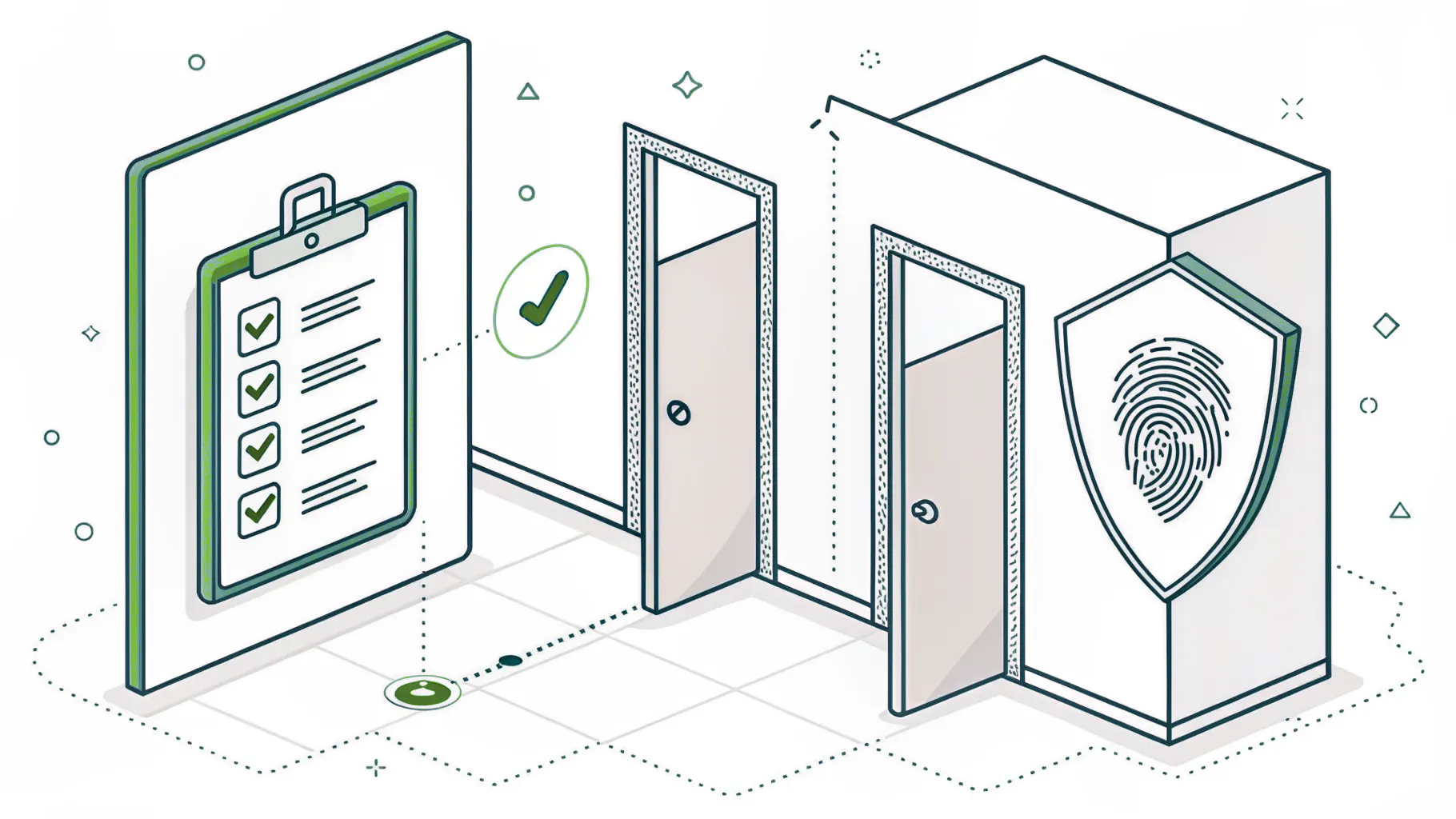
Different questions, different ways to fail. A company can answer the second and third perfectly and still be wide open on the first, which is exactly why we broke the governance layer out into its own piece on what IAM actually covers.
What Each One Actually Does
Short version, because you've probably read four takes on each definition already.
MFA asks for a second proof beyond the password. A texted code, a push approval, a fingerprint, a hardware key on your keyring. And it works. A peer-reviewed measurement study of Azure Active Directory accounts found MFA cut the risk of account compromise by 99.22%, and by 98.56% for accounts whose passwords had already leaked. Microsoft found that convincing enough to make MFA mandatory for Azure sign-ins, which is the short explanation for why the control now appears on nearly every cyber insurance questionnaire and client security review your finance team gets handed. The mechanics are in our breakdown of how MFA works.
SSO means one login session carries across many applications. Your team signs in to the identity provider once, meaning the system that holds the master login, usually Microsoft Entra ID or Okta, and from there Salesforce, Slack, and the ERP all accept that session instead of asking for a password again. Fewer passwords. Fewer reset tickets. Fewer sticky notes under keyboards. We walked through the mechanics in single sign-on explained.
The least exciting of the three by a wide margin is IAM, the system of record for identity. It creates accounts, decides what each role can reach, reviews those assignments on a schedule, and takes them away. It's also the only one that has anything to say about the day someone quits.

Look at that last column on the first two rows. Neither SSO nor MFA has any view on whether an account should exist, so they handle the login for accounts that already do, and they handle it just as cheerfully for the sales rep who left in March.
Why Companies Buy Them in the Wrong Order
The usual sequence runs MFA, then SSO, then nothing.
MFA lands first because it's the checkbox. The insurance renewal asks. The auditor asks. The client security questionnaire asks. So it gets switched on, usually for email, sometimes only for email, and the box gets ticked. Everyone moves on.
SSO arrives second because the help desk is drowning in password resets and someone finally does the math on what those tickets cost. Reasonable purchase. Real payback.
Then it stops. IAM never gets bought, because nobody files a ticket for it. Nothing breaks when access governance is missing. Nothing at all, right up until it does.
Access only ever accumulates. Someone moves from operations to finance and picks up finance permissions, but the operations permissions stay, because removing them wasn't on anyone's checklist and nobody wanted to be the person who broke a workflow during month-end close. Multiply that across five years and a few dozen role changes. Then look at what happens when people leave entirely. A 2022 Beyond Identity survey of 1,121 workers and business leaders found that 83% had kept using accounts from a previous employer after walking out the door.
83%. On accounts that sail straight through MFA, because they're real accounts with a real second factor still registered to a real phone.
They did buy security. They bought two good products. They just bought the two that assume the access list is already correct, and if you're ready to fix the layer sitting underneath both of them, the practical starting moves are in IAM best practices for growing companies.
What Happens When SSO Is the Only Layer
SSO turns one compromised login into access across every connected application. That's the tradeoff, stated plainly. Convenience and blast radius are the same feature seen from two directions.
On October 30, 2025, an attacker got into a single employee's PennKey single sign-on account at the University of Pennsylvania, and from that one login they reached the VPN, then Salesforce Marketing Cloud, Qlik, SAP business intelligence tools, SharePoint, and Box. Data on roughly 1.2 million people was gone inside about a day, and the attacker used the marketing platform to blast emails from legitimate Penn addresses to around 700,000 recipients. One account.
Penn is a university with a full security team and a budget to match. That's exactly why it's the example here.
Cisco Duo has a name for the structural version of this problem, identity provider concentration risk. Every authentication decision in the business depends on one provider, which means that when that provider has a bad morning, every employee in the company is locked out of every application at the same moment. And if it gets compromised, the attacker can issue login tokens that every connected application will honor, because those applications were built to trust whatever the identity provider says.
None of which is an argument against SSO. SSO with strong controls beats 40 separate passwords by a distance no honest person disputes. It's an argument against SSO as the only thing you did.
Which Layer Stops Which Attack
Abstract layer diagrams don't help anyone approve a budget. Attack scenarios do.
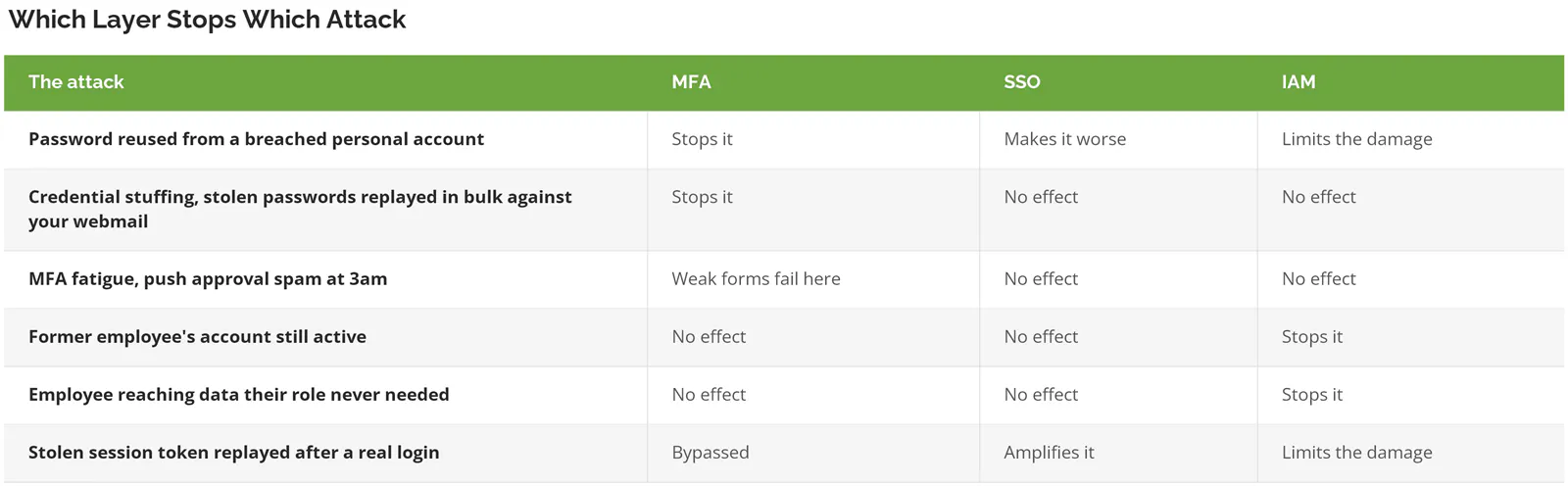
Two rows where MFA is the only control that matters. Two where only IAM helps. One where the answer is grim across the board, and we'll come back to that one.
The MFA fatigue row deserves a note, because that's the attack where the form of MFA you chose decides the outcome. Push notifications and texted codes can be worn down or intercepted. CISA recognizes only two categories as genuinely phishing-resistant, FIDO/WebAuthn, which covers passkeys and hardware security keys, and certificate-based authentication, meaning a digital certificate issued to the device or the person rather than a code anyone can be tricked into repeating, which leaves everything else on the market better than a password by itself and meaningfully worse than those two. Worth knowing before you sign. We wrote about the fatigue attack itself in MFA bombing and how to fight it.
The Attack That Beats All Three
An adversary-in-the-middle attack sits a fake login page between your employee and the real one. They type the password. They approve the MFA prompt. Everything works, and everything is stolen.
What the attacker takes isn't the password. It's the session token, the small file the identity provider hands your browser after a successful login to say this person is verified, stop asking, and stealing that token means inheriting the verified session outright. No password needed. No MFA prompt, because as far as the system is concerned the MFA already happened. Obsidian Security has good detail on how these attacks run in practice.
Then SSO does exactly what you paid it to do and carries that session into every connected application.
This used to take skill. Now it's a kit. Evilginx, Tycoon 2FA, and Mamba 2FA are sold as ready-made phishing infrastructure, which is why token theft moved from rare to routine in about two years. The 2026 Verizon Data Breach Investigations Report changed the top of the list, by the way. Vulnerability exploitation overtook stolen credentials as the top way into a breach at 31%, the first change at the top in 19 years. Credentials didn't stop mattering. They stopped being how attackers get in, and became how attackers spread once they're already inside. Credential abuse still shows up in 39% of full breach chains.
Which changes what you're buying these three layers for. You're not just buying a stronger front door anymore. You're buying containment, and containment is an IAM job with SSO session controls sitting on top. Shorter token lifetimes. Re-authentication when a device or location changes. Sign-in policies that check the health of the device before honoring the session at all, so that a stolen token pulled from an unmanaged laptop in another country doesn't quietly inherit the same trust your controller's company machine gets. That's the same principle behind the zero trust security model, applied to the one thing an attacker is guaranteed to touch.
What to Do First, Second, and Third
For a company running 20 to 500 users, the order that actually works looks like this.
- Write down who has access to what. Not a project. A spreadsheet, one afternoon, every application and every person in it. The gap between what leadership assumes and what the export shows is where this whole conversation starts making sense.
- MFA on everything, phishing-resistant on the accounts that matter. Email is not the finish line. Domain admins, finance approvers, and anyone who can move money get hardware keys or passkeys, not push notifications.
- SSO across the applications people actually live in, with session lifetimes set deliberately rather than left at the vendor default, and re-authentication triggered on new devices.
- A real process for joiners, movers, and leavers. This is the unglamorous one. It's also the one that closes the two rows in that table nothing else touches.
- Quarterly access reviews where a manager, not IT, confirms their people still need what they have. 90 minutes a quarter. Removes more risk than most tools you'll buy this year.
If you're a 15-person firm running four cloud applications, this is more structure than your risk justifies. A password manager, MFA on everything, and a written checklist for the day someone leaves will cover you. Come back to this when headcount passes 50 or when a client's security questionnaire starts asking how you review access. No sooner.
Consilien builds and runs this layer for companies with 20 to 500 users, mostly in manufacturing, distribution, professional services, and real estate management, where the problem is rarely a missing tool and almost always a missing structure around the tools already in place. It's usually delivered as part of managed cybersecurity services rather than as a standalone identity project.
The Decision in Front of You
You don't have three options. You have three layers, and the one your company is most likely missing is the one no vendor called you about.
MFA proves the person is real. SSO decides how often they have to prove it. IAM decides whether that person should have been on the list in the first place, and takes them off it when they shouldn't be. Buy MFA first, because the data on it is overwhelming. Add SSO with session controls, not SSO alone. Then build the governance layer, because it's the only one that answers for the accounts nobody is watching.
If your team is holding three quotes and can't tell which one closes a real gap, start with the access list. Export every user from every system, put it in front of leadership, and see how many names nobody recognizes. That conversation answers the buying question on its own. Usually within an hour. Speak to an identity security expert if you'd rather have someone run that review with you.