Passwordless Authentication: A Practical Rollout Guide
Passwordless authentication lets employees sign in with a passkey, Windows Hello, or a security key instead of a password. A rollout works when you fix account recovery first, match the method to user risk, and retire legacy logins.
Table of Contents
Microsoft has put a date on the text message code. Under its July 2026 Entra ID announcement, the SMS and voice sign-in checks Microsoft provides stop on February 1, 2027, and since September 1 anyone still relying on them gets nudged to register a passkey during sign-in. Entra ID sits underneath Microsoft 365, so the change reaches any Microsoft 365 company still using text or voice codes.
That turns passwordless authentication into a scheduling question. It's one piece of the program our identity and access management services cover, alongside single sign-on and access reviews, and this guide stays on the rollout itself. Signing in is easy. Rollouts go sideways around the edges, with the phone that gets dropped in a parking lot, the help desk call from someone who sounds exactly like your controller, and the office copier that still emails scans using a password somebody typed in six years ago.
What Is Passwordless Authentication?
Passwordless authentication verifies a person without asking for a password. The employee opens a credential stored on their device with a fingerprint, face scan, or PIN, and the device proves who they are to the sign-in service.
You'll run into passkeys first. When someone registers one, their device creates a matched pair of cryptographic keys. The service keeps the public key, which is worthless to a thief. The private key stays on the device, locked behind that fingerprint or PIN, and nobody ever types it, emails it, or reads it aloud to a caller.
Passwords work differently. A password is a secret shared between you and every service you log into, so it can leak from your end, from theirs, or from a fake login page in between. A passkey behaves more like a signature only your device can produce, and only for the one website it was created for. Passkeys are built on FIDO2, an open standard from the FIDO Alliance, and on WebAuthn, the part of that standard already built into Chrome, Edge, Safari, and Firefox.
NIST's current digital identity guidelines name the property that matters here. They call it phishing resistance, meaning the sign-in process won't hand a valid response to an attacker posing as the real site, and it doesn't depend on the employee spotting the fake. That's the important half. People miss lookalike pages every day, and a passkey never gives them the chance to.
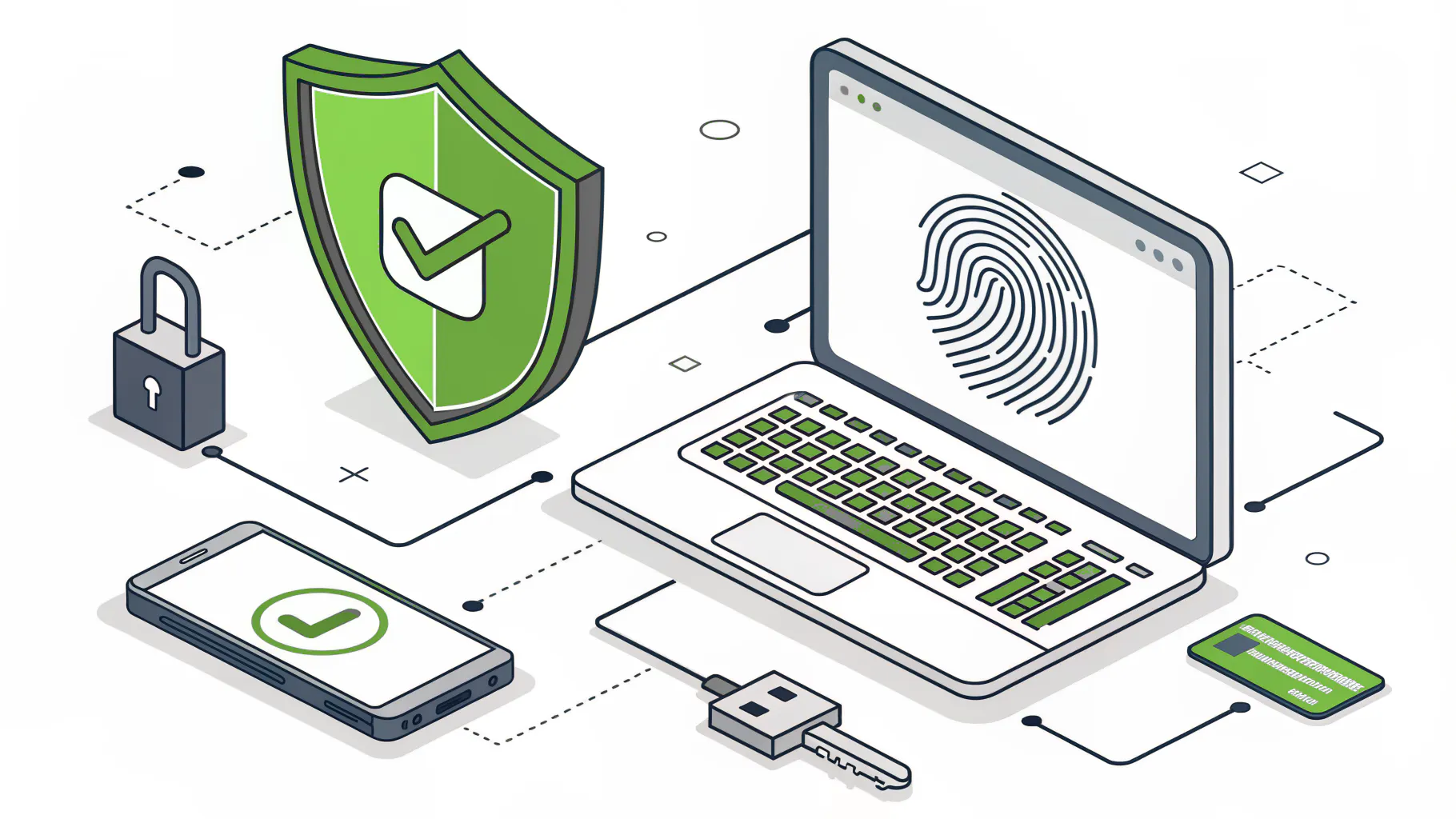
Passkeys come in several forms. Windows Hello for Business keeps one on a company laptop. Microsoft Authenticator can hold one on a phone. A FIDO2 security key, a small USB or NFC device like a YubiKey, holds one on a keychain. Okta customers get the same idea through Okta FastPass.
Is Passwordless the Same as MFA?
It's a stronger form of it. A passkey combines something you have, the device, with something you are or know, a fingerprint or PIN, so one gesture covers both factors. Traditional MFA stacks a code on top of a password.
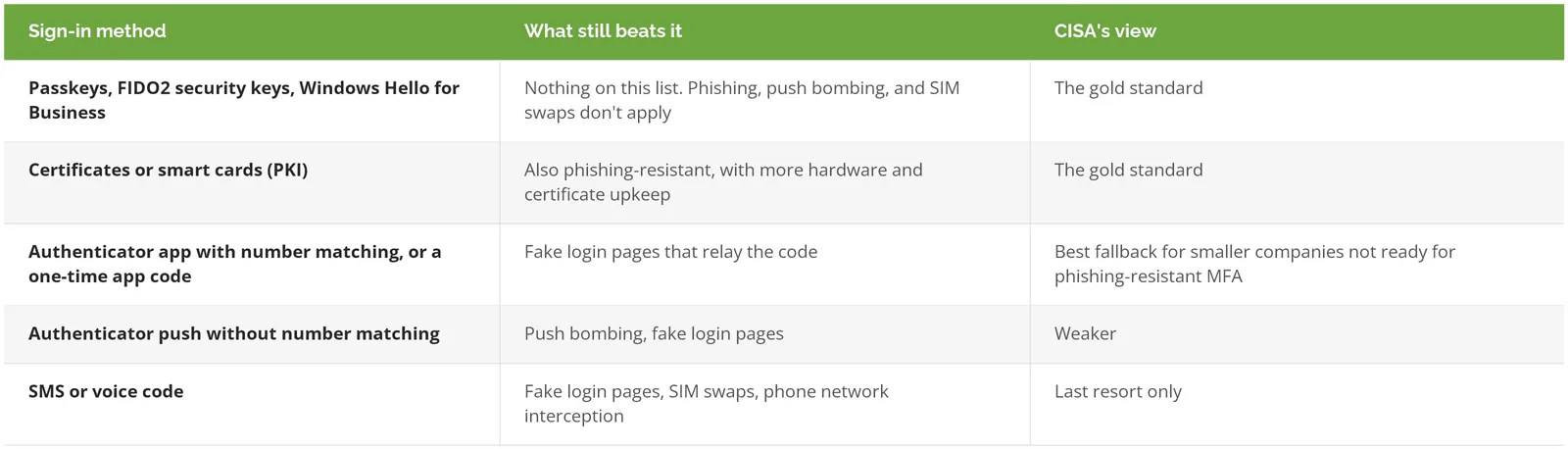
That gap sounds small until you look at how traditional MFA actually gets beaten. CISA's fact sheet on implementing phishing-resistant MFA describes the most common version. An employee lands on a fake login portal, enters a username and password, then types in the 6-digit code from their authenticator app, and the attacker relays all of it to the real site within seconds. MFA did its job. It just did it for the wrong person.
Push notifications have their own problem, called push bombing, where an attacker triggers approval requests until a tired employee taps Accept. Our write-up on fighting MFA bombing covers that one in detail. Text message codes can be stolen through a SIM swap, where a criminal talks a phone carrier into moving your number to their SIM card.
CISA ranks the options from strongest to weakest, and the order is worth taping to a monitor.
If the factors themselves are still fuzzy, start with our explainer on what multi-factor authentication is, then come back here.
Why Is This Landing on Your Desk Now?
Attackers are still mostly going after passwords. Microsoft's 2025 Digital Defense Report found that more than 97% of identity attacks are password attacks, and that phishing-resistant MFA stops over 99% of that type. Password spraying, where an attacker tries a few common passwords against thousands of accounts, is boring work. It keeps paying.
Standards caught up too. NIST's 2025 revision of its authentication guidelines accepted synced passkeys at AAL2, its middle assurance level, which removed the old objection that passkeys were a consumer convenience with no formal standing. And the phishing itself got better. In that same July announcement, Microsoft said AI-assisted phishing campaigns reached click-through rates as high as 54%, against roughly 12% for traditional ones. More than four times the rate.
Then there's the calendar. After February 1, 2027, a company that still wants text codes in Entra ID has to bring its own telecom provider, which Microsoft says admins can configure starting October 30, 2026. Larger companies are already moving. In a FIDO Alliance survey of 400 decision-makers at U.S. and UK companies with 500 or more employees, 87% had deployed or were deploying passkeys for employee sign-ins.
Which Passwordless Method Fits Which Employee?
Match the method to the damage an account could do. Synced passkeys suit general staff, Windows Hello for Business suits company laptops, and admins get device-bound passkeys on a security key or in Microsoft Authenticator.
Where the private key lives decides it. A synced passkey is encrypted and backed up to the employee's passkey provider, such as iCloud Keychain or Google Password Manager, so it follows them to a new phone. A device-bound passkey never leaves the one device that made it. Lose the device and that passkey goes with it.
Both are phishing-resistant, and the tradeoff between them is copyability. Because a synced passkey can be copied between devices, NIST says syncable authenticators shall not be used at AAL3, its highest assurance level. Microsoft lands in the same place. Its synced passkey guidance treats them as a sound fit for users outside highly regulated environments and points admins and highly privileged users toward device-bound options. Synced passkeys also don't support attestation, the check that confirms which device or provider created a passkey, so you can't restrict where employees store them.
Security keys aren't free of cost, either. Microsoft's passkey documentation notes they add expense for equipment, training, and help desk time, mostly when someone loses a key and needs their account recovered. That's a fair price for a global admin. For a receptionist, rarely.
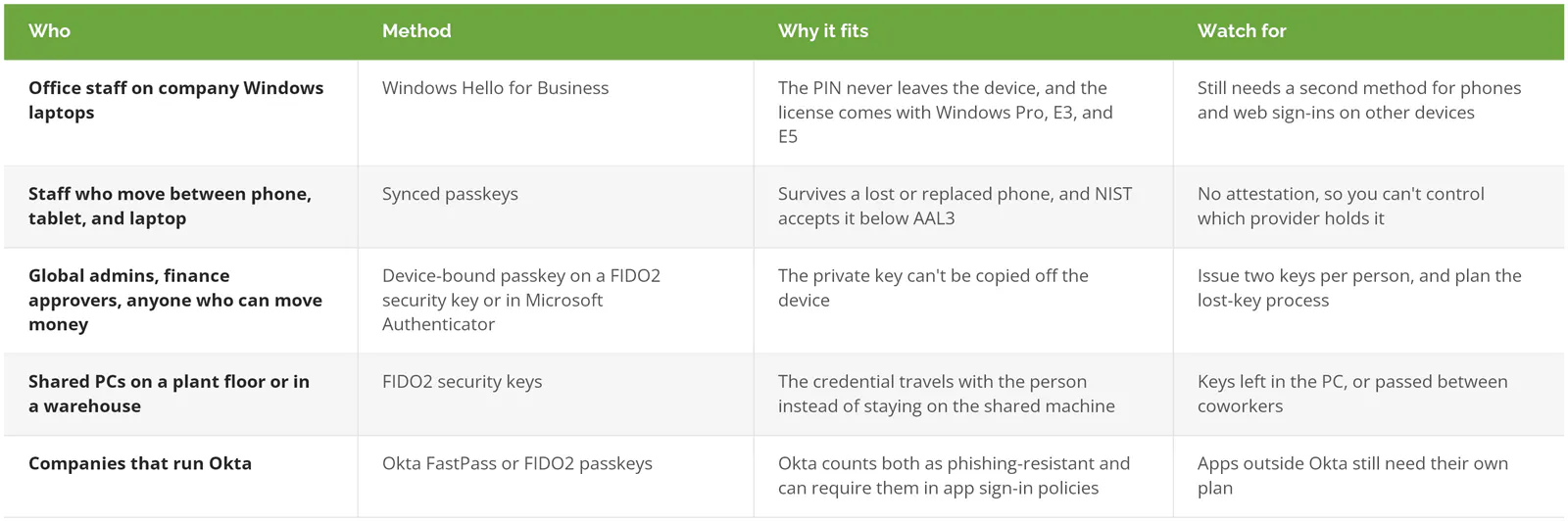
Windows Hello for Business deserves a word of its own, because it may already be licensed on your laptops. It ties a key to the laptop's security chip, and Microsoft notes the PIN never leaves the device and has built-in protection against guessing. A short PIN that only works on one physical laptop is a very different thing from a short password that works from anywhere in the world. Okta shops can get similar coverage with FastPass or FIDO2 passkeys, both of which Okta classifies as phishing-resistant.
Admin accounts get the strongest option first for a simple reason. They can undo everything else. Our IAM best practices for smaller companies cover the rest of locking those accounts down, from least privilege to removing standing access.
Fix Account Recovery Before You Enroll Anyone
Recovery is where passwordless rollouts get attacked. If a caller can talk your help desk into resetting their sign-in method, the passkey never mattered. Decide how you'll verify identity before the first employee enrolls.
This isn't theory. CISA's advisory on the Scattered Spider group describes its members posing as employees to convince help desk staff to reset passwords and move MFA to a device the attackers control. No exploit required. A phone call did it.
Help desks are built to get people working again fast, which is a reasonable goal, and it's precisely the instinct a social engineer counts on. Take a hypothetical 140-person food distributor that's just moved everyone to passkeys. At 7 a.m. on a Monday, a caller tells IT they're the controller, their phone was stolen at the airport, and payroll closes at noon. Everything they say checks out against what's on LinkedIn. If the technician issues a new sign-in method on the strength of that call, the attacker owns the controller's account, passkey and all, and the new sign-in system gets blamed for a process failure.
Build a recovery process that doesn't care how convincing the caller sounds.
- Use a Temporary Access Pass (TAP) instead of resetting a password. It's a time-limited code in Entra ID that lets someone register a new method. The default lifetime is one hour, and you can set it to one-time use.
- Verify before issuing it. Call back the number in your HR system rather than the one the caller gives you, or have the person's manager confirm on video.
- Would identity documents work better for your team? Microsoft Entra now supports account recovery through ID verification, where a third-party provider checks a government ID and a live face scan before the user gets a TAP, which takes the judgment call away from the technician entirely. It needs Entra ID P1, Face Check, and a paid subscription with the verification provider.
- Two emergency admin accounts, each on its own security key, stored somewhere physical.
- After any recovery, remove the old sign-in method from the account. Microsoft's own TAP guidance tells users who lost a device to do exactly that, and it's easy to skip.
Write the verification steps as a short script and tape it next to the phone. A technician under pressure at 7 a.m. will do whatever's fastest, and the script is what makes the safe path the fast one.
The Password Doesn't Leave on Day One
Enrolling a passkey adds a stronger way in. It doesn't close the old one.
Microsoft says this plainly in its TAP documentation. Users can continue to sign in with their password, and a TAP doesn't replace it. So after a successful enrollment week, every account still has a working password and, in some cases, a text code behind it. Attackers know this. Microsoft's passkey documentation specifically calls out downgrade techniques, where a phishing page pushes the user toward a weaker method the account still allows. The passkey never gets tested. The attacker just walks around it.
That's how a company ends up six months after launch with passkeys on every phone, a registration report full of green checkmarks, and a working password still sitting behind every single account.
The real finish line is enforcement, and enforcement stalls on the things nobody remembers are signing in. This usually starts as a reasonable shortcut and then quietly becomes part of the architecture.
Scanners and copiers are the classic example. A multifunction printer that emails scans through Microsoft 365 may well use SMTP AUTH, an older way of sending mail with a stored username and password. Microsoft's updated SMTP AUTH timeline turns that password-based method off by default for existing Microsoft 365 organizations at the end of December 2026, so those devices need attention either way. An older VPN that checks logins through RADIUS, the protocol firewalls use to ask a directory whether a login is valid, typically still expects a password too. So does the old ERP.
The CISA fact sheet has sensible advice for this group. Identify every system that can't do MFA, connect what you can through your identity provider and single sign-on, and escalate the risk of anything left over to senior leadership. That last step matters more than it sounds. It turns a quiet IT exception into a decision somebody with budget actually owns. Apps behind single sign-on inherit the passkey automatically, which is why our breakdown of how SSO, MFA, and IAM fit together is useful reading before you build the inventory.
How Do You Roll It Out Without a Flood of Lockouts?
In phases, over roughly 12 weeks for a company with 20 to 1000 users. Admins go first, a mixed pilot group second, and everyone else third. Enforcement comes last, after recovery and legacy logins are handled.
Registering passkeys and signing in with them doesn't require an extra license in Entra ID. Requiring them does. Microsoft's deployment planning guide recommends at least Entra ID P1, which adds Conditional Access, the rule engine that decides which sign-ins to allow and a core piece of zero trust security. P1 is included in Microsoft 365 Business Premium, so a company on that plan may already have it.
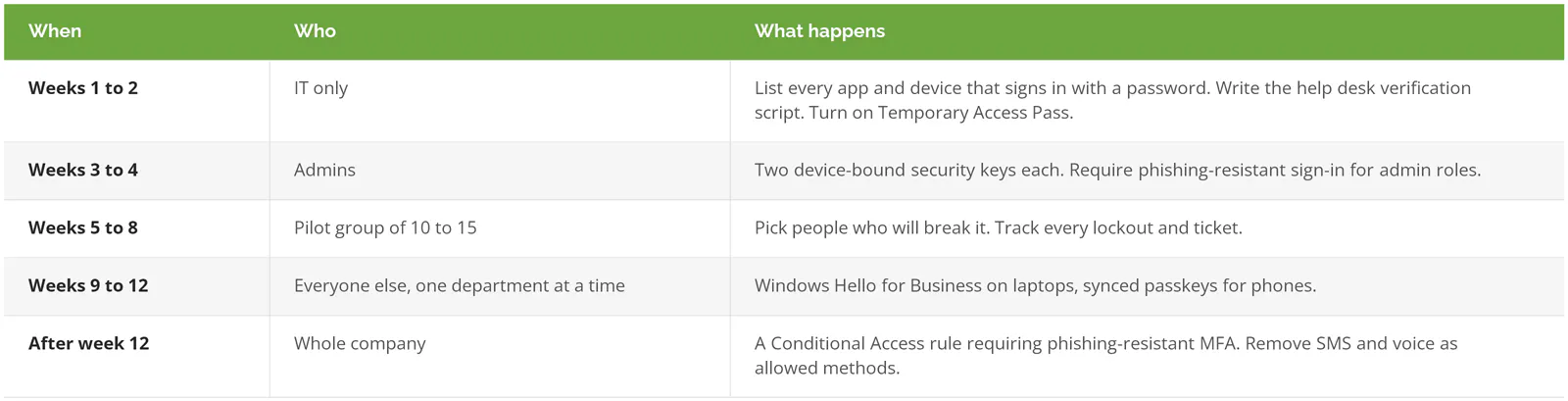
Who belongs in the pilot? Not the IT team's friends. You want the people whose days look least alike, like someone in accounts payable, a warehouse lead who signs in on a shared PC, a salesperson who lives on an iPad, an executive assistant who manages someone else's calendar, a remote employee two time zones away, and one person who openly dislikes change. If the rollout survives that group, it'll survive the company.
Weeks 9 to 12 are where momentum tends to fade. Entra ID's authentication methods activity report shows who has registered and who hasn't. Deadlines help. A department-by-department push with a real date tends to land better than one company-wide email.
What Breaks in the First Month
- My phone died. With a synced passkey, the new phone picks it back up from iCloud or Google. A passkey in Microsoft Authenticator doesn't come back, so that person needs a TAP and a fresh registration.
- New hires on day one have no registered method at all. Give them a TAP at laptop setup. On a laptop joining Entra ID, Microsoft lets them use it to finish setup and register Windows Hello for Business without typing a password.
- Passkeys saved to a personal Apple account. You can't stop that with synced passkeys. What you can do is disable the Entra account at offboarding, and the passkey becomes useless, because it only ever worked against your company's sign-in.
- What about the executive who only travels with an iPad?
- 81%. That's the drop in login-related help desk incidents in the FIDO Alliance's Passkey Index, but the data comes from consumer services like Amazon, PayPal, and Target, not from a workforce. Expect your tickets to climb during enrollment before they fall.
As for the iPad, the answer is boring. It's a synced passkey on the iPad plus a security key in the travel bag.
When to Wait
Some companies should wait a quarter. That's a reasonable call, and a better one than watching a rushed project get rolled back.
If some employees still sign in with only a password, turn on MFA for everyone first. CISA calls an authenticator app with number matching, where the employee types a number shown on the login screen into the app, the best option for small and mid-size businesses that can't move straight to phishing-resistant MFA, and it's a much smaller change for people to absorb.
A core business system that only accepts passwords, with no single sign-on path, is the other reason to pause. Sort out the plan for that system before enforcement, or you'll end up carving out an exception that covers half the company.
Companies under 20 users on Business Basic or Standard, without P1, can register passkeys but can't require them. Start with the admin accounts. The full project can wait until the license question is settled.