What to Expect From an IT Risk Assessment (And Why Most Are Incomplete)
Expect a few weeks of interviews, scans, and document review, then a report ranking risks by business impact, with an owner and budget for each fix. If it skips cloud apps, backup restores, admin accounts, or vendors, it's incomplete.
Table of Contents
What to expect from an IT risk assessment depends on who's doing it, and that's the problem. Two firms can sell the same label and deliver opposite things. One sends a 60-page export from a scanning tool, sorted by severity, with no idea which of those findings could actually stop your business. The other sits down with your controller, asks how payroll gets approved, and finds the one admin account nobody has touched since 2021.
Both get called an assessment. Only one is useful.
An IT assessment is a structured review of your systems, security controls, policies, and processes, done to find the risks that would hurt the business before they turn into an outage, a denied insurance claim, or a failed audit. The part worth your time is the six places an incomplete assessment quietly stops looking.
You can't judge a report by its page count.
What happens during an IT risk assessment?
An IT risk assessment runs in four stages. Scoping the engagement, gathering evidence through interviews and scans, analyzing and scoring what turned up, and briefing leadership on a prioritized plan. Your team's time is heaviest in the first two.
Those stages map closely to the federal method. NIST SP 800-30 Rev. 1, the government's guide for conducting risk assessments, breaks the work into prepare, conduct, communicate, and maintain. It was written for federal agencies in 2012. It has aged well. The logic of risk hasn't changed, only where your data lives.
We run ours in four steps too. Engage, Assess, Report, Roadmap.

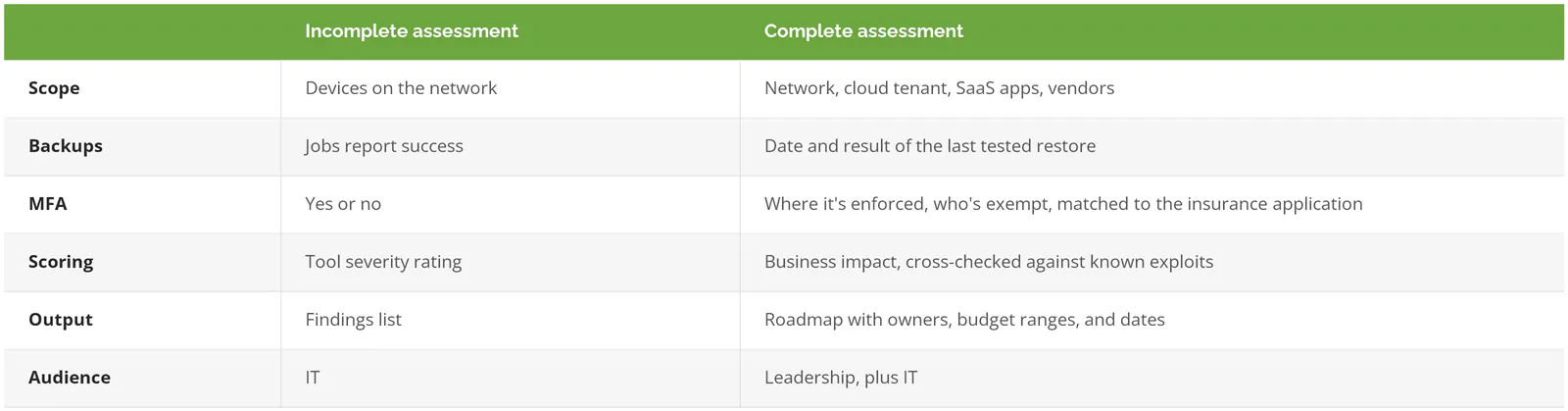
Look at that last row. Not just IT. If the person who signs off on budget never sees the findings, the report goes into a shared drive and dies there.
How long? For a single-office business, plan on a few weeks from kickoff to the final briefing. More locations add time, mostly travel and scheduling.
What will they ask you for?
Paperwork first. Lots of it. A good assessor sends a request list before anyone shows up, and how fast you can answer it is itself a finding.
Pull these together and the engagement moves faster:
- A list of everyone with admin rights, in Microsoft 365, on servers, on the firewall, and in your line-of-business apps
- Your vendor list. Especially anyone with remote access, like the copier company, the phone system installer, or an ERP consultant (the person who supports your core business system) who logs in twice a year
- The last cyber insurance application you signed. Yes, the actual form
- Backup reports, plus the date of the last time someone restored a file to prove it worked
- An org chart, so the assessor knows who approves what
- Anything that went wrong in the last 12 months, even the small stuff
Can't find half of it? That's normal, and it tells the assessor something. A company that can't produce an admin list in a day usually doesn't know how many admin accounts it has, and the forgotten ones are exactly the accounts nobody is watching for strange logins.
Expect interviews too. Short ones. Usually under an hour each, with the people who run finance, operations, and IT. The questions sound simple. Who can change a vendor's bank details? What happens if the file server is gone on Monday morning? How does someone's access get removed when they quit?
What does an IT assessment include?
Done properly, an IT assessment reviews security controls, infrastructure, IT management, backups and recovery, insurance readiness, and compliance readiness. The good ones score every gap by what it would cost the business, not by how alarming it looks on a scan.
Ours cover five areas. A cybersecurity posture review, led by our CISO (chief information security officer). An infrastructure and IT management review covering policies, vendor management, documentation, and governance, led by our CIO (chief information officer). Insurance alignment, meaning what an underwriter will ask and whether your honest answers hold up. Disaster recovery and processes. And compliance readiness, which is scoping, not certification.
Be precise about that last one. It trips people up. A general assessment can tell you whether you're anywhere near ready for SOC 2, CMMC, or ISO 27001. It won't get you there. Compliance work is its own engagement.
Running your own assessment instead? The step-by-step cybersecurity risk assessment process covers the method in detail. This guide is about the other side of the table, when you're the one paying for it.
Why are so many IT risk assessments incomplete?
Because the easy-to-scan parts of a network get assessed and the hard parts don't. Scanners see devices on your network. They don't see the SaaS apps (software you log into through a browser) your team signed up for, whether a backup actually restores, or which vendor still has a login.
Is that laziness? Rarely. It's scope. An assessor quotes a fixed fee, the fee covers a network scan and a questionnaire, and anything outside the network becomes somebody else's problem. You find out whose problem it was later, usually at the worst possible moment, when an insurer, a customer's security questionnaire, or an attacker finds the exact thing the fixed-fee scope left out.
Six gaps in particular.
Cloud and SaaS apps the scan never touches
Your network scanner checks what's plugged into your network. Your accounting platform, your CRM, the file-sharing app sales uses, and the AI tools people signed up for with a work email all live somewhere else. IBM's 2026 Cost of a Data Breach Report found shadow AI (AI tools used without IT's approval) involved in 43% of security incidents, up from 20% the year before. Ask your assessor how they plan to inventory the apps that aren't on the network, whether that means pulling sign-in logs from Microsoft 365, reviewing expense reports for software subscriptions, or asking each department what they use. If the answer is a blank look, that's your answer.
Backups that report success
Green checkmark in the backup console? That means the job ran. It doesn't mean you can get the data back. CISA's #StopRansomware Guide tells organizations to keep offline, encrypted backups and to regularly test their availability and integrity in a disaster recovery scenario. Testing is the step that gets skipped. It's also the only one that proves anything.
Proof of a restore is what a complete assessment asks for. A date, a file, a server, how long it took. If the assessor takes the backup console at its word, they assessed the console, not your recovery. Our guide to disaster recovery testing covers what a real test looks like.
Admin accounts and MFA exceptions
This one costs real money. In 2022, Travelers asked a federal court to rescind a cyber policy it had issued to International Control Services, after a ransomware attack revealed the company's MFA (multi-factor authentication, the second login step) protected only its firewall. The application had said MFA was in place for administrative access. The parties agreed to void the policy from inception.
No policy, no coverage.
Weak assessments ask whether you use MFA and check a box. A complete one asks where it's enforced, who's exempt, and why. Then it compares the answer to what you told your insurer. Our 2026 cyber insurance requirements checklist lists what underwriters are probing for now.
Vendors with a key to the building
The same IBM report ranks supply chain compromise, an attacker getting in through a business partner, as the second most common way breaches start, at an average cost of $4.96M and 258 days to find and contain. Your IT provider, your payroll processor, and the HVAC company with remote access to the building controls all count, and so does the software vendor that pushes updates into your environment every month while nobody on your side watches. If the assessment never asks for your vendor list, it never looked at this risk. A proper third-party risk management program picks up where the assessment leaves off.
Findings scored by severity instead of impact
Scan tools grade every finding on a technical severity scale. A critical rating on an unused test server outranks a medium one on the machine that runs payroll. Backward.
Useful assessments rerank by business consequence. They also check findings against CISA's Known Exploited Vulnerabilities catalog, the government's list of flaws attackers are actively using, since a medium-rated hole that's being exploited in the wild beats a critical one nobody has figured out how to use. Ask to see one finding where the assessor overruled the tool's rating. No example? Then nobody did any judging.
No owner, no budget, no date
The last blind spot is the report itself. A list of 140 findings with no owners is a to-do list nobody will do. Every item in the top tier should name who fixes it, a rough cost range, and a quarter. End-of-life hardware is a good test. Windows 10 reached end of support on October 14, 2025, so any assessment this year that finds those machines should come with a replacement plan and a number, not just a red cell in a spreadsheet.
Is it a scan or a real assessment?
Ask what the deliverable is. A scan produces a list of technical weaknesses, generated by software in an afternoon. An assessment produces judgment, a ranked set of business risks someone has interpreted, plus a plan.
Both have a place. A vulnerability scan is a fine monthly habit. It's just not an assessment, and neither is a formal audit, which tests controls against a standard so a third party can rely on the result. Our ranking of the best IT assessment firms covers the assessment versus audit question in more depth, including when you need a signature instead of a roadmap.
What should the final report look like?
Short at the top. Detailed underneath. A 1- or 2-page executive summary leadership can read in 5 minutes, a gap analysis scored by business impact, prioritized fixes, and the evidence your insurer or auditor will ask for.
Then a briefing. Don't skip it. In person or on a call, with the person who led the work walking your leadership team through it. Ours are led by our CIO or our CISO, depending on scope. The briefing is where the hard questions get asked. Can this wait until next year? What happens if we only do the top 3? Which of these is actually urgent and which is just ugly?
Good reports also tell you what you don't need. If your backups are tested, your MFA is enforced everywhere, and your vendor access is locked down, the honest answer is that you're in decent shape and the money should go elsewhere. An assessor who finds a crisis in every environment is selling remediation.
Two related reads if you're budgeting. Our breakdown of how much an IT assessment costs covers pricing tiers and how to read a quote. And if the roadmap is the part you want help building and running, that's what technology roadmap consulting is for.
Got a full-time CISO and an internal security team that already tests restores and tracks vendor access? You probably don't need an outside assessment every year. A targeted review of one area, or a penetration test, will tell you more for the money.
What happens after the assessment?

The roadmap becomes a working list. Not a trophy. Quick wins in the first 30 days, usually MFA gaps, stale admin accounts, and a real backup test. Bigger items, like replacing end-of-life hardware or segmenting a flat network (splitting it up so one infected laptop can't reach everything), get scheduled into the budget.
Then, a year later, you do it again, but faster. An annual IT risk review starts from last year's findings instead of from scratch, and it's where you find out whether anything on the roadmap actually got done. Go back to a full assessment when the business changes shape, whether that's a new location, an acquisition, a move to a new ERP system, or a new IT provider taking over the keys from the old one.
And keep the report. Seriously. Your next insurance renewal will ask questions it already answered.
If you want an assessment that covers the cloud, the backups, the admin accounts, and the vendors, not just the network, speak to an IT expert. Bring your last insurance application.