How Much Does an IT Assessment Cost? (2026 Pricing Guide)
A general IT assessment usually costs $1,000 to $5,000 for a single-office business. Multi-site environments, server-heavy networks, security testing, and compliance work push the price higher. Free assessments exist too, but they cover far less.
Table of Contents
How much does an IT assessment cost? Less than the problems it finds, usually. But the number on the quote depends almost entirely on what the provider plans to look at, and two quotes for "an IT assessment" can describe completely different jobs. Same label on the quote. One is a 2-hour network scan. The other is a week of interviews, on-site visits, and a written roadmap your CFO can budget from.
So before you compare prices, figure out which job you're buying. Our own IT assessments start at $1,000 and scale with on-site hours, server count, and scope. That's one data point. The rest of this guide covers the full market, from free scans to compliance audits that pass $50k, and what each tier actually gets you.
What does an IT assessment cost in 2026?
An IT assessment costs anywhere from $0 for a sales-funnel scan to $50k+ for a compliance audit. The general business IT assessment, the one that reviews your whole environment and hands you a plan, sits at $1,000 to $5,000 for a typical single office.
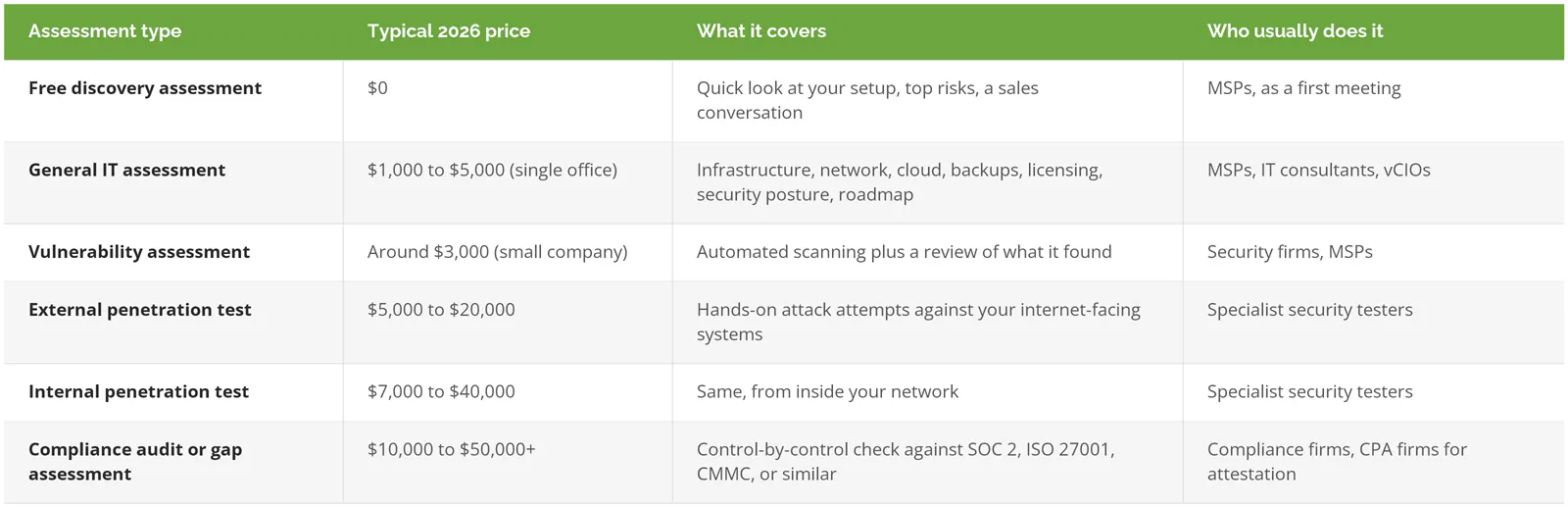
The security numbers come from two testing firms. Qualysec's 2026 audit pricing guide puts a basic small-company vulnerability assessment around $3,000 and compliance audits at $10,000 to $50,000+. DeepStrike's 2026 pentest pricing breakdown gives $5,000 to $20,000 for external tests and $7,000 to $40,000 for internal ones, and adds a warning worth taping to your monitor. Under $4k, you're usually buying an automated scan, not a real penetration test.
Notice where the general assessment lands. Lowest starting price of the paid rows. It's also the only one on the table that looks at the whole business instead of one slice of it, which is why it usually comes first and the pentest or compliance audit comes later, once you know where the real exposure is.
What are you actually paying for?
You're paying for someone's time to inventory your environment, test it against a standard, and turn the gaps into a ranked plan. Software handles a chunk of the scanning. The interviews, the judgment calls, and the roadmap take a person, and that's where the hours go.
Security is one piece of it. A real IT assessment walks through six areas.
- Infrastructure, meaning servers, switches, firewalls, and Wi-Fi, each with the date it stops getting vendor support.
- The network. Can the guest Wi-Fi see the accounting server? It happens more than you'd think.
- Cloud and Microsoft 365, including licensing, sharing settings, MFA (the second login step after your password), and the admin accounts nobody remembers creating.
- Backups. Whether they run is the easy part. How long a restore takes, and when anyone last tested one, is the part that matters.
- Lifecycle. Microsoft ended Windows 10 support on October 14, 2025, so any PC still running it is either paying for extended updates or sitting there unpatched.
- Security posture, scored against something like the NIST Cybersecurity Framework and its six functions, Govern through Recover.
If security is your main worry, I broke down what a cybersecurity assessment includes and costs on its own.
The person running it matters as much as the checklist. Ours are led by our CIO or our CISO (chief information security officer), depending on scope, with both on-site and remote review. Hand a junior tech a scanning tool and you'll get a 60-page report back. You won't get told which 5 findings to fix this quarter.
What makes one quote $1,000 and another $12,000?
Four things, and you can count all of them before you ever pick up the phone. Walk in knowing them and a bad quote gets obvious fast.
Users and endpoints
Every laptop, desktop, phone, and printer is one more thing to inventory and check. A 15-person office with one copier is a short afternoon of discovery. A company with 120 laptops, a dozen shared workstations on the warehouse floor, and a pile of tablets in the field isn't. Not close.
Locations and on-site hours
This is the biggest single driver, and the one buyers forget. Remote scans are cheap. Somebody physically walking your second office, your plant floor, or the closet where the old server lives is not. Travel time gets billed. If you have 3 sites, ask whether the quote includes on-site visits at all 3 or just headquarters, because a quote that only covers the main office will miss the branch where someone plugged a consumer router into the wall in 2021 and never told anyone.
Servers, cloud tenants, and line-of-business apps
More systems, more hours. A business running everything in Microsoft 365 is simpler to assess than one with 4 on-premises servers, a QuickBooks Enterprise install, an ERP system (the software that runs orders, inventory, and accounting), and a second cloud tenant (a separate company account in Microsoft or another cloud) somebody set up in 2019. Each system adds review hours.
Whether a compliance framework is in scope
Add "and check us against CMMC" (the Defense Department's cybersecurity requirement for contractors) to the request, and you've moved into a different price tier. A general assessment can flag whether you're anywhere near ready. A control-by-control CMMC gap assessment is its own project, priced separately, because it means checking every required control, collecting evidence, and documenting each gap. Same goes for SOC 2 and ISO 27001.
Put those together and the math gets predictable. Single office, mostly cloud, no compliance requirement? Low end. Three sites, servers in a closet, and a defense contract asking about CMMC? Not even the same conversation.
Free IT assessment vs. paid: what's the difference?
A free assessment shows you that problems exist. A paid one documents them, ranks them, and gives you a plan you own. Both have a place, as long as you know which one you're getting.
Free assessments are a sales tool. That's fine. Robin Robins, whose firm trains MSPs on marketing, describes the free assessment as a way to diagnose before you prescribe and to gather evidence for "wedging out that incumbent." Read that as a buyer. The provider running your free scan is, quite openly, building the case for replacing your current IT team.
We do it too. Our free technology assessment is a short first look, done as part of a first conversation. It's useful. In that window we can usually spot the aging firewall, the missing MFA on email, and the backup nobody has tested, and both sides get a decent read on whether they'd work well together. What it doesn't produce is a scored gap analysis, a full inventory, or a roadmap your leadership team can budget against.
When is free enough? If you're a small office running entirely in Microsoft 365, with no regulated data and no insurance questionnaire on your desk, a free assessment plus a sharp follow-up conversation might be all you need. Skip the paid version.
Pay for one when any of these are true.
- Your cyber insurance renewal asks questions you can't answer.
- A customer, auditor, or prime contractor wants evidence, not reassurance.
- You're about to switch IT providers and want an independent baseline first.
- Nobody on your team can say how old your firewall is.
A free option rarely comes up in MSP sales calls. CISA's Cyber Hygiene services offer vulnerability scanning at no cost to government agencies and to public and private critical infrastructure organizations. Manufacturers, utilities, and transportation companies may qualify. It's scanning only, not an assessment, but it's real data with no sales pitch attached.
What should you get for the money?
At minimum, four documents you keep after the engagement ends.

A thick PDF of scanner output isn't an assessment. It's raw material. The value is in the ranking, because a business with $40k to spend on IT next year needs to know which $40k of fixes to do first, and which ones can wait until 2028 without much risk.
One more question before you sign. Who owns the report? If the provider treats the findings as theirs and only shares them once you sign a support contract, you paid for a sales deck. Get it in writing.
How do you read an IT assessment quote?
Check five things. Whether it's a fixed fee or hourly, exactly what's in scope, how many on-site hours are included, who owns the deliverables, and whether fixing the findings is priced separately.
Fixed fees are easier to budget. Hourly quotes aren't automatically worse. They need a cap, though. IT consulting in the US runs roughly $150 to $300 an hour, which I covered in detail in what IT consulting costs, so an open-ended "15 to 30 hours" quote can swing by $4,500 before anyone finds anything.
Scope should name systems, not categories. "Network review" means nothing. Too vague. "Firewall configuration, switch inventory, Wi-Fi segmentation, and remote access at both locations" means something you can hold someone to.
And watch the remediation line. Closely. A good assessment quote prices the assessment. Fixing what it finds is a separate decision, made after you've seen the findings, possibly with a different vendor. If the two are bundled, you lose the ability to say no to the fix.
Is an IT assessment worth the cost?
For a business that has never had one, almost always. A $1,000 to $5,000 assessment is a rounding error next to a single bad outage, an insurance claim denied over missing controls, or a breach.
IBM's 2026 Cost of a Data Breach Report puts the average US breach at $11.5 million. That figure skews toward large companies with millions of customer records, and I'd never use it to scare a 30-person firm into buying something, because the number that actually hurts a smaller business is a lot less dramatic and a lot more common. A file server that finally dies on a Monday morning, and a backup that turns out to have been failing quietly for 5 months because nobody was reading the alert emails. A firewall nobody's updated since the person who set it up left. A renewal form that asks whether you enforce MFA on email, and an honest answer of "mostly."
Cheap IT gets expensive. Usually on a Tuesday, and usually all at once. An assessment is how you find out which of those Tuesdays is already scheduled.
If you're ready to price one for your environment, speak to an IT expert and bring your user count, your number of locations, and your last insurance questionnaire.