Managed IT vs. Break-Fix: When Reactive IT Stops Being the Cheaper Option
Break-fix means you pay a technician by the hour after something fails. Managed IT means a provider monitors, patches, and supports your systems for a flat monthly fee so fewer things fail. Break-fix looks cheaper. Downtime erases the difference.
Table of Contents
The managed IT vs. break-fix decision usually gets framed as a price comparison. It's really a question about who carries the risk. Under break-fix, you do. Every hour a server is down, every patch nobody installed, every Saturday a laptop won't boot, that's on your books. Under managed IT services, the provider takes on the work of keeping those things from happening, and the labor when they happen anyway.
Neither model is wrong. They fit different businesses at different points. The trouble is that companies tend to stay on break-fix a year or two after it stopped fitting, because the invoice never tells them.

What's the actual difference between break-fix and managed IT?
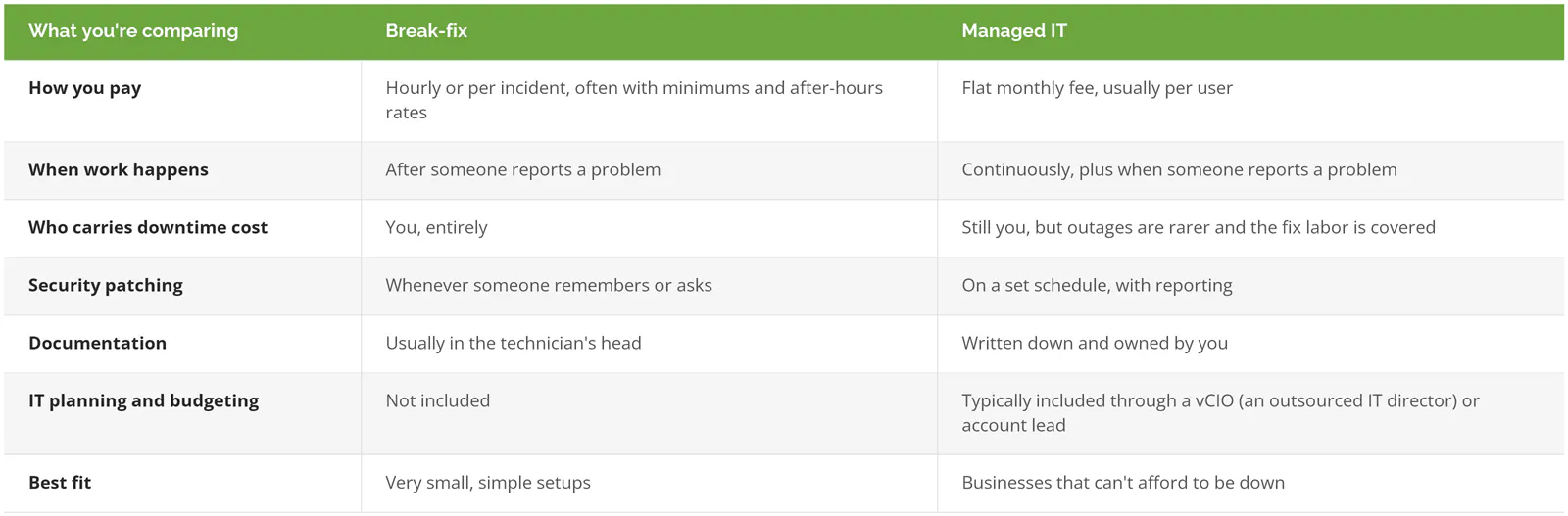
Break-fix is reactive, billed per incident or per hour, and starts when something breaks. Managed IT is proactive, billed per user or device each month, and runs continuously, covering monitoring, patching, security, help desk, and planning.
The billing model drives everything else. A break-fix technician gets paid when your systems fail, so there's no money in preventing failures. A managed provider gets paid the same whether you call twice a month or 20 times, so every avoidable ticket is a cost to them. Same trade, and two completely different reasons to show up.
For a line-by-line look at what a monthly plan should and shouldn't cover, see what managed IT includes.
Why does break-fix look cheaper than it is?
The break-fix invoice only shows technician hours. It never shows what your business lost while the system was down, which is usually the bigger number.
Think about what a 3-hour outage actually costs. Your people sit idle. Orders don't get entered. Someone in accounting misses a payroll cutoff and spends Friday fixing it. None of that is on the technician's bill.
ITIC's 2024 Hourly Cost of Downtime survey, which polled more than 1,000 firms, works through the math for smaller companies. A business that pegs an hour of downtime at $10k is losing about $167 a minute on a single critical server, and ITIC notes that hourly losses of $25k to $75k can be enough to put a small company out of business. You don't need to agree with any particular number. Run your own. Revenue per hour, plus payroll per hour for the people who can't work, is a decent rough cut.
And there's the incentive problem again. Recurring issues are recurring revenue for an hourly provider. Nobody's doing anything shady. The model just doesn't pay anyone to find the root cause.
How do you run the break-even math for your own business?
Add your annual break-fix labor to the cost of the downtime you actually had, then compare that total to a year of managed IT fees. If one bad outage closes the gap, break-fix isn't saving you money.
A hypothetical 25-person firm, using round numbers so the logic is easy to follow:
- Routine break-fix work, 10 hours a month at $175 an hour, comes to $21k a year.
- One serious outage, say 8 hours with the office mostly stopped, at $10k an hour, is $80k.
- Managed IT at $175 per user per month, the midpoint of the $100 to $250 range in our California managed IT pricing guide, runs about $52.5k a year.
In a quiet year, break-fix wins by about $31k. One bad day flips it.
I'm simplifying slightly. Managed IT doesn't make outages disappear. What it changes is how often they happen and how long they last, because someone is watching disk health, backup jobs, and firewall alerts at 2 a.m. instead of finding out at 8:15 when the first person can't log in. The fair comparison is break-fix plus your real outage history against managed IT plus a smaller, shorter outage history. Pull your last 24 months of IT invoices and write down every day something stopped work. That list settles the question faster than any vendor's spreadsheet, ours included.
Five signs reactive IT has stopped working for you

These are the points where the math usually flips. One of them is worth a conversation. Two or more and you're paying for break-fix twice, once on the invoice and once in downtime.
You've had two outages in the same quarter
Once is bad luck. Twice usually means a failing component, an unpatched system, or a backup that was never tested.
Your cyber insurance renewal asked questions you couldn't answer
Carriers now ask for proof of multifactor authentication (MFA, a second login step, like a phone prompt), endpoint detection and response (software that watches each laptop for suspicious behavior), and backups that have actually been restored. A break-fix shop can install those things. It doesn't typically keep the evidence that they're still working, and that's what the underwriter wants. Our cyber insurance requirements checklist lists what carriers are asking for this year.
Nobody owns patching
This is the expensive one. In Sophos's State of Ransomware 2025, a survey of 3,400 IT and security leaders in 17 countries, exploited vulnerabilities were the top root cause of ransomware attacks at 32%. Often that's a known hole with a fix already published. Someone just didn't install it. If your answer to "who patches our firewall?" is a shrug, read our explainer on how patch management works.
A customer, auditor, or regulator just asked about your security
Questionnaires from larger customers, a new contract clause, a state privacy rule. Each one asks you to document controls you might have but can't prove. Managed IT produces the logs and reports. Compliance itself (NIST, CMMC, SOC 2, PCI) is its own engagement, not something a managed IT plan quietly includes.
You've grown, and the documentation hasn't
Ten people can run on one person's memory. Forty can't. When the only map of your network is in your hourly technician's head, their vacation becomes your risk.
When is break-fix still the right call?
Break-fix still makes sense for very small, simple setups. Think a handful of people on cloud email and laptops, no server, no regulated data, and a business that can lose a day without losing customers.
A 4-person design studio running Google Workspace and a Wi-Fi router doesn't need 24/7 monitoring. A good hourly technician and a sensible backup service will cover it fine. Skip managed IT there, and revisit it when you add a server, sign a contract with security requirements, or hire your tenth person.
The same goes for one-off projects. An office move or a single network upgrade doesn't need a monthly contract.
Is co-managed IT a middle option?
Yes, if you already have an internal IT person. Co-managed IT keeps that person in charge of day-to-day knowledge while an outside provider adds overnight monitoring, security tools, patching, and extra hands.
It's the option that gets left out of most break-fix comparisons, and it's often the right one for a company that hired one generalist years ago and kept piling on. That person isn't failing. They're outnumbered. Co-managed IT services split the work so your IT lead stops being the single point of failure, and they don't lose their job in the process.
Why are LA companies moving off reactive IT?
Los Angeles businesses face the same downtime math as everyone else, plus a few local pressures. Wildfire disruption, new California privacy audit rules, and high local labor costs all make reactive IT more expensive to run here.
Start with continuity. The January 2025 Eaton and Palisades fires affected more than 6,800 businesses and 47,000 workers in the burn areas and surrounding zones, and LA County's Department of Economic Opportunity and the LAEDC project $5.2B to $10.1B in lost economic output. UCLA's research on the fires found microbusinesses were disproportionately represented among the damaged and destroyed buildings. A break-fix arrangement has no plan for that. Nobody's job was to know where the backups lived, whether they could be restored to a different building, or how people would log in from home the next morning.
Then regulation. California's privacy regulator finalized rules requiring certain CCPA-covered businesses to complete annual, independent cybersecurity audits, with certification deadlines staggered by revenue from April 2028 for companies over $100M to April 2030 for those under $50M. Risk assessments started January 1, 2026. Audits need evidence. Break-fix rarely produces any.
And cost. Emergency labor in LA isn't cheap, and after-hours rates stack quickly when a server fails on a Friday night in Commerce or Torrance.
If you're weighing reactive IT vs. managed services here, our page on managed IT services in Los Angeles covers what proactive IT support looks like for LA companies, and this South Bay breakdown goes service by service.
What does switching from break-fix to managed IT actually look like?

Plan on a couple of months to get fully settled. The provider documents your environment, closes the obvious security gaps, puts monitoring and patching on a schedule, and then builds a roadmap. The first month is mostly discovery.
At Consilien, the sequence before anything gets signed is a 20-30 minute discovery session, a 45-minute strategy session, and a 2-4 hour technology assessment. Then a solution presentation and a kickoff. After kickoff, the order of work tends to look like this:
- Get every account, password, license, and device into one documented place. Your old technician's notes help here, so ask for them early and politely.
- Fix what's actively dangerous. Missing MFA on email, admin accounts shared by 4 people, a backup nobody has tested.
- Roll out monitoring agents and a patch schedule.
- Build the roadmap, meaning what gets replaced, upgraded, or retired over the next 12 to 36 months, with budget attached.
One thing to check in any contract is the exit. Consilien's standard 3-year agreement carries a 1-year opt-out with 60 days' notice. Whoever you pick, know what leaving costs before you sign. Our list of questions to ask before signing with an MSP covers the rest.
Manufacturers have a few extra wrinkles, like plant-floor systems that can't be patched on a normal schedule. We wrote a separate piece on how manufacturers outgrow break-fix IT.
If your last 24 months of invoices and outages point toward a switch, speak to an IT expert and bring that list.