Questions to Ask an MSP Before Signing: A 15-Point Checklist
Before you sign with an MSP, ask 15 questions across five areas: scope and cost, service delivery, the provider's own security, strategy, and exit terms. Get each answer in writing. A verbal yes on a sales call proves nothing.
Table of Contents
These are the questions to ask an MSP once you're down to one or two finalists and a contract is sitting in your inbox. If you're still deciding whether outsourced managed IT services make sense for your business at all, start there. This list is for the last mile.
Every MSP interviews well. The salesperson has run this call a few hundred times, knows which questions are coming before you open your notes, and has a smooth, true-sounding answer ready for every one of them. Do you monitor around the clock? Yes. Do you test backups? Yes. Do we own our data? Of course.
None of that is a lie, exactly. It's unverified.
So skip the conversation and ask for the document. Each question below has a paper trail behind it, whether that's a service level agreement (SLA) report, a sample invoice, an audit report, or a contract clause. If the provider can hand it over before you sign, you've learned something. If they can't, you've learned more.

The 15 Questions at a Glance
- What's included in the monthly fee, and what triggers a separate invoice?
- What does onboarding cost, how long does it take, and what do we get at day 30?
- How does the price change when we add people, a location, or an acquisition?
- What are your response and resolution targets by priority, and what happens when you miss one?
- Who will actually work on our account?
- What happens when something breaks at 2 a.m. on a Saturday?
- What will you report to us, how often, and who walks us through it?
- How do you secure your own remote tools and your admin access to our systems?
- Can we see your SOC 2 Type II report?
- If either of us is breached, who notifies whom, and how fast?
- When did you last test a restore for a client, and can we see the result?
- How will you know what our business plans to do next year?
- What do you expect us to own?
- Who owns our documentation, passwords, and configurations if we leave?
- Can we talk to a current client like us, and one who left?
Why Is the Sales Call the Wrong Place to Get Answers?
A sales call tests how well a provider talks about its service. The contract and its attachments test what the provider will actually commit to. Before you sign, move every answer that matters from the first category into the second.
This isn't a cynical take. It's federal guidance. In 2021, CISA published Risk Considerations for Managed Service Provider Customers, and the middle of it reads like a procurement checklist. It tells customers to get specific items from an MSP "prior to signing a contract," including performance SLAs that separate IT operations from security services, incident management terms with compensation for outages, a statement on how client data is separated on the MSP's networks, records of who accessed your accounts and for how long, and notice of any subcontractors who could touch your data.
Short document. Plain English. Worth the 15 minutes before any MSP contract crosses your desk.
Scope and Cost (Questions 1 to 3)
1. What's included in the monthly fee, and what triggers a separate invoice?
Skip the inclusion list. Get the exclusion list. Inclusions are marketing. Exclusions are where the surprise invoices come from.
The usual suspects are after-hours work, on-site visits, new-hire setup, hardware, and project work like a server replacement or a Microsoft 365 tenant migration (moving your email and files from one Microsoft account to another). None of those are unreasonable to bill separately. The problem is finding out in month four. Our breakdown of outsourced IT support cost per user shows what typically lands inside the per-user rate and what doesn't.
One line item deserves its own question. If you have to meet CMMC, PCI DSS, or SOC 2, ask whether that work is part of the managed IT agreement or a separate engagement. At Consilien, compliance is a standalone service, not part of managed IT. Whatever a provider's answer is, you want it said plainly instead of assumed.
Before you sign, get a redacted invoice from a current client about your size, plus the written exclusion list. Walk away if the answer is "it's all-inclusive" and nobody can tell you what "all" leaves out.
2. What does onboarding cost, how long does it take, and what do we get at day 30?
Onboarding is when the provider learns your environment. Every laptop, every admin account, every license, every firewall rule, every application the plant floor runs on. It's also when the provider finds the problems your last provider left behind.
Get the plan in weeks, with named milestones. Then ask what you'll hold in your hands at day 30. A good answer is specific. An asset inventory, a list of every account with admin rights, a findings report ranked by risk, and documentation you can read.
Free onboarding? Not a red flag by itself. But ask what it skips.
3. How does the price change when we add people, a location, or an acquisition?
Growth outpaces IT structure. If you're planning to open a second warehouse, add a shift, or buy a competitor in the next 2 years, the pricing model and its minimums will shape your IT bill far more than whatever monthly rate you negotiate this year.
Per-user or per-device? Is there a minimum commitment? And the one that gets skipped, what's the annual increase cap? "We rarely raise prices" isn't a cap. A number in the contract is.
Service Delivery (Questions 4 to 7)
4. What are your response and resolution targets by priority, and what happens when you miss one?
Response and resolution are different promises, and the gap between them is where a business can lose a full day of production while its provider technically stays inside the SLA. A response means someone acknowledged your ticket. A resolution means the problem is fixed.
Published MSP SLAs commonly promise somewhere around 15 to 30 minutes to respond to a critical, business-down ticket. That sounds fast until you realize an automated email can technically meet it. Ask for the resolution target too, by priority level, and ask what each priority level means in your terms. Is the ERP down for the whole company a P1, top-priority ticket? Is one executive's laptop?
Then ask what happens on a miss. CISA's guidance names "compensation for service outages" as something to settle before the contract, and the usual mechanism is service credits, which we break down in what belongs in an MSP contract.
Collect the SLA document itself and a redacted SLA report from the last 90 days for a real client. A provider that tracks its SLAs can produce one in an afternoon.
5. Who will actually work on our account?
Meet the engineer. Not just the salesperson and the account manager, but the person who will actually be logged into your firewall at 4 p.m. on a Tuesday when the warehouse scanners stop talking to the ERP.
Is there a named primary technician? A named backup when that person is on vacation? Where does the help desk sit, and is it the provider's own staff? Pooled help desks aren't bad. A pooled help desk nobody can describe is.
6. What happens when something breaks at 2 a.m. on a Saturday?
"24/7 support" can mean a team watching your systems overnight, or it can mean a voicemail box that pages someone. Ask which one.
Specifically, who answers an after-hours call, is that person employed by the provider or an outsourced overnight desk, and does overnight coverage include security alerts or just outages? Security alerts are usually handled by a SOC, a security operations center, which is a team whose job is watching for signs of an attack. Some MSPs run their own. Others subcontract it. Either can work, as long as you know which you're buying.
Buyers care about this one more than they used to. In Barracuda's 2025 MSP Customer Insight Report, 45% of organizations said they'd switch MSPs if they couldn't see evidence of the skills and expertise to support them with 24/7 security. Evidence is the operative word. Ask for the after-hours escalation procedure in writing.
7. What will you report to us, how often, and who walks us through it?
Request a sample quarterly business review deck from a real client, with the names blacked out. Real, not a template.
Useful ones show ticket trends, patch compliance (the percentage of machines with current security updates), backup success rates, open risks with owners, and a 12-month budget forecast. If the sample is a ticket count and a satisfaction score, that's the report you'll get. Every quarter. For 3 years.
The MSP's Own Security (Questions 8 to 11)
An MSP holds administrative access to every client it manages. That's the point of hiring one. It's also the exposure.
IBM's Cost of a Data Breach Report 2026 ranks supply chain compromise, an attacker getting in through a vendor or partner, as the second most common way breaches start, behind phishing. Those breaches averaged $4.96M and took 258 days to identify and contain. Your MSP is the most connected vendor you have. These four questions are about whether it guards the keys as carefully as it guards your network.
8. How do you secure your own remote tools and your admin access to our systems?
MSPs manage clients through remote monitoring and management software, usually called RMM, which is a single console that can push software, scripts, and settings changes to every computer at every client the provider manages. Whoever controls it controls all of them. Every client. At once.
That's not theoretical. In July 2021, attackers exploited Kaseya's VSA remote management product and pushed ransomware through MSPs to their customers. Kaseya put the count at fewer than 60 direct customers and fewer than 1,500 downstream businesses, and CISA and the FBI issued joint guidance for the MSPs and customers caught in it. The businesses at the end of that chain never touched Kaseya. Their IT provider did.
So ask how the provider locks down its own house. Is multifactor authentication required on every admin login, including the RMM console? Does each technician have a named admin account, or do they share one? Can they show you a log of who accessed your systems, when, and what they did? CISA's guidance is to give an MSP "only the minimum necessary rights for the shortest necessary duration," so ask how they'd scope access for you. And ask for a list of every subcontractor that will touch your environment.
Shared admin passwords end the conversation. No follow-up needed.
9. Can we see your SOC 2 Type II report?
A SOC 2 report is an independent auditor's review of a provider's security controls, built on standards from the AICPA. Type I checks whether the controls are designed properly on one date. Type II checks whether they actually worked over a period of months. You want Type II.
Expect to sign an NDA first. When the report arrives, read two things before anything else, the scope (does it cover the services you're buying?) and the exceptions section, where the auditor lists controls that failed.
Smaller MSPs often don't have one. That alone shouldn't kill the deal. Ask what independent proof they do have instead, such as a recent third-party penetration test or an ISO 27001 certificate (an international security management standard), and how they'd answer CISA's pre-contract list item by item.
10. If either of us is breached, who notifies whom, and how fast?
Get a number of hours in the contract. "Promptly" isn't a number.
Timing matters. In the same IBM report, breaches that a third party discovered took 280 days to identify and contain, compared with 209 days for breaches an organization's own team found. If the provider is breached and doesn't tell you for weeks, you're the third party finding out late.
Then there's incident response itself. Who leads it if you're the one hit, is it included or billed hourly, and how would they work with your cyber insurance carrier? If the answer is "we're not really a security company," that's useful too. It tells you whether you need an MSP, an MSSP, or both, and our guide to MSP vs MSSP sorts out the difference.
11. When did you last test a restore for a client, and can we see the result?
Green checkmarks on a backup dashboard prove the backups ran. They don't prove anything restores. Different claim.
One document settles it. A redacted restore test report from the last 90 days, showing what was restored, how long it took, whether it worked, and what failed. If nobody can remember the last test, you have your answer, and a fair preview of what the green checkmarks in your own environment will be worth on the day a server dies.
Strategy and Shared Responsibility (Questions 12 and 13)
12. How will you know what our business plans to do next year?
IT support isn't IT strategy. A provider can close every ticket within the SLA and still let you walk into a year where the ERP upgrade, the new location, and the cyber insurance renewal all land at once with no budget for any of them.
Find out who owns your technology roadmap, how often they meet with leadership rather than your office manager, and what a budget forecast from them looks like. A quarterly meeting with a written 12 to 24 month plan is a reasonable expectation. If you need someone to own that plan, that's IT strategy consulting, and it's fair to ask whether it's part of the agreement or priced separately.
Skip this question if you already have a CIO or IT director who owns the roadmap. You need execution, not advice.
13. What do you expect us to own?
Every outsourcing arrangement splits responsibility, and the split is where things fall through. CISA puts this question first in its guidance on assessing IT service providers, asking "who is responsible for security and operations when outsourcing IT services to an MSP?"
Put the answer in a responsibility matrix, a table listing each task and who does it. Who approves a new admin account? Who manages the core business software your vendor supports, like your ERP? Who runs security awareness training, and who chases the people who skip it? Who decides when an old server gets replaced?
If you have internal IT staff, this matrix is basically the whole relationship. It's the core of any co-managed IT arrangement.
Getting Out (Questions 14 and 15)
14. Who owns our documentation, passwords, and configurations if we leave?
You should. Make sure the contract says so.
MSPs often keep client documentation in their own systems, tools like IT Glue or Hudu, which are databases of passwords, network diagrams, and configuration notes. That's normal while you're a client. It becomes a problem at exit, when the data you paid them to create sits in a system you can't log into.
Push for language that says all documentation, credentials, configurations, and scripts built for your environment belong to you and get exported on termination at no charge, within a set number of days, with a named offboarding contact. Ask how long they keep your backups after you leave and how they confirm deletion. CISA's checklist even asks for a transition plan going in, with any required downtime scheduled when it suits your business. Ask for the same thing going out.
Once you're ready to move, our guide on how to switch MSPs without losing a day covers the handoff step by step.
15. Can we talk to a current client like us, and one who left?
Half of that is standard. Ask for a reference in your industry, roughly your size, ideally one that's been a client for 3 years or more. A manufacturer running a plant floor and a 12-person law office don't need the same things.
Former clients are the useful half. Any provider that's been around a while has lost clients. Ask how they handled the exit. Whether they'll put you in touch with a former client, or how they explain why they can't, tells you more than any happy reference.
How Do You Score the Answers?
Score each answer 0, 1, or 2. A 2 means you have it in writing. A 1 means you got a good verbal answer. A 0 means it was dodged, deferred to "after you sign," or answered with a feature list.
Total possible is 30. There's no magic cutoff, but a 0 on question 8, 10, or 14 should stop the deal no matter what the total says. Those three are the ones you can't fix after signing.
Documents worth collecting for your MSP evaluation checklist, question by question:
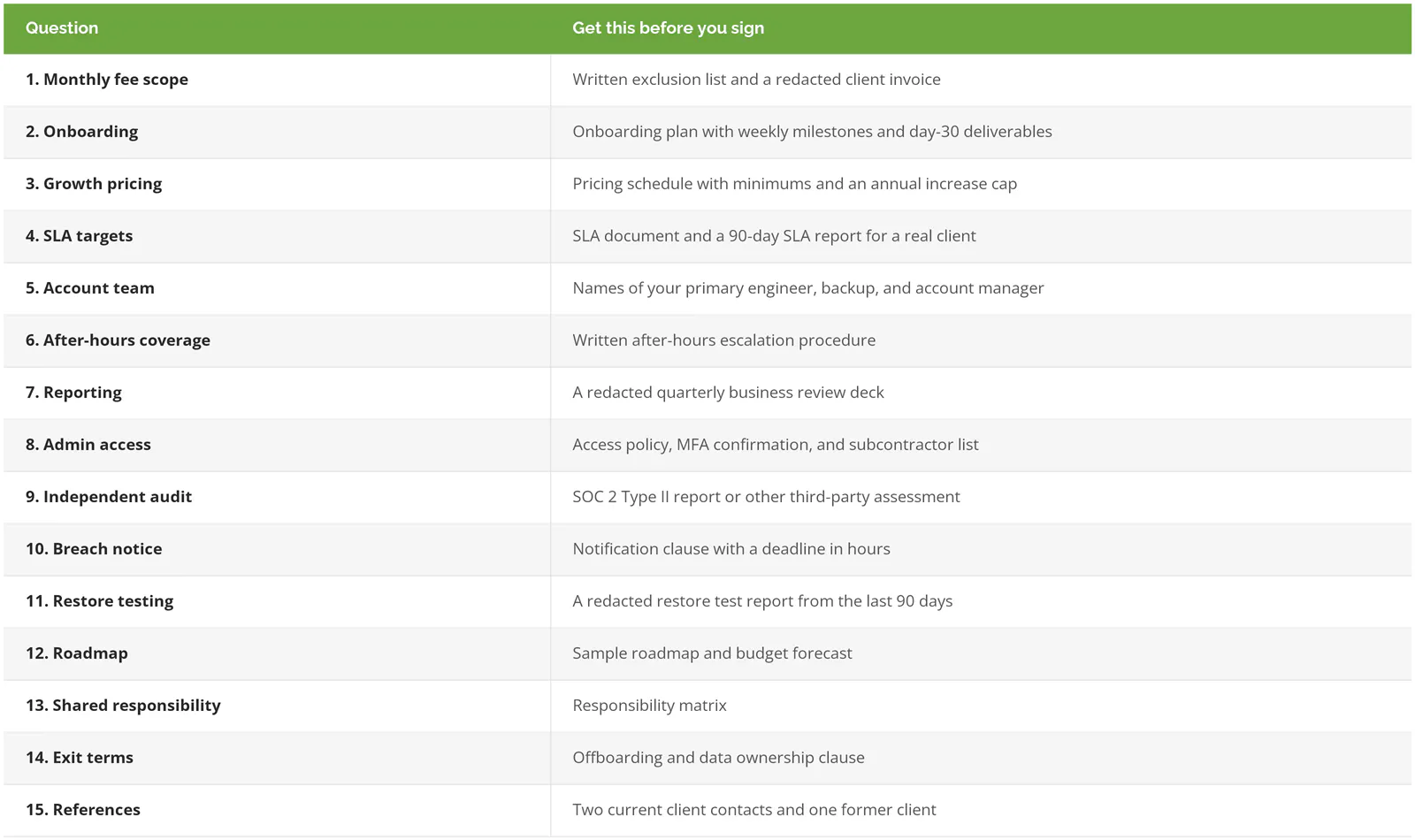
That's a lot of paper. Fair. But a good provider already has every item on this list sitting in a folder, because its best clients asked for it years ago.
Red Flags That Should End the Conversation
- The SLA is available "once you've signed."
- Technicians share admin logins.
- A 3-year auto-renewing term with a termination fee equal to the remaining months. Ask for a shorter first term. See what happens.
- Documentation lives in the provider's system and the contract says nothing about getting it back.
- A discount that expires at the end of the month. Good terms don't usually come with a deadline.
For the earlier stage of the decision, what criteria to shortlist on and what managed IT costs in 2026, see our guide on how to choose a managed IT provider. And if you're asking these questions because your current provider stopped answering them, here's how to tell whether you've outgrown your current MSP.
Consilien is a security-first managed IT provider for businesses nationwide, offering managed IT, co-managed IT, vCIO, and vCISO services, with compliance as a separate program. If you're comparing proposals right now and want a second set of eyes on one, speak to an IT expert.