Managed IT Services SLA Guide: What to Expect in Your Contract
A managed IT services SLA defines priority levels, response and resolution targets, support hours, uptime, exclusions, and reporting. For a business-down incident, expect a human response in about 15 minutes and service restored within about 4 hours, around the clock.
Table of Contents
The numbers in a managed IT services SLA matter less than the definitions sitting underneath them. That holds whether you're comparing two proposals or renewing an agreement you signed 3 years ago, and it's the part of buying managed IT services that gets the least attention.
Say the SLA promises a 15-minute response. Sounds great. Then you read the fine print. The clock only runs Monday to Friday, 8 to 5. An automated "we got your ticket" email counts as the response. And the provider decides which tickets are critical.
That SLA can be met on paper every single month while your warehouse sits idle for a day.
An SLA is a measurement system. It says what gets measured, when the stopwatch starts, when it stops, and who reads the result. Read it the way an auditor would, and the weak ones give themselves away fast.
What Does a Managed IT Services SLA Actually Cover?
A managed IT services SLA is the part of your MSP agreement that turns "good service" into numbers you can check. It covers priority definitions, response and resolution targets, support hours, uptime commitments, exclusions, reporting, and what happens when a target is missed.
It usually sits alongside two other documents. The master services agreement (MSA) holds the legal terms, like liability, term, and termination. The statement of work (SOW) lists what's in scope. The SLA is the scoreboard. Our guide to what's in an MSP contract covers the MSA and SOW side, including liability caps and exit terms.
Look for all of these in writing:
- Priority levels, with real examples from your business, not generic descriptions
- Response and resolution targets for each priority
- Support hours for each priority (24/7, extended hours, or business hours only)
- Clock rules, meaning when timing starts, pauses, and stops
- Uptime commitments and the specific systems they cover
- Exclusions
- A security incident section, separate from help desk tickets
- Reporting cadence and the metrics in each report
- Remedies for misses, including what happens after repeated misses
Nine items. If your draft has 4 of them, it isn't an SLA yet. It's a brochure with a signature line.
How Should Priority Levels Be Defined?
Priority levels should be set by business impact and urgency, written in terms of your own systems, and assigned by a rule both sides agreed to before signing. If the provider alone decides what counts as critical, every response target in the SLA is optional.
ITIL, the IT service management framework most help desks run on, sets the standard approach. It decides priority by combining impact (how much of the business is affected) with urgency (how fast the damage grows). The IT Process Maps incident priority checklist lays out that matrix if you want to see the mechanics. In practice, MSP agreements usually collapse it into four tiers.
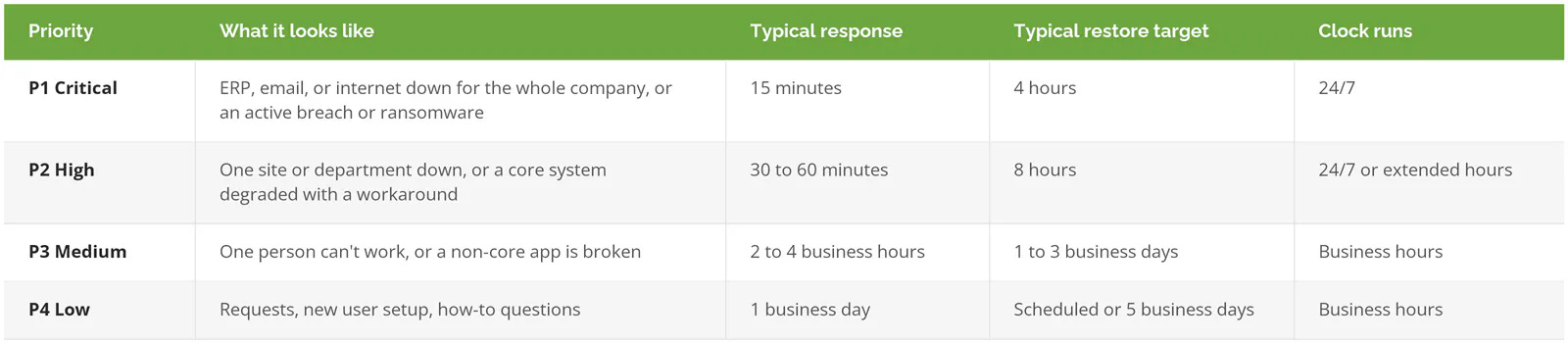
Those are commonly published ranges, not a guarantee and not a statistic. Your numbers should come from your operation.
Priority definitions tend to break down in 2 places.
One person, completely stuck. Fixify's 2026 IT Help Desk Benchmark Report, built from more than 50,000 tickets, found that 22% of help desk tickets come from an employee who can't do their job. A generic matrix files that as P3 because only one person is affected. But if the one person is your controller on the last day of the month, or the only buyer who can release purchase orders, it isn't a P3. Name those roles in the SLA.
Then there's reclassification. A provider logs your outage as P2, works it at P2 speed, and the SLA report shows a clean month. Ask who can change a ticket's priority, whether you can escalate it yourself, and whether the report shows tickets that were downgraded. If the answer to that last one is "we don't track that," you have your answer.
When Does the SLA Clock Start, Pause, and Stop?
The clock should start the moment you report the problem through any approved channel, pause only while the provider is waiting on you, and stop when service is restored, not when the ticket is closed. Every one of those three points should be written down.

A sharp-looking target can sit on top of clock rules that all favor the provider.
When the clock starts
Some SLAs start timing when a technician opens the ticket, not when you called. If your 7:40 a.m. call lands in a queue and gets logged at 8:25, that's 45 minutes the report will never show. The fix is simple. The clock starts at first contact by phone, portal, or email, whichever comes first.
When the clock pauses
Every SLA has a "pending customer" status, and that's fair. If the technician needs you to reboot a machine or approve a change, the provider shouldn't eat that time. The abuse is pausing for things that aren't you. Waiting on Microsoft. Waiting on the internet provider. Waiting on a parts shipment. Your SLA should say the clock pauses only when the delay is caused by you.
When the clock stops
"Resolved" can mean the problem is fixed, a workaround is in place, or the ticket was closed after you didn't reply for 48 hours. Those are 3 very different outcomes. Insist on a definition. Service restored means your people can work again. And if a ticket reopens within a few days for the same issue, the original clock should keep running instead of starting fresh.
Business hours versus clock hours
MetricNet's definition of mean time to resolve, published through HDI, uses business hours by default. Its own example is a ticket reported at 4 p.m. Friday and closed at 4 p.m. Monday. That's 8 business hours on the report and 72 clock hours in real life.
Neither number is dishonest. But you need to know which one your SLA uses for each priority, because a "4-hour restore" on a business-hours clock can mean Monday afternoon for a Friday evening outage.
One more thing on response. A human reply counts. An auto-acknowledgment doesn't. Write that sentence into the agreement.
What Does 99.9% Uptime Really Allow?
A 99.9% uptime SLA allows about 43 minutes of downtime in a 30-day month, or roughly 8 hours and 46 minutes a year. Whether that's acceptable depends on which systems it covers, how downtime is measured, and what's excluded.
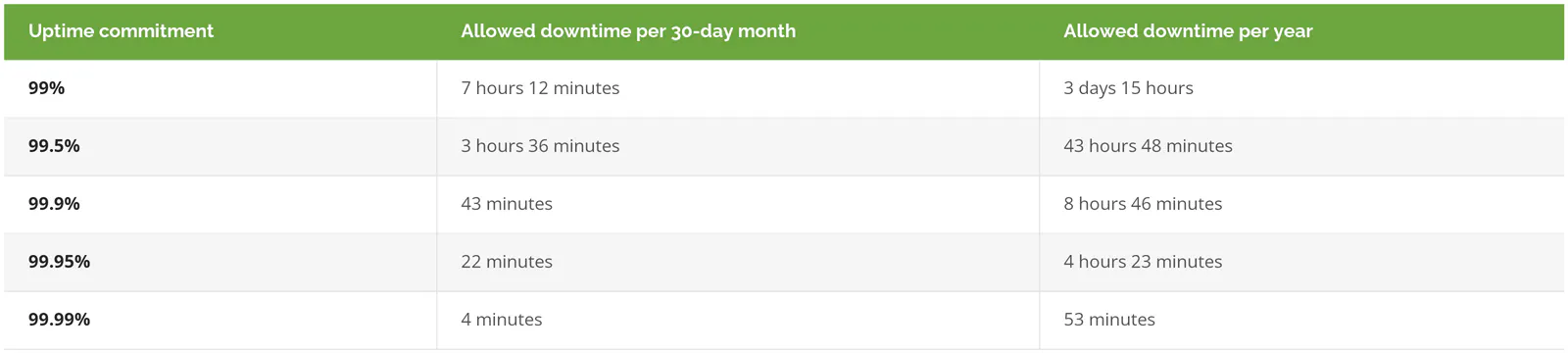
Calculating it is plain arithmetic. Minutes in the period times (1 minus the uptime percentage).
Start with the word "covered." An MSP's uptime promise normally applies to infrastructure it actually manages, like your servers, firewalls, switches, and wireless. It rarely covers your internet circuit, the vendor behind your core business software, or Microsoft 365. Ask for the list of covered systems in writing.
Microsoft 365 is the clearest example. Microsoft's own Service Level Agreement for Online Services (January 1, 2026 edition) backs Exchange Online at 99.9% monthly uptime, measures downtime in user-minutes (minutes of outage multiplied by the number of users hit), and pays service credits of 25%, 50%, or 100% as uptime drops below 99.9%, 99%, and 95%. It also excludes tenant misconfiguration (mistakes in your company's own Microsoft 365 settings) and network problems outside Microsoft's boundary.
So when a provider promises 99.99% email uptime, ask how. No MSP runs Microsoft's servers, so a promise above Microsoft's own 99.9% isn't one they control. What a good MSP can own is your tenant configuration, your connectivity, and how fast they tell you Microsoft is having a bad morning.
And check for unlimited maintenance windows. If scheduled maintenance is excluded from downtime, and the provider can schedule maintenance whenever it likes, the uptime number is decorative. Cap the windows, fix them outside your working hours, and require notice.
Why fuss over 43 minutes? ITIC's 2024 Hourly Cost of Downtime survey of more than 1,000 firms found that 90% of mid-size and large enterprises put the cost of one hour of downtime above $300,000. Smaller businesses lose fewer dollars per hour. They also have less cushion to absorb them.
Which SLA Exclusions Should You Push Back On?
Some exclusions are reasonable. Damage you cause, hardware the provider told you to replace 2 years ago, and true disasters belong outside the SLA. The ones to push back on are vague enough to cover almost anything:
- "Third-party issues," undefined. Your internet provider, your phone carrier, your ERP vendor (the company behind the system that runs orders, inventory, and accounting). If the provider manages the vendor relationship, the clock should keep running while they chase it.
- Unlimited or unscheduled maintenance windows.
- "Unsupported" equipment, with no list attached. Get the list.
- Force majeure clauses broad enough to include a cyberattack. Ransomware is a P1 incident, not an act of God.
- Anything excluded "at the provider's discretion."
- Exclusions for end-of-life software that the provider never flagged in a quarterly review.
That last one stings because it's preventable. If a Windows Server 2012 R2 machine, out of Microsoft support since October 2023, is still running your file shares and sits outside the SLA, the provider should have put its replacement on your budget long ago.
What Should a Security SLA Promise?
A security SLA should set separate targets for detecting and responding to threats. That covers how fast a human reviews a security alert, how fast an infected device or compromised account is isolated, how fast you're notified, and how often backups are test-restored. Help desk response times don't cover any of this.
CISA made the same point in its Risk Considerations for Managed Service Provider Customers, which tells buyers to get performance SLAs that separate IT operations from security services, along with incident terms that include "compensation for service outages." A password reset and a live intrusion shouldn't share a clock.
Speed matters here more than anywhere else. IBM's Cost of a Data Breach Report 2026 puts the global average at 247 days to identify and contain a breach, and breaches first spotted by an outside party took 280 days. The cost follows the clock. IBM puts the US average breach at $11.5M.
What to get in writing:
- Alert triage time. How long between an alert firing and a human analyst looking at it, nights and weekends included.
- Containment authority. Can the provider isolate a laptop or disable an account immediately, or do they need to reach you first? Decide this before 2 a.m., not during it.
- Notification. How many hours until you hear about a confirmed incident, and from whom.
- Backup and restore. How often restores are tested, and the recovery time and recovery point targets (how long until you're running again, and how much data you can afford to lose). Our disaster recovery cost guide walks through setting those.
If your provider doesn't run security operations at all, the SLA should say who does. Our breakdown of MSP vs MSSP covers where that line usually falls.
Compliance is a different question again. At Consilien, compliance work like CMMC, PCI DSS, or SOC 2 readiness is a standalone service, not part of the managed IT agreement, and your SLA shouldn't leave you guessing about where yours sits.
How Do You Know the MSP Is Hitting Its SLA?
You know because the provider sends a monthly report showing the percentage of tickets that met target for each priority, response and resolution times as a median and 90th percentile (the time 9 out of 10 tickets beat), reopened tickets, and every breach with its cause. Then someone walks you through it.

Averages hide things. One 9-hour P1 outage disappears inside a month of 10-minute password resets. That's why benchmark reports use percentiles. In Fixify's 2026 data, median first response was 5 minutes and 90% of tickets got a response within 15. Ask for your own numbers in the same format.
Resolution is where providers really differ. The same Fixify report found a median resolution time of 4.4 hours for tickets handled with automation and 71 hours without. Response times barely changed. If your report only shows response, it's showing you the easy number.
Ask for these in every monthly report:
- Ticket counts and percentage met, split by P1 to P4
- Median and 90th percentile response and resolution, by priority
- Every missed target, with the cause and the fix
- Reopened tickets and any priority changes
- Uptime for each covered system
- Security alerts reviewed and incidents contained
Before you sign, ask for a redacted copy of a real report from the last 90 days. A provider that tracks its SLA can send one the same afternoon. If you're earlier in the process, our guide to choosing a managed IT provider covers the rest of the evaluation.
What Happens When the MSP Misses?
Usually you get a service credit, a small percentage off next month's invoice. Credits are a signal that the provider takes its targets seriously. They aren't compensation for what the outage cost you.
Microsoft's terms show the pattern. You have to file the claim yourself, with supporting detail, by the end of the month after the incident, and credits are the "sole and exclusive remedy." Watch for the same wording in your MSP agreement. We go deeper on credit math in our MSP contract guide.
What matters more is the pattern clause. If P1 targets are missed in 2 of any 3 months, you should be able to leave without an early termination fee. One bad month happens. Three tells you something about staffing.
Do You Need a 24/7 SLA?
Not always. A tighter SLA costs more, because someone has to be awake and qualified at 3 a.m. Whether that's worth paying for depends on when your business actually runs.
Skip round-the-clock coverage for every priority if you run one office shift, your core apps live in the cloud, and nobody works nights or weekends. Business-hours coverage with a 24/7 P1 line is plenty.
Run a second shift and the math changes. So does a plant floor, a warehouse shipping overnight, customers in other time zones, or an online store. Those businesses need P1 and P2 covered 24/7, with real humans, not an answering service that pages someone who may or may not call back.
There's also a middle path. If you have an internal IT person or team, a co-managed IT split can let them own P3 and P4 during the day while the MSP covers after-hours P1s and security monitoring. Pricing shifts with coverage, and our breakdown of outsourced IT support cost per user shows how.
Bring Your SLA to Someone Who Reads SLAs for a Living
Consilien is a managed IT and cybersecurity provider serving businesses nationwide, with vCIO (virtual CIO) strategy built into its managed service. Our IC24 managed services agreements define severity levels and the response time attached to each, and put security and backup commitments in writing.
If you've been handed an SLA and you're not sure what it actually commits the provider to, send it over. Speak to an IT Expert and we'll go through the priority definitions, the clock rules, and the exclusions with you, line by line.