How Much Do Managed IT Services Cost in the Inland Empire?
Managed IT services in the Inland Empire cost about $150 to $250 per user per month for full coverage. Help desk-only plans run $100 to $150. Security-heavy 24/7 plans start near $250. Shared warehouse devices, extra sites, and compliance are priced separately.
Table of Contents
Ask an owner in Ontario what they expect to pay for IT, and you'll usually hear some version of "less than LA." Rent is lower out here. Payroll is lower for plenty of roles. It feels like IT should follow.
It barely does. The technicians who support Riverside, San Bernardino, Ontario, and Rancho Cucamonga earn within a few percent of their counterparts in Los Angeles, and anyone quoting managed IT services in the Inland Empire is building that price on top of their payroll. The discount works out to about $4 per user.
What moves an Inland Empire quote is the building. A 200,000-square-foot distribution center with handheld scanners on three shifts, a machine shop in Fontana, a second site out in Redlands. Those are the lines that make one proposal twice the size of another.
What does managed IT cost in the Inland Empire?
Full managed IT for an Inland Empire business usually runs $150 to $250 per user per month. A 25-person office pays $3,750 to $6,250 a month at that rate, before onboarding, hardware, shared devices, or compliance work.
A per-user rate is one monthly price per employee that covers every device that person uses. Laptop, phone, tablet. It's a common way IT support pricing in the Inland Empire gets quoted for office staff, but it's rarely the whole proposal for a company with a warehouse floor, and you should read it next to the list of what it buys before you compare it to anything.
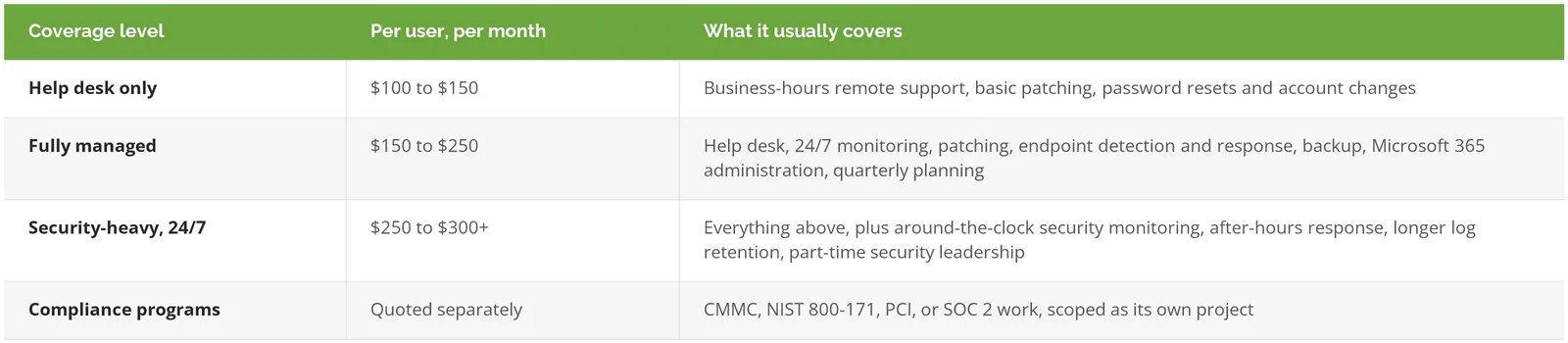
Endpoint detection and response is software on each laptop and server that watches for attacker behavior and can cut a machine off the network by itself. Log retention is how long the record of who signed in, from where, and what they touched gets kept. After a breach, it's the first thing an investigator wants.
You'll find cheaper numbers. Kaseya's 2023 Global MSP Benchmark Survey found the most common per-user band was $50 to $100 a month, picked by 22% of the 1,091 providers who answered, and only 16% charged above $150. That's national, three years old, and full of shops that sell help desk and stop there. A quote in that band today is missing scope, missing technicians, or both.
Is IT support cheaper in Ontario or Riverside than in Los Angeles?
A little. The BLS occupational wage tables for May 2025 put the median computer user support specialist in the Riverside-San Bernardino-Ontario metro at $72,140 a year. In Los Angeles it's $75,070. That's a 3.9% gap.
Compared with the country, the Inland Empire isn't cheap at all. The national median for the same job is $61,860, which puts IE technicians about 17% above it.
Now load that salary. The BLS employer compensation data for June 2026 shows wages make up 70.0% of private-industry compensation, with benefits and payroll taxes making up the rest. One Inland Empire technician costs an employer about $103,100 a year. Give that person 75 users and the help desk labor alone comes to roughly $115 per user per month, before a single tool, backup license, or senior engineer gets added, and before the provider makes a dollar.
The same math gives $119 in Los Angeles. Nationally, $98.
So the Inland Empire discount is $4 per user per month. For a 25-person company, that's $1,200 a year. Real money, but not the big break owners expect when they think about what an office lease in Ontario costs next to one in Century City.
The full ratio table is in outsourced IT support cost per user, and the same labor math runs through managed IT cost in the South Bay and Orange County. Use it as a test. Ask any provider how many users each of their technicians carries. One quoting $85 a user has already answered, out loud or not.
Why do warehouse and distribution quotes look so different?
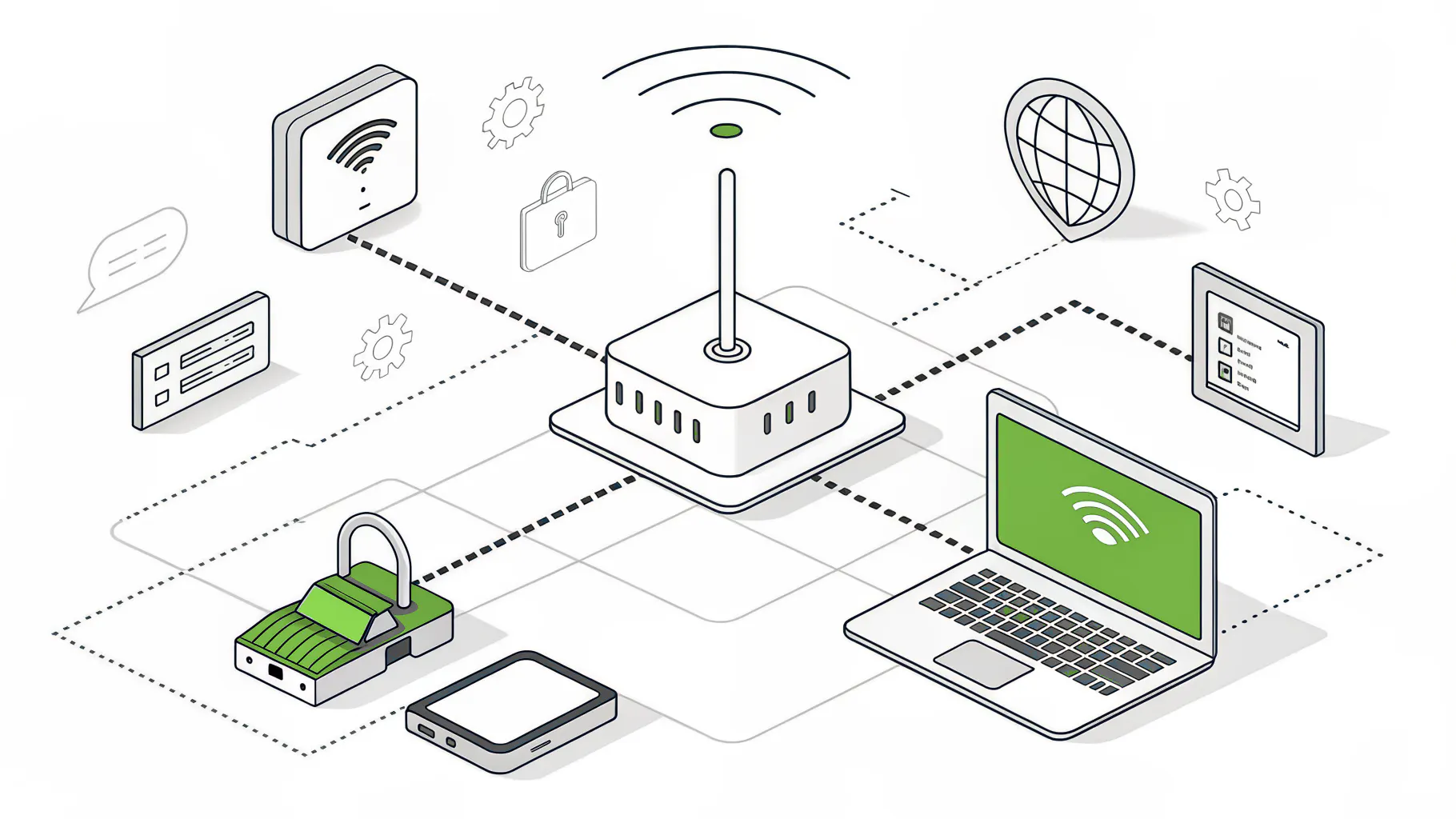
Because the devices don't belong to anyone. A scanner used by three people across three shifts doesn't fit a per-user price, so providers add a per-device or per-site line, and that line is where two Inland Empire quotes for the same headcount drift apart.
Logistics carries the regional job market. A UC Riverside report on transportation, distribution, and logistics called it the primary source of jobs in San Bernardino County and the second largest employer in Riverside County. So a lot of the companies asking for managed IT pricing in Ontario, Fontana, and Moreno Valley have 30 people in the office and 150 on the floor.
The floor carries its own gear. Rugged handhelds. Label printers at every pack station. Shared PCs at the dock doors running the warehouse management system. Wi-Fi access points hung 40 feet up over steel racking, where coverage gaps kill scanner sessions. Badge readers and cameras on the same network as payroll, if nobody separated them.

None of these is a trick. They're just different, and a per-user quote that ignores the floor isn't cheaper. It's unfinished. The scanners still need patching, the dock PCs still need monitoring, and if the proposal doesn't say who does that, the answer is you, at an hourly rate, the night a shipment can't print labels. Our page on IT for distribution companies covers the operational side.
What does cargo theft have to do with your IT bill?

More than it should. In an April 2026 public service announcement, the FBI estimated 2025 cargo theft losses in the US and Canada at nearly $725 million, up 60% from 2024. Confirmed incidents rose 18%. The average theft rose 36%, to $273,990.
The FBI calls it cyber-enabled theft, and the method is mostly email and accounts, with criminals spoofing brokers, taking over carrier accounts on load boards, the online marketplaces where brokers post freight, posting fake loads, and redirecting real shipments so the goods can be resold. The part an IT buyer should notice is that the FBI says attackers also download legitimate remote monitoring and management software onto victim machines.
Remote monitoring and management, usually shortened to RMM, is the same kind of tool your IT provider uses to patch and support your computers from a distance. It's normal software. Antivirus often lets it run. That's the problem.
For a freight broker in Ontario or a third-party logistics warehouse in Fontana, this changes what a good quote includes. Look for these in writing:
- A list of the remote access tools your provider uses, and an alert when any other one gets installed
- Email security that flags lookalike domains and spoofed broker addresses
- Sign-in monitoring on every mailbox and load board account, with multi-factor authentication, meaning a second sign-in step beyond the password
- A callback rule. Any change to a pickup, a carrier, or payment details gets confirmed by phone, using a number already on file
That last one isn't technology. It's a process the FBI recommends, and it costs nothing. The first three cost money, usually as part of the security-heavy tier or as add-ons. Price them before you sign, because a help desk-only plan won't include any of them, and you won't hear about the gap until a load disappears.
What do Inland Empire manufacturers pay for?
Uptime, mostly. A machine shop in Fontana or a food plant in Ontario loses output by the hour when the ERP, the system that runs orders, inventory, and scheduling, or the production network goes down, so manufacturers usually buy backup that's actually been restore-tested and a recovery plan with a time attached to it.
Manufacturing is also a favorite target for ransomware. We've written about why manufacturing companies get ransomware, and the short version is that older production machines can't be patched like laptops, and shop-floor networks often sit wide open to the office side. Fixing that is project work, quoted separately. See manufacturing disaster recovery for how the recovery side gets scoped.
Then there's defense work. Plenty of Inland Empire shops machine parts for prime defense contractors. If you hold DoD contracts with controlled unclassified information, you still owe a NIST 800-171 self-assessment, a score in SPRS, the Pentagon's supplier risk database, and 72-hour incident reporting under DFARS 7012. CMMC's Phase II, the start of third-party assessments, was suspended in July 2026. The self-assessment obligation wasn't.
Compliance isn't part of managed IT. Consilien sells it as a separate service, and you should read any managed IT quote that claims to "include CMMC" very carefully. It usually means a policy template and a dashboard. Our breakdown of ITAR vs. CMMC vs. NIST for manufacturers explains which applies to you. No DoD contracts, no CUI? Skip the whole thing.
What costs sit outside the monthly number?
Six, usually. Ask about each before you compare two rates, because one proposal may cover something the other leaves out.
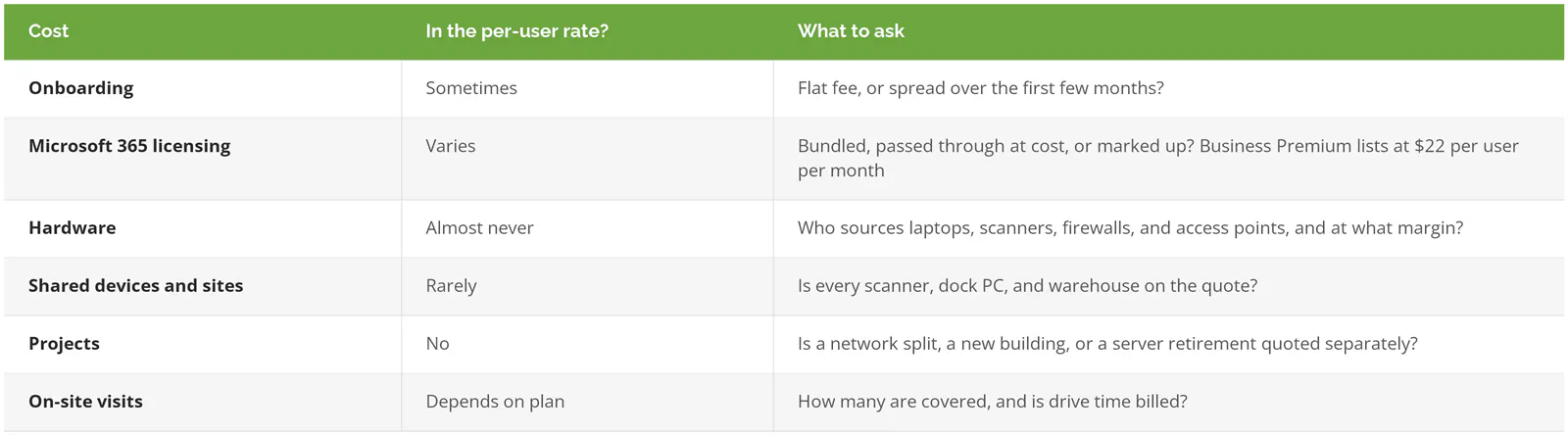
Licensing goes first. Microsoft lists Business Premium at $22 per user per month on an annual plan, which for 25 people is $6,600 a year that can sit inside one quote and quietly outside another, which is enough to make the more expensive proposal look like the cheaper one.
On-site gets its own paragraph out here. San Bernardino County alone covers about 20,000 square miles of land, and a company with an office in Rancho Cucamonga and a yard in Victorville is two very different drives for any technician. We're based in Torrance, and our techs come out to the Inland Empire when a remote session can't fix it. Plenty of good providers sit outside the region. Just get the visit count, the travel terms, and the response time in writing before you sign. Ask what happens at 6 a.m. when the dock PCs won't boot and the first trucks are already backed in.
Managed IT vs. break-fix vs. one in-house hire: what does each cost?
For a 25-person Inland Empire company, managed IT runs about $45,000 to $75,000 a year. One in-house technician costs about $103,100 loaded, before tools. Break-fix looks cheapest until the month something important breaks.

Fifteen hours a month is an assumption, and a generous one. Break-fix bills arrive in lumps. A calm quarter, then a dead server in peak season, and one week erases the savings. The full managed IT vs. break-fix comparison shows where the two lines cross.
In-house has a different weakness. One technician is one person, with a vacation schedule and a phone that goes to voicemail on Saturdays. But if you already employ a strong IT manager, fully managed IT is probably more than you need. Co-managed IT covers the gaps around that person, nights, security monitoring, a second pair of hands on projects, for less.
How do you compare two Inland Empire managed IT quotes?
Put the proposals side by side and get each of these answered in writing.
- How many users does each of your technicians support?
- Are our scanners, shared PCs, and every site on this quote, or only named users?
- Is endpoint detection and response included, and who looks at an alert at 2 a.m.?
- Which remote access tools do you run, and will we get an alert if a different one shows up?
- How many on-site visits are covered, how fast, and is drive time billed?
- What's the term, what's the notice period, and what do we get back when we leave?
Watch the first two answers closely. Vague ones are their own answer. If you're still building a shortlist, our ranking of the best IT support in the Inland Empire compares local and regional providers, and there are city pages for managed IT in Ontario, Rancho Cucamonga, and Fontana. For the statewide picture, see what California businesses pay for managed IT.
Turning a range into your number
A pricing page can only go as far as a range, because it can't count your scanners. Your number depends on users, devices nobody owns, the number of buildings, whether you hold defense contracts, and how much freight or money moves on the strength of an email.
Consilien is a managed IT and cybersecurity provider based in Torrance and serving businesses nationwide, with compliance sold as its own service. A technology assessment takes 2 to 4 hours and turns this range into an actual quote, floor and all. If you'd rather start by talking through what you pay now, speak to an IT expert.