Managed IT Services Cost in the South Bay: What Companies Pay
Managed IT services in the South Bay cost about $150 to $250 per user per month for full coverage. Help desk-only plans run $100 to $150. Security-heavy 24/7 plans start near $250. Onboarding, compliance, and hardware are billed separately.
Table of Contents
A 30-person office on Hawthorne Boulevard in Torrance pays close to what a 30-person office in Century City pays for managed IT. Owners down here tend to expect a break. Cheaper rent, easier parking, a smaller pond. It doesn't show up on the proposal.
Labor is why. The Bureau of Labor Statistics doesn't treat the South Bay as its own market. Torrance, El Segundo, Carson, and Long Beach all sit inside the Los Angeles-Long Beach-Anaheim metro, and every provider quoting managed IT services in the South Bay hires from that same pool of technicians at that same pay.
What actually moves a South Bay quote is the kind of business asking for it. Shared machines on shop floors and in warehouses. A second building across the 110. Aerospace customers who write security requirements into purchase orders. Those swing the number. The city on the invoice barely does.
How much do South Bay companies pay for managed IT?
Fully managed IT for a South Bay business usually lands between $150 and $250 per user per month. A 30-person company in that band spends $4,500 to $7,500 a month before onboarding, hardware, or compliance work.
Per-user pricing means one monthly rate per employee, covering every device that person uses, laptop and phone included. It's a common way IT support pricing in the South Bay gets quoted for office-based companies, though per-device and flat-fee proposals show up too. Alone, the rate is meaningless. It only means something next to the list of what it covers.
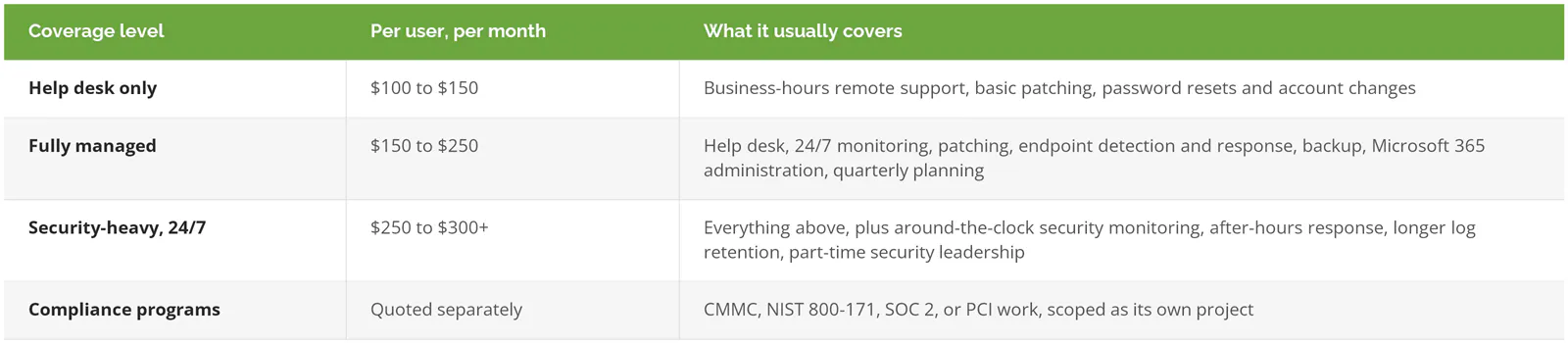
Endpoint detection and response is software on each laptop and server that watches for attacker behavior and can cut a machine off the network on its own. Log retention is how long the record of who logged in, from where, and what they touched is kept, which is the first thing an investigator asks for after a breach.
Survey data runs lower. In Kaseya's 2023 Global MSP Benchmark Survey, the most common per-user band was $50 to $100 a month, picked by 22% of the 1,091 providers who answered, and only 16% charged more than $150. Those figures are national, three years old, and include shops selling help desk and nothing else. They still work as a warning. A South Bay quote sitting in that band is thin on scope or thin on technicians.
Usually both.
Why doesn't the South Bay get a lower rate than LA?
Same technicians, same pay. BLS counts the South Bay inside the Los Angeles metro, where IT support pay runs 21% above the national median. Providers build prices up from labor, so a Torrance quote and a downtown quote look alike.
Start with one support technician. The BLS occupational wage tables for May 2025 put the median computer user support specialist in the Los Angeles-Long Beach-Anaheim metro at $75,070 a year. Nationally, the same job's median is $61,860.
Salary isn't the whole cost. Employer compensation data for June 2026 shows wages make up 70.0% of private-industry compensation, with benefits and payroll taxes covering the other 30.0%. Apply that national share to the local median and a typical South Bay technician costs about $107,200 a year fully loaded. That's the real number.
Now spread that person across users.

That's one help desk technician's labor. Nothing else is in there. No monitoring software, no backup storage, no security tools, no profit, and no senior engineer for the problems the help desk can't solve, which matters here because network and systems administrators in the same metro earned a median of $106,290 in that BLS release.
At national wages, that 75-user row drops to $98. Here it stays at $119. Roughly $21 per user, every month, before the provider has bought a single tool. That gap is baked into every Torrance quote, whoever writes it.
Got a South Bay proposal under $100 per user? Before you celebrate, ask how many users each of their technicians carries. An honest answer lands somewhere on that table. For a provider hiring outside LA, run the same math behind outsourced IT support cost per user at national wages.
What pushes a South Bay quote higher or lower?
The labor floor is shared across the region. The businesses on top of it vary wildly, and four differences do most of the damage to a quote.
Shared machines on the shop floor and in the warehouse
A machine shop in Gardena or a distributor in Carson might have 40 employees and 70 devices: terminals at each workstation, rugged tablets on forklifts, a label printer bolted to the packing table, scanners nobody signs into by name.
Per-user pricing has no clean answer for a machine that doesn't belong to a user. Ask whether those devices are billed per device, folded into a site fee, or left out of scope entirely. The third option is the one to push back on. Shared floor machines tend to be the oldest and least-patched computers in the building, and an attacker doesn't care that the scanner isn't anybody's. If your operation looks like this, managed IT in Carson covers what support for a warehouse floor involves.
More than one building
An office in Torrance plus a warehouse near the port means two internet circuits, two firewalls, two wireless networks, and at least one network closet nobody has opened since the lease was signed. Some providers add a per-location fee for the gear at each site. Others fold it into a higher per-user rate. Both are legitimate. Comparing two totals without knowing which one you're holding isn't.
On-site visits and drive time
Some problems can't be fixed over a remote connection. A dead switch, a new hire's desk, a conference room display that refuses to connect at 8:55 before a client meeting. Ask how many on-site visits the agreement covers and whether a technician's drive time is billed. The 405 between El Segundo and Long Beach at 4:30 on a Thursday is a real cost to somebody, and you want to know who before it lands on an invoice.
Distance matters here. Consilien works out of 21250 Hawthorne Boulevard, so IT support in Torrance and visits up to El Segundo are short trips rather than an afternoon on the freeway.
Microsoft 365 licensing
Licenses are pass-through. They're also easy to double-count. Microsoft 365 Business Premium lists at $22 per user per month on an annual commitment. One provider bundles it into the per-user rate. Another bills it at cost on a separate line. A third marks it up. If one quote includes Business Premium and the other doesn't, $22 of the gap is explained before you've read a single service description.
Is compliance included in managed IT pricing?

It shouldn't be. Compliance work like CMMC and NIST 800-171 (defense supplier security rules), SOC 2 (a security audit customers request), or PCI (card payment security) is scoped and priced as its own project. Managed IT keeps systems patched, monitored, and backed up. It doesn't produce the policies, evidence, and assessments an auditor or a prime contractor asks to see.
That distinction carries more weight in the South Bay than in most places, because of who's here. The aerospace supply chain running through El Segundo, Hawthorne, and Torrance lives on Defense Department contracts, and those contracts increasingly carry CMMC, the Pentagon's security certification for suppliers, with Level 2 required for any that handle controlled unclassified information (sensitive but not classified defense data).
The price tag shows why it can't hide inside a monthly rate. When the rule was proposed, the Defense Department estimated a small company's Level 2 third-party assessment at nearly $105,000. That's the assessment alone. Not the gap work, the written security plan, or the months of evidence collection it takes to pass.
So a provider who says compliance comes included in a $175 per-user rate is describing something much smaller than a compliance program, or planning to bill for the rest later. Ask which. Consilien keeps compliance as a separate service from managed IT for exactly that reason, and suppliers to aerospace prime contractors can start with CMMC for aerospace manufacturers.
No defense contracts, no card payments, no SOC 2 requests from customers? Then you may never need any of this, and a quote that adds it anyway is padding.
What one-time costs sit outside the monthly rate?
The monthly number is the recurring part. Plenty sits beside it.
- Onboarding. The opening weeks of any agreement go to documenting your environment, installing the small monitoring program that runs on every machine, and cleaning up admin accounts nobody remembers creating. Some providers charge a flat fee for it. Others spread it across the first several months.
- Hardware? Almost never in the rate. Laptops, firewalls, switches, Wi-Fi access points, and the server in the back room that's two years past retirement are budgeted on their own.
- Projects get their own quote. An office move, a Microsoft 365 migration, a second warehouse coming online in Compton.
- What does an emergency call at 11 p.m. on a Saturday cost if your plan only covers business hours? Find out before you need to.
Term length matters too. Consilien's agreements run three years, with an option to leave after the first year on 60 days' notice. Longer terms generally buy a lower monthly rate, but whatever term you sign, read the exit clause before the price, and confirm you get your passwords and documentation back on the way out.
Managed IT vs. break-fix vs. one in-house hire: what does each cost?
For a 30-person South Bay company, fully managed IT runs about $54,000 to $90,000 a year. One in-house support technician costs about $107,200 loaded, before tools. Break-fix looks cheaper until a bad month arrives.

Twenty hours a month is a guess. Maybe a generous one. That's the whole problem with break-fix, because the bills are lumpy. Three slow months, then a server fails during quarter close and one week's invoice wipes out the savings. The full managed IT vs. break-fix comparison walks through where that line usually crosses.
In-house has a different weakness. One person is a single point of failure with a vacation schedule. And if you already employ a capable IT manager, you probably don't need fully managed IT at all, because a co-managed arrangement fills the gaps around that person for less. The risk side of that choice gets its own treatment in in-house vs. outsourced IT.
How do you compare two South Bay managed IT quotes?
Put both proposals side by side and get an answer to each of these in writing.
- How many users does each of your technicians support?
- Shared devices, servers, and network gear. Billed per user, per device, or per site?
- What's excluded? Hardware, projects, after-hours work, and licensing are the usual four.
- Is endpoint detection and response included, and who looks at an alert at 2 a.m.?
- How many on-site visits are covered, and is drive time billed?
- Term, notice period, and what you get handed back when you leave.
Watch the first answer closely. A provider who can't give one is telling you something. Still building a shortlist? This ranking of IT support companies in Long Beach scored eight local providers on reviews, coverage, and leadership, and managed IT pricing in Los Angeles breaks the same ranges down by team size for the wider metro.
Getting from a range to your number
Pricing pages stop at a range. They have to. The number that matters gets built from your own user count, buildings, shared machines, and contracts, and nobody can produce it from a web form.
Consilien is a managed IT and cybersecurity provider founded in 2001 and headquartered in Torrance, serving businesses nationwide, with compliance offered as a separate service. A technology assessment takes two to four hours and turns the range on this page into an actual quote. If you'd rather start with a conversation about what you're paying now, speak to an IT expert.