IT Outsourcing Guide: How to Outsource IT in 7 Steps Without Losing Control
IT outsourcing means handing defined IT work to an outside provider under a written agreement. The 7 steps: take inventory, choose a model, decide what stays yours, vet providers, write the exit into the contract, run the handover, and keep oversight.
Table of Contents
An IT outsourcing guide should open with the sentence vendors leave out. Handing your IT to a provider doesn't hand them the risk. CISA's guidance for customers of managed service providers (outside firms that run your IT for a monthly fee) says outsourcing "does not absolve executives of risk management responsibilities." The provider does the work. You still own what happens.
That isn't a reason to keep everything in-house. It's a reason to do this in order.
When outsourcing goes sideways, the contract usually got signed before anyone wrote down the scope, and a year later nobody inside the company can log in to its own Microsoft 365 admin console. If you're weighing providers around Los Angeles, here's how managed IT services in Los Angeles work at Consilien. The steps below apply wherever you are.

What does IT outsourcing actually cover?
IT outsourcing is paying an outside firm to run some or all of your technology work, from help desk tickets and patching to security monitoring, backups, and cloud administration, under a contract that sets scope, response times, and price.
The contract is the product. Not the brochure. Two providers can both say "fully managed" and mean very different things. One covers after-hours outages and calls your phone vendor for you. The other stops at password resets.
Read the scope. Ignore the label. We broke down what outsourced IT support includes line by line, including the parts contracts tend to leave out.
Step 1: What should you inventory before you call a provider?
Write down what you own, who holds the admin logins, and which 5 systems would stop the business if they went down tomorrow. Providers plan and price from that list. Without it, every quote is a guess. An educated one, maybe.
It doesn't need to be pretty. A spreadsheet works. So does a legal pad. Cover these:
- Every laptop, desktop, and server, with its age. Anything still on Windows 10 Home or Pro has been past Microsoft's end of support since October 14, 2025.
- Cloud apps and who pays for them. Microsoft 365, QuickBooks Online, your ERP (the system that runs orders, inventory, and accounting), and that CRM (customer database) somebody in sales put on a company card in 2023.
- Admin accounts. Who has the global admin login for Microsoft 365, the firewall, and the domain registrar? If the honest answer is "the guy who left," fix that before anything else.
- Outside vendors with remote access, like the copier company or your line-of-business software support.
- Your critical functions. Order entry, payroll, production scheduling, email, and the shared drive with every signed contract on it.
Then answer the 3 questions CISA puts to small and mid-sized businesses. Which tasks will the provider take on? Which will you keep? Which will be shared?
Short answers are fine. Blank ones aren't.
Step 2: Which outsourcing model fits your business?
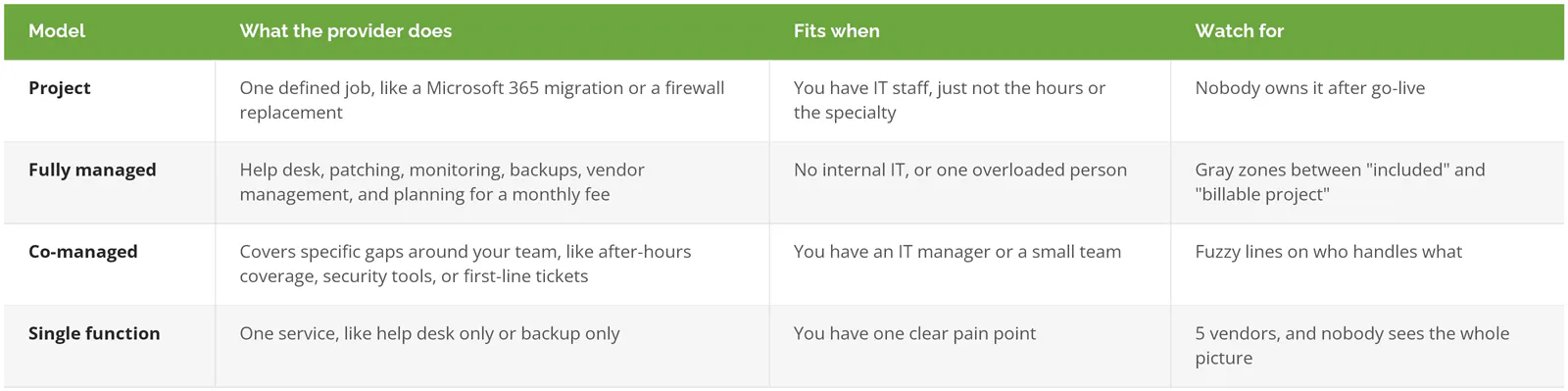
Pick the model from your gaps. Not the provider's menu. Companies with no internal IT usually need fully managed. Companies with an IT manager or a small team usually need co-managed. A one-time job like a migration is a project.
Why not just hire? Fair question. The Bureau of Labor Statistics puts the median pay for a network and computer systems administrator at $99,130 (May 2025), before benefits, and that one person still takes vacations, gets sick, and sleeps. A ransomware attack at 2 a.m. on a holiday weekend doesn't care. It never does. We ran the full numbers in in-house vs. outsourced IT cost and risk.
If your internal team already covers nights and weekends and isn't drowning, you may not need to outsource the core at all. A specialty project, or a co-managed IT arrangement for the one gap you can't staff, will do more for the money.
Step 3: What should stay in-house no matter what?
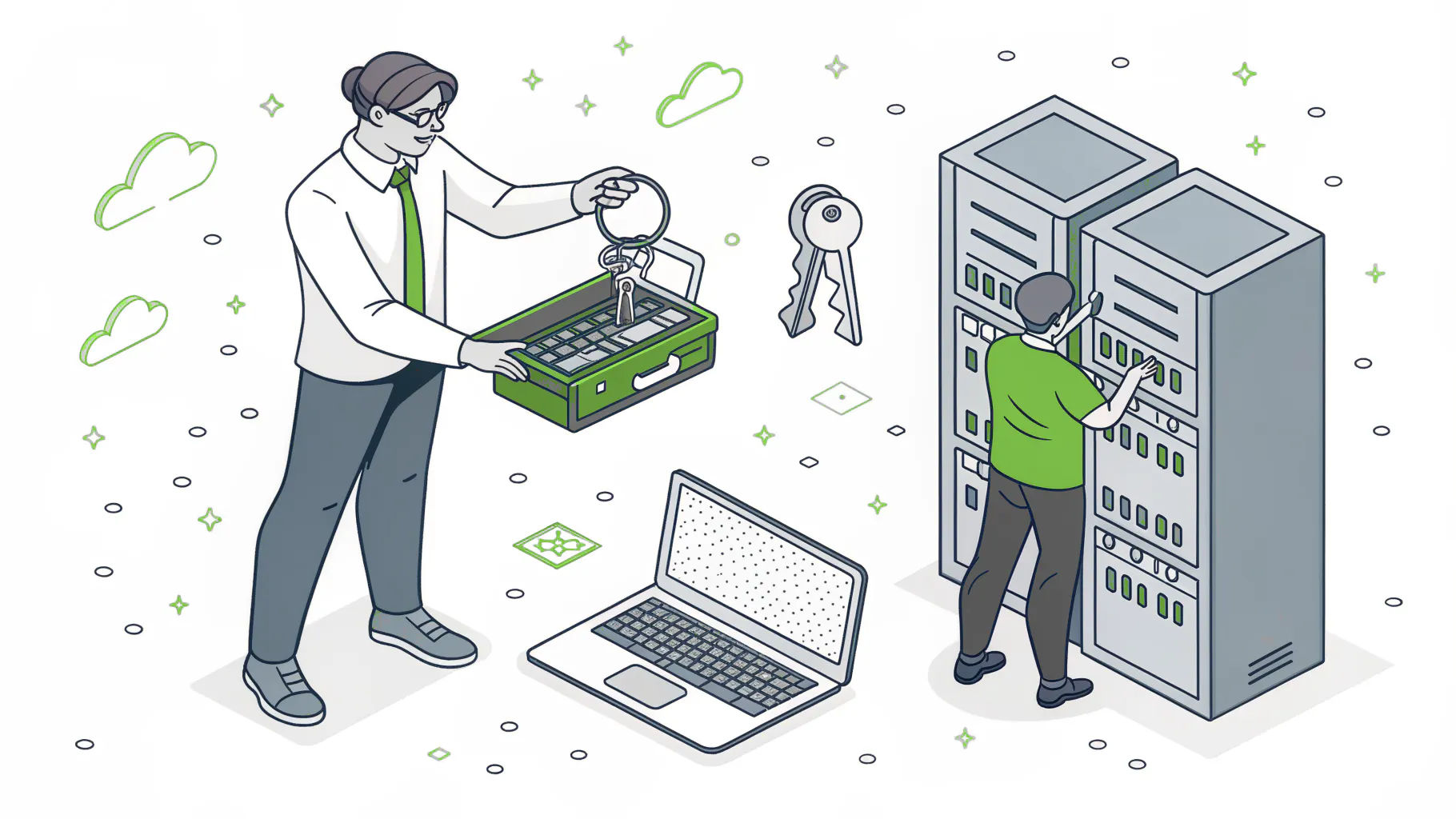
Outsource the work. Keep the judgment.
Four things stay with you regardless of model.
You own the keys. Keep a break-glass admin account (an emergency login for Microsoft 365 and your core systems, stored where only leadership can reach it) that the provider doesn't control. CISA recommends giving any provider the minimum access it needs for the shortest time it needs it, and re-checking that access regularly, because the access a provider needed for a server migration in March shouldn't still be sitting open in November.
Security policy is a business decision. The provider should recommend MFA rules (multi-factor authentication, the second login step like a phone code), password standards, and who gets remote access. Someone on your side signs off. In writing. If nobody does, you've outsourced your risk tolerance to a vendor who doesn't carry it.
The roadmap and the budget are yours too. Day-to-day support and IT strategy are different jobs, and a help desk contract rarely includes the second. That's the role a virtual CIO fills, a part-time technology executive who plans spend and priorities with leadership.
And keep your own logs. Always. CISA's guidance says to keep controls and logs separate from the vendor's records, so you can verify what the provider actually did. Trust, but with receipts.
Step 4: How do you vet an IT outsourcing provider?
Ask for evidence. Promises are free. Before signing, get written response-time commitments, an incident response plan, a statement on how your data is kept apart from other clients' data, a list of subcontractors who'll touch your systems, and proof the provider is financially stable.
Every item on that list comes from the CISA guidance, which asks for 14 things before you sign. It's worth the scrutiny because your provider becomes a door into your network. SecurityScorecard's 2025 Global Third-Party Breach Report tied 35.5% of the 1,000 breaches it studied to third-party access, and 46.75% of those third-party breaches involved technology products and services.
Those breaches aren't cheap or quick to find, either. In IBM's Cost of a Data Breach Report 2026, supply chain compromise was the second most common way in, averaging $4.96M per breach and taking 258 days to identify and contain.
Attackers know where the access is. They go straight for it. In May 2022, CISA, the NSA, the FBI, and cybersecurity agencies from the UK, Australia, Canada, and New Zealand issued a joint advisory on threats to managed service providers, warning that compromising one provider can open a path into every customer it manages.
So, the questions that separate a good provider from a smooth salesperson:
- Who on your team can reach our systems, and how is that access logged?
- Can we see your last incident and what you changed afterward?
- Which tools would you install, and do we keep them if we leave?
- Who answers at 2 a.m., an engineer or an answering service?
CISA also publishes a free vendor vetting template for small and medium businesses with a section built specifically for vetting MSPs. Our longer list of questions to ask before signing with an MSP goes deeper.
Step 5: What belongs in an IT outsourcing contract, including the exit?
Four things, mainly. A service level agreement with response and resolution times by priority, a clear line between included work and billable projects, a statement that your data stays yours, and an exit clause with a handover timeline and data formats. Write the exit before you sign.
The service level agreement, or SLA, is where "fast response" turns into a number. Look for separate targets for a full outage and a single broken printer, and find out whether the clock measures a real response or an automated ticket email. Our managed IT SLA guide walks through the terms that matter.
Then the exit. Nobody wants to negotiate a breakup on the first date, which is exactly why it gets skipped. Spell out what the provider hands over when you leave (documentation, passwords, network diagrams, ticket history), in what format, how fast, and who pays for the transition. Avoid contracts you can only end "for cause." Proving cause turns a business decision into a legal argument. Expensive, too. And watch auto-renewal clauses with built-in price increases. Here's what should be in an MSP contract if you want the full clause list.
California companies outsourcing IT have one more requirement to check. Under California Civil Code §1798.100(d), a business covered by the CCPA that discloses consumer personal information to a service provider needs a written agreement limiting use to specified purposes, binding the provider to the same privacy protections, and requiring notice if the provider can no longer meet them. Outsourced IT in California touches that data constantly, through email, file shares, and backups. Have your attorney confirm the language is in there.
Step 6: What happens in the first 90 days?
The first 90 days decide whether this works. Expect the provider to spend the first month getting access and documenting your environment, the second fixing what that turned up, and the third proving the service with real ticket data.

Don't skip that test restore. A backup nobody has restored is a hope, not a backup.
Schedule any downtime yourself. CISA recommends that outages needed for a transition happen at a time of the customer's choosing, which in practice means a Friday night after payroll, not a Tuesday morning during month-end close.
Replacing an existing provider adds a second handover. Ask the outgoing firm for hardware and software inventories, ticket history, runbooks (the step-by-step procedures for routine and emergency tasks), and every admin credential, in writing, with a date. Some outgoing providers are gracious about it. Others go quiet. Plan for quiet. We wrote a separate guide on switching MSPs without losing a day of productivity for that case.
And talk to your staff early, because people who find out about a new IT provider from an unexpected password reset email tend to assume the worst, and a few of them will forward it to you asking whether it's phishing.
Step 7: How do you keep oversight once it's running?
Review the service monthly and the strategy quarterly. That means a monthly report on tickets, response times, patch status, and backup results, plus a quarterly business review where you and the provider look at risks, upcoming spend, and anything the business is planning that IT should know about.
Twice a year, pull the list of everyone, inside and outside the company, who has admin access. Is anyone on it who shouldn't be? Former employees and old vendors are the usual finds.
Ask one blunt question at every quarterly review. What would you fix first if this were your company? A good provider has an answer ready. A weak one changes the subject to the dashboard.
Where IT outsourcing goes wrong
Scope drift is the quiet one. The contract covered 40 devices in 2024, the company has 65 now, and every new laptop is either unmanaged or quietly billed as a project. Re-baseline the device list every year. Every single year.
Then there's the lost-keys problem from Step 3. The provider set up Microsoft 365, holds the only global admin account, and the relationship sours. Now leaving means asking permission from the people you're leaving.
Outsourcing also gets treated as a strategy. It isn't. It's a way to get work done, and someone still has to decide what work matters.
Distance catches people off guard, especially manufacturers and warehouses. Remote support handles most tickets, but a failed switch on a production floor needs someone on site, so ask how fast a technician can physically get there and whether that person has seen your equipment before. Ask whether they have technicians near you. Our South Bay coverage is one example.
Last, the compliance assumption. A managed IT contract keeps systems running and secure. Compliance work for NIST, CMMC, PCI, or SOC 2 is a separate engagement, scoped and priced on its own. If an auditor is in your future, ask about it directly.
Consilien is a managed IT and cybersecurity provider for businesses across the US. We run fully managed and co-managed IT, security operations, and vCIO planning.
Still at Step 1 with no list? Good. That's the right place to be. Speak to an IT expert and bring whatever you have, even a spreadsheet with gaps in it.