What Does a vCIO Actually Do, and Do You Need One?
A vCIO (virtual chief information officer) is a part-time, outside executive who owns your technology plan. That means the roadmap, the IT budget, vendor decisions, and the risk conversation with leadership. A vCIO doesn't fix laptops or work tickets.
Table of Contents
Try a quick test. Ask who at your company can say what IT will cost next year, and why. If the answer is a shrug, or the name of your support vendor, that seat is empty. Plenty fail it.
What does a vCIO do, in plain terms? A vCIO turns your business plans into dated, budgeted technology decisions and then owns them. Your IT support team keeps the lights on. The vCIO decides which lights you're paying for, which ones you'll need in 18 months, and which ones should have been switched off 2 renewals ago.
Companies get the order wrong all the time. They hire for support, assume strategy comes bundled with it, and find out at budget season that nobody planned anything, usually in a meeting where the CFO is holding a spreadsheet with one line labeled IT. The laptop refresh shows up as a surprise. So does the software renewal that quietly went up. That gap is the reason vCIO services exist at all.

What does a vCIO do?
A vCIO does the job of a chief information officer on a part-time contract. They set technology direction, build and defend the IT budget, manage vendors, and report technology risk to leadership in business terms.
The full-time version is expensive. The Bureau of Labor Statistics puts the median pay for computer and information systems managers, the occupation that includes CIOs, at $175,140 as of May 2025. That's the median, before benefits, across a category that also includes IT directors. Hard to justify when your whole server room fits in a closet.
So what lands on a vCIO's desk? Think of the ERP upgrade (the system that runs your orders, inventory, and accounting) that nobody wants to schedule. The Microsoft 365 license count that drifted 15 seats above headcount. The firewall that loses vendor support next spring. The cyber insurance questionnaire your CFO forwarded with nothing but a question mark. Not one is a ticket. Every one of them is a decision with a dollar figure attached, and every one of them gets made badly, or late, when nobody owns it.
If you're weighing the part-time version against a hire, I compared a virtual CIO vs a full-time CIO on cost, value, and risk separately.
What does a year with a vCIO look like?
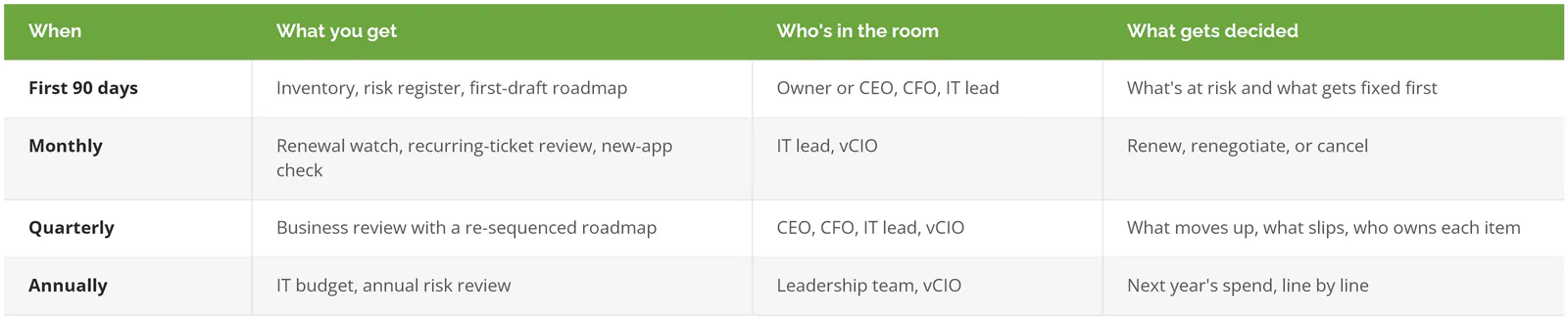
It runs on a calendar. A heavy first 90 days, light monthly check-ins, a quarterly review that reorders the roadmap, and an annual budget build. If you can't map your vCIO's work to that rhythm, something's missing.
The first 90 days
Everything starts with inventory. Servers, switches, laptops, applications, user accounts, and the date each one stops getting vendor support, because a system with no support date on file is a system somebody discovers the hard way in the middle of an outage. Boring work. It's also where the surprises live, like the label printer in shipping that still runs on a PC nobody's patched since 2021.
Next comes a risk register, built from a business impact analysis that ranks which systems stop revenue when they fail, and how fast the damage grows. Then the first roadmap. I've written up how a vCIO builds an IT roadmap step by step. The short version is that every line gets a date, an owner, and a cost, even if the cost is a range.
By day 90 you should be holding an inventory, a risk register, and a draft roadmap covering the next 12 to 36 months. Not a slide deck. Documents.
Every month
Monthly work is mostly watching. Which contracts renew in the next 90 days? Which tickets keep coming back with the same root cause? Did someone in marketing sign up for a new app on a company card?
That last one matters more than it sounds. Flexera's 2026 State of ITAM report found 43% of organizations saw SaaS waste rise over the past year, and only 36% had complete visibility into their IT, down from 43% a year earlier. Fewer companies can see their whole IT environment now than a year ago. That's the number that bugs me.
Every quarter
The quarterly business review is where a vCIO earns the fee. Or doesn't.
ScalePad's 2026 MSP Trends Report, a survey of more than 1,100 North American managed service providers, found that the providers losing the most clients often spend the most time preparing their quarterly reviews, while top performers meet more often and tie their work to business outcomes. A thick deck of ticket counts proves effort, and not much else.
A real review re-sequences the roadmap. A big contract closes and the warehouse expansion moves up 2 quarters, which pushes the phone system replacement back, which means somebody has to call the phone vendor before the old contract auto-renews for another 3 years. Your insurer adds a multi-factor login requirement (a second check, like a phone prompt, on top of the password) at renewal, so that project jumps the line. A vendor announces end of life on your backup software. You leave with decisions, owners, and dates. Anything else was a status meeting.
Once a year
Budget season. The vCIO builds the IT budget from the roadmap, and the two should match line for line, because a roadmap item with no money behind it isn't happening, whatever the slide says. Our IT budget planning guide for 2027 covers how that gets built. Same season, an annual IT risk review checks whether last year's risk register still describes the business you actually run.
Prices won't hold still while you plan, either. Gartner forecasts worldwide IT spending will grow 14.2% in 2026, to $6.37 trillion. Some of that shows up in your renewals. Plan for it.
What doesn't a vCIO do?
A vCIO doesn't reset passwords, run your security program, or make you compliant. Those jobs belong to IT support, a vCISO, and a compliance program. A good vCIO coordinates with all of them and doesn't pretend to be any of them.
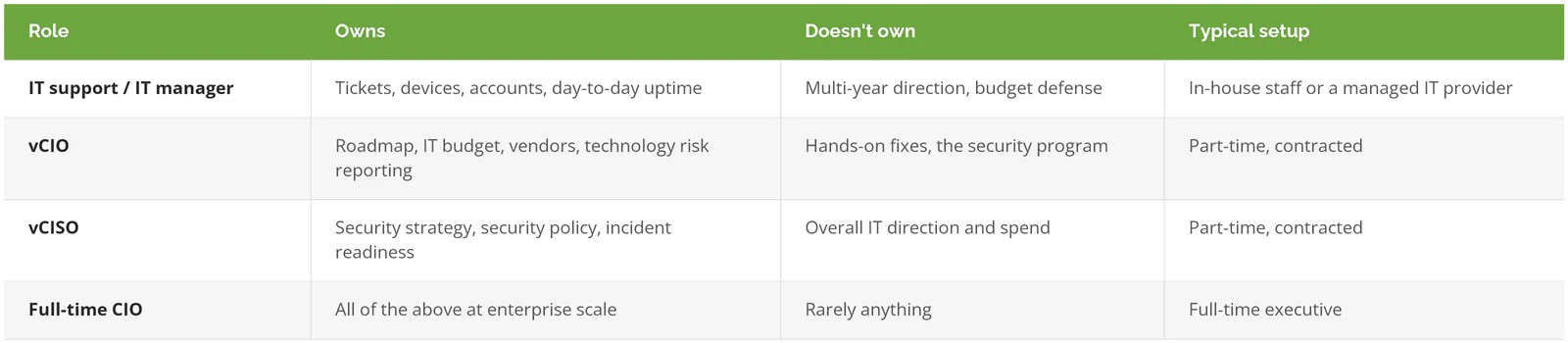
Security blurs the most. A virtual CISO decides what your security program needs. The vCIO decides when it fits on the roadmap and where the money comes from. Two seats, one conversation.
Compliance is separate, too. Frameworks like NIST, CMMC, PCI, and SOC 2 need a dedicated compliance program with its own evidence, audits, and owners. A vCIO plans for the cost and the deadlines. The vCIO doesn't produce the evidence.
Titles get stretched in practice, and some providers sell a vCIO that's really a senior technician with a nicer email signature. Read the scope, not the title.
Three decisions IT support won't make for you

The Windows 10 bill. Picture a distributor with 60 Windows 10 laptops still on the floor. Microsoft ended Windows 10 support on October 14, 2025. Businesses can buy extended security updates at $61 per device for year one, and the price doubles every year, for up to 3 years. Skipping year one doesn't work either, because the updates are cumulative and a late buyer pays for both. For those 60 laptops, that's $3,660 for year one and $7,320 for year two, so $10,980 to keep aging hardware patched for 2 years, with a $244-per-device third year still ahead. Run the numbers. Somewhere in that math, buying new machines costs less than patching old ones. Your help desk will gladly apply the updates. Deciding whether to buy them is a different job.
The renewal pileup. Picture a professional services firm paying for Microsoft 365, Zoom, Slack, Adobe, a CRM, and a document management system, each renewing on a different date and paid by a different person. Microsoft 365 already includes Teams for chat and meetings. Nobody noticed, because nobody owns the whole list. A vCIO puts every contract on one calendar and kills the duplicates 90 days before they auto-renew, not the week after, when the cancellation window has closed and the only person who can approve the change is on vacation.
The second building. Picture a manufacturer that signs a lease in March and plans to start production there in August. Tight timeline. Business internet circuits can take weeks to install. Network gear has lead times. The ERP needs more licenses, and the floor needs Wi-Fi that reaches the far end of the racking. Somebody has to sequence all of it and tell finance what it costs before the lease is signed, ideally. That's a vCIO's week, not a ticket queue.
Do you need a vCIO?
You probably need a vCIO if you answer no to 2 or more of the questions below. That threshold is my rule of thumb, not an industry standard. But it's held up.
- Can someone name the 3 technology failures that would hurt revenue most, without looking anything up?
- Is there a written IT budget for next year with line items, rather than one number someone guessed?
- Do you know which systems lose vendor support in the next 24 months?
- Was your last big technology purchase your own idea?
- Does anyone review contracts 90 days before they auto-renew?
- When ownership asks about cyber risk, does someone answer in dollars?
Question 4 trips up more owners than you'd expect. In NFIB's 2025 Small Business and Technology survey, 28% of small business owners said the idea for their most recent new or improved technology came from a vendor. The same survey found 29% of owners agree with "if the current stuff works, why mess with it." Fair enough, until it stops working on a Tuesday in the middle of month-end close.
Skip it if
You already have an in-house IT director who controls a budget and sits in leadership meetings. That person is doing the job. If anything is missing, it's more likely security leadership, so look at a vCISO instead.
Your environment fits on one page. One office, Microsoft 365, a few cloud apps, no regulated data, nothing custom. A solid managed IT provider and a yearly review will cover you, and the money you'd spend on a vCIO is better spent on the basics, like tested backups and multi-factor login on every account.
Or leadership won't give the work 2 hours a quarter. A vCIO without executive time turns into an expensive note-taker.
How do you tell a real vCIO from a renamed account manager?
Ask how they're paid, who owns the roadmap if you leave, and when they last told a client to spend less. A real vCIO answers all three without hesitating.
The label is common. ScalePad's same 2026 report names vCIO as one of the strategic services that separates top-performing providers from the rest. What's behind the label varies. A lot.
Commission is the first thing to check. Ask directly. A vCIO paid on what they sell will find a reason to sell something. Not always, but often enough that you should know the incentive before you take the advice.
Ownership comes next. The inventory, the risk register, and the roadmap should be your documents, in your systems, readable without the provider's software, so that if you walk away tomorrow the next provider, or your own new IT director, can open them on day one and keep going. Ask to see them. If switching providers means starting from a blank page, the plan was never yours.
Then ask about the last time they recommended spending less. Canceling a contract. Keeping hardware another year. Skipping a project. A vCIO who's never said no to a purchase is working for somebody, and it might not be you.
Last, check who attends the quarterly review. If nobody with budget authority is in the room, decisions can't get made there, and the review becomes a recap. Find out early.
Pricing depends on scope, hours, and whether the vCIO comes bundled with managed IT. The vCIO cost guide for 2026 covers pricing models in detail.
Consilien is a managed IT and cybersecurity company headquartered in Torrance, California, working with businesses nationwide. Its vCIO service covers the full calendar above, from the first 90-day inventory and risk register to quarterly roadmap reviews and the annual IT budget, and the documents are written to belong to the client. Compliance and vCISO work run as separate services alongside it when a business needs them.
If nobody at your company can answer the 6 questions above, speak to an IT strategy expert.