How Much Does Disaster Recovery Cost? A Line-by-Line Budget for 2026
Disaster recovery cost runs from under $100 a month to store an offsite backup copy, to well over $1,000 a month to have your servers ready to boot somewhere else within hours. The difference is almost entirely how long your business can afford to be down.
Table of Contents
Storage is cheap, and it keeps getting cheaper. Getting back to work fast is what you pay for, in replication, standby capacity, testing, and the hours your people spend making sure the plan still works. This guide prices every line of a backup and disaster recovery budget from published list prices, then builds three budgets for the same example business so you can see where the money actually goes.
The example business is small on purpose. It runs 10 servers with 5 TB of data, and its 60 people average 50 GB each in Microsoft 365 between mailbox and OneDrive. Every price below is a US list price checked in September 2026. Your numbers will move, but the shape won't.
What Does Disaster Recovery Cost?
For a business with 10 servers and 5 TB of data, published cloud prices put disaster recovery at roughly $500 a month for backup-only protection with a recovery time measured in days, about $1,400 a month for cloud-based recovery in hours, and the price of a second production environment for recovery in minutes. Labor comes on top of all three.
They're far apart because each tier keeps something different waiting for you.
- Backup only keeps copies of your data. After a disaster, somebody still has to find hardware, rebuild servers, and restore onto them.
- Warm recovery keeps copies of your whole servers, operating system and settings included, replicated to a cloud that can boot them on request.
- Hot recovery keeps a second environment running all the time, so switching over takes minutes.
Every jump in speed buys more standing infrastructure. None of it is optional once you pick the speed.
The Decision That Sets Your Price: How Long Can You Be Down?
Your recovery time objective, or RTO, is how quickly a system has to be working again after an outage. Your recovery point objective, or RPO, is how much recent data you can afford to lose, measured in time. Those two numbers decide which tier of spending you're in before you look at a single vendor. (If you haven't set them yet, our guide to RTO vs. RPO walks through it.)
NIST's contingency planning guide, SP 800-34 Rev. 1, draws this as two curves crossing. One is the cost of disruption, which climbs the longer you're down. The other is the cost to recover, which climbs the faster you want to be back. In NIST's words, "the shorter the RTO, the more expensive the recovery solutions cost to implement," and a low-impact system "would be able to implement a less costly simple tape backup system." Where the curves cross is your cost balance point, and it's different for every business and for every system inside the same business, which is why a single company-wide recovery target almost always overspends somewhere.
So what does an hour of downtime cost you?
Don't borrow somebody else's number. The widely quoted figure from ITIC's 2024 Hourly Cost of Downtime survey, over $300,000 an hour for 90% of firms, comes from a survey of more than 1,000 firms, and ITIC applies it to mid-size and large enterprises. Put that in front of a board at a 60-person company and it will either scare them into overspending or get laughed out of the room. Neither helps.
Work out your own. A rough version takes 10 minutes.
- Annual revenue divided by the hours you operate in a year. A $12M business open 2,000 hours a year moves about $6,000 an hour.
- Payroll for the people who can't work while the system is down. 60 people at a $40 average loaded hourly cost is $2,400 an hour.
- Anything contractual. Late-delivery penalties, service-level credits (refunds your contracts promise when you miss an uptime commitment), overtime to catch up.
In that example, an hour down costs somewhere around $8,400 before penalties. Not every hour is lost revenue, since some orders just slip a day, so treat it as a ceiling rather than a forecast. Our RTO calculator does the same math with your inputs.
Then run the math system by system. Payroll and the ERP system that runs order entry and production scheduling probably can't wait three days, while the file share with last year's marketing assets can wait a week. Paying to recover it in an hour is money set on fire.
The Disaster Recovery Cost Stack, Line by Line
A disaster recovery budget has five lines. A vendor quote usually covers one or two of them.
Backup storage
This is the cheapest line and the one people fixate on. One full offsite copy of 5 TB costs between $9 and $118 a month at list price, depending on where you put it.
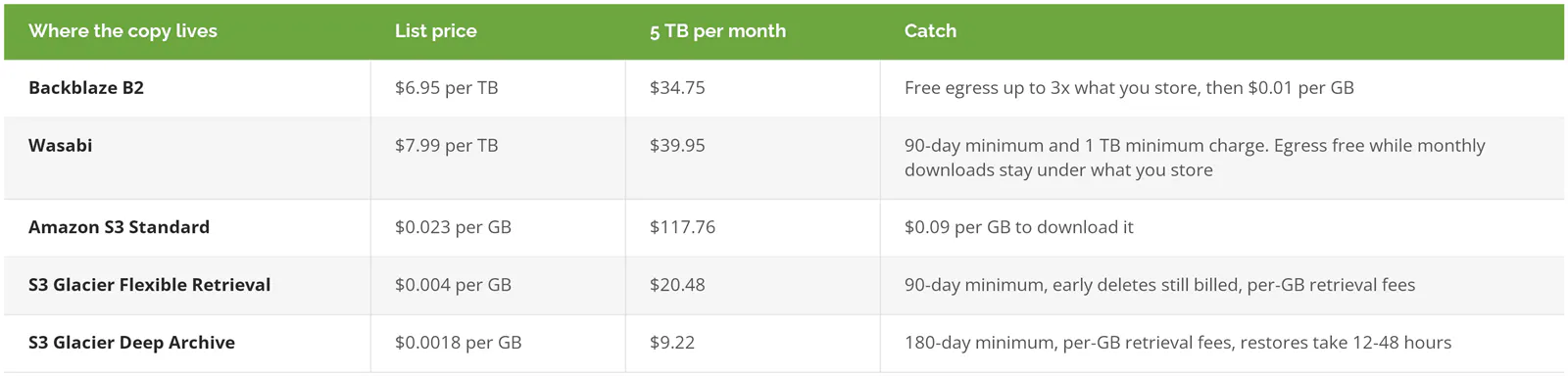
Sources: Backblaze B2 pricing, Wasabi pricing, and Amazon S3 pricing (US East), checked September 2026.
Two things inflate that line in real life. Retention, because keeping 30 or 90 days of restore points stores more than one copy's worth of data. And a second copy, because a backup that someone with your admin password can delete isn't much of a backup. An immutable copy, one that can't be changed or deleted until its retention date passes, is worth paying for, and it's a separate line on the bill.
Still cheap. Even doubled, this is rarely the number that breaks a budget.
Getting the data back out
Egress is what a cloud provider charges to move data out of its network. It's invisible until the worst day of the year.
At $0.09 per GB, restoring all 5 TB from S3 Standard runs about $450 after the first 100 GB, which AWS gives away free each month. That's not ruinous, but it lands in the same week you're paying overtime and possibly buying hardware, and nobody put it in the plan. Backblaze would charge nothing for the same restore, since 5 TB is well under 3x the stored amount. Wasabi doesn't charge egress either, as long as a month's downloads don't exceed what you store, and a one-time 5 TB restore stays inside that.
Archive tiers add a second problem, which is time. Deep Archive is the cheapest storage on the list, and it earns that price by making you wait, with restores that take 12 to 48 hours, a per-GB retrieval fee, and a 180-day minimum on everything you put there. That's fine for the seven-year retention copy your auditors want. It's a poor choice for the copy you'd restore payroll from.
Standby compute and replication
This is the line that buys speed. Instead of copying data, a replication service keeps copies of whole servers in a cloud that can boot them. Disaster recovery as a service, or DRaaS, is the packaged version of this line.
Azure Site Recovery lists at $25 per protected server per month when replicating to Azure (US East, Azure Site Recovery pricing), with the first 31 days free for each server. For our 10 servers, that's $250 a month. It's also not the bill. The standby disks, the saved restore points (snapshots), and the computing time your servers use once you fail over are all charged separately.
AWS publishes a worked example that shows the full picture. On its Elastic Disaster Recovery pricing page, 100 servers with 30 TB of disk come to $6,389.03 a month, or about $64 per server all in. Our example servers are bigger, about 512 GB each against AWS's 300, and when the disk and snapshot lines are scaled up to match, the estimate lands closer to $87 per server. Call it $870 a month for the 10 servers, before anyone boots anything.
A real failover adds compute for every hour the servers run in the cloud, which is pocket change for a two-hour drill and a very different conversation when the recovered environment has to carry the business for weeks. After a building fire, that could be six weeks, so ask for the rate in writing. Our DRaaS buyer's guide covers the contract terms that decide what a long failover costs.
Microsoft 365 and other SaaS data
Server replication doesn't touch Microsoft 365. Your email, OneDrive, SharePoint, and Teams files need their own backup, and it's priced by the gigabyte.
Microsoft's own product, Microsoft 365 Backup, lists at $0.15 per GB per month of protected content (Microsoft 365 Backup pricing). Sixty users averaging 50 GB is 3,000 GB, which comes to $450 a month. That's more than the server storage and the Azure platform fee combined.
One detail in Microsoft's billing trips people up. Deleted and older versions of files stay in the backup, and on the bill, until they age out of the backup's recovery window, which Microsoft's own example puts at 365 days. Delete half a site's content and the charge stays flat for up to a year. Third-party SaaS backup tools often price per user instead, so compare them on your real data volume rather than the headline rate.
Testing, runbooks, and labor
This line rarely shows up on a vendor quote. NIST puts it in the budget anyway. Section 3.4.5 of SP 800-34 says a contingency budget "must be sufficient to encompass software, hardware, travel and shipping, testing, plan training programs, awareness programs, labor hours, other contracted services," and even desks and phones. Its Table 3-5 is a blank budget template with columns for vendor, hardware, software, travel and shipping, labor and contractor, testing, and supply costs. A vendor quote covers the first three.
The cloud part of a test is cheap. AWS prices an 8-hour drill that boots 100 recovery servers at $122.94. The people part isn't. If a test ties up three people for a full day, that's 24 hours of labor, and at an assumed loaded cost of $100 an hour, $2,400. Twenty times the cloud bill.
Runbooks cost time too. A runbook is the written, step-by-step recovery procedure, including which system comes up first, who makes the call, and how staff reach the recovered servers. It goes stale every time you add a server, change a firewall rule, or lose the one person who knew the order the systems have to come back in, so somebody has to own it, and their hours belong in the budget.
Three Budgets for the Same Business
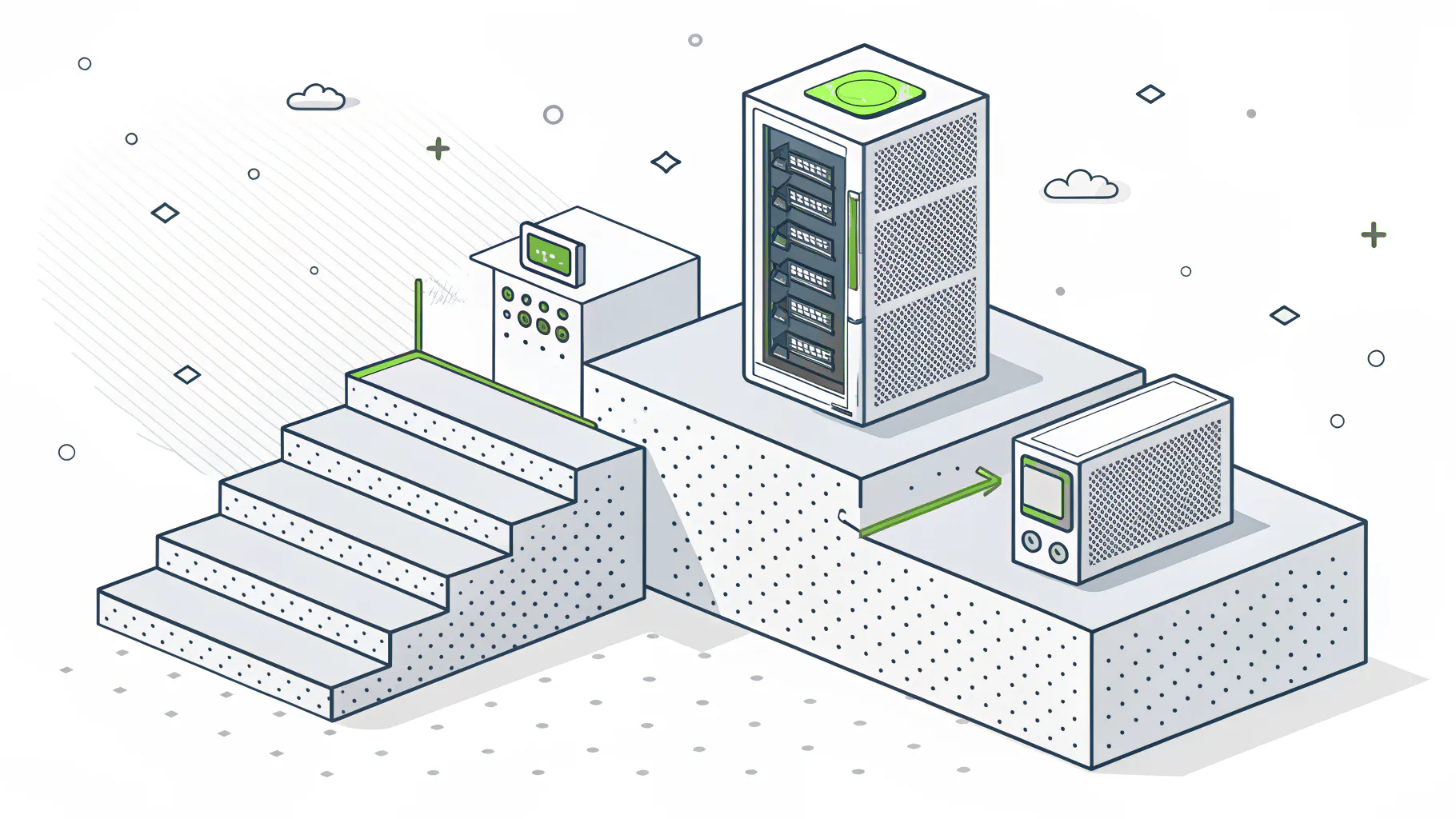
Same company, same 10 servers, same 5 TB, same 60 Microsoft 365 users. Three different answers to "how long can we be down?"
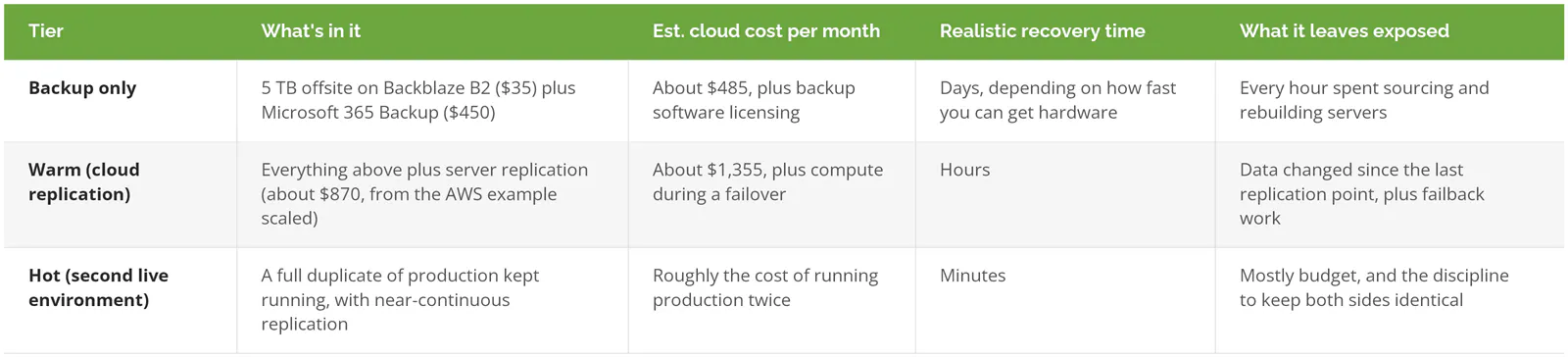
Figures are list-price estimates built from the sources cited above, before labor, licensing, and taxes. Your quotes will differ.
Run the backup-only tier against the downtime math from earlier. If recovery takes three working days, that's 24 business hours at up to $8,400 each, or about $200,000 at the ceiling. The warm tier costs about $870 a month more, roughly $10,400 a year. For a system that genuinely stops the business, that's an easy trade.
For a system that doesn't, it's a waste. The right answer is usually a mix, with warm recovery for the two or three systems that stop revenue and backup-only for everything else. NIST's alternate site criteria make the same point, rating cold sites low cost, warm sites medium, and hot sites medium to high. Our breakdown of hot vs. warm vs. cold disaster recovery sites covers what each one looks like in practice.
Build It Yourself or Buy DRaaS?
A self-built recovery site means a second set of servers, storage, and network gear in a second location, plus the power, cooling, space, and staff to keep it current. You pay for all of it every month whether you use it or not, you keep its software patched and its data in sync with production, and you replace the hardware when it reaches the end of its refresh cycle.
DRaaS rents that capacity. You pay a platform fee plus storage while things are calm, and pay for compute only while you're actually running on it.
For a business at our example's size, the math almost always favors renting. The exceptions are specific. Very large, stable data sets where cloud storage and egress charges pile up. Workloads with licensing tied to hardware, which some cloud recovery services can't run. Or a company that already owns a second facility with space and power sitting idle. If none of those fit, a second data center is an expensive way to own a problem.
Where Disaster Recovery Budgets Go Wrong
Check any quote or plan for these.
- One RTO for everything. Paying hour-level recovery for the archive file share is the easiest money in the budget to get back.
- Putting the restore copy in an archive tier. Deep Archive's 180-day minimum and 12-to-48-hour restores are a bad fit for anything you'd need back the same day, and deleting it early still gets billed.
- Forgetting Microsoft 365. Server DR gets bought and tested while the email, OneDrive, and SharePoint data sits unprotected past Microsoft's built-in retention, and nobody notices until someone deletes a folder.
- No line for failback. Failback is moving operations from the recovery site back to your rebuilt primary systems. It's a project in its own right, with its own data transfer and labor, and it needs its own line.
- Budgeting the drill, not the disaster. A two-hour test costs almost nothing in compute. Six weeks of production running in the cloud after a fire does not.
Ransomware changes the math. Replication faithfully copies encrypted files to the recovery site. Your recovery depends on a clean restore point from before the attack, stored where an attacker with stolen admin credentials can't reach it. Our breakdown of the real cost of a ransomware attack shows what happens when that copy doesn't exist.
How Can You Lower Disaster Recovery Cost Without Slowing Recovery?
Tier your systems first, then buy speed only where the downtime math justifies it. That one step usually moves more money than any vendor negotiation.
After that, a few smaller moves add up. Put long-term retention copies in archive storage and keep only recent restore points in faster tiers. Choose storage whose egress terms you can live with on a bad day, because a restore fee that looks trivial on a pricing page lands in the same week as the overtime and the emergency hardware order. And test with a subset of systems most quarters, saving the full-environment test for once a year. It's cheaper in labor and still proves the runbook works. Our guide to disaster recovery testing best practices covers how to structure those tests, and building a disaster recovery strategy covers the tiering work that comes before any of it.
Skip warm recovery entirely if your whole business runs on Microsoft 365 and a few SaaS apps with no servers of your own. You've got nothing to fail over. Budget for SaaS backup, make sure you can reach it from any laptop, and put the savings somewhere else.
If you're weighing a quote or trying to set RTOs your leadership team will actually sign off on, speak to a disaster recovery expert.