Compliance Automation: Build vs Buy for Mid-Market Teams
Buy compliance automation when a customer or contract sets your audit date and your stack is SaaS-heavy. Build on tools you already own when you run one cloud or Microsoft 365. Neither works until controls have owners.
Table of Contents
A Vanta contract runs a median of $20,000 a year. Drata runs $25,000. Those numbers land on the table the moment your compliance readiness work needs software and someone on your team swears they could script the whole thing over a few weekends. Sometimes they can. A surprising share of compliance automation already comes bundled with the Microsoft 365 and AWS licenses you pay for every month. So is it really build versus buy? Not quite. The better question is what the software, bought or built, will never do for you, and whether anyone at your company has the hours to do it instead once the dashboard turns red.
Those medians come from Vendr's buyer data on 373 Vanta purchases and 233 Drata purchases, which track what companies actually signed rather than list prices. Neither vendor publishes one.
What Does Compliance Automation Actually Automate?
Compliance automation software connects to your systems, pulls evidence like MFA settings (the second sign-in check after a password) and user access lists, and re-checks those controls on a schedule. It doesn't write your policies, decide who should have access, or fix a control that fails.
Evidence, in audit terms, is proof a control works. A screenshot of your password policy. A list of who can reach the finance share. Vanta advertises 400+ integrations plus an API for building your own, where an API is simply the doorway one piece of software uses to read data from another. That's the job. Collect, test, flag, repeat.
The first two are the platform's job. The last three stay with your people.
- Pulling configuration evidence from Microsoft 365, Google Workspace, AWS, Okta, and your HR system, automatically
- Re-testing it daily or hourly, then flagging drift (a setting that quietly changed since the last check)
- Policy templates. You still have to edit them until they describe how your company actually works.
- Quarterly access reviews? The tool sends the reminder. A manager still decides whether the intern from 2024 keeps admin rights.
- Remediation stays manual, every time
None of this is new thinking. NIST said it plainly in Special Publication 800-137 back in September 2011, writing that organization-wide monitoring "cannot be efficiently achieved through manual processes alone or through automated processes alone." Fifteen years later, the sentence still holds. AWS says something close about its own tool. Audit Manager, per its user guide, "doesn't assess your compliance itself."
What Does a Compliance Automation Platform Cost?
Vanta and Drata contracts run $7,500 to about $67,000 a year, with Vanta's median at $20,000 and Drata's at $25,000. The auditor bills separately. So does the internal time to answer what the platform flags.
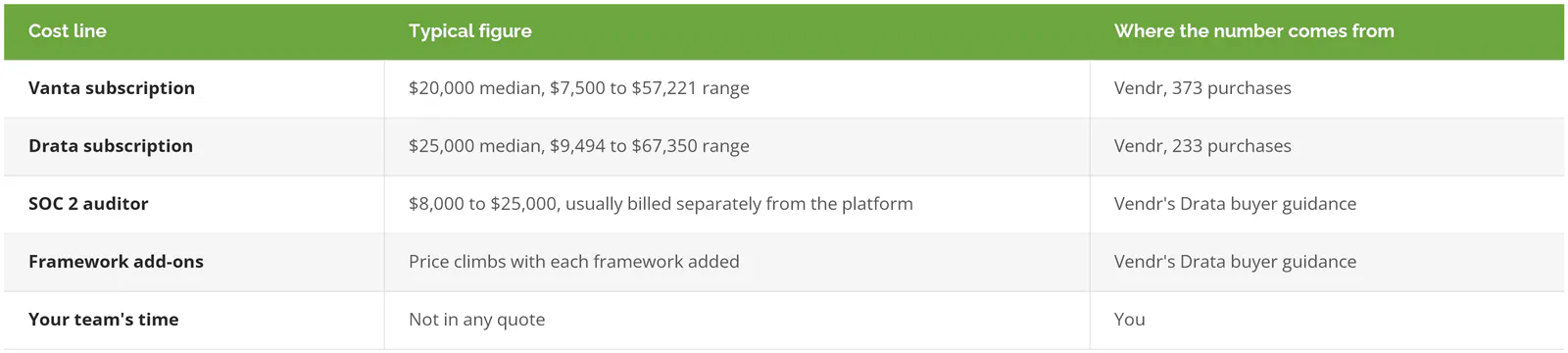
That last row never shows up on an invoice. It should. A platform that flags 60 failing tests in week one has done its job perfectly, and now somebody on a 4-person IT team owns 60 tickets.
Which platform you pick matters less than vendors want you to believe. When we scored nine compliance automation platforms on software alone, the top six landed within 0.18 points of each other on a 10-point scale. A rounding error, basically. The gaps that separated them were framework coverage and how much help came with the license.
What Building It Yourself Actually Looks Like
Building compliance automation at a company with 20 to 1000 users rarely means writing a platform from scratch. It means stitching together tools you already license, then scripting the gaps. Duct tape, mostly.
Start with what's already paid for. Microsoft 365 tenants get Purview Compliance Manager, and organizations on Microsoft 365 E5, the top enterprise license, can pick up to three premium regulatory templates, NIST 800-53 or ISO 27001 for instance, at no added cost. AWS accounts get AWS Config conformance packs, over 100 prebuilt rule sets including PCI DSS 4.0 and NIST 800-171. And CISA gives away ScubaGear, a free tool that checks seven Microsoft 365 services (Entra ID, Exchange Online, SharePoint, and Teams among them) against federal security baselines and spits the results out as HTML, JSON, or CSV.
Then comes the glue. PowerShell or Python scripts that run those checks on a schedule, a locked storage folder for the output, and a ticket queue for anything that fails. If you want the data to outlive whoever wrote the scripts, store it in OSCAL, NIST's machine-readable format for control catalogs, security plans, assessment results, and remediation plans. It reads as XML, JSON, or YAML, so a future platform or auditor can import it instead of starting over.
The Bureau of Labor Statistics puts the median information security analyst at $129,180 a year as of May 2025. Give a quarter of that person's time to keeping homegrown checks running, updating mappings when a framework revises, and chasing broken API tokens, and you've spent $32,295 in salary alone. That's before benefits. It's also already more than the median Vanta contract.
Build still wins sometimes, though. A company living almost entirely in Microsoft 365 with one framework to meet can get most of the way on Purview and ScubaGear for close to nothing extra. Nobody needs a $20,000 dashboard to read a free report.
The Cloud-Native Trap
Building on a cloud provider's own compliance service looks safe. It's their product, after all. Then the product changes.
AWS moved Audit Manager into maintenance mode in 2026. Since April 30, new accounts can't set it up, and AWS says it won't add new frameworks or new versions of existing ones. Its recommended replacement, Config conformance packs, has no template for SOC 2 or for ISO 27001. Existing users can keep running Audit Manager, but when PCI DSS or NIST publishes a new version of a framework, AWS has said plainly that the tool won't be updated to follow it. Free native tools aren't permanent. Plan for that.
Where Build and Buy Fail the Same Way
Both approaches monitor controls. Neither one creates a control, assigns an owner, or fixes what's broken. A green dashboard over a missing process is the most expensive kind of green.
Microsoft's own FAQ takes on the question directly. Does a high Compliance Manager score mean you're fully compliant? Microsoft's answer is no, and it adds that the score "shouldn't be interpreted as a guarantee in any way." AWS goes further in its Audit Manager transition FAQ. A PCI DSS conformance pack covers only the technical controls, and "there is no Config Rule that verifies that the organization has documented its Security Policies." Then AWS points readers to Vanta and Drata for the rest.
That's a cloud provider admitting its own tooling can't carry an audit.
And the platforms can't carry one either, for a different reason. They'll confirm that a quarterly access review happened. They can't tell you whether the reviewer clicked approve on 140 accounts in 11 minutes. Big difference. Compliance was never the same thing as security, and a dashboard that turns every check green on schedule just makes the gap between the two easier to miss for another full audit cycle. What closes it is a working compliance program, with named owners, written procedures, and someone checking that the procedures match reality.
Should You Build or Buy Compliance Automation?
Buy when a customer contract or sales deal sets the audit date, you're running two or more frameworks, or your stack spans dozens of SaaS tools (subscription software you log into on the web). Build when you're mostly Microsoft 365 or one cloud with a single framework. Fix the program first when controls have no owners.
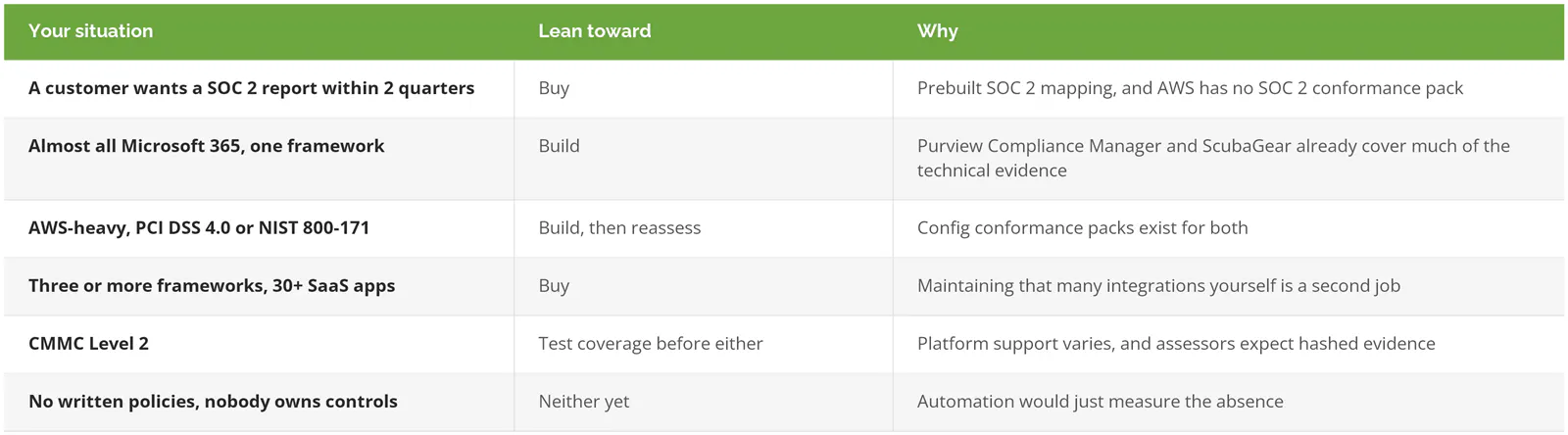
If you already employ a GRC analyst (the person who runs governance, risk, and compliance day to day) and you only answer to one framework, a $20,000 platform is closer to a convenience than a necessity. Not sure how many frameworks you're actually on the hook for? Work out which standards apply to you before you count integrations.
How Does Your Framework Change the Answer?
SOC 2 favors buying. The report is an opinion issued by a CPA firm under AICPA standards, and every major platform ships a prebuilt SOC 2 control mapping. Whether you need SOC 2 Type I or Type II changes how long the evidence has to run, not which tool collects it.
CMMC is pickier. Under 32 CFR 170.17, a Level 2 certification assessment comes from an accredited third-party assessor, known as a C3PAO. The results filed with the Department of Defense list every evidence artifact by name alongside its hash value, a digital fingerprint that proves the file wasn't altered afterward. A senior official then affirms compliance at the assessment and every year after it. Any open remediation items have 180 days to close. So whatever you build or buy has to keep evidence files untouched and traceable. Screenshots in a shared drive? Not enough. Platform coverage is uneven too. In our August scoring, one platform advertising 200+ frameworks never named CMMC or NIST 800-171 on its frameworks page. Map your CMMC certification timeline first, then ask each vendor to show Level 2 evidence mapping live in a demo.
ISO 27001 leans buy once you're outside Microsoft 365, since AWS has no conformance pack for it. PCI DSS 4.0 can go either way. Follow the cardholder data.
Run a 30-Day Test Before You Sign or Start Building
- List every system in scope. Email, identity, file storage, endpoints, HR, payroll, and whatever cloud hosts customer data.
- Count the evidence items your framework needs, then mark each one automatable or manual. Expect the manual column to be longer than the sales demo suggested.
- Put a name next to every control. Not a team. A person.
- Trial a platform against your real Microsoft 365 or cloud environment, not the vendor's sandbox, and at the same time run ScubaGear or Purview Compliance Manager against it. Compare what each one actually catches.
- Export everything on day 30. Can you get evidence out in CSV, JSON, or OSCAL? If leaving means losing a year of audit history, you've learned the real price of the contract.
Step 3 is where the answer usually shows up. Companies that can't fill that column don't have a build-or-buy problem yet.