IT Budget Planning for 2027: A CFO-Ready Framework
IT budget planning is the annual process of forecasting next year's technology costs, sorting them into run, refresh, and change spending, and tying every line to a date, an owner, and the business risk of cutting it.
Table of Contents
Part of your 2027 IT budget is already decided. Microsoft raised Microsoft 365 prices on July 1, 2026, Windows 10 security updates double in price every year you keep buying them, and Windows Server 2016 loses support in January. None of that waits for a planning meeting. Good IT budget planning starts with the costs that already have dates on them, then decides what to do with whatever is left.
Your CFO isn't asking for a wish list. They want to know which numbers are fixed, which ones can move, and what happens to the business if a line gets cut in March because revenue came in soft. Last year's total plus 5% answers none of that. It just moves the argument to April.
Gartner's July 2026 forecast puts worldwide IT spending growth at 14.2% this year, and John-David Lovelock, the analyst behind it, says technology budgets are "being strained by inflation, supply shortages, rising hardware and memory costs." Big-company numbers. The pressure still rolls downhill. What follows is the process for companies between 20 and 1000 users. CFO signs. Usually no CIO in the room.
What Makes an IT Budget CFO-Ready?
A CFO-ready IT budget separates committed costs from optional ones, puts a date on every line, names an owner, and states what breaks if the line gets cut. If it can't do those four things, it's a forecast. Not a plan.
The budget has to survive four questions from someone who doesn't care how the technology works.
- What's already committed? Contracts, subscriptions, and renewals you can't walk away from without a penalty or an outage.
- Anything with a deadline attached, like a vendor end-of-support date, a lease ending, or a warranty running out.
- What could slip a quarter, or even a full year, without anyone outside IT noticing?
- If we cut this, what breaks? That's the column your CFO actually reads.
IT budgets usually get built by category. Hardware, software, services, people. That's how the accounting system sees the money, and it's how last year's budget was built, and the year before that, going back to whoever set up the chart of accounts. Useless for a decision. A $40,000 line labeled software could be a Microsoft renewal you can't avoid, or a reporting tool nobody has asked for yet. Same category. Completely different conversation.
Consequences beat categories for a second reason, too, because in Deloitte's 2023 Global Technology Leadership Study, six in 10 executives said it's hard to quantify the benefits of individual tech investments, which is a polite way of saying the upside math is mostly guesswork. So stop forecasting the upside. Price the downside. A finance team can weigh "this server stops getting security patches in January and it runs our ERP" far faster than any projected efficiency gain.
Why Percent-of-Revenue Benchmarks Are the Wrong Place to Start
Percent-of-revenue benchmarks are a sanity check, not a starting point. The number quoted on nearly every benchmark page, 5.49%, comes from a global survey of CIOs and CTOs fielded in fall 2022, and it describes a very different company than a 150-person manufacturer.
The study itself says more than its headline. The same Deloitte study surveyed 1,179 technology leaders and split the results. Companies that sell technology or tech-enabled services spent 8.54% of revenue on tech. Companies that don't sell it spent 3.66%. A distributor, a food processor, a property management firm, or a contract manufacturer lives in that second group, which means the headline average overstates their benchmark by roughly half.
Half. That's a lot of rounding error to carry into a budget meeting.
Build bottom-up first. Contracts, dates, projects. Then compare the total against a benchmark to see whether you're wildly off. Our guide on how much to spend on IT covers the ranges in more detail, and the free IT budget planning tool gives you worksheets to do the bottom-up build without starting from a blank spreadsheet.
The 2027 IT Costs Already on Your Calendar
Three 2027 costs are set before anyone proposes a new project. Microsoft 365 prices rose July 1, 2026, and land at your next renewal. Windows 10 extended security updates double to $122 per device. Windows Server 2016 support ends January 12, 2027.
Add rising hardware prices and a real share of the budget is spoken for. Good news, sort of. Almost all of it can be calculated exactly from published prices, before you talk to a single vendor.
Microsoft 365 Goes Up at Your Renewal, Not in January
Microsoft's new commercial pricing took effect July 1, 2026. Business Standard went from $12.50 to $14.00 per user per month, Office 365 E3 from $23 to $26, and Microsoft 365 E3 from $36 to $39. Frontline plans took the steepest jumps. Business Premium and Office 365 E1 held flat.
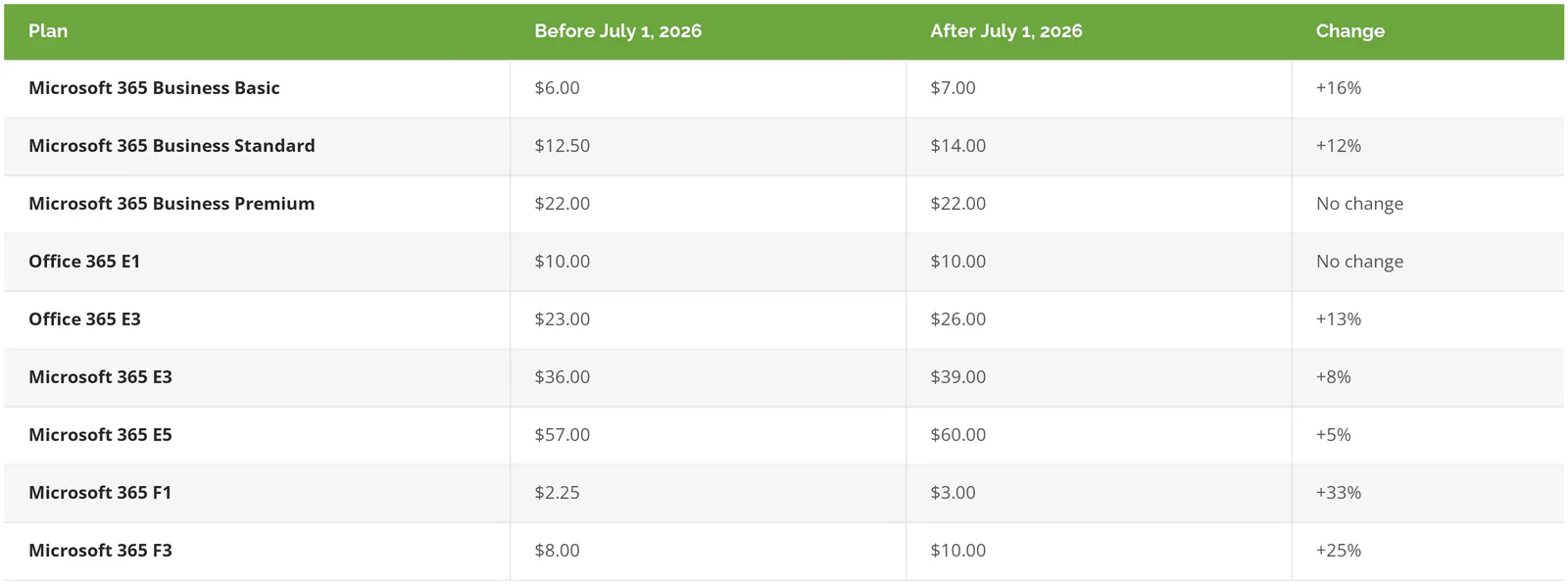
Prices are per user per month, with Teams, from Microsoft's July 2026 price list.
Existing customers keep their current price until renewal. So the question isn't whether you pay more. It's when. Renewed an annual or multi-year agreement between January and June 2026? You're still on the old rate, and the increase lands at your 2027 renewal. Renewed after July 1? You're already paying it.
Per seat it looks small, and in total it isn't. 150 users on Business Standard adds $2,700 a year. The same 150 on Office 365 E3 adds $5,400. Put 60 warehouse or plant workers on F3 and that's another $1,440. And one quiet shift deserves a second look, because the gap between Business Standard and Business Premium shrank from $9.50 to $8.00 per user, so if you were already planning to move to Premium for the device management and security tools bundled into it, the step up costs less than it did a year ago.
Windows 10 Extended Security Updates Double Every Year
Windows 10 support ended October 14, 2025. Companies that kept machines running it can buy Extended Security Updates, the paid program that keeps security patches coming. Year 1 costs $61 per device. The price doubles every year after, so year 2 is $122 and year 3 is $244.
ESU is cumulative. Enroll a machine in year 2 and you pay for year 1 too. Forty PCs joining late cost $7,320, not $4,880. Carry a device all the way through year 3 and you've spent $427 on patches for a computer you already decided was too old to keep. One exception. Windows 10 virtual machines running in Windows 365 or Azure Virtual Desktop get ESU at no extra cost, which can make a cloud desktop the cheaper bridge for a handful of stubborn machines.
Windows Server 2016 Hits End of Support
Extended support for Windows Server 2016 ends January 12, 2027, per Microsoft's lifecycle page. After that, no more security patches unless you pay for Extended Security Updates for the server, available for up to three years.
Servers are harder than PCs. A laptop is a laptop. A 2016 server is usually running something specific, like an ERP database, a file share, or a specialized business app, like your quoting or inventory system, that was never certified on anything newer. The application sets the timeline. Not Microsoft. Find out what's on each one before you price the replacement. Sometimes a server swap turns into an application upgrade that costs five times more.
Hardware Costs More Than Last Year's Invoice Says
Gartner expects device spending to grow 9.8% in 2026, and the same forecast points at memory costs as part of the pressure. Price your 2027 refresh from current quotes. The 2024 invoice for the same laptop is a bad anchor.
A 5-Step IT Budget Planning Process for 2027
Five steps, in this order. The order matters more than the steps.
1. Build the Renewal Calendar First
List every recurring contract with its vendor, annual cost, renewal date, notice window, and whether it auto-renews. Microsoft 365, your managed services agreement, firewall and endpoint security subscriptions, backup, your ERP maintenance, phone system, and any cloud hosting.
The notice window is the column that pays for the whole exercise. Miss it and a contract with a 60- or 90-day cancellation window simply renews at whatever the new price is. No warning. And the renewal date, not the fiscal year, decides when a price increase hits your P&L. A calendar built this way usually turns up at least one subscription nobody remembers buying. Sometimes three.
2. Put a Date on Everything That's Aging
Every server, network device, PC fleet, and major application gets an end-of-support date and a planned replacement quarter, and that list is the backbone of an IT roadmap, so if you already have one, this step takes an afternoon. If you don't, you'll find out quickly how much technical debt has been quietly piling up.
3. Sort Every Line into Run, Refresh, or Change

Run is the cost of keeping today's operation working, meaning subscriptions, support, licenses, and your IT team or provider. Refresh replaces what's wearing out, on a schedule. Change is new capability, like the analytics project or the new site buildout.
Run is rent. Refresh is maintenance on the building. Change is the addition you've been talking about for two years.
Each bucket gets cut differently. Cut run and something breaks. Defer refresh and you're taking on risk, and usually paying more later. Change is where a CFO has real room to say not this year. When all three sit in one blended number, the easy cuts come out of refresh because it looks optional, and that's exactly how a company ends up paying for security patches on 2016 servers well into 2028 while the project that was supposed to replace them sits in a slide deck.
4. Price What Every Deferral Risks
For each refresh and change line, write one sentence covering what happens if it waits a year, when it happens, and roughly what it costs. Deferring the Windows 10 replacement is easy to price, $244 per device for ESU year 3. Deferring a firewall replacement is harder. What's the exposure if the device stops getting firmware updates while it sits between the internet and your production floor?
You won't get precise numbers for every line. A rough number is fine. An empty cell isn't, because that's the line that gets cut first.
5. Re-Forecast Every Quarter
A budget approved in November is wrong by March. Always. Somebody hires 20 people, a switch dies, a vendor gets acquired and reprices. Walk the renewal calendar every quarter, compare actuals to plan, and move money between change lines instead of pretending the original number still holds. Forty-five minutes. Four times a year.
Capex, Opex, and the 2027 Accounting Changes Your CFO Will Raise
Two rule changes shape how 2027 IT spending lands on the books. 100% bonus depreciation is now permanent for qualifying property acquired after January 19, 2025, and FASB's ASU 2025-06 tightens when internal software development costs can be capitalized.
If you need a refresher on the basic split between capital spending and operating expense, our post on aligning the IT budget to business goals walks through it. What's changed since then is the tax and accounting treatment underneath.
On the tax side, the IRS confirmed in Notice 2026-11 that the One Big Beautiful Bill made 100% first-year bonus depreciation permanent for qualifying property acquired after January 19, 2025, which takes in any qualifying server, switch, or PC your company has bought since that date. Section 179 expensing is also larger. Revenue Procedure 2025-32 sets the 2026 limit at $2,560,000, phasing out once qualifying purchases pass $4,090,000, and IRS Publication 946 lists off-the-shelf computer software as eligible. The 2027 figures haven't been published yet. The IRS typically releases them in the fall.
In practice, a server replacement or a PC refresh can usually be deducted in the year you buy it rather than spread over several years. December or January? That timing choice can move real money between tax years.
The book side is moving the other way. ASU 2025-06 throws out the old project-stage model for software you build or customize for internal use. Capitalization now starts only once management has approved and funded the project and it's probable the software will be finished and work as intended. FASB itself expects more development costs to be expensed as a result. It applies to fiscal years starting after December 15, 2027, which is calendar 2028 for most companies, and early adoption is allowed. A custom ERP or integration project that starts in late 2027 will straddle both rules, so ask your auditor now which one you'll be under.
Subscriptions are easy. SaaS fees are operating expense regardless. Your CPA makes the final call on treatment. The budget's job is to flag which lines are candidates for each, so that conversation happens in November instead of at year-end close.
What Goes in the CFO Pack
One page. Every line carries its bucket, its 2027 cost, the date it hits, an owner, and what happens if it's deferred. Figures below come from the arithmetic earlier. Illustrative, not a quote.
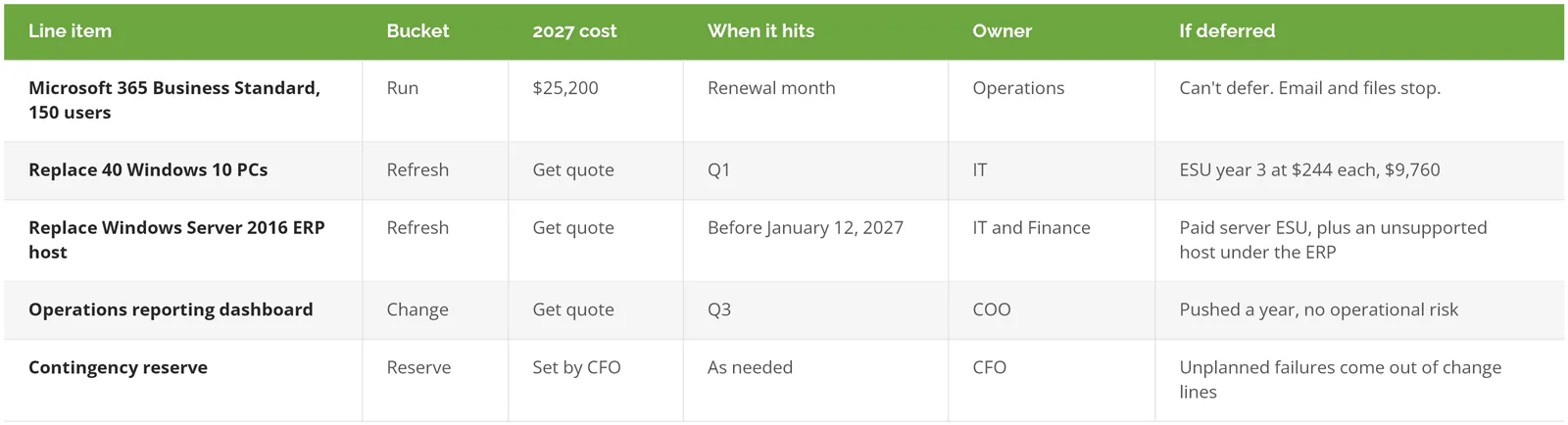
Show it twice. A flat-revenue version carries run plus the dated refresh lines and nothing else. A growth version adds the change projects. That gap is the real decision. Debating whether 5% or 7% sounds right, which is how these meetings tend to go when the budget arrives as one blended number with no dates attached, isn't a decision at all.
Where 2027 IT Budgets Drift
Auto-renewals are the quiet one. A contract renews at the new price because the notice date passed during a busy month, and nobody notices until the invoice.
Unplanned replacements are the loud one. A core switch fails in February. The emergency replacement eats the change budget, and the project everyone agreed on in November, the one with a sponsor and a budget line and a kickoff date, quietly slides to 2028.
Cloud spend drifts in a way that's hard to see month to month, which is its own discipline, covered in our post on FinOps for mid-market companies. And departments buying software on a company card add up faster than anyone expects. Step 1 usually catches them.
Already have a full-time CIO and a finance team with an IT cost model? Skip the framework. You need the dated list from the third section and a calendar reminder.
Before the Budget Meeting
Pull every IT contract renewal date into one sheet this week. That single list will tell you more about your 2027 exposure than any benchmark, and it's the part that takes longest to assemble when the budget deadline is already close.
Consilien is a security-first managed IT and advisory firm for companies with 20 to 1000 users in manufacturing, distribution, professional services, and real estate. Building the renewal calendar, the dated refresh list, and the CFO pack is where our technology roadmap consulting work begins.