MSP vs MSSP: What's the Difference and Which Do You Need?
An MSP runs your IT, from help desk and networks to patching and backups. An MSSP defends it with 24/7 security monitoring, threat detection, and incident response from a security operations center. Businesses without security staff usually need both.
Table of Contents
It's 1:40 a.m. on a Saturday. The endpoint protection on your finance controller's laptop flags a process trying to encrypt a shared drive. Who sees that alert? And are they allowed to do anything about it before Monday?
That's the real MSP vs MSSP question. A managed IT provider keeps your systems running and your people working. A managed security service provider keeps someone watching those systems for attackers, around the clock, with the authority to act. Plenty of businesses pay for the first and assume they've bought the second.
Sometimes they have. Often they haven't, and the gap doesn't show up until the alert fires on a weekend, when the person who could fix it is asleep and the person who saw it isn't allowed to touch anything.

What's the Difference Between an MSP and an MSSP?
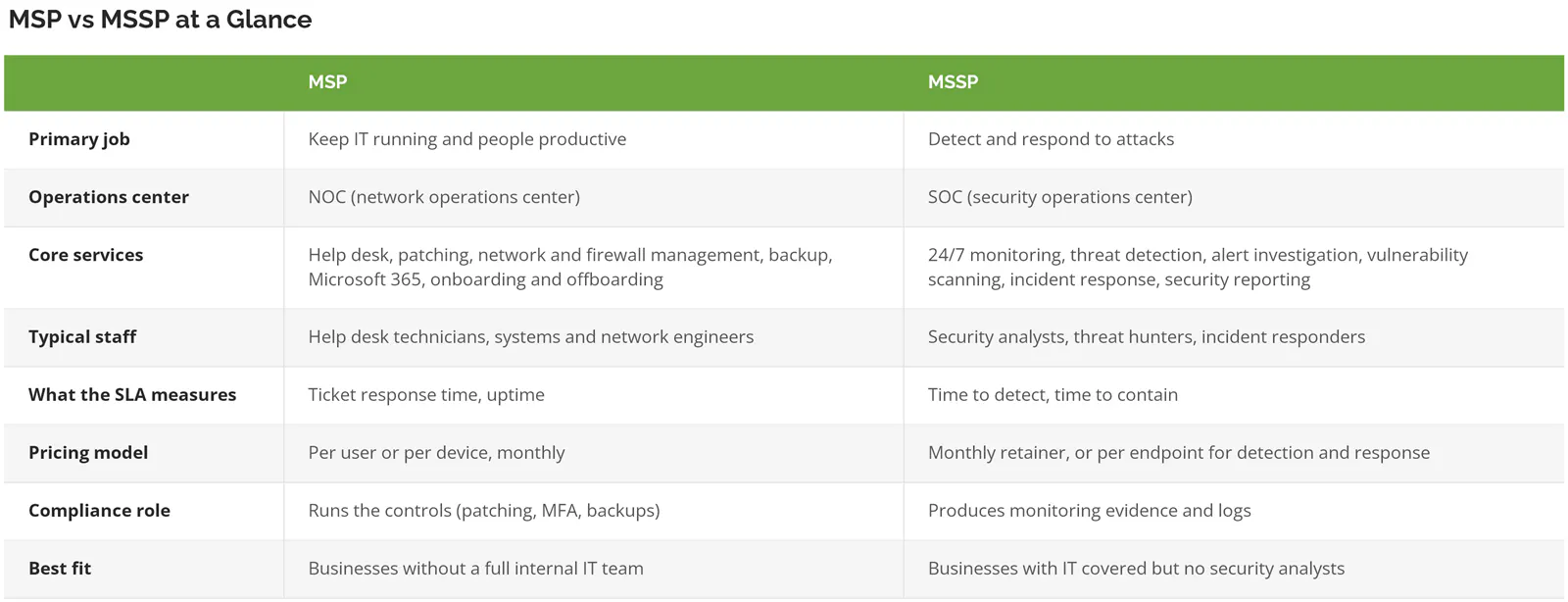
An MSP (managed service provider) manages your day-to-day IT and asks "is it working?" An MSSP (managed security service provider) monitors and defends your environment and asks "is it safe, and would we know if it wasn't?"
MSPs run a NOC, a network operations center, which watches uptime, performance, and failed backups. The MSSP runs a SOC, a security operations center, staffed by analysts who watch for attacker behavior in your logs, endpoints, email, and cloud accounts. Sometimes they share an office. Rarely a skill set.
One wrinkle. Nearly every MSP sells some security, and it's real work. Antivirus or EDR on every device, firewall management, multi-factor authentication. That's hygiene. If your MSP contract mentions security at all, it's often a line item for the tool license, and a tool license says nothing about whether a human will look at what that tool finds at 3:12 a.m. on the Sunday of a holiday weekend. Hygiene isn't monitoring, and a managed cybersecurity service exists precisely because those two things get confused in contracts.
What Does an MSP Actually Handle?
Unglamorous stuff, mostly. A new hire needs a laptop, an email account, and access to the ERP (the system that runs orders, inventory, and billing) by Monday. The VPN drops an hour before a board call. Someone in accounting clicks "remind me later" on a Windows update for the ninth week running.
All MSP. In practice the work falls into five buckets:
- Help desk tickets, the password resets and "Outlook won't open" calls that eat a Tuesday
- Patching. Windows, macOS, servers, and the third-party apps people forget about, like Chrome, Zoom, and Adobe Reader.
- Network, Wi-Fi, and firewall administration
- Backups, and ideally the restore test nobody schedules until a server dies
- Microsoft 365 or Google Workspace admin, including shutting off a departing employee's access on their last day, not three weeks later
Those five are the core, and the full breakdown of what managed IT includes runs longer. When an MSP is doing its job well you barely notice it, because the patches went out Tuesday night, the backup job finished at 2:14 a.m., and the new hire in your second office had a working laptop at 8 a.m. on day one without anyone opening a box.
If you already have one or two IT people in-house, you don't have to hand everything over. Co-managed IT splits the load, with the outside team taking help desk overflow, patching, and after-hours coverage while your staff keep the projects and the institutional knowledge.
Where does the MSP stop? Usually at the alert. The MSP installs the EDR agent (endpoint detection and response, software that watches each device for attacker behavior rather than just known viruses). Whether a trained analyst is reading what that agent reports at 2 a.m. is a separate service with a separate price, and that's the line buyers assume is covered when it isn't.
What Does an MSSP Actually Handle?
Around the clock, an MSSP watches your environment, digs into anything suspicious, and responds to confirmed threats from a SOC staffed by security analysts rather than help desk technicians.
The NIST Cybersecurity Framework 2.0 splits security into six functions: Govern, Identify, Protect, Detect, Respond, and Recover. An MSP does most of its work in Protect and Recover. An MSSP lives in Detect and Respond. Honestly, that's the cleanest way I know to draw the line.
Day to day, that means:
- Watching endpoints, servers, firewalls, Microsoft 365 sign-ins, and cloud accounts, all night, every night
- Triage. Is that 2 a.m. PowerShell command an admin's script or an intruder's?
- Scheduled vulnerability scans
- Containing an incident, then walking your team through what happened and what changes
- Reports and log evidence for auditors and insurers, usually monthly
Why not just hire for this? Because the people are hard to find and harder to keep. The ISC2 2025 Cybersecurity Workforce Study found 95% of security teams report at least one skills gap, with 59% calling theirs critical or significant. Nearly everyone, in other words. And one analyst can't cover nights. Keeping one seat filled 24/7 takes about 4.2 people once you count shifts, weekends, and vacation. If you want the mechanics, here's how a SOC actually works.
A practical aside. Ask any MSSP whose SOC it is. Some run their own analysts. Others resell a third party's SOC under their own logo, which isn't automatically bad. But it adds a handoff between the people who see the alert and the people who know your network. Ask anyway.
Who Owns What When You Have Both?
"You might need both" is where the usual advice ends. Fine. Then who patches the server the MSSP flagged? Who isolates the laptop? Who answers the insurance questionnaire?
Read the last column first. That's where incidents start.
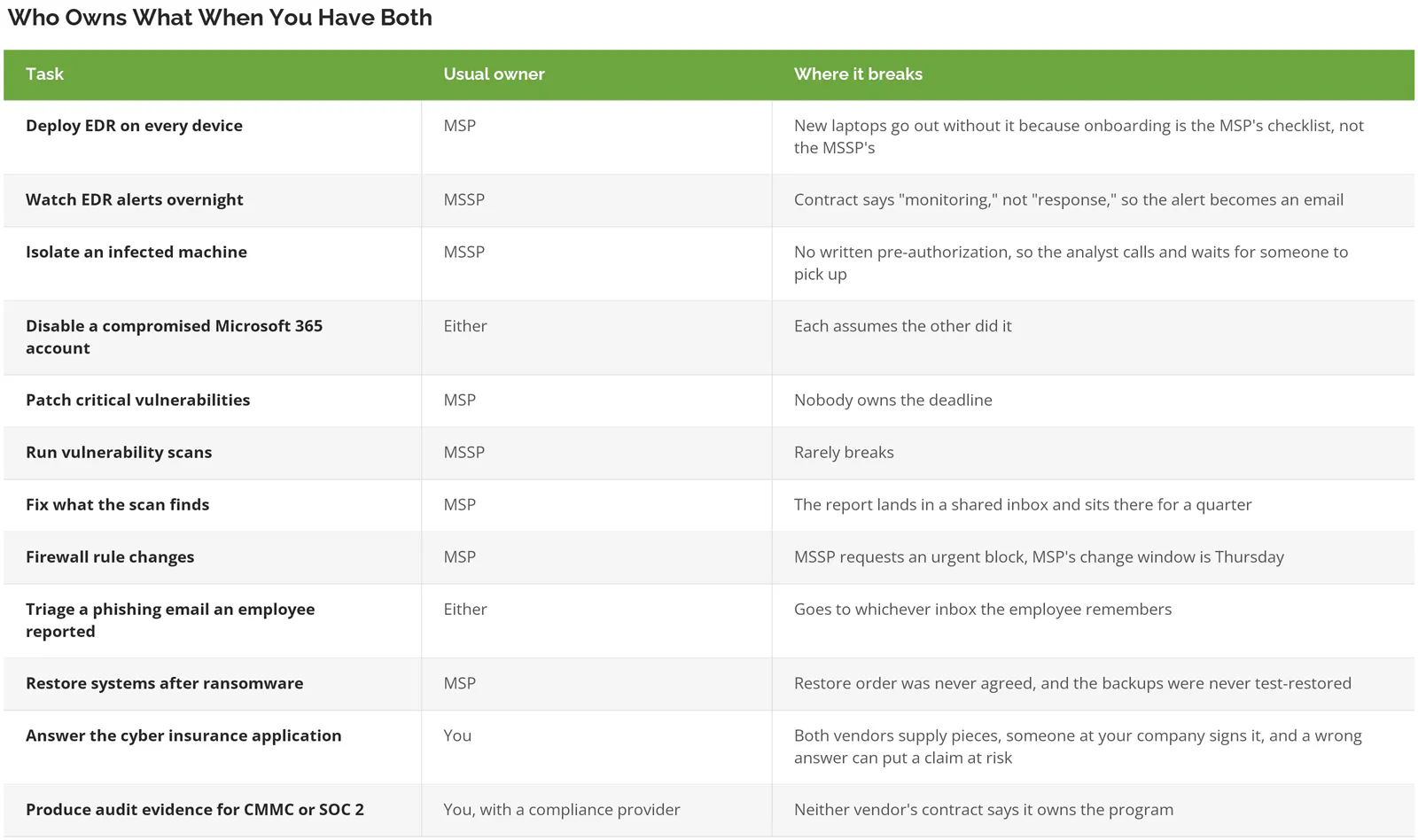
Two rows go wrong more than the rest. Scan findings that never get fixed, and host isolation that waits on a phone call.
Picture how the first one plays out. The MSSP's monthly report flags an unpatched VPN appliance. The report goes to the office manager, because that's the contact on the contract, and it gets filed. The MSP never sees it. Months later that appliance is the way in. Nobody broke a contract. Both vendors did exactly what they were paid to do.
Write the split down before you sign. One page. Both vendors sign it, and so do you. That page prevents more incidents than another security tool will.
Is an MSSP Actually Faster at Catching a Breach?
Faster than outsiders, a little slower than a strong internal team, and cheaper than both when it does catch one. That's what IBM's 2026 breach data shows.
According to IBM's Cost of a Data Breach Report 2026, internal IT and security teams identified 38% of breaches, MSSPs identified 31%, attackers disclosed 17% themselves, and third parties found 14%. When an MSSP spotted the breach, the full lifecycle of identifying and containing it averaged 230 days, against 209 for internal teams and about 280 when a partner, consultant, or law enforcement found it first. MSSP-identified breaches also cost less, averaging $4.86 million, 2.6% under the global average.

Read that honestly. An MSSP isn't magic. A capable in-house security team, with its own analysts and tooling, still edges it on speed. Fair enough. If you have two or three security people on staff running their own SIEM (a system that collects and correlates security logs from across your network) and a well-tuned EDR, keep doing what you're doing and maybe add an MSSP for nights. But if your security team is the same person who resets passwords, internal versus MSSP was never the real choice. The realistic alternative isn't an in-house SOC. It's finding out when the attacker tells you, and IBM puts the average breach in that case at $5.12 million. Costliest way to find out.
IBM also lists using an MSSP among the three factors that reduced breach costs the most in 2026, alongside a DevSecOps approach and identity and access management.
One distinction matters more than the acronym. A traditional MSSP often detects, validates, and then forwards the alert to your team to act on. Managed detection and response (MDR) goes further, with analysts who contain the threat themselves. Plenty of MSSPs now include MDR, plenty don't, and the difference is laid out in our MDR vs MSSP vs SIEM comparison.
Do You Need an MSP, an MSSP, or Both?
It depends on who's already on your payroll and what your contracts, insurer, and customers require. The common situations sort out like this.
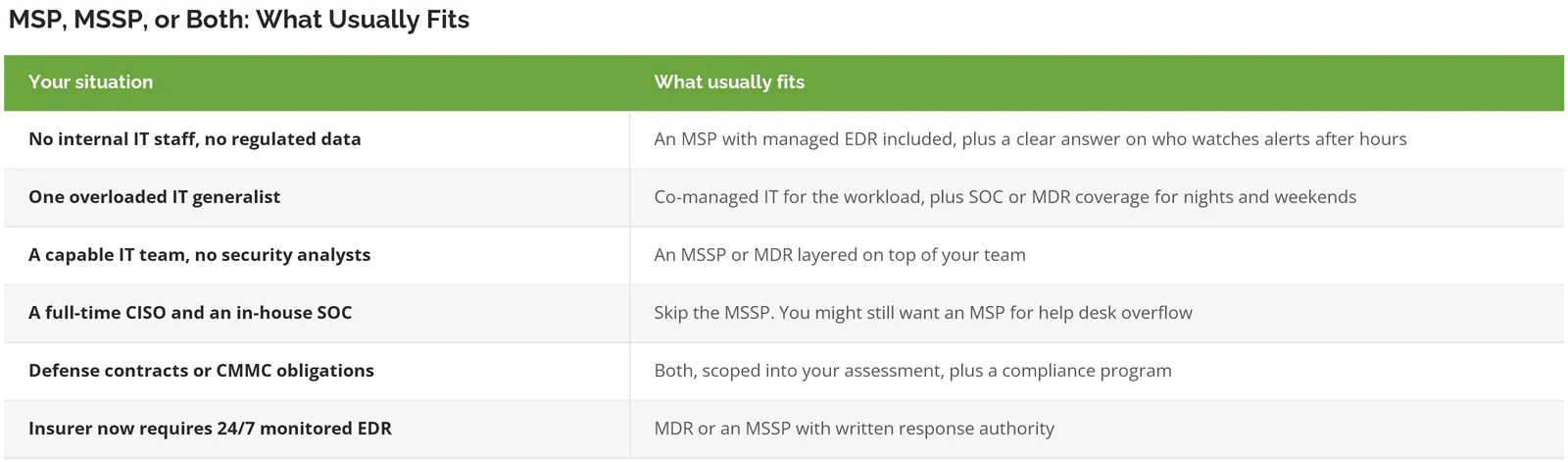
No regulated data, no security questionnaires from customers, and a modest insurance renewal? You can start lean. Get the MSP basics right first. MFA everywhere, patching that actually happens, backups you've restored at least once. An MSSP on top of a messy environment just generates a lot of very well-documented alerts.

Two vendors or one? Either works. Two specialists are fine, provided the responsibility matrix above exists and both sign it. One provider running IT and security together removes the handoff, and the handoff is where incidents slip. Consilien is built the second way, a security-first managed IT provider that runs day-to-day IT and 24/7 security monitoring for businesses nationwide under one team, with compliance kept as its own separate service.
What Do MSPs and MSSPs Cost?
Managed IT typically runs $100 to $250 per user per month. MSSP retainers for a small business usually land at $2,000 to $5,000 a month, and MDR is often priced at $7 to $45 per endpoint per month.
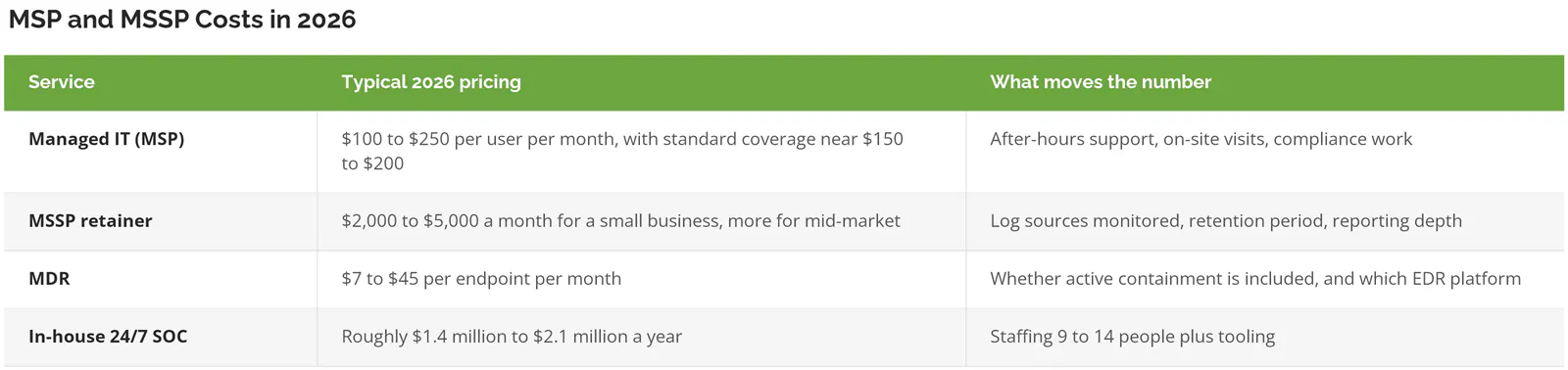
Both ranges match our own breakdowns of outsourced IT support cost per user and in-house SOC vs SOC as a service. Cheap quotes usually hide the response part. If one MSSP proposal is half the price of the other, check whether it includes containment or just notification. Often it doesn't.
Run your own numbers. A 40-user company paying $175 per user for managed IT and $3,500 a month for an MSSP retainer spends about $126,000 a year on the pair, which is real money, and still a small slice of what one bad week of ransomware recovery, downtime, and legal fees tends to cost. Do the math on yours.
Set that against the downside. IBM puts the global average breach at $4.99 million in 2026, with US organizations averaging $11.5 million, the highest of any country in the study. A small business may never see a bill that size. It also doesn't have the balance sheet to absorb a fraction of them.

Then there's the renewal. Cyber insurers increasingly want EDR on every endpoint with someone actually watching it, not an agent nobody reads. Our 2026 cyber insurance requirements checklist lists what underwriters ask for now. If the application asks about 24/7 monitoring and your honest answer is "sort of," that's an MSSP or MDR decision being made for you.
How Does Compliance Change the Answer?
Compliance pulls both providers into scope. Under CMMC, an MSP or MSSP that handles your security data counts as an External Service Provider, and its services get assessed as part of your certification.
32 CFR Part 170, the CMMC program rule, defines an External Service Provider as an outside party providing IT or cybersecurity services that processes, stores, or transmits CUI (controlled unclassified information, the sensitive government data defense contractors handle) or Security Protection Data, which explicitly includes log data and configuration data. An MSSP pulling your logs into its SIEM handles that data. So does an MSP whose remote management tool stores your device configurations. Both end up in your assessment as Security Protection Assets, which means their controls become your problem at audit time. Pick carefully.
PCI DSS and SOC 2 work differently but land in a similar place. Auditors want to see who monitors, who responds, and the evidence that both happened. A SOC 2 auditor will often ask for the alert that fired, the ticket it became, the person who closed it, and the timestamps in between, and if your MSP and MSSP keep those records in two different systems, someone on your staff ends up stitching them together the week before fieldwork.
Neither an MSP nor an MSSP is a compliance program, though. Separate work entirely. Risk assessments, written policies, control mapping, and the evidence binder are their own body of work. At Consilien, compliance services are a separate offering from managed IT, and CMMC readiness is scoped on its own. If a provider says compliance is "included" in a per-user IT plan, ask what the deliverable is. Usually it's patching and MFA, which are controls, not a program.
The CISA Cybersecurity Performance Goals are a useful free baseline if you're not under a formal framework yet. Version 2.0 landed in December 2025 and maps to the same six NIST functions above.
Five Questions to Ask Before You Sign Either Contract
These come straight from the gaps above. A verbal "sure, we handle that" from a salesperson has a way of evaporating the first time an alert fires on a Saturday night, so get every answer in writing, attached to the contract, and signed by someone who'll still be there next year. Then file it somewhere findable.
- What can your analysts do without calling us first? Isolate a device, disable an account, block an IP at the firewall? If the answer is "notify you," you're buying monitoring, not response.
- Whose SOC is it? In-house, or resold?
- When your scan finds a critical vulnerability, who fixes it, and by when? Get a number of days for critical, high, and medium findings.
- What's your SLA from detection to containment, not just detection to notification? Those are different clocks.
- Who fills in our cyber insurance application, and will you sign off on the security answers? If neither vendor will, you're the one attesting to controls you didn't configure.
For the managed IT side of the contract, our list of questions to ask before signing with an MSP covers onboarding, exit terms, and the fine print on response times.