IT for Port-Area Logistics Companies in Long Beach
Logistics companies around the Port of Long Beach need IT built around three port-specific risks: customs filings that can't stop, freight fraud that arrives by email, and work that runs on vessel schedules instead of office hours.
Table of Contents
September 2026 was the busiest month the Port of Long Beach has ever had. It moved 997,177 TEUs (twenty-foot equivalent units, the standard container count), beating the record it set in October 2024, according to FreightWaves. Every one of those boxes passed through somebody's inbox, somebody's customs filing, and somebody's dispatch screen. A lot of that somebody is a 15-person forwarder in a Wilmington office park or a drayage carrier with a yard off the 710. If you're comparing providers for managed IT services in Long Beach and you run freight, the questions worth asking differ from the ones a law office or a dental group would ask.
Key Takeaways: A customs broker that discovers a breach has 72 hours to report it to CBP, and that clock starts whether or not IT support is reachable. The FBI put cyber-enabled cargo theft at nearly $725 million in 2025, mostly through spoofed emails and stolen logins. Ransomware against transport and logistics more than doubled. Plan for after-hours support, phone-back checks on any payment change, and a tested paper fallback for filings. CTPAT compliance is separate work.
What makes IT different for a logistics company near the port?
A port-area logistics office is wired into other companies' systems all day. Terminals, ocean carriers, railroads, truckers, customers, and U.S. Customs and Border Protection all trade data with it, so a problem in one connection stops freight that belongs to someone else. That reach shapes every IT decision.
Think about what a small freight forwarder actually touches before lunch. Bookings go out to ocean carriers. Arrival notices come in. Entries get filed with CBP. Rates change. A trucker needs a terminal appointment, and the customer wants to know where the container is. Each runs through something different. A portal, an email thread, or an EDI feed (electronic data interchange, the format companies use to pass shipping documents between systems automatically).
The port itself is pushing in the same direction. Its Supply Chain Information Highway, built with UNCOMN on Amazon Web Services and funded partly by a $7.875 million state grant, pulls data from terminals, shipping lines, truckers, and railroads into one view. More shared data is good for cargo flow. It also means more logins, more connected accounts, and more places where a stolen password matters.
In an office tenant's network, an outage mostly hurts the tenant. A logistics network is different. When it goes down, the pain lands on the customer whose container is sitting at the terminal racking up storage charges, on the trucker who drove in for a pickup that can't be released, and on the warehouse that held a dock door open for a load that never shows. Those customers may not wait for you to recover.
Which systems can't go down, and what's the fallback?
The systems that matter most are the ones that move cargo or release it: the customs filing software, the transportation management system, email, and the portals truckers book through. Each needs a written fallback someone has practiced, because the first hour of an outage is the wrong time to invent one. Write it down.
Below is how I'd rank them for a typical forwarder or broker. The downtime column is my own rough tolerance, not an industry standard, and your contracts may make it tighter.
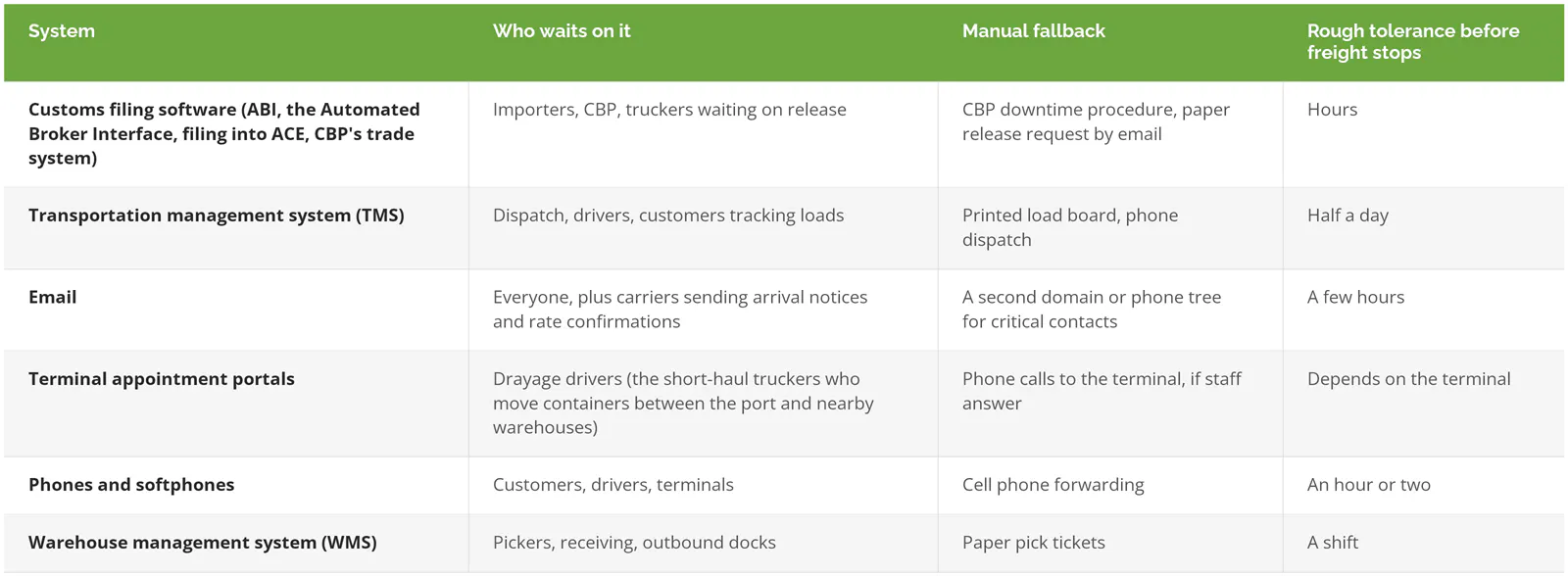
Filling this in usually turns up two things. First, email is doing more work than the TMS. So many carriers still send arrival notices, delivery orders, and rate confirmations as attachments that an email outage quietly stops the whole office even when every other system is running. Second, nobody has tested the fallback. A paper process that exists only in someone's head will fail at 2 a.m. on a Saturday. It just will.
If your buildings are the bigger worry (power, internet lines, warehouse Wi-Fi, scanner fleets), the warehouse and distribution infrastructure guide we wrote for the Inland Empire covers that layer in detail.
What happens if a customs broker gets hacked?
A licensed customs broker must report any known breach of physical or electronic records to CBP no later than 72 hours after discovering it. CBP can then authorize downtime procedures so cargo still releases, but every entry released that way has to be filed electronically once systems come back.
The rule sits in 19 CFR 111.21(b), added in the broker regulation update that took effect in December 2022. The report goes to CBP's Security Operations Center and must list any importer of record numbers (the IDs CBP uses for each importing client) known to be compromised. Within ten business days, the broker sends an updated list. The clock is tight.
CBP's March 2024 cyber guidance fact sheet explains what happens next. CBP's Office of Field Operations can let a broker request release by email with supporting documents, and it may use enforcement discretion on filings the attack delayed. Other federal agencies, like FDA or USDA, still have to clear their shipments. CBP can't release without them. Once systems are back, every entry released on downtime gets filed in ACE, and the normal entry filing deadlines aren't waived.
That catch-up work lands on a team that just lost its systems.
- Somebody has to know, within the first day, whether records were actually accessed. That takes logs. If nobody is collecting them from your servers, firewall, and Microsoft 365, you won't be able to answer CBP's question.
- Keep the SOC contact ([email protected], 703-921-6507) in your incident plan and on paper, outside the network that may be down.
- Your ABI software vendor is part of the plan. Find out now what they do if your workstations are encrypted.
- Backups have to restore fast enough to clear every downtime entry before normal filing deadlines, which is a lot of keying for a small team. That's a recovery-time question for your backup and disaster recovery setup, not just a "do we have backups" question.
How are thieves stealing freight through inboxes?
Criminals are impersonating brokers and carriers with spoofed emails, fake websites, and stolen logins, then redirecting real loads. The FBI estimated cyber-enabled cargo theft in the U.S. and Canada at nearly $725 million in 2025, a 60% jump from the year before.
That figure comes from an FBI public service announcement issued April 30, 2026. Confirmed incidents rose 18%. The average loss per theft rose 36%, to $273,990. More thefts, and bigger ones.
It usually starts small. Someone at a carrier or broker clicks a link and types their Microsoft 365 password into a fake login page. Now the attacker can read that mailbox, watch which loads are booked, and reply from a real address. Sometimes they register a lookalike domain instead, one letter off, and nobody notices on a phone screen. Then a rate confirmation gets "updated," or a remittance email asks to send payment to a new bank account, and the load or the money goes somewhere else. Sometimes nobody notices for days.
Highway, a carrier identity vendor, reported blocking more than 400,000 fraud attempts in the first quarter of 2025 alone, with compromised carrier emails and caller ID spoofing among the methods.
What stops it is mostly unglamorous:
- Multi-factor authentication on every mailbox, including the shared dispatch@ and accounting@ accounts that often get skipped. Our explainer on multi-factor authentication covers which methods hold up against fake login pages.
- A phone-back rule. Any change to bank details, pickup location, or carrier on a booked load gets confirmed by calling a number you already had on file. Never use the number in the email.
- Email filtering that flags lookalike domains and first-time senders. Email security services handle that layer, plus checking for forwarding rules an attacker may have set up quietly.
- Short, frequent training for dispatch and billing staff on what a fake rate confirmation looks like.
None of these need new hardware. They need habits, and someone who checks that the habits stuck.
Are smaller forwarders and drayage companies really targets?
Yes. Ransomware groups pick victims by what they can reach, not by company size. Logistics firms pay because stopped freight is expensive, and every day a terminal holds a container the storage and demurrage charges keep running against someone, usually the importer who then calls the forwarder to ask why. Cyble counted 283 ransomware victims in transport and logistics in 2025, more than 2023 and 2024 combined.
The Cyble 2025 report also found criminals selling VPN access (the remote connection staff use to reach the office network from home) and firewall access to logistics companies, which is a common way in. An old VPN appliance that hasn't been updated is a door somebody can buy a key to. Patch it.
Two incidents show the scale of damage at the top end. When Expeditors, the global freight forwarder, was hit in February 2022, it shut down most of its operating systems. The Stack reported about $40 million in lost business plus $20 million in investigation and recovery costs. And in November 2023, DP World Australia disconnected its terminals in Sydney, Melbourne, Brisbane, and Fremantle from the internet after a breach. About 30,000 containers sat stranded over three days, per gCaptain. Three days was enough.
A Long Beach drayage company with 20 trucks won't lose $60 million. It can still lose a week of moves, a few customers who switched carriers that week, and whatever it costs to rebuild a server from scratch. That alone can sink a firm already running on thin margins.
Scale changes the dollar figure. It doesn't change the shape.
What should after-hours support look like on a port schedule?
Port work keeps vessel and terminal hours, not office hours. Your IT support has to answer when freight is moving. That means a real person on call at night and on weekends, a defined response time in the contract, and remote access ready before anything breaks.
Ships arrive when they arrive. Entries get filed late at night so cargo can release in the morning. Truckers start early. A dispatcher locked out of the TMS at 5 a.m. has a line of drivers waiting, each one burning hours of service on the clock, and the help desk that opens at 8 is three hours too late to matter.
When you read a support agreement, look for these specifics:
- Hours, in writing. "24/7 support" can mean a voicemail box that gets checked at 8 a.m. Ask what happens when you call at 3 a.m. on a Sunday, and who answers.
- Response time by severity. A locked-out dispatcher and a slow printer are different tickets. The contract should say so.
- Monitoring that runs without a call. A 24/7 security operations center (a team watching alerts around the clock) catches a compromised mailbox at night, before your staff log in and find it.
- On-site coverage. Remote fixes handle most things. A failed firewall in your Carson office doesn't fix itself remotely.
Where does CTPAT's cybersecurity section fit?
CTPAT, CBP's voluntary supply chain security program, includes cybersecurity as one of its required security criteria. Members need written IT security policies, controlled access, training, and incident procedures. Paperwork matters here. For Consilien clients that's a compliance engagement, separate from managed IT.
Managed IT does produce a lot of the evidence a CTPAT validator wants to see: patch records, access lists, backup tests, training logs. The written policies, gap reviews, and validation prep are their own project. The program itself is under review, too. A January 2026 GAO report found CBP wasn't fully meeting its legal requirements to review CTPAT's minimum security criteria each year.
Our article on how MSPs support compliance for logistics and transportation goes further, and the compliance services page lists the frameworks we cover.
What should you ask a Long Beach IT provider?
Ask questions that test whether they understand freight, not just computers. A good provider should be able to talk through your filing software, your carrier email traffic, and your after-hours needs without a long pause. Then listen to how they answer.
I'd bring these to a first meeting:
- What would you do in the first 72 hours if our customs broker workstations were encrypted?
- Who answers at 3 a.m., and how long until they're working on it?
- Have you supported ABI software, a TMS, or a WMS before? Which ones?
- How do you protect shared mailboxes like dispatch@ and billing@?
- Show me a restore test you've run for another client. How long did it take?
- What's in the monthly price, and what's billed hourly on top of it?
Two quotes can differ by half and cover very different things. Get both in writing. The list of IT support companies in Long Beach compares several local options side by side, and if your systems are older, the post on IT infrastructure modernization in Long Beach covers which upgrades to do first.
Where does Consilien fit?
Consilien is headquartered in Torrance, a short drive from the port, and supports businesses nationwide. Our IC24 managed IT covers the help desk, patching, backups, and Microsoft 365, and IC24 Managed Cybersecurity adds the 24/7 security operations center. The distribution IT page explains how we support warehouse and fleet operations. Compliance work like CTPAT is sold separately.
You may not need a full managed service. Plenty of companies don't. A forwarder with a solid in-house IT team, tested backups, and someone already watching alerts overnight might only want help on security or a single project. That's a fine answer, and worth knowing before you sign anything.
If you want someone to look at your fallback plan or your after-hours coverage, speak to a Long Beach IT expert and bring your current setup.
Fred Romero is CTO and Partner at Consilien, where he leads infrastructure, security architecture, and systems design for businesses nationwide.