Disaster Recovery Planning for Manufacturing IT Environments
Disaster recovery planning for manufacturing IT means writing down, for every plant system, what gets restored, from which copy, by whom, and in what order, plus the firmware, licenses, and spare parts recovery needs beyond the backup file.
Table of Contents
Ask a plant manager whether they have a disaster recovery plan and you'll usually hear yes. Ask to see it, and what comes back is often a backup schedule. Nightly jobs, a retention policy, maybe a cloud copy. That's a good start. It isn't a plan.
The gap shows up in the numbers. A 2026 study by Macrium and the research firm NewtonX found that while most manufacturers believe they can restore critical systems on time, only 18% actually meet or exceed their own recovery targets. When a restore runs long, the backups themselves are rarely the problem. What's missing is the written part of backup and disaster recovery, the list of what it takes to turn those files back into a running line.
The theory behind recovery targets, and how continuity differs from recovery, is in our post on business continuity vs disaster recovery for manufacturers.
Why isn't a backup schedule a disaster recovery plan?
A backup schedule proves files were copied. A disaster recovery plan proves you can put those files back into service, on the right hardware, with the right versions and credentials, in the right order, with a named person doing each step.
The difference is easier to see in a small example. Scott Taylor, writing for Automation.com in October 2026, describes a line that stopped when a PLC (the programmable logic controller that runs a machine) failed. The site had a spare, a current backup, and a laptop. The spare shipped with different firmware, and the technician on shift had never loaded a program. A one-hour swap took four.
Nothing in that story was a backup failure.
This usually starts as a reasonable decision. Someone sets up good backups, the dashboard turns green every night, and over a few years that green dashboard quietly becomes the plan, while the other pieces, which firmware, whose password, which vendor to call, stay in people's heads. Then one of those people retires.
Ransomware makes the gap wider. In Sophos's survey of 332 manufacturers hit in the prior year, 40% of attacks encrypted data, 58% of those with encrypted data restored from backups, and 51% still paid a ransom. That gap can come from backups that got encrypted along with everything else, or from teams that had clean copies and still couldn't restore fast enough to keep orders moving.
And cyberattacks aren't even the main cause. Macrium's March 2026 report found they drive about 5% of manufacturing downtime. Planned maintenance gone wrong (18%), configuration loss or change (16%), and network failures (16%) all rank higher. A plan written only for ransomware misses the Tuesday afternoon when a firmware update bricks a switch.
What systems does a manufacturing DR plan need to cover?
Every system production touches, not just the servers IT manages. That includes the ERP (orders, inventory, purchasing), the MES (the manufacturing execution system that tracks work on the floor), and the quality, shipping, and engineering systems on the business side. On the plant floor it means PLCs, HMIs (the operator screens on each machine), historians that log process data, and the network gear connecting all of it.
Here's how each one breaks down. The third column is the part that usually goes unwritten.
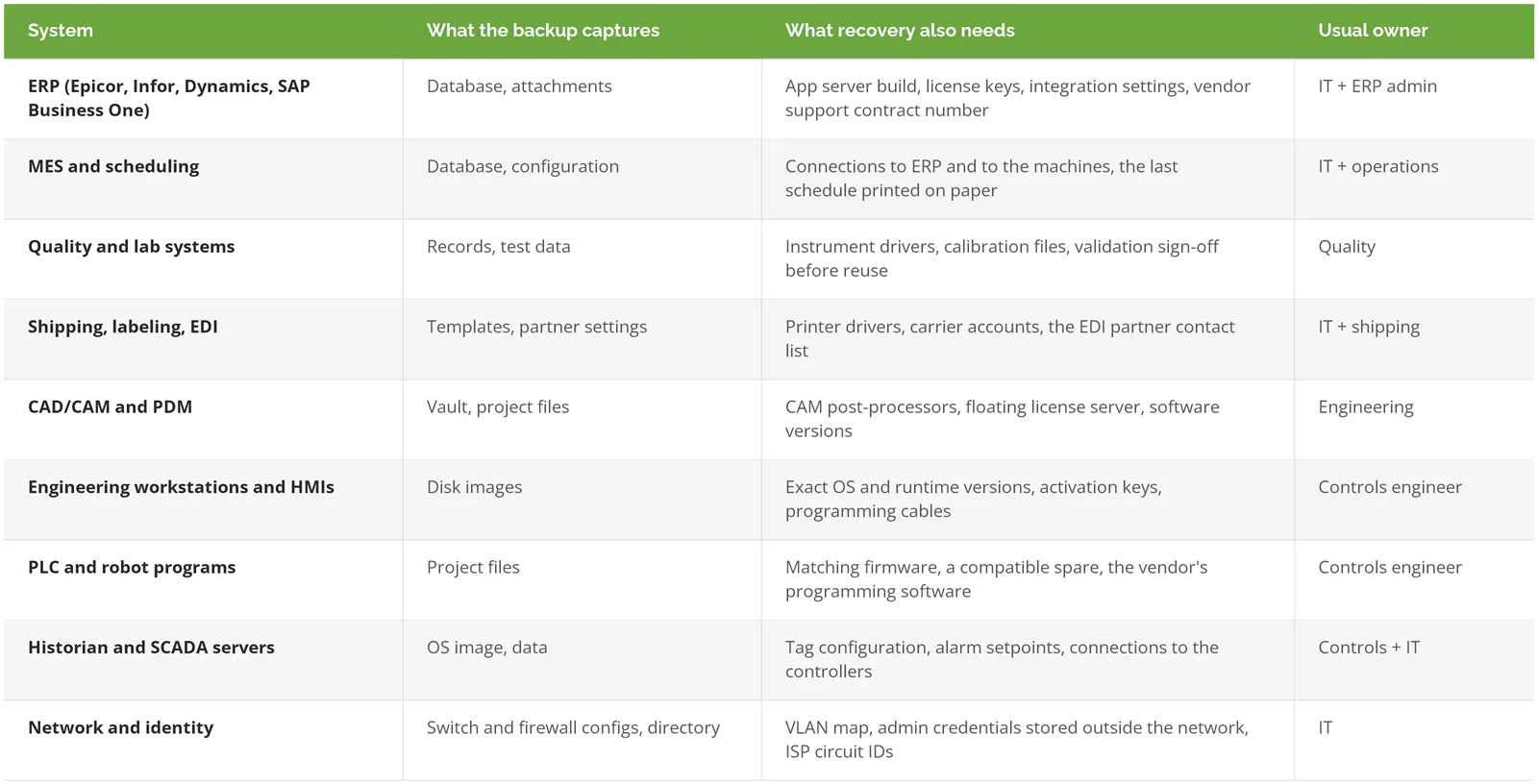
A mid-sized machine shop might have 6 of these rows. A plant running several lines with robotic cells could have all 9, plus a few vendor-managed boxes nobody has logged into since installation. Our manufacturing IT page shows how these systems usually connect.
The OT side, where IT plans usually stop
OT, or operational technology, means the systems that run machines rather than spreadsheets, including SCADA, the supervisory software that monitors and controls equipment across the plant. It's often left out of DR plans because a different team owns it. IT backs up the servers, the controls engineer keeps PLC files on a laptop, and nobody writes the two halves down in one place.
NIST published an OT Backup Quick Start Guide (SP 1339) in June 2026, and it's a useful checklist even for a small plant. Beyond the program files themselves, it lists I/O lists, firmware, HMI graphics files, license keys, vendor configuration tools, and operating system images as things you'll need to restore. It also calls for a spare parts plan with "hardware that is compatible with the digital backups," and for keeping engineering software, cables, and licenses on site.
That last point sounds minor. It isn't. The programming cable for a 15-year-old controller is a cheap part, and it can still take a week to arrive.
Cloud ERP and Microsoft 365 have retention, not backups
When the ERP moves to the cloud, it's easy to assume recovery moved with it. The vendor runs disaster recovery for its own platform, which keeps their service up but usually won't help you undo a bad import or bring back a record someone deleted two months ago.
Microsoft 365 works the same way. Exchange Online keeps deleted items for 14 days by default, 30 at most. Past that, it's gone unless someone set up a retention policy or hold ahead of time, or you're paying for a separate backup. Read the retention terms on your cloud ERP contract and write the actual number in the plan.
What order should a plant restore systems in?

Restore in dependency order. Network and identity come first, then the backup system itself, then ERP, then the systems that read from ERP, and plant-floor OT last, done together with the controls engineer and the equipment vendor.
Picture it as 5 waves.
- Wave 0, the foundation. Switches, firewalls, internet, and the directory people log in with. Nothing else works until these do. Include the backup server here, because you can't restore from a system that's still down.
- Wave 1, ERP. Orders, inventory, and purchasing all live here. Restore the database, then the application, then confirm the numbers match the last known count.
- Wave 2, MES and quality. These read from ERP, so they come back second. Bringing MES up first just gives you a schedule with no orders behind it.
- Wave 3, shipping and EDI. Built product needs to leave the dock.
- Wave 4, OT. Engineering workstations, HMIs, historians, and PLCs. Slower on purpose. A restored PLC that runs the wrong program version is a safety problem, not an IT one.
Your order may differ. A plant that ships from finished-goods stock might move shipping ahead of MES. That's fine. The point is that someone decides it on a calm Tuesday, and writes it down, instead of deciding at 2 a.m.
What does the plant do while IT restores?
This is the business continuity side of manufacturing, and it's simpler than it sounds. For each wave, write down how the floor keeps working without it.
Paper travelers for jobs already in progress. The last printed schedule, taped up at each cell. Handwritten packing lists and a carrier's web portal for labels. A spreadsheet for inventory moves, reconciled into ERP later. None of this is elegant. A plant that can run 2 shifts on paper buys IT about 16 hours to work through the restore, and that's often the difference between a bad day and a missed delivery to a customer who'll remember it. The continuity side has more to it than this, and the business continuity vs disaster recovery post goes further into it.
What should the written plan actually contain?
One document, kept short enough that someone will read it during an outage. For each system it names the owner, the restore order, where credentials live, the known-good software versions, the vendor contacts, and which backup copy to trust.
Here's what that one-page plant recovery sheet looks like.
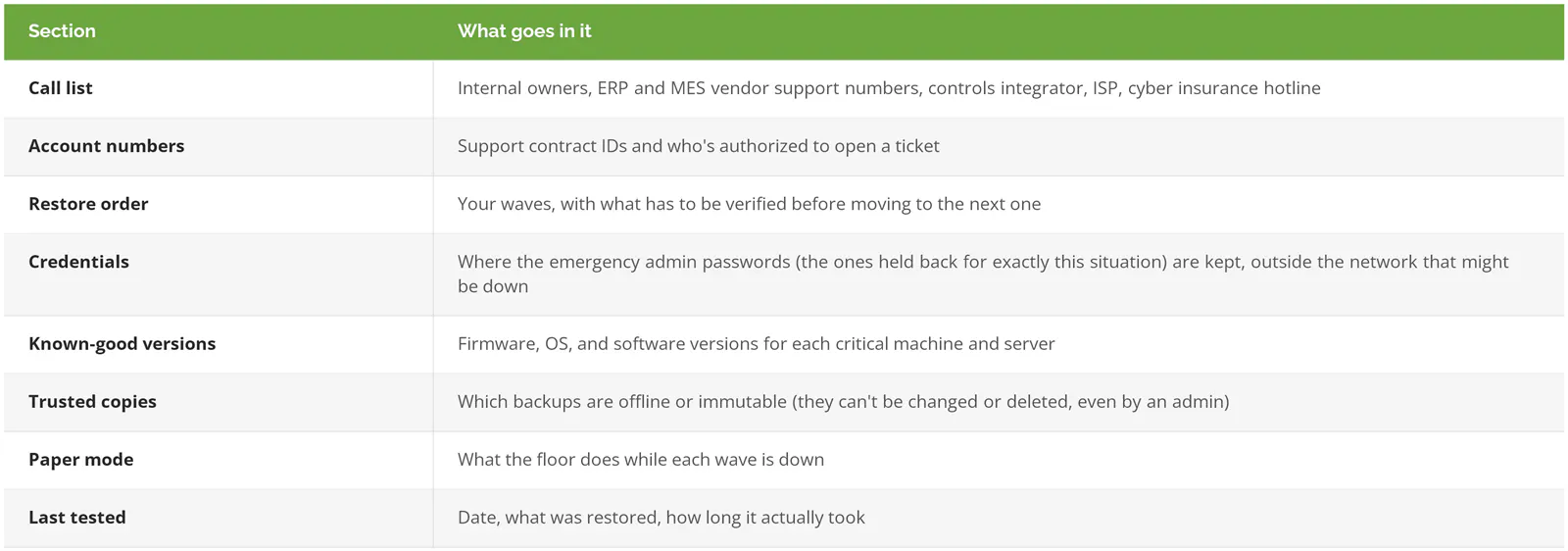
Print it. NIST's guide asks for supporting documents in "both printed and electronic formats," and there's a plain reason for that. If ransomware has encrypted the file server, the plan stored on the file server won't help.
The trusted-copies line matters most after an attack. The team has to know which backup predates the compromise, and one stored where the attacker could reach it may not be usable. Our post on why manufacturing companies get ransomware covers how attackers typically get in, which helps decide where those copies should live.
How do you know the plan works?
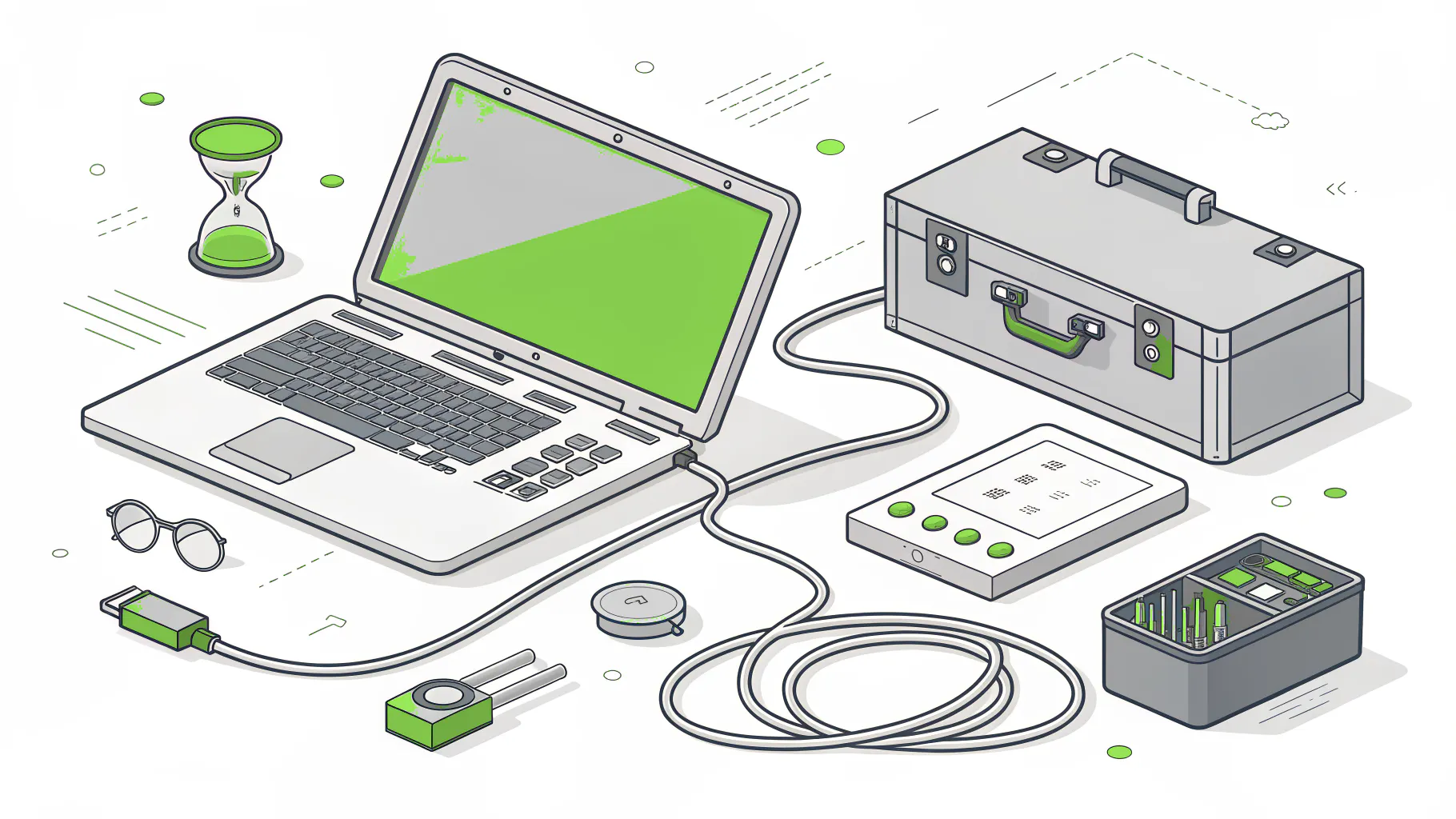
You restore something and time it. In Macrium's 2026 data, only 60% of manufacturers run a full disaster recovery exercise at least once a year, which leaves 40% testing less often than that. A plan that's never been run is still an estimate.
Start small. Pull one PLC program onto a bench controller with the spare you'd actually use, and time it. Restore the ERP database to a test server, then have someone in accounting who knows the books pull a few open orders and last month's inventory value and check that the numbers make sense. NIST SP 1339 recommends exactly this kind of restore on non-production systems, then updating the procedures with whatever you learned. Fold the measured times back into the plan. They're usually longer than the guesses.
Speed after an attack has a lot to do with how well you can see the plant network. The Dragos 2026 OT Year in Review found organizations with full OT visibility detected and contained OT ransomware in about 5 days, against an industry average of 42. For more on scheduling and scoring drills, see our guide to disaster recovery testing best practices.
If you already have a controls team that bench-tests restores every quarter and an IT team that rehearses ERP recovery, you're in good shape, and this post is a checklist to compare against. If the plan is mostly a backup schedule and a few people who know where things are, that's the work Consilien's manufacturing disaster recovery and business continuity team does with plants, mapping the systems, writing the restore order, and running the first timed test.
Want a second opinion on yours? Speak to a disaster recovery expert, and bring whatever you have, even if it's just the backup schedule.