How IT Directors Use Co-Managed IT to Scale Without Adding Headcount
Co-managed IT gives an IT director more coverage, specialist depth, and project capacity by contracting a managed services provider for defined work, while the internal team keeps strategy, architecture, and decision rights. The capacity comes from a contract, not a hire.
Table of Contents
You asked for two more people in next year's budget. You got zero, and the project list didn't get any shorter.
Money isn't really the problem. Gartner expects worldwide IT spending to grow 13.5% in 2026, and the IT services line is growing 9%. The dollars are moving toward services and away from seats. IT directors who use co-managed IT to scale without headcount are working with that shift instead of fighting it, and co-managed IT services are how they do it. The ones who get real capacity out of the arrangement treat it as an operating decision and run it like one.
Why doesn't the next hire fix the capacity problem?
One hire adds about 40 hours of coverage to a 168-hour week. Covering every hour with your own staff takes roughly 4.2 people before anyone takes a vacation, and each of them costs around $145,000 a year once benefits are counted.
Start with the salary. The Bureau of Labor Statistics puts the median pay for network and computer systems administrators at $99,130 as of May 2025. Wages are only part of what a full-time employee costs, though. In BLS's June 2026 employer compensation data, benefits made up 31.5% of total compensation for full-time private-industry workers. Run the median through that ratio and one sysadmin lands near $145,000 a year.
Then try to find one. ManpowerGroup's 2026 talent shortage survey found 69% of U.S. employers reporting hiring difficulty, and Robert Half's 2026 research found 65% of tech leaders saying skilled professionals are harder to find than a year ago.
Say you do land a good one. You've bought one skill set, working one shift, who will eventually want a week in Hawaii. A strong systems administrator isn't also your firewall engineer, your Azure architect, and the person who knows what to do at 3 a.m. when a domain admin account signs in from somewhere it never has.
BLS also projects employment for this role to fall 4% between 2025 and 2035. I read that as the work moving, not the work disappearing. It's going to cloud platforms and outside teams, and your org chart is allowed to follow it.
What do IT directors keep, share, and hand off?
Keep anything where the right answer depends on knowing your business. Hand off anything where the right answer is the same at every company. Share the work where speed and judgment both matter, like a live security incident.
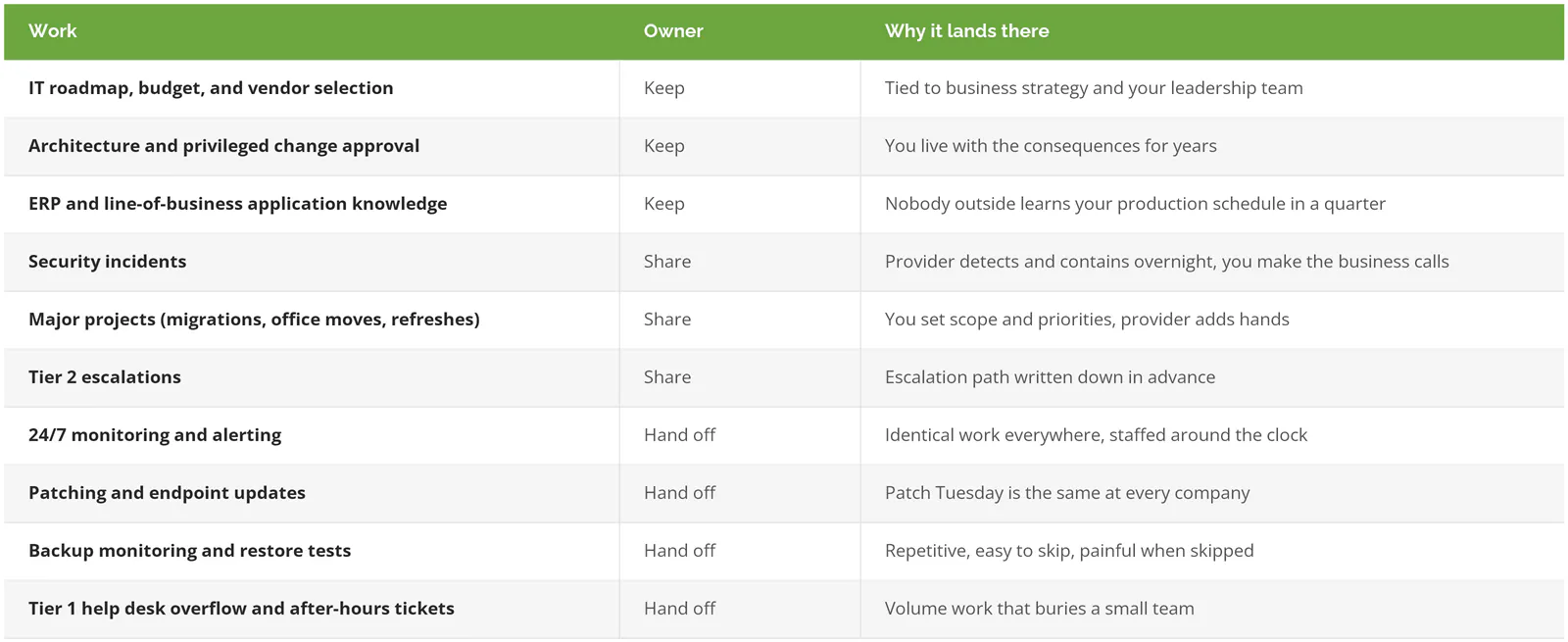
Patch Tuesday is identical in Torrance and Toledo. Which production line can go down on a Saturday morning is not. That's the whole sorting rule. The table just applies it.
Four ways IT directors use co-managed capacity

Coverage for nights, weekends, and your vacation
This is the most common starting point, and the math above explains why. A provider that already staffs a 24/7 desk for dozens of companies can cover your nights, weekends, and holidays for a fraction of what four more salaries would cost, because you're sharing the overnight shift instead of paying for all of it. Your team stops sleeping with phones on the nightstand.
Depth you can't justify full time
You need a senior network engineer for maybe 6 days a year. A cloud security specialist for 10. Nobody approves a full-time salary for that, so the work waits or gets done by whoever is closest. In the 2025 ISC2 Cybersecurity Workforce Study of 16,029 professionals, 29% said they can't afford to hire staff with the skills they need, and 88% had experienced at least one significant security consequence because of a skills shortage. A co-managed bench is how you rent those 6 days.
Surge capacity for projects with an end date
A Microsoft 365 tenant migration. A second site coming online. A server refresh that's been "next quarter" for three quarters. Hiring for a project ends one of two ways, a layoff when the migration wraps up or a person you're now inventing work for, and both cost you more goodwill with your team and your CFO than the contract would have cost in dollars. Contracted hands go away when the project does.
Relief for the work burning your team out
SysAid's State of Service Management 2026 report found 43% of IT professionals struggling with burnout and workload pressure, and VPs of IT reported the highest rate of any role, at 50%. HDI's 2026 research found 63% of service organizations understaffed. Burnout turns into resignations, and a resignation on a three-person team takes a third of your institutional knowledge out the door with it. Handing off the password resets and the 2 a.m. disk alerts is a retention decision as much as a capacity one.
What does the cost comparison actually look like?
One loaded sysadmin runs about $145,000 a year for 40 hours a week. In-house 24/7 coverage runs about $608,000. Consilien's co-managed IT starts at $4,000 a month, or $48,000 a year, with scope set by contract.

These aren't equivalent, and pretending they are would be its own kind of sales pitch. By month 6, a good hire knows which executive panics about which report and which vendor lies about delivery dates. A provider learns some of that and never all of it. The co-managed price also climbs with device count, sites, and coverage hours, so $48,000 is a floor, not a quote.
What the table does show is where the money goes. A hire buys depth in your environment. A co-managed contract buys breadth and hours. When your bottleneck is hours and breadth, the hire is the expensive way to solve it. Our in-house vs. outsourced IT cost and risk breakdown runs the broader version of this math, and co-managed IT services explained covers how providers structure pricing.
Where co-managed arrangements break
Co-managed IT fails on structure far more often than on talent.
The classic version is tool ownership. The provider's monitoring agent gets uninstalled by the internal team during a cleanup, or the documentation platform renews under the provider's account and you find out at contract end that your network diagrams live in someone else's tenant. Nobody did anything malicious, and that's the problem, because no single person ever had that agent or that renewal on their list.
Picture a Friday outage where both teams believed they owned firewall changes. The plant sits idle while two groups of smart people argue about whose change it was. One name per line in the responsibility matrix. Not two, not "shared."
Then there's the sysadmin who hears "we signed an MSP" and assumes their job is next. Work quietly stops showing up in the shared queue. If nobody sat down and explained the plan, that's a fair read on their part. And a provider that routes around the IT director to talk to the CFO directly will kill the arrangement inside a year, deservedly.
The fix for all three is boring. Write it down before day 1.
How do you set up co-managed IT in the first 90 days?

Inventory every system and tool, assign one accountable owner per line, put both teams in one ticket queue with a written escalation path, then review the numbers monthly and move the split when they say to.
- Days 1 to 30. List every system, tool, admin account, and contract. Decide who holds the admin credentials and whose name each renewal sits under. Build the RACI (who's Responsible, Accountable, Consulted, and Informed for each task) with one accountable name per row.
- Days 31 to 60. Move to one shared ticket queue that both teams can see and assign from. Write the escalation path with real phone numbers, not a shared inbox. Write the after-hours runbook, meaning what the provider can do at 2 a.m. without waking you, and what it can't.
- Days 61 to 90. Hold the first monthly review. Look at ticket volume by owner, after-hours incidents, patch compliance, backup restore test results, and which projects actually moved. Then adjust the split. If your team is still taking 40% of the password resets, that line goes back to the provider.
If you want a plainer walk-through of the fit questions before you get here, co-managed IT services in Los Angeles: is it right for your business? uses Los Angeles companies as the example, but the questions apply anywhere.
When co-managed IT is the wrong call
Skip it if you have no internal IT at all. Co-managed assumes someone on your side owns the roadmap, and without that person you're better served by fully managed IT. Our breakdown of co-managed vs. fully managed vs. in-house IT covers the difference.
Skip it if you already run a staffed 24/7 operations team with network, cloud, and security specialists on payroll. You've built the thing co-managed IT rents.
And if the real gap is a compliance program for CMMC, SOC 2, or PCI, that's a separate engagement. Co-managed IT doesn't include it. Consilien runs compliance readiness as its own service for that reason.
Picking the first thing to hand off
Pull last quarter's tickets and sort them by two columns, how much business knowledge the fix required and how much of your team's time it ate. The high-time, low-knowledge pile is your first handoff. For a lot of teams it's after-hours alerts and patching. For some it's the help desk overflow that shows up every Monday.
Joel Poindexter, IT manager at Hixson Metal Finishing, said it in a Clutch review. "Consilien has a great depth of knowledge and experience throughout their team." That depth is what you're renting. If you're still comparing providers, our list of the best co-managed IT providers is a starting point. If you'd rather walk through your own ticket data with someone, speak to a co-managed IT expert.