What Is Co-Managed IT? Co-Managed vs. Fully Managed vs. In-House (2026 Guide)
Co-managed IT is a shared model where an outside provider works alongside your existing IT staff instead of replacing them. You keep control and institutional knowledge. The provider adds coverage, specialized skills, and security depth where your team runs thin. It sits between two extremes: fully managed, where the provider owns everything, and in-house, where you own everything. For most companies between 50 and 250 employees, co-managed is the model that fits.
Table of Contents
Which model fits you, in one line: No internal IT, go fully managed. A capable team stretched too thin, go co-managed. Deep bench, budget to spare, and a need for total control, keep it in-house.
Most growing companies don't decide to hire a co-managed IT partner. They back into it. A migration stalls. The one person who knows the network takes a week off. A customer's security questionnaire sits unanswered for ten days. The team that was "fine" last year is suddenly underwater, and nobody planned for it.
Here's the problem with most "co-managed vs. fully managed" articles: they skip the third option you're actually weighing, which is keeping everything in-house. So this guide puts all three side by side and shows you which one wins at your size.
What is co-managed IT?
Co-managed IT is a partnership. Your internal team stays in place and keeps running the work it does well. An external provider, usually a managed service provider (MSP), takes on the rest: after-hours coverage, monitoring, specialized security work, large projects, or any domain your team doesn't have the time or depth to own.
The key word is augment, not replace. In a co-managed arrangement, scope is written down in a statement of work that draws a clear line: this is yours, this is ours, and this we do together. That line is the whole game. Get it right and the two teams move faster than either could alone. Get it fuzzy and you pay for confusion.
This is not a fringe arrangement anymore. Roughly 20% of MSP revenue now comes from co-managed engagements rather than full outsourcing, according to industry reporting on managed vs. co-managed models. The buyers driving that shift are companies that have real IT talent in-house and simply need more hands, more hours, or more depth.
Co-managed vs. fully managed vs. in-house: the 30-second version
Three models, one decision. Here's how they line up across the dimensions that actually change the answer. (See the full comparison table below.)
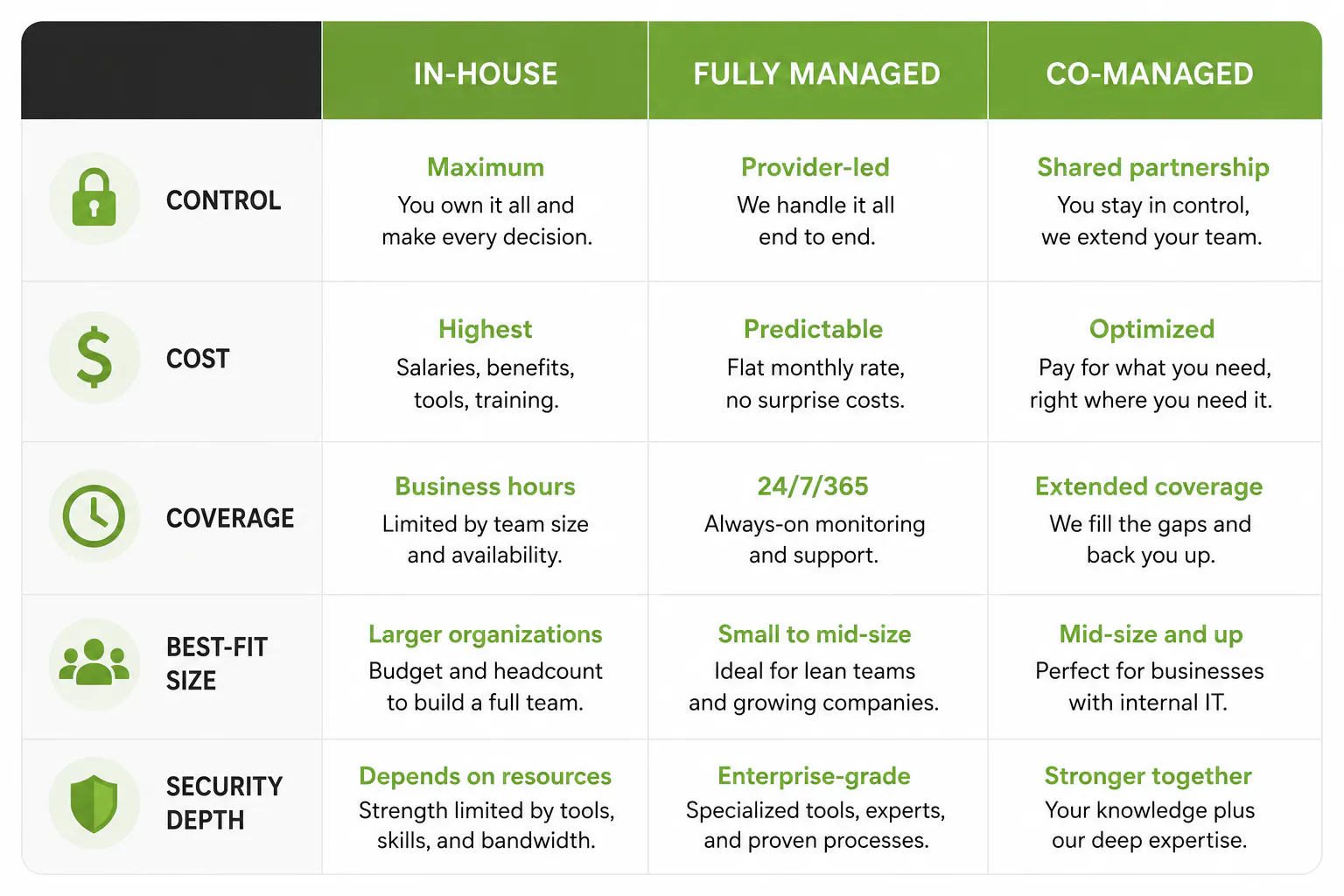
The rest of this guide walks each model in turn, then gives you a framework to pick.
In-house IT: what you control, and what it really costs
In-house IT means you hire, train, and keep your own technology staff. The upside is obvious. They know your business, they sit down the hall, and you control every decision. For a company with complex, always-on systems and a deep enough bench, that control is worth paying for.
The cost is where the math surprises people. A mid-level systems administrator runs an average base salary of about $93,000 in 2026, and base salary is only the start. Add 30% to 40% for benefits, payroll taxes, and a 401(k). Add another $3,000 to $7,000 a year to keep certifications current, because cloud and security skills go stale fast. All in, a single experienced hire in a market like Southern California lands somewhere between $110,000 and $148,000, and that one person covers roughly 8 to 5, weekdays only.
Then there's the risk nobody puts on the budget line. When one person holds all the knowledge, every vacation is a gamble and every resignation is a crisis. Lean teams in growing companies feel this first. The talent is good. There just isn't enough of it, and bigger employers keep poaching the people you train.
Fully managed IT: when handing over everything is the right call
Fully managed IT is full outsourcing. The provider owns your environment end to end: help desk, monitoring, security, infrastructure, strategy, all of it. You get 24/7 coverage, predictable monthly billing, and a whole bench of specialists without hiring any of them.
Pricing typically runs $75 to $250 per user per month depending on scope. For a company with no internal IT, that is usually the cleanest answer. You stop worrying about who patches the servers and get back to running the business. Companies that move to managed services tend to cut overall IT costs by 20% to 30% compared with carrying the equivalent staff.
The tradeoff is control. When the provider runs everything, you have less hands-on say in day-to-day decisions and more dependence on the relationship. That's fine if you have no internal team to begin with. It chafes if you do, which is exactly the gap co-managed was built to fill.
Co-managed IT: reinforcing the team you already have
Co-managed IT keeps your people in charge and adds an outside team behind them. You decide what to hand off and what to hold. The provider plugs the gaps. Nobody loses their job, and the work that needs institutional memory stays with the people who have it.
This is the dominant model for mid-sized companies for a reason. Globally, 88% of SMBs already use an MSP in some form, and as internal teams mature, more of them choose to share the load rather than surrender it. Manufacturers in particular use this to reclaim time: teams running a co-managed model routinely win back 30% to 40% of their capacity for strategic work instead of firefighting tickets.
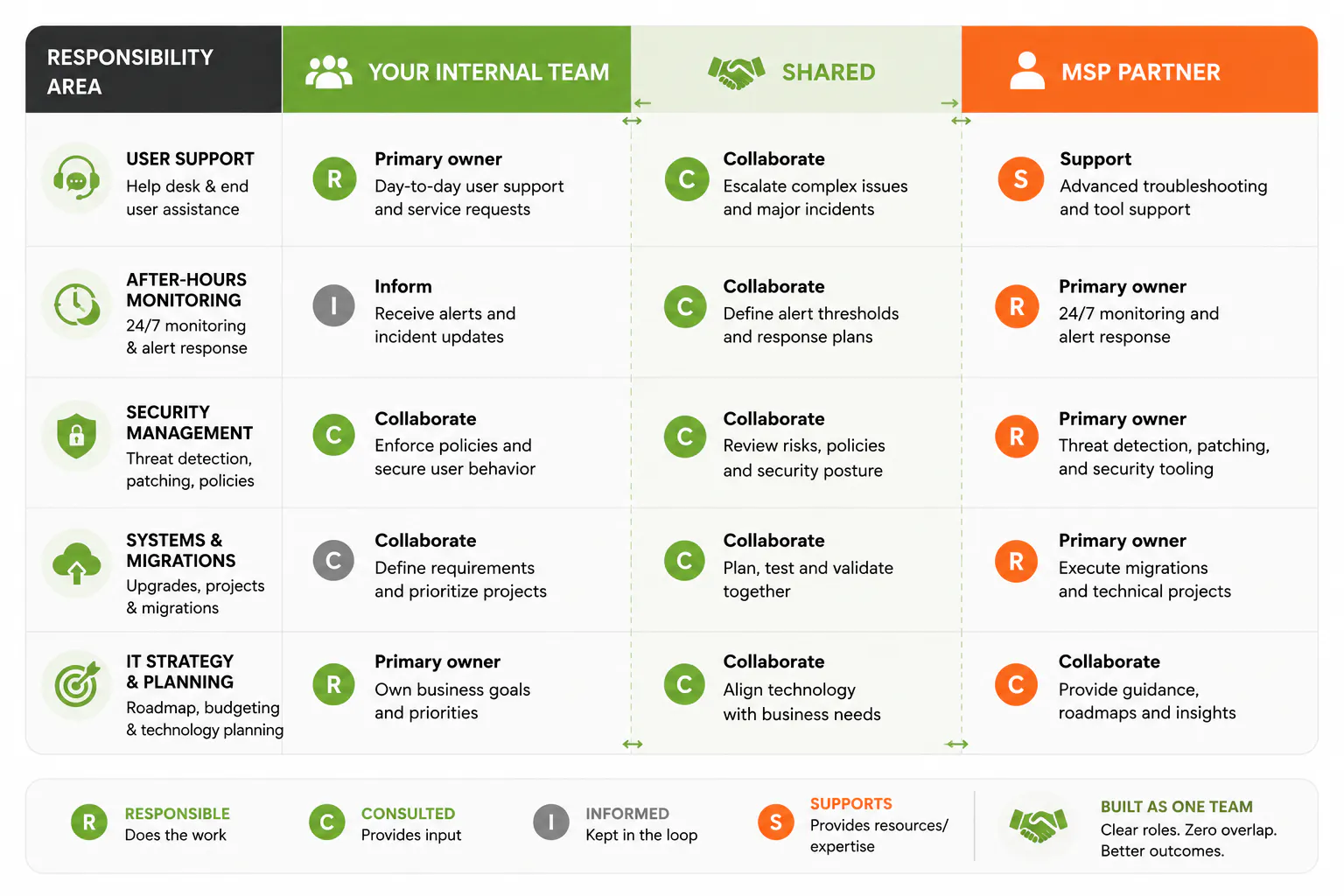
How responsibilities get split
There's no fixed template, which is the point. The split follows your gaps. A few common patterns:
- Your team owns daily user support and the decisions that need to know your business. The provider owns after-hours monitoring, patching, and escalation.
- Your team handles infrastructure and operations. The provider brings cybersecurity depth, compliance work, and a security operations center your size could never staff alone.
- Your team runs the floor. The provider leads a one-time heavy lift, like a cloud migration or a Microsoft 365 rollout, then hands it back.
Whatever the split, write it down before anyone touches a keyboard. The single biggest predictor of whether co-managed works is whether both sides know exactly who owns what.
Seven signs you're ready for co-managed IT
You probably already feel a few of these. If you check three or more, it's time to look at co-managed support seriously:
- Your IT team lives in the ticket queue and never gets to projects.
- One person is the answer to every question, and you hold your breath when they travel.
- Upgrades, documentation, and security work keep slipping to "next quarter."
- You're planning a migration or a major rollout your team has never done before.
- Downtime or security scares are getting more frequent, not less.
- Customers are starting to send security questionnaires you can't answer fast.
- You want strategic IT planning but no one has the hours to do it.
What does co-managed IT cost?
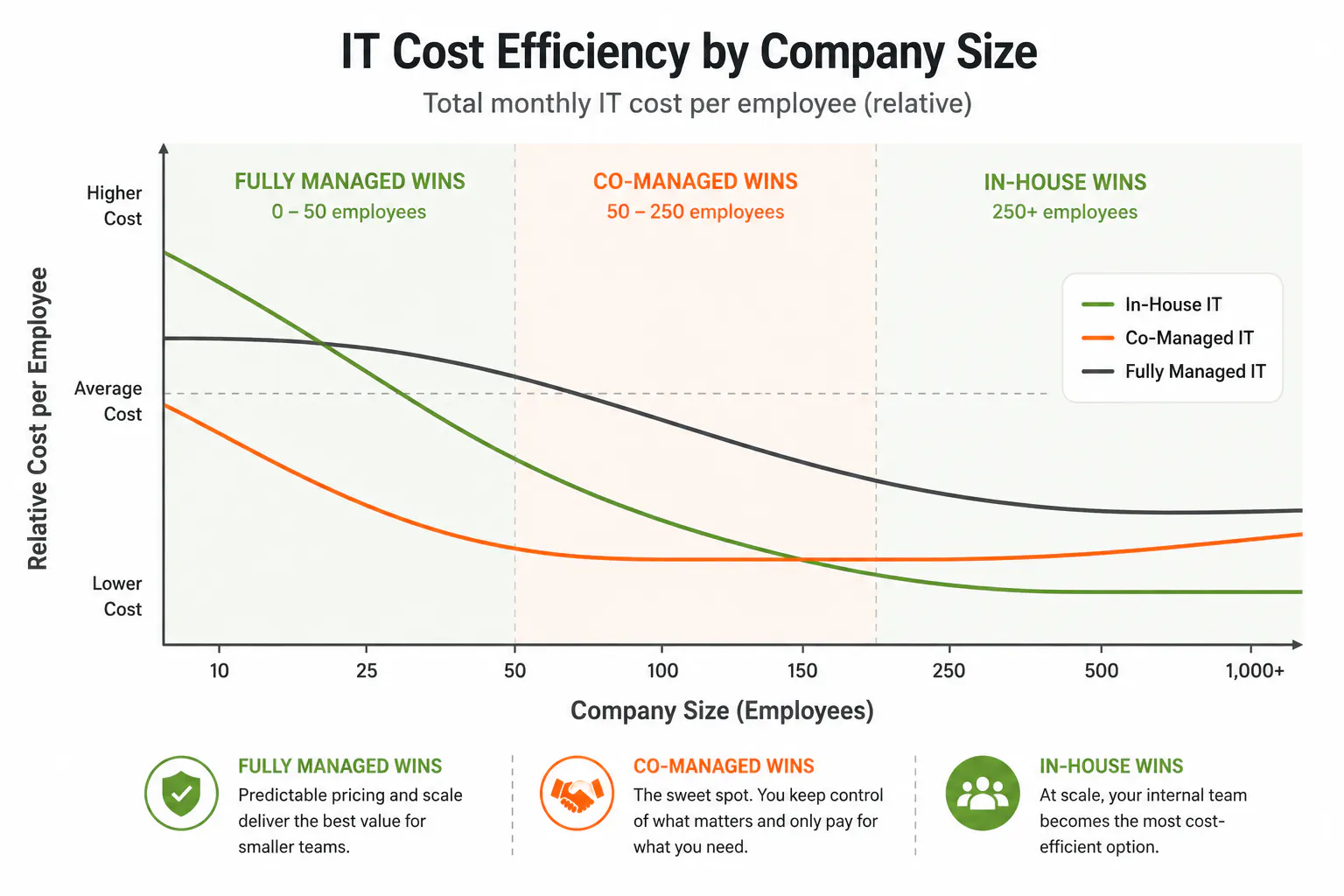
Co-managed pricing usually works on a per-user or block-of-hours basis, and because you're buying a slice rather than the whole department, the monthly number is smaller than fully managed. You're paying for depth and coverage on top of staff you already have, not for a replacement.
The cleaner way to think about it is the break-even. Below 50 employees, the loaded cost of one in-house generalist often exceeds what a capable provider charges for broader coverage, so fully managed tends to win. Above 250 with a mature department, in-house economics work. In between, in the 50-to-150-employee band where co-managed is the dominant choice, you get the most out of it: keep your IT lead, add an outside team for everything that lead can't get to. For a fuller breakdown, our explainer on who needs co-managed IT and what it costs goes deeper on the numbers.
Where co-managed IT goes wrong (and how to prevent it)
Co-managed isn't automatically the safe choice. It fails in a specific, predictable way, and it's worth naming so you can avoid it.
The failure mode is overlap. When roles are fuzzy, two teams either duplicate the same work or both assume the other has it. A ticket falls through the gap. A patch gets skipped because each side thought the other owned it. Accountability blurs, and the model that was supposed to add coverage quietly adds confusion instead. Communication overhead is the second tax: two teams means more coordination, and that takes real effort.
The fix isn't complicated, but it's non-negotiable. Define the boundary in writing before the engagement starts. Spell out ticket routing, who handles a security incident at 2 a.m., who owns vendor relationships, and where the handoffs live. A good provider insists on this conversation up front. If yours waves it off, that's your warning sign.
The security and compliance layer most comparisons skip
Most "which model" articles treat security as one row in a table. It deserves more, because it's often the real reason a company moves off in-house in the first place.
Managed security is now the largest segment of the MSP market and the fastest growing, expanding about 18% a year. The reason is simple: the threats and the compliance demands have outrun what a small internal team can carry. A two-person IT shop cannot run a 24/7 security operations center, keep up with CMMC, NIST, SOC 2, and PCI requirements, and still answer the help desk. Something gives, and it is usually the security work, because the help desk is louder.
This is where co-managed earns its keep, and where Consilien's approach differs from a generic MSP. Security is not an add-on in our IC24 model. It is the starting point. A co-managed engagement can layer in compliance readiness and the kind of vCIO and vCISO leadership that most companies can't justify hiring full time, so your internal team gets executive-level security strategy without an executive-level salary on the books. For manufacturers and mid-market firms facing customer security audits, that backup is frequently the deciding factor.
How to choose: a quick decision framework
Strip away the noise and the decision comes down to two questions: how much internal IT do you have, and how much control do you need? Map yourself to the closest situation in the guide below.
Two companies the same size can still land in different rows, and that is fine. A firm under strict compliance pressure may go co-managed earlier to get security depth. A firm with a brilliant, deep IT team may stay in-house longer. The framework points you at the likely answer. A short conversation confirms it. If you're weighing this against full outsourcing specifically, our breakdown of managed vs. co-managed IT compares those two head to head.
The bottom line
Co-managed IT isn't a discount version of fully managed, and it isn't in-house with extra steps. It's a different shape: your people in control, an outside team filling the gaps, and a written boundary holding it together. For most companies between 50 and 250 employees, especially those carrying real security and compliance weight, it's the model that gives you depth without giving up the wheel.
If your team is capable but stretched, the next step isn't a sales pitch. It's a clear-eyed look at where the gaps are. A free IT assessment maps exactly that, so you can decide which model fits before you spend a dollar on the wrong one.