Cloud Migration Services

Move to the cloud on a schedule you set, with a team that still runs the environment after cutover.

Cloud migration services move your servers, email, files, and applications into Microsoft 365, Azure, or a private cloud, then keep them running afterward. Consilien plans the move, runs the cutover, and manages the environment as one engagement instead of three. Assessment through day 31 and past it. Companies of 20 to 500 users, nationwide.

The migration is not the risky part

A CFO signs off on a cloud project once. The quote says nine weeks. Then month five arrives, two old servers are still humming in the closet because a line-of-business app never came across, and there's a line on the invoice nobody recognizes.

McKinsey surveyed roughly 450 CIOs and IT decision makers on this exact problem. 75% went over budget and 38% finished behind schedule, with about $100 billion in wasted migration spend projected across three years. Those weren't shops without project managers. Those were enterprises with entire PMO teams.

So the failure isn't technical skill.

A pattern worth naming. The 60-person distributor that moves email first and file servers next quarter ends up paying for both environments for eight months, and the second half of the project never gets funded because the first half already ate the budget. The move technically succeeded. The company just never got out of the middle.

The other version is quieter. Everything lands on time, the project partner shakes hands and leaves, and nobody at the company owns the tenant. Licenses auto-renew at counts nobody reviewed. Conditional access rules, the settings that decide who can sign in from where, sit at whatever the defaults were. Six months later somebody asks who's watching this, and the honest answer is nobody.

A migration plan that doesn't say who owns the environment on day 31 isn't a plan. It's a moving quote.

We've run IT environments for manufacturers, distributors, and professional services firms since 2001, which means most of what we know about migrations we learned by inheriting the ones somebody else did. Our cloud services practice and this migration work are the same team, on purpose.
75%
Of cloud migrations run over budget, across roughly 450 CIOs surveyed by McKinsey. 38% also finish late.
29%
Of cloud spend is wasted, per Flexera's 2026 State of the Cloud Report. First increase in five years.
1-year opt-out
On a standard 3-year agreement, with 60 days notice. In writing.

Why the clock is actually running

Two dates are driving nearly every conversation we're having right now, and neither is a marketing deadline.

Microsoft ends extended support for SQL Server 2016 on July 14, 2026, and for Windows Server 2016 on January 12, 2027. After those dates the patches stop. Not slow down. Stop. If a vulnerability lands in February 2027 on a 2016 box running your ERP database, there's no fix coming.

That matters beyond security. Cyber insurance renewals now ask what you're running. So do customer security questionnaires, and in aerospace and defense supply chains, so do CMMC assessors.

Planning takes longer than moving does. A 120-user environment with an ERP, a file server, and Exchange on-prem is a 10 to 14 week project once it starts. Getting the ERP vendor to confirm what they'll support in Azure can take six weeks on its own, and that clock doesn't start until somebody calls them.

January 2027 sounds far away in August. It isn't. More on the timing case in why cloud migration is no longer optional.

What you are actually buying

Ask three providers for a cloud migration quote and you'll get three different scopes. One is quoting a mailbox move. One is quoting a data center exit. One is quoting an application rewrite. Same phrase, wildly different work.

Cloud migration services are the planning, moving, and securing of a company's servers, email, files, and applications, from on-premises hardware into cloud platforms like Microsoft 365, Azure, or a private cloud. The work covers assessment, workload disposition, pilot testing, cutover, and post-migration management.

What's inside a Consilien migration:

  • A workload inventory built from what's actually running, not from the asset list in the spreadsheet.
  • Vendor confirmation on every line-of-business app, in writing, before anything moves.
  • Identity and access design, meaning who signs in, from where, and with what.
  • A pilot department cut over and used for real work before the rest of the company follows.
  • Data migration with a validated rollback point.
  • Microsoft 365 backup, because Microsoft doesn't do that for you.
  • Decommission and secure wipe of the old hardware.
  • Ongoing management, reporting, and a vCIO roadmap after go-live.

Email and identity

Exchange, shared mailboxes, and domain controllers into Microsoft 365 and Entra ID.

Files and shares

Mapped drives and file servers into SharePoint, OneDrive, or Azure Files without breaking permissions.

Servers and apps

Application and database servers into Azure or a managed private cloud, sized to real usage.

Backup and recovery

Cloud-to-cloud backup with tested restores, not just replication you hope works.

Not every workload belongs in the cloud

The pitch every buyer hears is that everything should move. It shouldn't, and a provider who tells you otherwise hasn't looked at your plant floor.

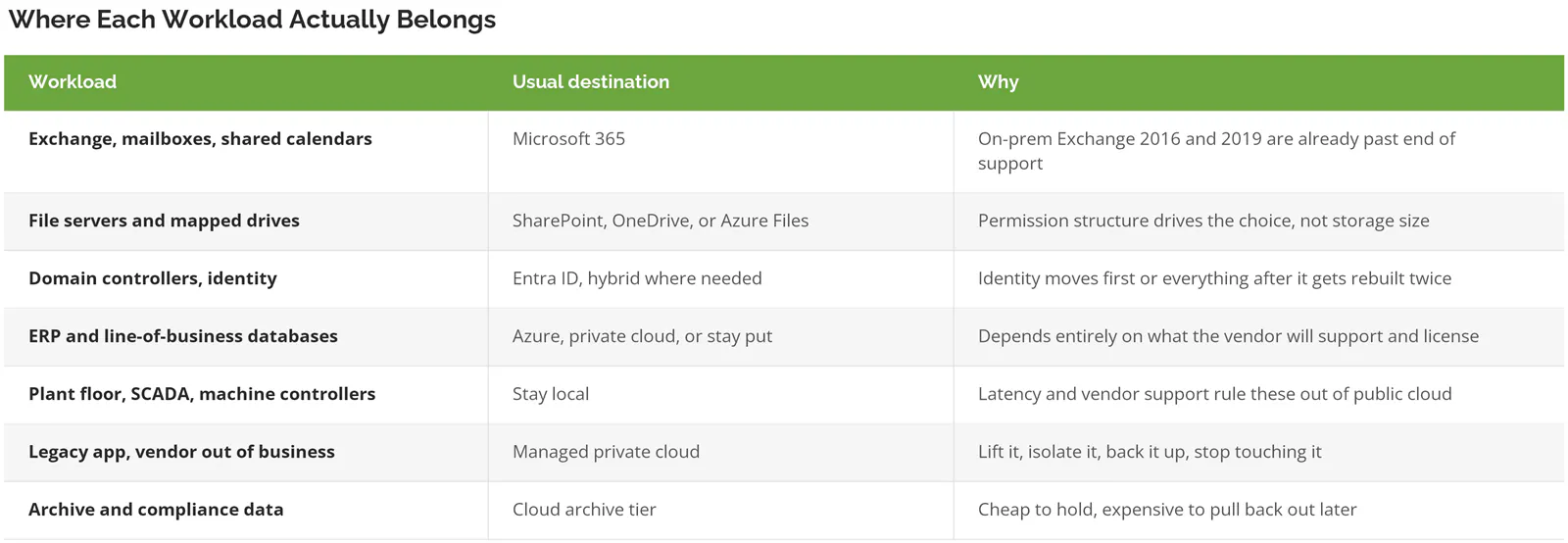
We run private cloud and IaaS hosting, so we have no reason to push a workload into Azure that doesn't want to be there. Sometimes the right answer is a lift into a managed private environment. Sometimes it's leaving a machine exactly where it sits and putting a proper backup around it.

Cloud migration workload disposition table showing which systems move to Microsoft 365, Azure, private cloud, or stay on-premises

The archive row is the one people learn about after the fact. Egress fees, the cost of pulling your own data back out of a cloud platform, don't show up until you need the data.

If you're 15 people on one Microsoft 365 tenant with nothing in a closet, you don't have a migration project. You have a licensing cleanup and maybe a backup gap. Don't buy this.

More on the tradeoffs in on-premise vs cloud, and the manufacturing side of it here.

What it actually costs

Flexera 2026 State of the Cloud Report, their 15th annual, found 29% of cloud spend is wasted. First increase in five years. 85% of organizations call managing cloud spend a top challenge. Nearly nine in ten. Read that as a warning about what happens after the project ends, because that's where the waste lives.

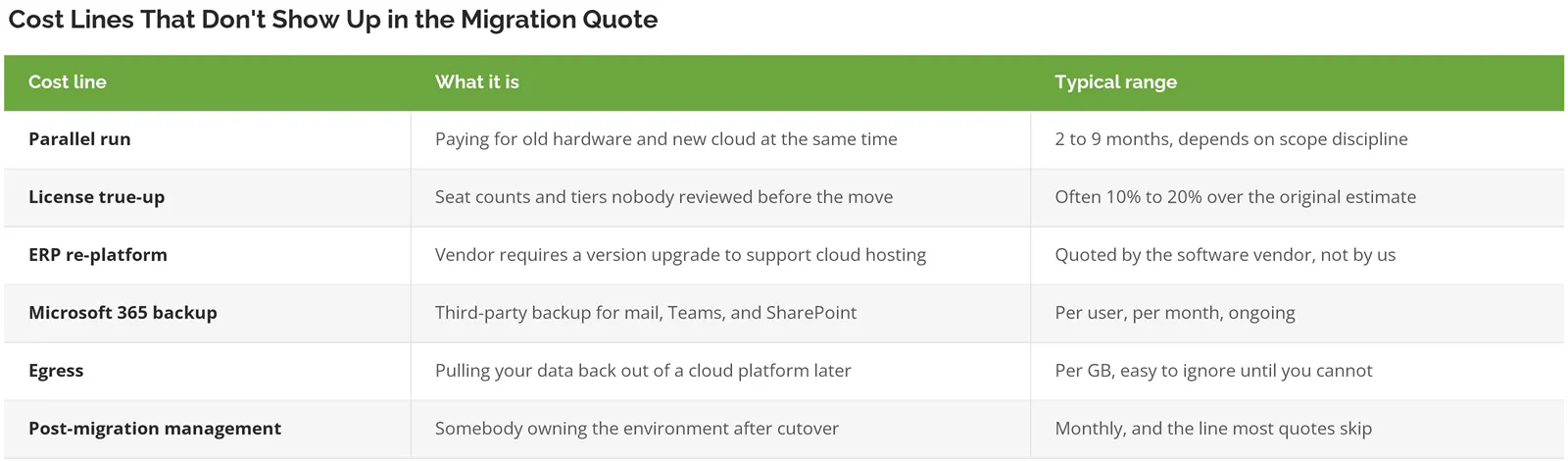
The migration quote is rarely the problem. The lines around it are.

Table of cloud migration cost lines including parallel run, license true-up, egress, and post-migration management

Rough sizing. A 100-user company moving Exchange, two file servers, and one line-of-business application usually lands in the mid five figures for the project. An ERP that needs a version jump can double it. A plant with machine controllers that have to stay put costs less to migrate and more to secure.

We put a number on the whole thing before you sign, including the parallel-run months. That number is what you get billed.

The deeper breakdown lives in how much cloud migration costs, and there's a companion piece on cloud cost optimization for SMBs.

Security gets configured during the move, not after

Every environment we inherit from a completed migration has the same three gaps. MFA enabled but not enforced. No conditional access, so a login from anywhere works as long as the password does. And no backup of the Microsoft 365 data, because the assumption is that Microsoft handles it.

Microsoft doesn't. Their agreement covers the platform. Your data is yours to protect.

CISA publishes free secure configuration baselines for exactly this. The Secure Cloud Business Applications project covers 16 product baselines across Microsoft 365 and Google Workspace, and ScubaGear, the assessment tool that checks a tenant against them, is free and available to private companies. Federal civilian agencies were ordered to implement the baselines by June 20, 2025. Almost no mid-market company has run the tool once.

We configure to those baselines during the migration, not as a follow-on project six months later. Identity design, conditional access, MFA enforcement, admin role separation, and tenant-level logging go in while we're already in the tenant. It costs a fraction of what it costs to retrofit.

Related work sits in identity and access management, managed cybersecurity, and backup and disaster recovery.

Ongoing monitoring and response after go-live runs under managed cybersecurity.

Backup design, retention, and restore testing get scoped in the same pass, covered under backup and disaster recovery.

How the migration runs

Five phases. Each one produces something you can read, and none of them start until the one before it is signed off.

1

Discovery and technology assessment, 2 to 4 hours on site

We inventory what is actually running, including the machine under someone's desk that turns out to run shipping labels. You get a workload inventory and a risk list.

2

Disposition and design, 2 to 3 weeks

Every workload gets a destination and a written reason, and every software vendor gets contacted to confirm what they will support. You get the migration plan, the security design, and the full cost including parallel-run months.

3

Pilot, 1 to 2 weeks

One department cuts over and does real work in the new environment before anything else moves. Accounting is usually the right pilot, because they complain fastest. You get a validated build and a fixed punch list.

4

Cutover, scheduled, usually a weekend

The rest of the company moves on a published schedule with a rollback point defined before we start. You get users working Monday morning and a decommission plan for the old hardware.

5

Run it, ongoing

Environment goes under management, aligned to our CIMS maturity standard, with monthly reporting and a vCIO roadmap. You get an owner. That is the phase most migration quotes leave out.

Want the strategy layer before you scope any of this? Start with how to build a cloud migration strategy.

Send us your server list and we'll tell you what moves, what stays, and what it costs. Speak to a cloud expert.

Proof

100% uptime. A business consulting firm in Irvine, working with us since April 2018, reported it on their Clutch review along with clean conversions to new hardware.

Eagle Print Dynamics in Orange, a print and promotional apparel manufacturer, brought us in for cloud consulting and systems integration alongside managed IT between November 2017 and February 2018. 5.0 across quality, schedule, cost, and willingness to refer.

They were great to work with. Jodee Gonzalez, Director of Finance, Eagle Print Dynamics.

Consilien has a great depth of knowledge and experience throughout their team. Joel Poindexter, IT Manager, Hixson Metal Finishing, a client since January 2010.

3 minutes to a ticket, 15 minutes to a live person. That's what a product support manager at Human Touch in Long Beach described in March 2025. The technician also taught her to fix it herself and left written steps on her machine.

Independently owned since 2001, with several client relationships now past the 10-year mark.

Before you commit

At this stage the same questions come up, usually in the same order.

How much of this lands on our people? What happens if the ERP vendor says no? And if this goes badly, how do we get out?

Line illustration of on-premises servers migrating to cloud infrastructure

Common questions about cloud migration

How long does a cloud migration take for a company with 100 people?


10 to 14 weeks for a typical environment with Exchange, a couple of file servers, and one line-of-business application. Discovery and design eat the first month, the pilot runs 1 to 2 weeks, and the cutover itself is usually a single weekend. What stretches it is almost always a software vendor taking six weeks to answer a support question about their own product.

Windows Server 2016 stops getting patches on January 12, 2027

The planning takes longer than the move. Send us what's running and we'll tell you what moves, what stays, what it costs, and who owns it afterward.