Why Cloud Migration Is No Longer Optional in 2026
If you're still debating whether cloud migration is necessary, the short answer is: it's no longer optional.
Table of Contents
Cyber threats are scaling faster than on-premise systems can keep up. Remote and hybrid work dominate. Clients expect 24/7 access. And vendors are retiring on-prem tools at record speed. Cloud migration isn't about being "modern". It's about staying competitive, secure, and resilient.
This guide breaks down exactly why cloud migration is now a business necessity, not an IT nice-to-have.
Cloud migration is no longer optional because:
- On-prem systems can't keep up with today's security threats.
- 75% of business applications are now SaaS-first.
- Cloud reduces downtime risks and improves resilience.
- Vendors are ending support for legacy, on-prem products.
- Compliance, cyber insurance, and client contracts increasingly require cloud-grade security.
If you're not migrating, you're falling behind.
1. Cybersecurity Threats Exceed On-Prem Capabilities
Let's get straight to the biggest driver: security.
Cloud Identity & Access Controls Are Superior
- MFA required by default
- Conditional access
- Zero Trust enforcement
- Built-in threat detection
- Continuous compliance monitoring
- Automated patching and security updates
On-prem systems require manual work for each of these, leading to gaps and vulnerabilities.
The Numbers Don't Lie
- 80% of breaches now involve compromised identities (Verizon DBIR).
- Companies using cloud identity platforms reduce breaches by 60% (Microsoft Digital Defense Report).
- 45% of data breaches involve misconfigured on-prem systems (IBM).
The cloud is not inherently "safer," but it automates and enforces critical security practices that on-prem cannot sustain.
2. Remote Work Isn't Going Away, and On-Prem Can't Support It Well
Even fully on-site companies rely on remote access.
But:
- VPNs are slow
- On-prem file servers are bottlenecks
- Remote workers create risky access patterns
- Managing identity for distributed teams is complex
Cloud collaboration tools fix this instantly.
Real Example
A 60-employee construction firm used an on-prem server for drawings and documentation.
Issues:
- Remote project managers constantly lost access
- VPN instability caused file corruption
- Large CAD files took minutes to open
- Ransomware hit their server in 2023
After migrating to SharePoint + Azure AD:
- Access improved 4x
- No VPN issues
- Ransomware risk dropped significantly
- They saved $14,000/year on server refresh cycles
Cloud = resilience + mobility.
3. Vendors Are Ending Support for On-Prem Software
Microsoft, Adobe, QuickBooks, Cisco, and dozens of major software vendors have one thing in common:
ð They are phasing out on-prem versions
ð New features are cloud-only
ð Security updates increasingly target cloud platforms first
Examples:
- Microsoft Exchange Server falling behind cloud security baseline
- QuickBooks Desktop discontinuations
- Many firewalls now require cloud-based threat feeds
- Legacy Windows Server versions end-of-life (EOL) every 2-5 years
Staying on-prem means staying behind.
4. Cloud Reduces Downtime and Downtime Is Expensive
Downtime is not just annoying. It's expensive.
The Stats
- Downtime costs SMBs $9,000 per minute on average (IDC).
- 93% of businesses without cloud DR go bankrupt after a severe outage.
- 80% of untested backups fail during ransomware recovery (Veeam).
Cloud platforms offer:
- Automatic failover
- Redundant data centers
- Built-in disaster recovery
- Continuous replication
- Geo-redundancy
On-prem servers simply cannot match these capabilities without massive investment.
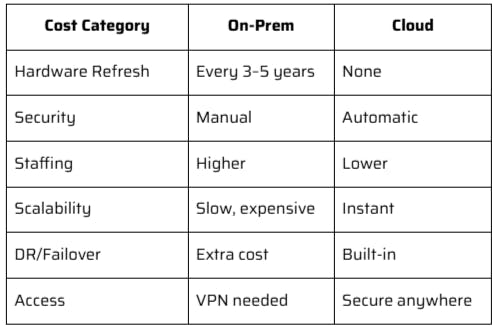
5. Cloud Migration Enables Predictable Costs (No More Surprise Hardware Bills)
On-premise IT spending is spiky:
- Servers
- Storage
- Firewalls
- Licensing
- Data center equipment
- Cooling
- Physical security
Cloud IT spending is predictable and scalable, letting you:
- Pay only for what you use
- Scale up during growth
- Scale down during slow seasons
- Avoid CapEx surprises
Cost Comparison Table
6. Compliance & Cyber Insurance Are Driving Cloud Adoption
Whether you're in finance, healthcare, manufacturing, retail, or professional services-compliance requirements are tightening.
Cloud supports modern compliance more easily:
Cyber insurance now expects this:
- MFA
- Encrypted backups
- Zero Trust
- Endpoint detection & response
- Secure identity platform
These are easier to implement and maintain in cloud-native ecosystems such as:
- Microsoft 365
- Azure
- AWS
- Google Cloud
7. Cloud Unlocks Innovation You Can't Get On-Prem
The most competitive companies aren't just moving to the cloud, they're building on the cloud.
Cloud enables:
- AI-powered analytics
- Automation
- Machine learning
- Integrated workflow tools
- Advanced reporting
- Automated compliance
- Intelligent routing
- Identity governance
- App integration via APIs
Your competitors are moving faster because their infrastructure lets them.
Remaining on-prem is like choosing:
Flip phone vs. smartphone
Both technically work, but one enables way more capabilities.
8. Your Employees Expect It
Cloud tools improve:
- Speed
- Collaboration
- Mobility
- Productivity
- Accessibility
- Employee satisfaction
Fast, flexible workplaces attract better talent.
On-prem systems slow people down and increase IT workload.
9. Businesses Avoid Hardware Lifecycle Chaos
Hardware lifecycle management is one of the biggest hidden IT risks.
Servers need replacing every 4-5 years.
Firewalls every 3-5.
Endpoints constantly.
Cloud reduces the load dramatically.
Cloud Migration Isn't Optional, But Your Timeline Can Be Strategic
There is no one-size-fits-all timeline.
Consilien typically recommends:
- Phase 1: Identity + Microsoft 365
- Phase 2: Data + file migration
- Phase 3: App migration
- Phase 4: On-prem server retirement
- Phase 5: Security modernization
- Phase 6: Cloud optimization + cost tuning
This approach reduces risk and downtime while improving security and performance.
Conclusion
Cloud migration is no longer something organizations can push off to next year. The pressure from modern security threats, remote work, compliance requirements, and aging hardware has made cloud adoption a business priority. Companies that move early gain stability, stronger protection, and a foundation that supports growth. Companies that delay face increasing risk and rising costs as on-prem systems fall further behind.
A smart migration plan can remove the guesswork. It can also reduce disruption and give your team better tools with stronger security. At Consilien, we help organizations move at the right pace, build a secure cloud environment, and replace fragile on-prem infrastructure with systems that support long-term resilience.
If you want to understand your risks, build a roadmap, and see the financial impact before you commit, schedule a Cloud Migration Assessment. It gives you clarity and a clear plan for moving forward with confidence.
Cloud migration is no longer optional, but doing it right is optional.
Consilien helps organizations migrate securely, minimize downtime, and modernize their IT foundation without risk or disruption.