IT Support for Small Businesses in Los Angeles: What a Help Desk Should Cover
A small-business help desk in Los Angeles should cover sign-ins and MFA, software and Microsoft 365, onboarding and offboarding, devices, and escalation inside the monthly fee. After-hours work, onsite trips, projects, and security incidents need their own written terms.
Table of Contents
Fixify, a help desk software company, went through more than 50,000 tickets from 30-plus organizations over 14 months for its 2026 benchmark, and software and applications made up 38% of the volume, onboarding and offboarding 17%, and identity and access 16%, per MSP Today's write-up of the report. App assignment alone (an employee needs a program they can't open yet) came to 28% of all tickets. Whether to outsource all of IT rather than support alone is covered on our page about managed IT services in Los Angeles.
Key Takeaways: Sign-ins, MFA, app access, and new or departing employees made up the bulk of tickets in both the Fixify and ControlUp data, so put them in the base fee. After-hours calls, onsite trips in LA traffic, projects, and breach response should each get a line in the quote. And before signing, find out how a caller's identity is checked before a reset and whether the response clock stops at 5 p.m.
What should a help desk cover in the base monthly fee?
Accounts and sign-ins, software access, people joining and leaving, everyday device problems, and escalation to a senior engineer all belong inside the flat fee, because they come up every week in every office.
Are password resets and MFA problems included?
They should be, without a cap. ControlUp, an IT monitoring company, analyzed 1,069,110 help desk tickets and found sign-in problems made up as much as 53% of tickets at individual enterprises, Campus Technology reported on November 9, 2026. MFA enrollment trouble (multi-factor authentication, the code or app prompt after a password) appeared at 40% of the organizations studied, with one in five of those tying it to employees replacing or upgrading their phones, so a new iPhone on Saturday can mean a locked-out salesperson on Monday morning.
Microsoft lets staff reset their own passwords through self-service password reset, and its deployment guide says that "before deploying SSPR, you may opt to determine the number and the average cost of each password reset call" so you can show the savings afterward. A help desk that bills per reset has little reason to switch that feature on for you.
Are Microsoft 365 and app access part of the fee?
Yes, and it's the largest category in the Fixify data. MSP Today's write-up notes that "the top three use cases (app assignment, permissions management, and employee offboarding) account for 40% of all tickets," which in practice means a shared mailbox, a Teams channel, an Adobe license, or edit rights to a SharePoint folder. When those requests sit inside the fee they get done the same day, and when they're billed one at a time people tend to start sharing logins instead of asking, which is how a small access question turns into a security problem a year later.
What about onboarding and offboarding?
New hires need a laptop, an account, the right groups, and the right apps on day one, and departures matter even more, since a former employee's account that still works is an open door. CISA's Cyber Guidance for Small Businesses tells owners to require MFA, but MFA still lets a former employee in if their account and authenticator app were never shut off. Ask the provider for its written onboarding and offboarding checklist and who triggers it (ideally a form HR fills in), because if someone has to remember to email IT on a departing employee's last day, the step will eventually get skipped.
Are laptops, printers, and the office network covered?
Repair and setup should be, while the hardware itself and a large rollout of new machines (replacing 20 laptops at once, say) usually sit outside the monthly fee. Laptops that won't connect, a printer that drops off the network, and a Wi-Fi dead spot in the back office get fixed remotely most of the time, though network problems tend to drag, and Campus Technology's summary of the ControlUp research says sign-in problems are the most common, "but network issues can take significantly longer to resolve."
Does escalation to a senior engineer cost extra?
It shouldn't. A first-level technician (often called tier 1) handles common requests, and harder problems go to tier 2 or tier 3, the engineers who know your firewall, your file server, and why the accounting software only runs on one machine. MetricNet's 2023 benchmarking roundup puts the average service desk at 70.2% of contacts resolved on the first interaction, up from 67.9% in 2010, so roughly three in ten tickets need a handoff, and a help desk that charges for that handoff has a reason to keep you on the first tier too long.
How should response and resolution times work?
Response time is when a person starts on your ticket, and resolution time is when it's fixed. Both belong in the agreement for each priority level, along with the hours the clock actually runs.
HDI's write-up of MetricNet's mean time to resolve counts business hours by default. Its example is a ticket opened at 4 p.m. on a Friday and closed at 4 p.m. on Monday, which goes in the report as 8 business hours, although the person waiting was without a fix for 72 hours. Our managed IT SLA guide covers when those clocks start, pause, and stop.
Handoffs add time too. In the ControlUp data, 87% of network and phone tickets were reassigned between teams, against 20% of account tickets, and every reassignment means a new technician reading the ticket history before doing anything. Current documentation on your network (who installed the firewall, which switch feeds the conference room) cuts down on those handoffs.
What usually costs extra in a help desk quote?
After-hours coverage, onsite visits, projects, and security incident response are the four items that most often sit outside a help desk's base fee. A quote should say, item by item, whether each one is included.
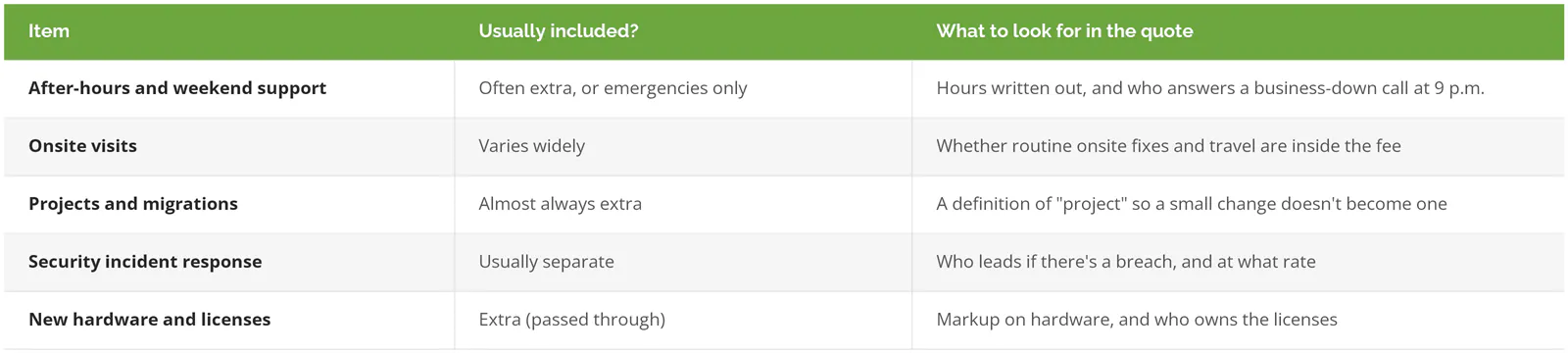
One IT provider's published help desk schedule states that after-hours support is excluded unless separately contracted. That kind of line usually sits in a schedule attached to the contract, not in the proposal.
Travel is the Los Angeles-specific cost. A technician driving from the South Bay to Burbank at 4 p.m. can spend longer on the 405 than at your office, so the quote should name where technicians start from and whether drive time is billed. Los Angeles County had 304,988 employer establishments in 2023, per the Census Bureau's QuickFacts, and with that many businesses there are a lot of providers, so comparing three or four quotes is normal. Our Los Angeles managed IT pricing guide has the per-user numbers.
Incident response is the extra that gets assumed. NIST's incident response guide, SP 800-61r3 (April 2025), says "third parties may be under contract with an organization to help perform incident response activities," and some of them take the primary role. A help desk may be that third party or may only pass along a phone number. IBM's Cost of a Data Breach Report 2026 puts the average U.S. breach at $11.5 million.
How should a help desk verify who's calling?
With something an outsider can't look up, such as a callback to the number on file or a manager's approval, before any password reset or MFA change. A name and birthday don't qualify, because both are usually a LinkedIn search away.
MGM Resorts is the standard example. In September 2023, attackers phoned its IT help desk posing as an employee, had credentials reset, and reached a high-privilege account, per 1Password's analysis of the MGM hack, which quotes a former employee saying a reset needed only "their name, employee identification number and date of birth." Okta had warned customers that attackers were getting service desk staff to reset MFA for "highly privileged users," Bloomberg reported. A small office gets the same kind of call, since a reset request costs an attacker almost nothing, so ask any provider to describe its verification step in one sentence.
What should you ask before signing a help desk agreement?
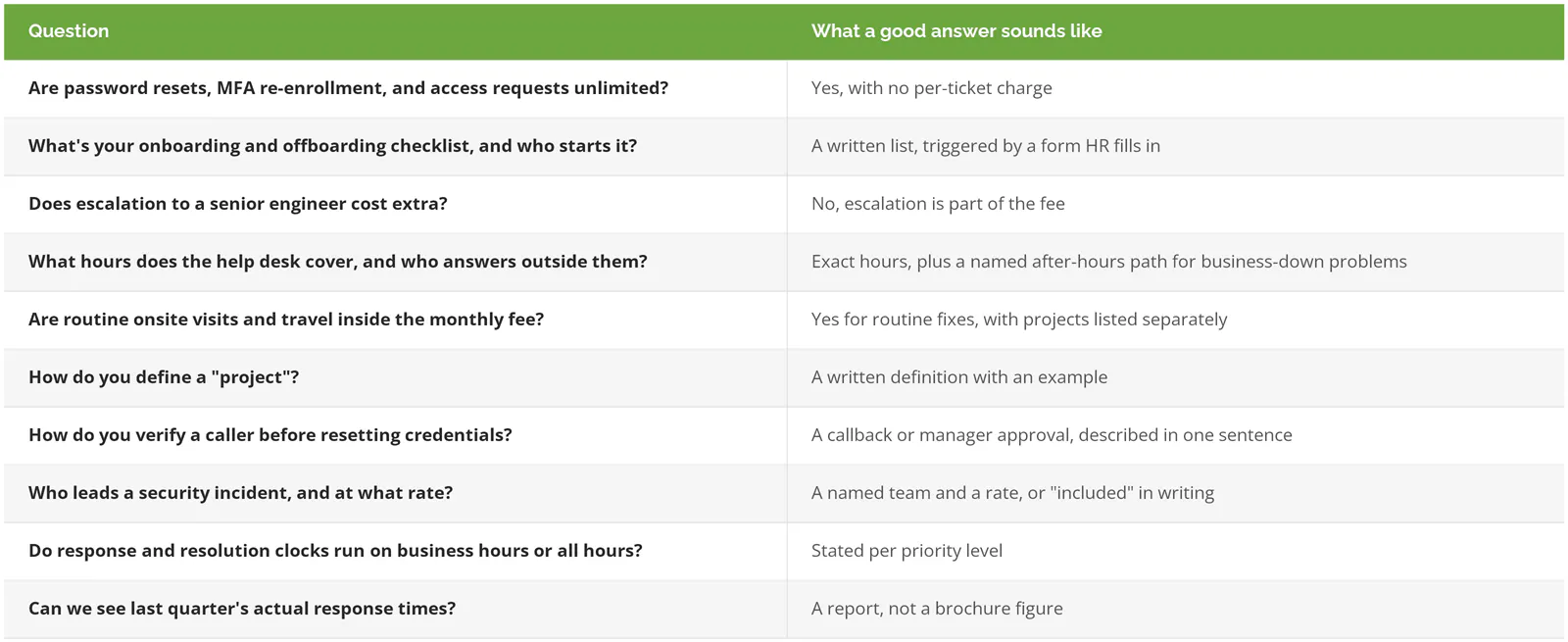
CISA's guidance for small and mid-sized businesses, Risk Considerations for Managed Service Provider Customers, recommends getting "specific performance-related service level agreements, including a clear delineation of operational IT services and security services" before signing. The ten questions below can each be checked against the written agreement.
A business with someone in-house who already handles accounts, devices, and Microsoft 365 well, and whose real gap is planning or security, may not need a full outside help desk. A co-managed arrangement (the in-house person and an outside provider split the work) often costs less. For a second read on a quote or an existing agreement, speak to a Los Angeles IT expert and bring the contract along. Our guide on switching MSPs in Los Angeles covers leaving a current provider without downtime.