Managed IT Services in Los Angeles: What You Get, What It Costs, and Why Pricing Varies
Managed IT services in Los Angeles typically cost between $125 and $300+ per user per month, with most small to mid-sized businesses spending $1,500 to $20,000+ per month depending on size, infrastructure, and security requirements. Co-managed IT services usually cost less per user because responsibilities are shared with internal IT, while server management ($150-$500 per server/month) can add to total costs.
Table of Contents
What drives pricing:
- Number of users
- Security and compliance requirements
- Infrastructure (cloud vs on-premise)
- Support coverage (24/7 vs business hours)
- Co-managed vs fully outsourced IT
What Are Managed IT Services?
Managed IT services are a fixed monthly service that covers your company's IT operations- support, systems, security, and planning. Instead of reacting to problems, the goal is to prevent them, stabilize operations, and reduce risk.
What Do Managed IT Services Cost in Los Angeles?
Short answer: $125-$300+ per user per month.
But that number alone doesn't tell you much. What actually matters is:
- How many users you have
- How complex your environment is
- How much security or compliance you actually need
Here's what that looks like in the real world:
Average Monthly Cost by Company Size

A couple important things here:
- Co-managed is cheaper per user because your internal team is still handling part of the workload
- Server costs vary widely depending on how critical those systems are and how they're backed up and monitored
- Cloud environments shift costs, but don't eliminate them-you're just paying differently (licenses, infrastructure, security layers)
How Managed IT Services Are Priced
There are a few common models, but most companies today are on per-user pricing.
- Per user (most common)
- Per device
- Flat-rate / all-inclusive
- Co-managed IT (shared model)
- Hourly / break-fix (less common now)
- Per-user pricing won because it's predictable. You can actually budget around it.
What You Actually Get with Managed IT Services
This is where things start to separate providers.
At a high level, most will say they include:
- Help desk
- Monitoring
- Backups
- Security
But that's surface-level. The real difference is how deep those services go.
In practice, managed IT typically includes:
- Help desk support (remote and onsite)
- Network and infrastructure management
- Endpoint and identity security
- Backup and disaster recovery
- Cloud platform management
- Strategic planning (vCIO / vCISO)
Here's the reality most companies don't see upfront:
The difference between IT that "keeps things running" and IT that actually reduces risk is everything behind the scenes- detection, response, and visibility.
Why Managed IT Services Pricing Varies So Much
This is the part most articles gloss over.
Pricing isn't random. It comes down to two things: risk coverage and operational complexity.
The biggest cost drivers:
- Security maturity
Basic antivirus vs endpoint detection and response is a completely different level of effort - Compliance pressure
Frameworks like National Institute of Standards and Technology or requirements tied to contracts and insurance - Infrastructure complexity
On-prem servers, hybrid environments, legacy systems - Number of locations
One office vs multiple sites is not linear - Support coverage
24/7 coverage requires a different operating model - Internal IT involvement
Co-managed environments shift responsibilities
If you take nothing else from this section, it's this: User count sets the baseline. Complexity and security determine the real cost.
The Biggest Pricing Misconception
A lot of companies assume: "If two providers charge $150/user, they must be comparable."
They're not.
In most cases:
- One is delivering basic support and light security
- The other is delivering layered protection, monitoring, and response
On paper, they look the same. Operationally, they're not even close. In most environments, the difference between $150 and $250 per user isn't support, it's security coverage.
Managed IT vs Security-First Managed IT
This is where the market has shifted.
Not all managed services are built the same:
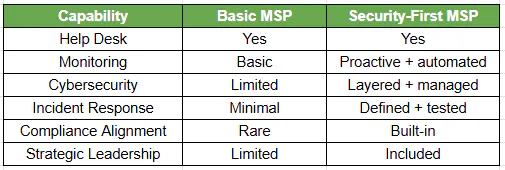
Security expectations today are being shaped by organizations like:
- Cybersecurity and Infrastructure Security Agency
- Center for Internet Security
That's why pricing has moved up over time. The baseline changed.
Co-Managed IT Services in Los Angeles
A lot of companies don't want to outsource IT completely, and they shouldn't.
Co-managed IT is built for:
- Internal IT teams that are overloaded
- Companies growing faster than their IT capacity
- Environments where security requirements outpace internal expertise
How it works:
- Your internal team handles day-to-day business systems
External provider handles:
- Security
- Monitoring
- Escalation
- Strategy
Why companies choose it:
- Lower cost than fully outsourced IT
- Stronger security posture
- Better coverage without hiring more staff
Most internal IT teams don't need to be replaced, they just need support and coverage.
What's Typically NOT Included in Managed IT Pricing
This is where transparency matters.
Most agreements do NOT include:
- Hardware purchases
- Major projects or migrations
- Large infrastructure upgrades
- Compliance audits or certifications
- Third-party software licensing
If this isn't clearly defined, pricing comparisons fall apart quickly.
How to Evaluate Managed IT Service Quotes
If you're comparing providers, don't just look at price.
Use this as a baseline:
- What security tools are actually included?
- Is there real incident response, or just alerts?
- Are SLAs clearly defined?
- Is there strategic guidance (vCIO / vCISO)?
- What's excluded from the agreement?
- How are servers and infrastructure handled?
A well-scoped agreement should remove ambiguity. If it doesn't, that's a problem.