IT Support in Pasadena: Response Times, Onsite Coverage, and What to Ask
Good IT support in Pasadena puts a person on a business-down problem within about 15 minutes, fixes most issues remotely, and can send a technician the same day. Ask where that technician drives from and whether travel is billed.
Table of Contents
Fixify, a help desk software company, went through more than 50,000 tickets from 30-plus organizations over 14 months for its 2026 IT Help Desk Benchmark Report, and the timing data is what I'd show a Pasadena office manager first. 82% of tickets came in during business hours. Volume peaked at 11 a.m., and Tuesday (not Monday, as you'd guess) was the busiest day, per MSP Today's write-up of the report. So the real test of an IT provider is 11 on a Tuesday morning, with the front desk printer jammed, and the controller locked out of QuickBooks. Whether to outsource all of IT is a bigger question, covered on our page about managed IT services in Pasadena.
The same data shows why a fast first reply proves so little. First responses "remained roughly five minutes either way," MSP Today reported, comparing help desks that leaned on automation with those that didn't, while median resolution ran 4.4 hours with automation and 71 hours without it.
Key Takeaways
An IT support promise is three clocks (an auto-reply, a person starting work, and the fix), and only the last two matter. Remote tools handle the bulk of everyday tickets, while onsite visits are for hardware, network closets, moves, and anything that knocks the office offline. Get the onsite promise in writing before you sign, including where the technician starts from and whether travel time is billed.

What response times should a Pasadena business expect?
For a business-down problem, expect a human working on it within about 15 minutes and service restored within roughly 4 hours, around the clock. For one person who's stuck, a reply within an hour is fair, and an automated "we got your ticket" email doesn't count as a response.
The clock can hide a lot, too. HDI's write-up of MetricNet's mean time to resolve uses business hours by default, and its own example is a ticket opened at 4 p.m. on a Friday and closed at 4 p.m. on Monday, which is 8 business hours on the report and 72 hours for the people waiting. A "4-hour restore" on a business-hours clock can mean Monday afternoon for a Friday evening outage.
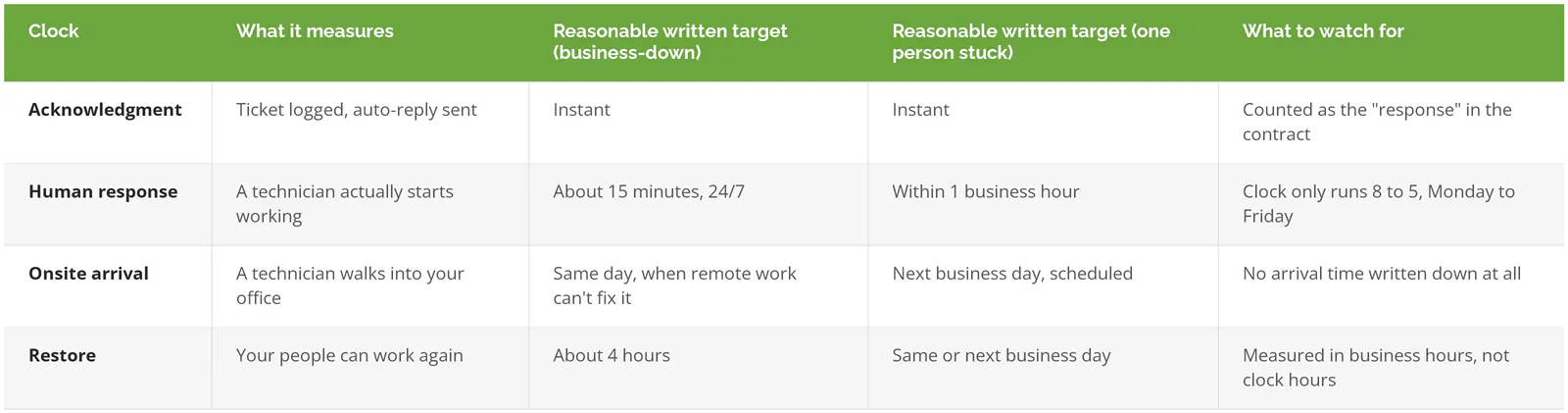
Those are commonly published ranges, not a guarantee. The service level agreement (SLA, the part of the contract that puts those targets in writing) also has to say when each clock starts, pauses, and stops, and our managed IT services SLA guide covers those rules line by line.
What a slow restore costs depends on the business. In the Calyptix and ITIC 2025 small business survey of 715 organizations, polled from October to December 2024, 37% put a single hour of downtime at $1,000 to $5,000, according to Journal of Cyber Policy's summary, and ITIC's 2024 Hourly Cost of Downtime survey found 90% of mid-size and large enterprises put one hour above $300,000.
Which IT problems actually need someone onsite?
A technician needs to be in the room for a failed switch, a jammed plotter, a new conference room screen, or an internet outage that takes the remote tools down with it. Password resets, Outlook problems, and software installs get fixed faster remotely, because nobody has to drive up the 110 first.
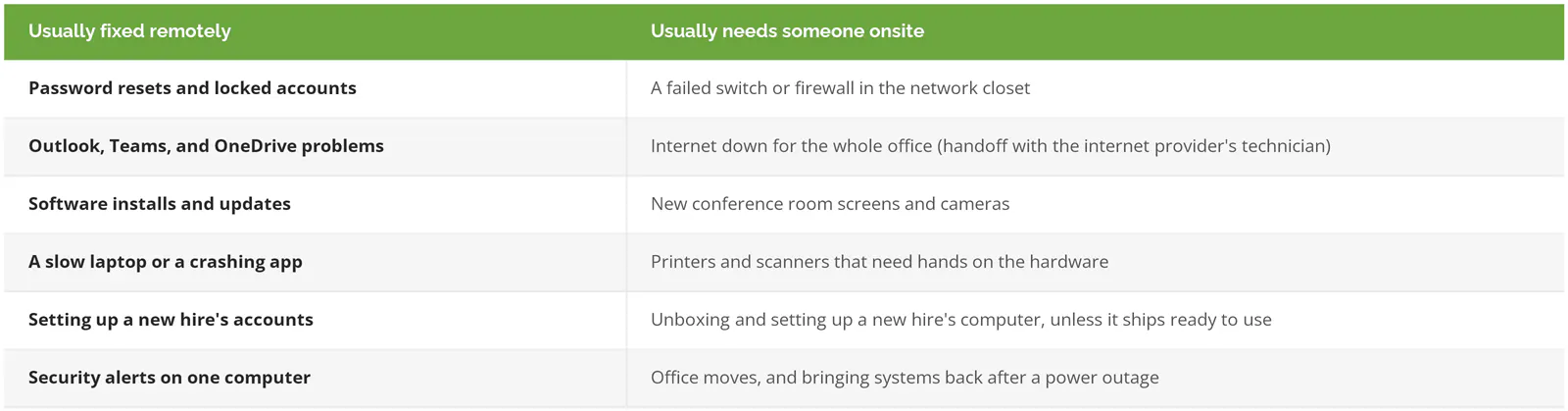
"A greater proportion of tickets in larger companies concerned hardware problems, too," Computerworld noted in its coverage of the Fixify study. A 15-person design studio on Colorado Boulevard running everything in Microsoft 365 might need a technician onsite a few times a year, while a 60-person engineering firm near the Playhouse District, with a server room, plotters, and a phone system, will need one far more often.
Some outages can't be fixed by anyone standing in your office. Microsoft's Service Level Agreement for Online Services (January 1, 2026 edition) backs Exchange Online (Microsoft's email service) at 99.9% monthly uptime and pays service credits of 25%, 50%, or 100% as uptime drops below 99.9%, 99%, and 95%, so when Microsoft 365 is down, the technician at your desk can confirm it and keep people informed while Microsoft does the actual fixing.
What does onsite coverage mean when your provider isn't based in Pasadena?
Consilien's office is at 21250 Hawthorne Boulevard in Torrance, roughly 30 miles from Old Pasadena by way of the 110, so for us "onsite" means a technician driving north, and the contract should say how fast that happens and who pays for the drive. Our own Pasadena page says onsite response "depends on your service plan and urgency," which is the sentence to turn into an arrival window with any provider, including one with an office on Lake Avenue.
Public-sector buyers pin this down, and their wording is worth borrowing. On August 21, 2026, the City of Isle of Palms, South Carolina answered a bidder on its managed IT contract who asked "whether unlimited help desk support includes unlimited onsite labor and travel." Addendum 7 to RFP 2026.09 says "routine onsite labor and ordinary travel necessary to troubleshoot or resolve an issue that is otherwise within the Base Monthly Support scope should be included in the base monthly fee and should not be separately billed solely because onsite service is required." The same answer adds that "'Unlimited help desk support' should not be interpreted to mean that all onsite work of any nature is included in the base fee," leaving projects, migrations, and extended emergency work to be priced separately, which is a fair split to ask a Pasadena provider to put in your agreement too.
What should you ask a Pasadena IT support company before you sign?
CISA's September 2021 guidance for small and mid-sized businesses, Risk Considerations for Managed Service Provider Customers, lists what to get from a provider before signing, starting with "specific performance-related service level agreements, including a clear delineation of operational IT services and security services," and including "compensation for service outages, and plan to provide continuous support during a service outage."
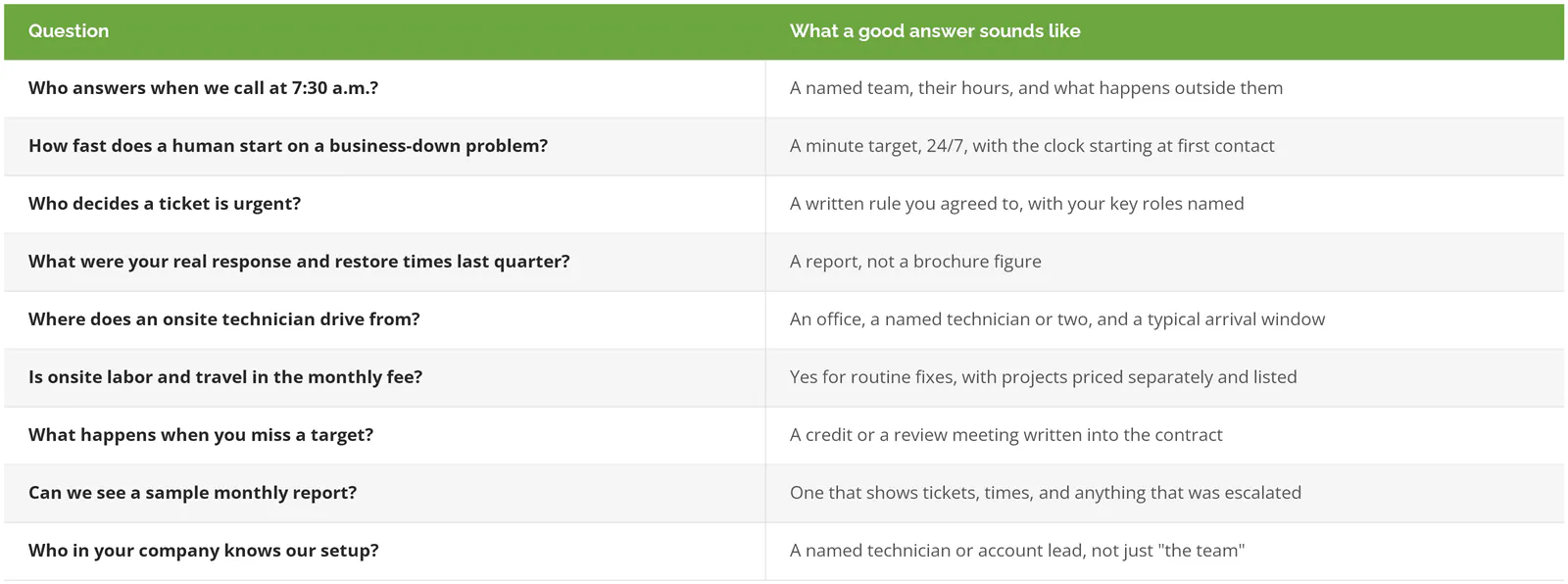
Pricing for all of this, including what sits inside a monthly fee and what lands outside it, is in our look at what's included in a managed IT plan for Pasadena businesses. The difference between a support-only arrangement and full managed IT is covered in our explainer on IT support vs. managed IT services, and the support-only scope is laid out on our IT support services page.
Skip paid onsite coverage if your office has nothing to fix in person
If your business runs on laptops and Microsoft 365, with no server and no closet full of equipment, remote-only support plus an hourly rate for the rare visit will usually cost less than a plan built around onsite coverage you'll barely use.
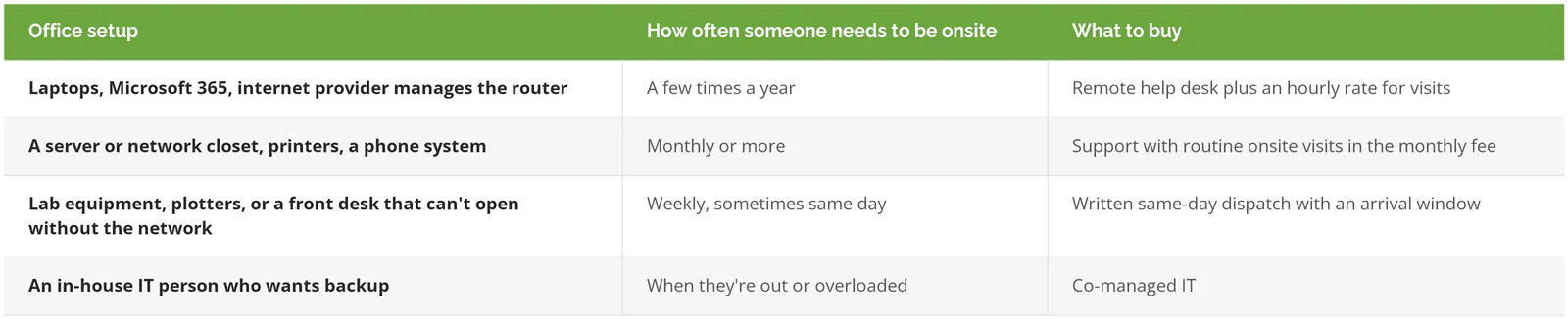
If you already have that in-house person, co-managed IT keeps them in charge while an outside team adds help desk coverage, after-hours support, and a second pair of hands onsite. A one-off job like an office move often fits a short consulting engagement better, as our post on IT consulting in Pasadena explains.
What a Consilien help desk ticket looks like
Human Touch, a consumer products company in Long Beach, described a March 2025 ticket in its review on Consilien's Clutch profile that got a number and an issue description within 3 minutes, a live technician on the phone within 15, and a fix in under 15 minutes after that, with the technician showing the user how to handle it next time and leaving the steps written down on the computer. "The individuals that I contacted were very personable and extremely knowledgeable... they are easy to reach and we have very little downtime," wrote Catherine Taylor, the company's Product Support Manager.
If your current provider's response terms live in a proposal instead of a contract, or you've never seen a report of their actual times, speak to a Pasadena IT expert and bring your agreement along.