IT Support in Anaheim: What to Expect From a Local Provider

A good IT support provider in Anaheim documents your systems in the first month, answers business-down calls in minutes during the hours you actually operate, fixes most problems remotely, and sends a technician the same day when hardware needs hands.
Table of Contents
Anaheim is two cities when it comes to IT, and the right support looks different in each. If you're weighing a provider for everything, not just the help desk, our page on managed IT services in Anaheim covers that bigger decision.
The Orange County Business Journal counts 721 manufacturers here, more than any other city in the county, and The Canyon business park along the 91 alone covers 2,645 acres and 63% of Anaheim's industrial space. Then there's the resort side, where restaurants, hotels, and shops near the Convention Center do their best business on Friday nights and Sunday afternoons. A machine shop on Kraemer Boulevard and a restaurant near Honda Center both need IT support in Anaheim, but at different hours, for different equipment. Same city. Very different problems.
Key Takeaways
Expect the first 30 days to be documentation, not heroics. Your provider should collect passwords, map the network, list every device, and test a backup restore. Response promises only count if the clock matches your real hours, which for a second-shift plant or a resort-area restaurant isn't 8 to 5. Onsite support depends on drive time and a written arrival window, so get both in the contract.

What happens in the first 30 days with a new IT support provider?
Month one is discovery. A provider should finish it holding your admin passwords, a map of your network, a list of every device, and proof that your backups restore. Skip that, and you're paying them to guess.
I put this first for a simple reason. Nearly every recurring IT problem I've traced in a business started as a reasonable workaround. Someone set up the shop-floor PC with a shared login because the operator kept getting locked out. Someone plugged a consumer Wi-Fi router into the network because the break room had no signal. Years later, those quick fixes are the architecture. Nobody remembers why.
Expect a solid onboarding to produce these, in roughly this order:
- Every admin password moved into a password manager that you can open too, not just the provider.
- A network map showing the internet connections, firewall, switches, and wireless access points, plus where each one physically sits.
- A device inventory that includes the odd stuff, like the PC that runs the label printer at the shipping dock or the tablet at the host stand.
- A real backup restore test. Not a green checkmark on a dashboard. An actual file brought back.
- A short list of people who can declare an emergency, with cell numbers.
- Account numbers and support lines for your internet provider and your phone system, so the provider can call them for you.
That last item sounds minor. It isn't.
When your internet goes down at 7 a.m., the difference between a 20-minute outage and a 3-hour one is often whether your IT provider is authorized to open a ticket with AT&T or Spectrum without waiting for you to find the account PIN.
How fast should an Anaheim IT company respond, and on whose clock?
For a business-down problem, a person should be working on it within about 15 minutes. For one stuck employee, an hour is fair. The bigger question is whether that clock runs during your business hours or the provider's.
Fixify, a help desk software company, reviewed more than 50,000 tickets from 30-plus organizations for its 2026 IT Help Desk Benchmark Report. According to MSP Today's summary, 82% of tickets came in during business hours, volume peaked at 11 a.m., and Tuesday was the busiest day. That's an office pattern. Plenty of Anaheim businesses don't work like an office.
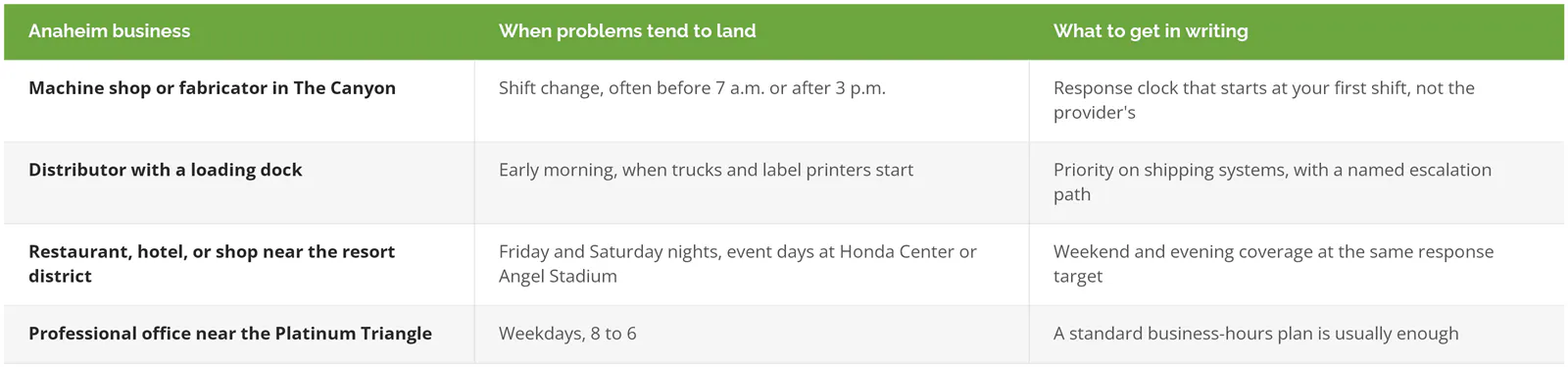
Read that part of the contract slowly. Business hours are the default in a lot of agreements, and a restaurant that loses its point-of-sale system (the registers and card terminals) at 8 p.m. on a Saturday doesn't care about a 15-minute promise that starts Monday morning. Our managed IT services SLA guide explains how the service level agreement, the part of the contract that sets those response times, decides when the clock starts and pauses.
What does "local" actually mean for onsite support in Anaheim?
Local should mean a short, predictable drive and a promised arrival time, not just an Orange County mailing address. Ask how far away the technician starts, how long the trip usually takes, and whether the visit is included or billed.
Consilien sits at 21250 Hawthorne Boulevard in Torrance, roughly 30 miles from downtown Anaheim and a bit farther from The Canyon. Our Anaheim page promises "same-day onsite response available in Anaheim," and that's the kind of phrase any buyer should turn into a specific window in the contract, whether the provider is in Torrance, Irvine, or down the street on Lincoln Avenue. A provider with an office two exits away and one technician who's already on another call isn't faster than one 30 miles out with three.
Remote work does most of the job anyway. Password resets, Outlook trouble, software installs, and new user setups all get fixed without anyone driving. Onsite visits are for the physical stuff, like a dead switch, a failed firewall, a new printer, or a whole office that's offline. Our post on onsite vs. remote IT support walks through which problems fall on which side.
So what should the contract say? Something like "a technician onsite within four business hours for a business-down issue that can't be fixed remotely, with routine visits included in the monthly fee." Your numbers may differ. Fine. Just make sure there are numbers.
Who do you call when the power or internet goes down in Anaheim?
Power outages go to Anaheim Public Utilities, not Edison, because the city owns its electric utility. Internet outages go to your carrier. Your IT provider's job is to keep equipment safe, get it back up in the right order, and handle the carrier calls.
Anaheim Public Utilities is in the middle of a grid upgrade worth knowing about. Its filing under the California Environmental Quality Act (CEQA) for the Distribution Switch Reliability and Automation Upgrades project describes replacing 20 to 40 aging pad-mounted switches (the green ground-level boxes that route power along a street) with newer ones that detect faults faster, plus automation that lets the utility respond quicker. Shorter outages are the goal. Short outages still knock over networks, though.
Trouble usually starts with a few seconds of lost power. A firewall or server that loses power without warning can come back with corrupted settings, and a switch that boots before the firewall sometimes leaves half the office without internet until someone restarts things in the right order. Battery backup helps. A unit called a UPS (uninterruptible power supply), buys enough time for equipment to shut down cleanly, and it's one of the cheapest fixes in IT.
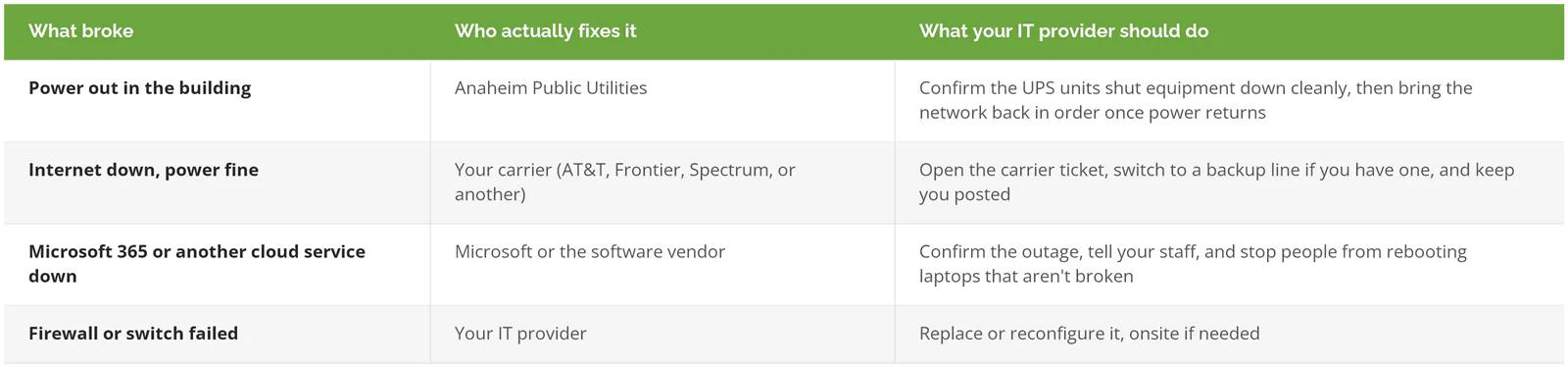
Then there's the internet line. A second one from a different carrier, set to take over automatically, is worth pricing if a dropped connection stops your business cold. For a distributor printing shipping labels from a cloud system, it usually does. Backups belong in the same conversation, and our backup and disaster recovery page covers what to protect first.
What does IT support cost in Anaheim?
Full managed IT in Orange County runs roughly $150 to $250 per user per month, and less for help desk-only plans. Labor behind those numbers costs more here than the national average, so very low quotes usually mean thin coverage.
The BLS occupational wage tables for May 2025 put the median computer user support specialist in the Los Angeles-Long Beach-Anaheim metro at $75,070 a year. Nationally, the same job pays a median $61,860. Every Anaheim provider hires from that metro pool. No exceptions. Somebody has to pay that $13,000 gap, and it's usually baked into the per-user rate.
What changes the price more than the city is your setup. Two sites, a production floor, weekend coverage, or a server room all add cost. Each one. We've laid out the ranges, the add-ons, and what sits outside the monthly fee in our guide to how much managed IT costs in Orange County.
When a local provider isn't worth paying for
A small office that runs entirely on laptops and Microsoft 365, with no server and no equipment closet, can usually skip a plan built around onsite visits. Remote help desk support plus an hourly rate for the occasional visit will cost less.
You give up a guaranteed visit you'd rarely use, and you keep the money. Simple trade. Picture a six-person consulting office near Anaheim Hills that hasn't touched its network gear in two years is a good example.
There's a middle path too. If you already have an IT person on staff, co-managed IT keeps them in charge while an outside team covers the help desk, after-hours calls, and the days they're out. That works well for manufacturers whose in-house person spends most of the week on the ERP system (the software that runs orders, inventory, and production) and doesn't have time left for password resets.
What working with Consilien looks like in north Orange County
Consilien is a managed IT and cybersecurity provider based in Torrance that supports businesses nationwide with help desk, onsite, co-managed, and managed IT. Eagle Print Dynamics, a print, promotional products, and apparel company in neighboring Orange, worked with us on cloud consulting, managed IT, and IT strategy and rated the work 5.0 across the board on Consilien's Clutch profile. "They were great to work with," wrote Jodee Gonzalez, the company's Director of Finance.
If you're comparing Anaheim IT support providers and want someone to read the response and onsite terms with you before you sign, speak to an Anaheim IT expert and bring the proposal along.