7 Reasons to Use Professional IT Support Services for Small Businesses
Professional IT support for a small business is an outside team that runs your help desk, security, updates, and backups for a monthly fee, usually for less than one full-time IT hire costs.
Table of Contents
Fixify, a help desk software company, went through more than 50,000 tickets from 30-plus organizations over 14 months for its 2026 IT Help Desk Benchmark Report, and 82% of them arrived during business hours, with volume peaking at 11 a.m. and Tuesday the busiest day, per MSP Today's write-up. In a small company those tickets land on whoever is good with computers, usually someone hired to do a different job. What Consilien handles instead is laid out on our page for IT support services for businesses.
Key Takeaways: Professional IT support replaces one overloaded person with a team that handles help desk, security, patching, backups, and after-hours monitoring. A single in-house support specialist has a national median salary of $61,860 before benefits and still can't cover every skill or every hour. Outside support costs a predictable monthly fee. It's the wrong fit for a tiny cloud-only office or a company that already has a full IT team.
1. Is IT support cheaper than hiring in-house?
One in-house hire is the cheapest way to get a single IT person, but a professional support team is usually the cheaper way to get IT covered. The difference comes from what one salary can't buy, which is a second person for vacations, a security specialist, and someone awake at 2 a.m.
The Bureau of Labor Statistics puts the national median pay for a computer support specialist at $61,860 a year. Add benefits and payroll taxes, which BLS employer compensation data puts at about 30% of total compensation, and that one person costs close to $88,000. That's a help desk generalist. A network engineer or security analyst costs more, and you'd need both eventually.
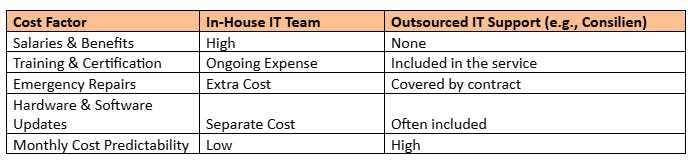
For comparison, Consilien lists its fully managed plan, IC24, at a starting price of $1,800 a month on our managed IT services page. Per-user pricing elsewhere varies a lot, and our breakdown of outsourced IT support cost per user shows what moves the number.
2. How does IT support keep security on a schedule?
Professional IT support turns security into routine work: multifactor authentication on every account, firewall rules that get reviewed, email filtering, and endpoint protection on every laptop. In a small company without that, security tends to happen after an incident, not before one.
CISA's cyber guidance for small businesses says "any form of MFA (like SMS text messages, or authenticator codes) will raise the cost of attack and will reduce your risk," and it tells owners to make the MFA announcement to staff themselves rather than leaving IT to persuade everyone. MFA, or multifactor authentication, means a login needs a second proof beyond the password.
IBM's 2026 Cost of a Data Breach Report puts the global average breach at $4.99M, up 12% from the year before, and the US average at $11.5M. A small company won't see a bill that size, but phishing was again the most common way attackers got in, and a phishing email doesn't check headcount first. More on what a security program includes is on our managed cybersecurity services page.
3. How fast should security patches be installed?
For flaws attackers are already using, about two weeks is the federal benchmark. CISA's Binding Operational Directive 22-01 gives agencies "two weeks for all other vulnerabilities" on its Known Exploited Vulnerabilities catalog, and 6 months for ones with a CVE ID (the public tracking number for a software flaw) assigned before 2021.
A support provider pushes vendor updates to every computer on a schedule and checks that they actually installed, rather than trusting each employee to stop clicking "restart later." It also tracks hard deadlines, like Microsoft ending Windows 10 support on October 14, 2025, after which machines still running it stopped receiving free security fixes.
4. What does a flat monthly IT fee actually cover?
Help desk tickets, monitoring, patching, and backup checks, priced as one monthly number, with projects, hardware, and licenses quoted separately and the contract saying exactly where that line sits.
Public-sector buyers write this down more carefully than most businesses do. On August 21, 2026, the City of Isle of Palms, South Carolina answered a bidder on its managed IT contract who asked "whether unlimited help desk support includes unlimited onsite labor and travel," and Addendum 7 to RFP 2026.09 says routine onsite work within the base scope "should be included in the base monthly fee and should not be separately billed solely because onsite service is required." Migrations, projects, and extended emergency work were left to be priced on their own, which is a fair split to ask for in any agreement.
Break-fix (hourly billing after something has already broken) skips the scope question entirely, which is why it can look cheaper in a quiet month. Our comparison of managed IT versus break-fix walks through where reactive support stops being the cheaper option.
5. Why is one IT person a single point of failure?
If one employee set up the firewall, the file server, and the Wi-Fi, the admin passwords and the reasons behind each setting usually exist in that employee's memory and nowhere else, which is fine until they give notice.
A support provider puts a help desk, network engineers, security staff, and Microsoft 365 administrators behind one contract and keeps written records of every device, account, and license, so that whoever picks up a ticket isn't starting cold. NIST's Cybersecurity Framework 2.0 Small Business Quick-Start Guide (NIST SP 1300, February 2024) begins its Identify function with that same inventory of hardware, software, and data.
CISA's guidance for small and mid-sized businesses, Risk Considerations for Managed Service Provider Customers, lists what to get in writing before signing, starting with "specific performance-related service level agreements, including a clear delineation of operational IT services and security services," along with direct access to the provider's security logs for your systems.
6. How do you know the backups actually work?
A backup only counts if you can restore from it, so a professional team runs backups on a schedule, keeps one copy where ransomware can't reach or change it, and restores from that copy regularly to prove the files come back. CISA's small business guidance suggests owners track "the percentage of systems that you back up" as a goal, next to MFA adoption and patch levels.
CISA's MSP guidance goes further and tells customers to require the provider to "provide secure storage of backups," citing NIST's guide for MSPs on how to maintain and test backup files. NIST's quick-start guide lists Recover as one of six core functions, alongside Govern, Identify, Protect, Detect, and Respond. Our backup and disaster recovery service includes the restore testing.
7. Who notices a problem at 2 a.m.?
Monitoring software checks servers, network gear, and laptops around the clock and alerts a technician when a drive starts failing, a disk fills up, or an account logs in from somewhere it never has, so the problem is handled overnight instead of at 8 a.m. Monday.
How a breach gets found changes what it costs. In IBM's 2026 report, breaches a company's own team caught averaged $5.01M and 209 days to identify and contain, while the ones the attacker disclosed (a ransom note, usually) averaged $5.12M and 268 days. Speed on ordinary tickets moves too. In the Fixify data, median resolution ran 4.4 hours at help desks that leaned on automation and 71 hours at those that didn't, even though first replies "remained roughly five minutes either way."
When isn't professional IT support worth it?
Five people on laptops, everything in Microsoft 365, nothing in a closet. At IC24's $1,800 starting price that office would pay $21,600 a year, and an hourly provider called twice a year will probably cost less. Companies that already employ an IT manager have a different option, co-managed IT, where the outside team covers overnight monitoring or a security project and the in-house person keeps the day-to-day.
Everyone in between can test it with three questions. Can anyone tell you how your systems are set up, when a backup was last restored, and who answers when the server goes down on a Friday night? If not, speak to an IT expert.