Cloud Repatriation: When Moving Back On-Prem Makes Sense
Some workloads are cheaper to own than to rent. Cloud repatriation is the move back, out of public cloud and onto hardware you control, in your own facility or a colocation cage. Rarely all of it. It pays for a narrow set of workloads and wrecks budgets for the rest.
Table of Contents
Cloud repatriation is moving workloads from public cloud back to on-premises or colocation infrastructure. It pays off for steady-state workloads running above roughly 80% sustained utilization. It rarely means a full cloud exit.
Before you model anything, separate two problems. Public cloud might be the wrong home for a workload. Or your cloud services might simply be configured badly. Two different bills. Two different fixes.
Look at when the migration that produced your current invoice was approved. Somewhere between 2019 and 2022, most likely, back when borrowing was cheap and the growth curve in the board deck assumed a headcount that never quite showed up. Lifted, not rebuilt. Virtual machines that ran fine in a rack got copied into EC2 instances and left alone, and five years later you're paying cloud prices for a data center design nobody has revisited since.
Companies that get this wrong spend 18 months and a capital budget solving something a two-week cost review would have handled in a quarter, and they usually work that out somewhere around month ten. Companies that get it right move three workloads, cut a real line item, and leave everything else alone.
What Is Cloud Repatriation, Exactly?
Cloud repatriation is the move of applications, data, or compute out of public cloud and back onto infrastructure you own or lease directly. That means your own data center, a colocation facility, or a private cloud.
The word suggests a reversal. In practice it's a correction to a placement decision made years earlier. One workload moves, or four do, and the rest stay exactly where they are. Full exits happen. They're rare. They make headlines precisely because they're rare.
Three destinations account for nearly all of it. Colocation first. You own the servers and rent space, power, and network in somebody else's building. On-premises next, where the hardware sits in your facility and you own the whole stack. And then a smaller specialist provider, technically still cloud, priced nothing like the hyperscalers. Each carries a different capital commitment and a different staffing burden, and the differences between on-premise and cloud tradeoffs matter a great deal more once real money and a four-year hardware commitment are attached to the answer.
Repatriation is not a verdict on cloud computing. Not a philosophy. It's a workload-by-workload judgment about where a specific thing runs cheapest and most reliably over the next four years.
Is Everyone Really Leaving the Cloud?
No. A Q4 2024 Barclays CIO survey found 86% of CIOs planned to move some workloads off public cloud, the highest figure it had recorded. IDC put full-scale repatriation at 8% to 9%.
Those two numbers describe the same market. One counts anyone moving anything. The other counts real exits. The gap between them is where almost every article on this topic goes wrong, because the 86% figure gets quoted as an exodus when what it describes is selective redistribution across a hybrid estate nobody intends to abandon.
Read it as a correction, not a retreat. The 2020 assumption was that everything belongs in cloud. The 2026 assumption is that placement is a per-workload question. More expensive. Also more accurate. IDC's read of the same survey data puts wholesale exits in single digits and everything else in the selective bucket.
Which is why nearly every company that starts this analysis ends up somewhere in the middle. Some workloads come home. The rest stay. Permanent split, not a transitional one. The practical question becomes how to run a hybrid and multi-cloud split without doubling your operational overhead.
Which Workloads Actually Belong Back On-Prem?
Workloads that run at high, predictable load around the clock. Under roughly 70% sustained use, public cloud usually wins on total cost. Above 80%, owned hardware usually wins over a three-year horizon.
Public cloud pricing rewards variability. You pay a premium for the ability to scale, and that premium is worth every dollar when you actually scale. A workload sitting at 85% utilization every hour of every day, every week of the year, is buying elasticity it never once uses and paying a monthly premium for the privilege, forever.
That's the whole decision in one variable. Not the bill. Not how frustrated finance is. Utilization, measured over 90 days, per workload.
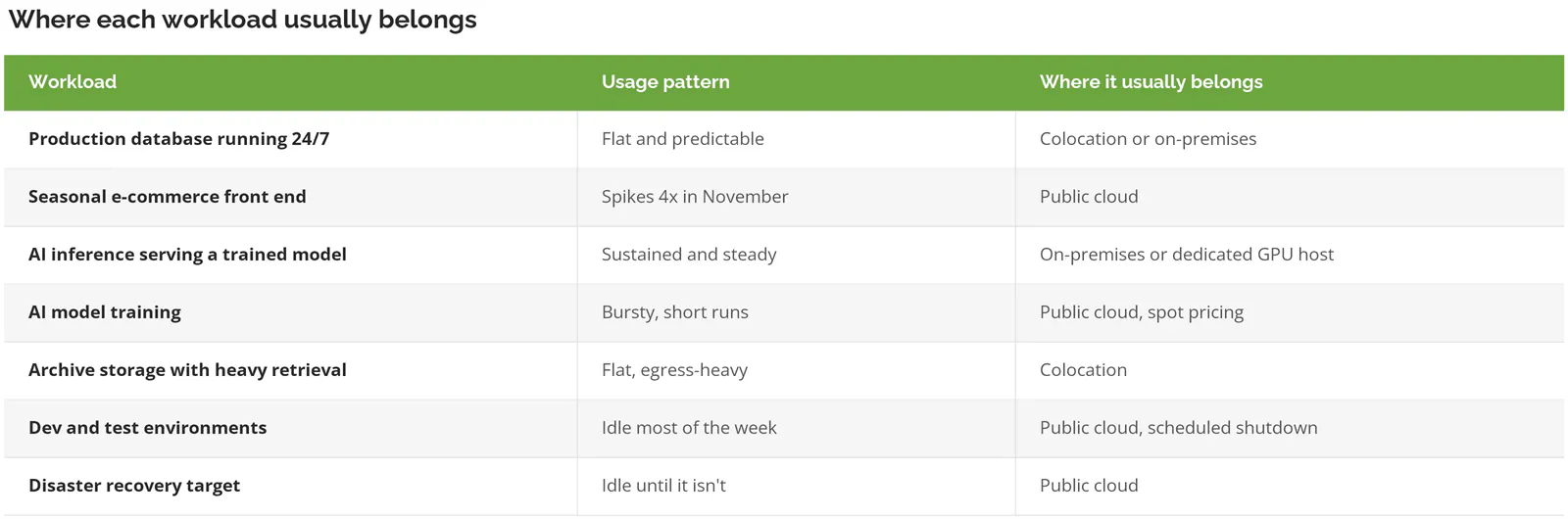
AI inference is the newest entry on that list and the one moving fastest. A trained model serving production traffic has exactly the profile hardware ownership rewards, which is constant use at steady load. Break-even analysis on GPU workloads lands in the same place as everything else, with cloud winning below about 70% use and owned hardware winning above 80% on a three-year total cost view.
Training is the opposite. Short bursts. Idle hardware between runs. A strong case for renting.
Pricing differences between platforms shift that threshold a few points either way, which is worth checking before you commit, because how the three platforms price the same workload is less uniform than the marketing suggests.
What Does the Real Cost Comparison Look Like?
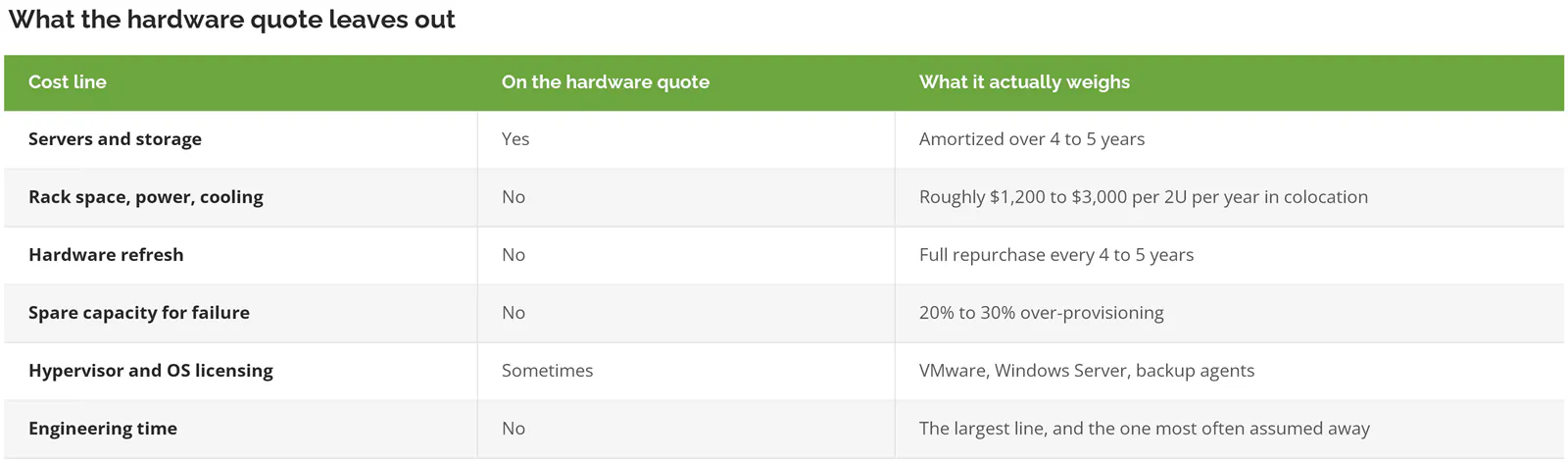
Compare the cloud invoice to the hardware quote and the answer will be wrong. Owned infrastructure carries five costs the quote doesn't show. Space and power, refresh cycles, spare capacity, licensing, and the engineers who run it.
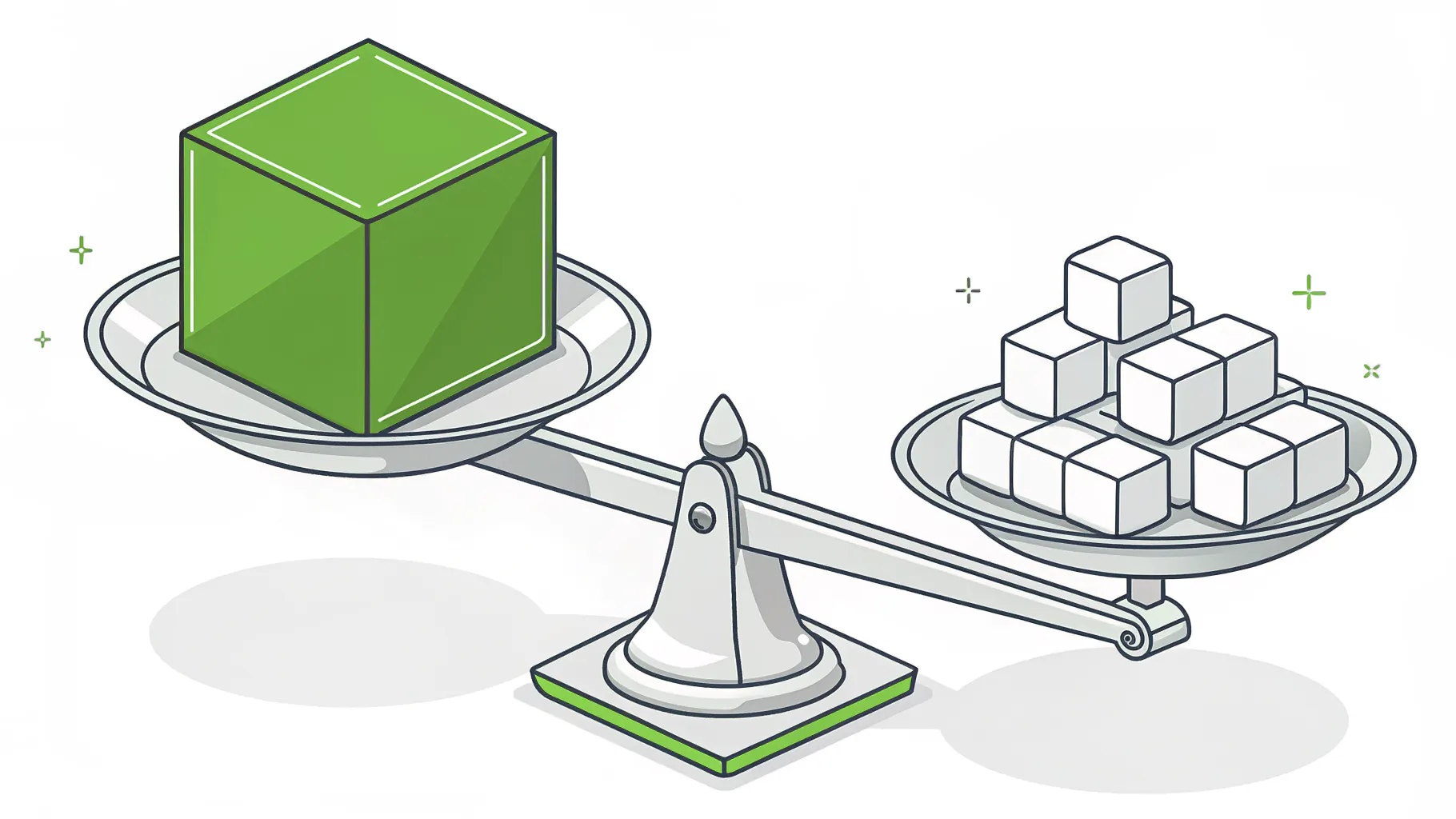
A cloud invoice is a complete number. It includes the building, the electricity, the replacement hardware on a refresh cycle, the spare capacity you never think about, the hypervisor licensing, and a proportional share of the people who keep all of it running. A hardware quote includes servers. That's the asymmetry. It turns a projected 60% saving into a 15% saving somewhere in year two.
37signals is the case study everyone cites, and the numbers are real because the company published them. They ran a $3.2 million annual cloud bill, spent about $700,000 on Dell hardware, and brought the 2024 bill down to $1.3 million. Their own write-up of the exit is worth reading, and their five-year projection now runs past $10 million.
Now notice what that case study doesn't resemble. A company with its own infrastructure team, a software product as its entire business, and a $3.2 million annual cloud bill isn't the company most people reading this are running, and the distance between those two situations is the whole ballgame. At $3.2 million a year, hiring three infrastructure engineers to save $1.9 million is arithmetic. At $18,000 a month, the same three hires erase the savings. And then some.
Nobody writes a case study about a 200-person distributor that moved four virtual machines into a colocation cage and saved $58,000 a year. That's the realistic version. Perfectly good outcome. Terrible headline.
For most mid-market moves, that math lands on colocation. A single 2U server in a colocation facility runs roughly $100 to $250 a month for space, power, and cross-connect, with wholesale pricing around $196 per kW per month in primary North American markets. Set that against a 64-vCPU instance with 6.4 TB of block storage, which lists near $2,243 a month on demand and about $1,017 on a three-year commitment before storage. AWS publishes its reserved instance pricing openly. No sales call required.
What Will It Cost to Get Your Data Out?
Standard egress runs $0.09 per GB on AWS and $0.087 on Azure. Both waive it when you leave the platform entirely. Partial repatriation, which is what nearly everyone does, pays full rate.
This one catches people. The headlines in 2024 said the hyperscalers had dropped exit fees. They did. With a condition attached that changes the math completely. AWS waives data transfer out for customers moving off AWS, which takes a support request, an approval, and the closure of your account, while Azure's own bandwidth pricing page offers the same waiver only to customers leaving Azure for another provider or an on-premises data center.
Move four workloads and keep the other thirty? You pay retail on every terabyte. Every single one.
At 40 TB of egress that's roughly $3,600 in one-time transfer charges on AWS pricing. Not fatal. Easily enough to erase the first year of savings on a small move, and almost never in the initial business case.
Anyone with an EU entity has a timing lever here. The EU Data Act caps switching charges at direct cost through a transition period and bans them outright from 12 January 2027. If your repatriation is already scheduled for 2027 and the data sits in an EU region, the sequencing is worth a conversation with counsel before anybody signs a hardware purchase order.
When Is Repatriation the Wrong Move?
When your cloud environment has never been optimized. Flexera put wasted cloud spend at 29% in 2026. Reserved instances, rightsizing, and orphaned storage usually recover more than a migration will, at a fraction of the risk.
Wasted spend went up, not down, for the first time in five years, and Flexera attributes the reversal to AI workloads nobody budgeted for. Separately, 84% of organizations say they struggle to manage cloud spend at all. A company in that group doesn't have a cloud problem. It has a governance problem. Governance problems follow the workloads home.
Skip this analysis entirely if any of the following describe you.
- Under roughly $15,000 a month in cloud spend. The consulting fee and the internal hours cost more than the move returns. Tune what you already run and revisit in a year.
- You have never bought a reserved instance or a savings plan. There is 30% to 60% sitting on the table before anyone touches a migration plan. Start there.
- Growth is unpredictable, or the business is heading into an acquisition. Hardware is a four-year commitment. Made at the worst possible moment to commit.
- Nobody on staff has run physical infrastructure in the last five years and you aren't planning to hire for it.
- The workload is genuinely spiky. Elasticity you actually use is elasticity worth paying for.
A surprising share of the savings people expect from repatriation is available without it. Reserved capacity, rightsized instances, deleted snapshots, storage tiering, and scheduled shutdowns on dev environments are unglamorous and fast, and tuning what you already run carries none of the execution risk a physical migration drags behind it. Do that first. Then look at placement with a clean baseline.
The Four-Question Repatriation Test
Run every candidate workload through four questions. If it fails the first one, stop. Nothing else matters.
Utilization. What's the sustained utilization over 90 days, not the peak and not an average smeared across a quarter that hides a nightly batch window doing all the real work? Under 70%, this workload stays in cloud. Above 80%, keep going. Between the two, the answer turns on the other three questions and on how much variance is buried inside that average.
Egress. How many terabytes leave the platform monthly, and does this move qualify for the exit waiver? If you're keeping any workloads behind, it does not. Price the transfer at retail and put it in year one. All of it.
Headcount. Who patches the hypervisor at two in the morning? Name the person. If the answer is a role you intend to hire, price the role, not the wish. If the answer is your managed provider, get the number in writing before the hardware quote, because that line usually moves more than the servers do.
Horizon. Will this workload still exist, roughly unchanged, in four years? Servers are a 4 to 5 year bet. A workload scheduled for replacement by a SaaS platform in 18 months is a bad candidate no matter how well it scores on the first three questions, and that scenario comes up more often than anyone admits in the planning meeting.
Four yeses and you have a real candidate. Three and you have a conversation. Anything less and the workload stays put.
Same discipline that applies to any infrastructure decision, which is why it helps to look at infrastructure through a vCIO lens rather than through the invoice. The invoice tells you what you spent. It does not tell you what you should have spent.
What Does the Move Actually Look Like?
8 to 16 weeks for a single workload. 6 to 18 months for anything a board would call a repatriation program. The variance sits almost entirely in how well the environment was documented on the way in.
Nothing about the sequence is glamorous. Baseline utilization across your top ten workloads for 90 days. Pick one candidate, ideally something important enough to matter and boring enough to survive a rough cutover. Size the hardware with failure capacity included, not just steady-state need. Build it. Run both environments in parallel for a few weeks. Cut over during a window the business can absorb. Then decommission.
That last step is where the money actually appears, and it's the one that gets skipped. Every time.
Bills don't fall when the workload leaves. They fall when somebody deletes the instances, the snapshots, the load balancers, the unattached volumes, and the NAT gateway nobody remembers provisioning. I know a 300-person manufacturer that ran 11 weeks paying for both sides of a cutover because the teardown had no owner and no date. 11 weeks of double spend on a project sold to the CFO on a nine-month payback.
Assign the decommission to a named person with a date, before the cutover happens. One sentence in the project plan. Worth more than most of the technical decisions that precede it. The planning discipline that makes a migration planning effort succeed in the other direction applies here without modification.
Where This Leaves You
Companies that handle this well treat placement as an exercise they rerun every couple of years rather than a verdict they deliver once, and the rerun tends to be cheaper than the first pass because the baseline data already exists. They baseline utilization before they shop for hardware. They price engineering time honestly. They move one workload, prove the model, then decide whether a second one qualifies.
The ones that struggle start from the invoice and work backward, which produces a migration plan built to justify a decision already made in a meeting.
Consilien advises companies between 20 and 1000 users on decisions like this through its vCIO practice, mostly manufacturers, distributors, and professional services firms that want a defensible answer instead of a vendor preference. The work starts from your actual usage data, not from a product recommendation.
If your cloud bill has outgrown what the 2020 migration promised, start with a 90-day utilization baseline across your top ten workloads and an honest read of what the same environment would cost if it were tuned properly. Speak to a cloud expert. Bring the last three invoices.