Business IT Outsourcing in Los Angeles: Is It Right for Your Company?
IT outsourcing can be a strong solution for Los Angeles businesses facing internal IT overload, rising cybersecurity risks, or increasing compliance pressure. Typically, for a mid- sized company, particularly ones having multiple locations or needing to follow regulations, a collaborative IT model will be their perfect choice, which allows them to combine internal resources with external expertise, get enhanced security, and have cost predictability. Those who have quite small teams or are very specialized in-house IT might not get much benefit out of it.
Table of Contents
What Is Business IT Outsourcing?
Business IT outsourcing is the practice of hiring an external provider to manage some or all IT functions including support, infrastructure, cybersecurity, and compliance—rather than relying entirely on internal staff.
Why Los Angeles Companies Are Outsourcing IT
LA businesses operate in a high-cost, high-risk environment. The decision to outsource is rarely about convenience, it's about staying operational and secure.
- Labor costs are rising
According to the U.S. Bureau of Labor Statistics, demand for IT and cybersecurity roles continues to outpace supply, driving up salaries. - Cyber threats are increasing
Cybersecurity and Infrastructure Security Agency highlights that mid-sized businesses are prime ransomware targets. - Compliance is expanding
Frameworks from the National Institute of Standards and Technology and programs like the Department of Defense CMMC are becoming mandatory for many LA-based firms. - Internal IT teams are overloaded
Most internal teams are reactive. They’re not staffed to handle security, compliance, and strategic planning simultaneously.
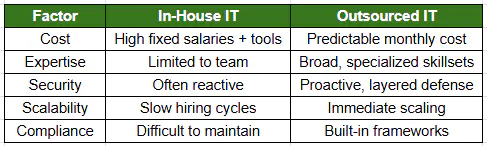
In-House IT vs Outsourcing
Key Benefits of IT Outsourcing
- Cybersecurity threats are reduced with proactive monitoring and controls
- Predictable monthly IT expenses (no surprise hiring or unexpected expenses)
- Access to expert-level talent for IT projects (cybersecurity, cloud, compliance, etc.)
- Rapid response and resolution for IT issues
- Better compliance posture for NIST, CMMC, HIPAA, and more...
When IT Outsourcing Is the Right Choice for Your Business
IT outsourcing is typically beneficial when:
- Overwhelmed in-house IT staff
- Managing multiple locations
- Operating in a highly regulated industry (healthcare, finance, defense)
- Scaling quickly
- Experiencing downtime or security incidents
When It Might NOT Be the Right Fit
Outsourcing isn’t universal.
- Very small businesses with minimal IT needs
- Organizations with highly specialized, fully staffed internal IT teams
- Short-term or project-only needs
The Rise of Co-Managed IT (Where Most Companies Land)
Most Los Angeles companies don’t fully outsource. They augment.
Co-managed IT combines:
- Internal IT (business knowledge, on-site presence)
- External Partner (security, tools, 24/7 support, compliance)
This is in line with industry-wide trends as identified by Gartner, where there is a move towards hybrid IT operating models.
Why it works:
- Reduces burnout on internal teams
- Adds enterprise-grade security
- Maintains control while expanding capability
How IT Outsourcing Works (Operational Reality)
This is where most competitors stay vague. Here’s what actually happens:
1. Onboarding (First 30–90 Days)
- Environment audit
- Risk assessment
- Tool deployment (monitoring, security, backup)
2. Ongoing Management
- 24/7 monitoring
- Help desk support
- Patch management
- Vendor coordination
3. Security Layering
- Endpoint protection
- Identity and access controls
- Threat detection and response
4. Strategic Oversight
- vCIO: budgeting, roadmap
- vCISO: risk and compliance guidance
How to Choose an IT Outsourcing Partner in Los Angeles
Not all providers are equal. Focus on capability—not price.
- Security-first approach
Must align with frameworks like NIST - Compliance readiness
Experience with CMMC, HIPAA, PCI - Co-managed flexibility
Should support—not replace—your internal IT - Local + strategic presence
LA-based understanding + executive-level guidance - Clear operating model
Defined onboarding, SLAs, escalation paths
1. In-House vs Outsourced IT Cost Breakdown
- Shows: salary vs subscription model
- Placement: after the comparison table
- Why: CFO clarity
2. Co-Managed IT Model Diagram
- Shows: shared responsibilities
- Placement: co-managed section
- Why: differentiation
3. IT Outsourcing Decision Tree
- Shows: when to outsource
- Placement: mid-article
- Why: self-qualification
4. Cyber Risk Reduction Diagram
- Shows: layered security model
- Placement: security section
- Why: reinforces risk reduction
5. Onboarding Timeline (0–90 Days)
- Shows: transition phases
- Placement: operations section
- Why: reduces uncertainty